


This topic illustrates the best practices to improve performance in JDBC with the following sections:
JDBC defines how a Java program can communicate with a database. This section focuses mainly on JDBC 2.0 API. JDBC API provides two packages they are java.sql and javax.sql . By using JDBC API, you can connect virtually any database, send SQL queries to the database and process the results.
JDBC architecture defines different layers to work with any database and java, they are JDBC API interfaces and classes which are at top most layer( to work with java ), a driver which is at middle layer (implements the JDBC API interfaces that maps java to database specific language) and a database which is at the bottom (to store physical data). The following figure illustrates the JDBC architecture.
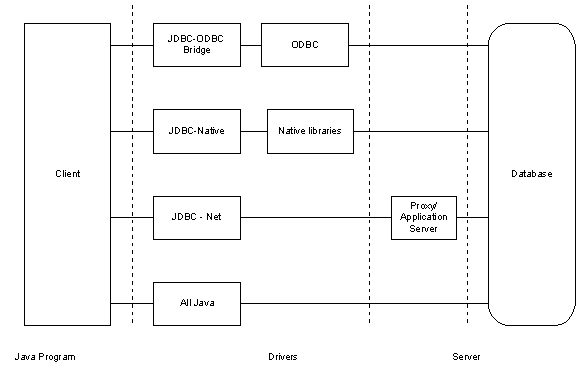
JDBC API provides interfaces and classes to work with databases. Connection interface encapsulates database connection functionality, Statement interface encapsulates SQL query representation and execution functionality and ResultSet interface encapsulates retrieving data which comes from execution of SQL query using Statement.
The following are the basic steps to write a JDBC program
1. Import java.sql and javax.sql packages
2. Load JDBC driver
3. Establish connection to the database using Connection interface
4. Create a Statement by passing SQL query
5. Execute the Statement
6. Retrieve results by using ResultSet interface
7. Close Statement and Connection
We will look at these areas one by one, what type of driver you need to load, how to use Connection interface in the best manner, how to use different Statement interfaces, how to process results using ResultSet and finally how to optimize SQL queries to improve JDBC performance.
Note1: Your JDBC driver should be fully compatible with JDBC 2.0 features in order to use some of the suggestions mentioned in this section.
Note2: This Section assumes that reader has some basic knowledge of JDBC.
Here we will walk through initially about the types of drivers, availability of drivers, use of drivers in different situations, and then we will discuss about which driver suits your application best.
Driver is the key player in a JDBC application, it acts as a mediator between Java application and database. It implements JDBC API interfaces for a database, for example Oracle driver for oracle database, Sybase driver for Sybase database. It maps Java language to database specific language including SQL.
JDBC defines four types of drivers to work with. Depending on your requirement you can choose one among them.
Here is a brief description of each type of driver :
| Type of driver | Tier | Driver mechanism | Description |
| 1 | Two | JDBC-ODBC | This driver converts JDBC calls to ODBC calls through JDBC-ODBC Bridge driver which in turn converts to database calls. Client requires ODBC libraries. |
| 2 | Two | Native API - Partly - Java driver | This driver converts JDBC calls to database specific native calls. Client requires database specific libraries. |
| 3 | Three | JDBC - Net -All Java driver | This driver passes calls to proxy server through network protocol which in turn converts to database calls and passes through database specific protocol. Client doesn't require any driver. |
| 4 | Two | Native protocol - All - Java driver | This driver directly calls database. Client doesn't require any driver. |
Obviously the choice of choosing a driver depends on availability of driver and requirement. Generally all the databases support their own drivers or from third party vendors. If you don't have driver for your database, JDBC-ODBC driver is the only choice because all most all the vendors support ODBC. If you have tiered requirement ( two tier or three tier) for your application, then you can filter down your choices, for example if your application is three tiered, then you can go for Type three driver between client and proxy server shown below. If you want to connect to database from java applet, then you have to use Type four driver because it is only the driver which supports that feature. This figure shows the overall picture of drivers from tiered perspective.

This figure illustrates the drivers that can be used for two tiered and three tiered applications. For both two and three tiered applications, you can filter down easily to Type three driver but you can use Type one, two and four drivers for both tiered applications. To be more precise, for java applications( non-applet) you can use Type one, two or four driver. Here is exactly where you may make a mistake by choosing a driver without taking performance into consideration. Let us look at that perspective in the following section.
Type 3 & 4 drivers are faster than other drivers because Type 3 gives facility for optimization techniques provided by application server such as connection pooling, caching, load balancing etc and Type 4 driver need not translate database calls to ODBC or native connectivity interface. Type 1 drivers are slow because they have to convert JDBC calls to ODBC through JDBC-ODBC Bridge driver initially and then ODBC Driver converts them into database specific calls. Type 2 drivers give average performance when compared to Type 3 & 4 drivers because the database calls have to be converted into database specific calls. Type 2 drivers give better performance than Type 1 drivers.
Finally, to improve performance
1. Use Type 4 driver for applet to database communication.
2. Use Type 2 driver for two tiered applications for communication between java client and the database that gives better performance when compared to Type1 driver
3. Use Type 1 driver if your database doesn't support a driver. This is rare situation because almost all major databases support drivers or you will get them from third party vendors.
4.Use Type 3 driver to communicate between client and proxy server ( weblogic, websphere etc) for three tiered applications that gives better performance when compared to Type 1 & 2 drivers.
java.sql package in JDBC provides Connection interface that encapsulates database connection functionality. Using Connection interface, you can fine tune the following operations :
1. Set optimal row pre-fetch value
2. Use Connection pool
3. Control transaction
4. Choose optimal isolation level
5. Close Connection when finished
Each of these operations effects the performance. We will walk through each operation one by one.
1. Set optimal row pre-fetch value
We have different approaches to establish a connection with the database, the first type of approach is :
1. DriverManager.getConnection(String url)
2. DriverManager.getConnection(String url, Properties props)
3. DriverManager.getConnection(String url, String user, String password)
4. Driver.connect(String url, Properties props)
When you use this approach, you can pass database specific information to the database by passing properties using Properties object to improve performance. For example, when you use oracle database you can pass default number of rows that must be pre-fetched from the database server and the default batch value that triggers an execution request. Oracle has default value as 10 for both properties. By increasing the value of these properties, you can reduce the number of database calls which in turn improves performance. The following code snippet illustrates this approach.
java.util.Properties props = new java.util.Properties();
props.put("user","scott");
props.put("password","tiger");
props.put("defaultRowPrefetch","30");
props.put("defaultBatchValue","5");
Connection con = DriverManger.getConnection("jdbc:oracle:thin:@hoststring", props);
You need to figure out appropriate values for above properties for better performance depending on application's requirement. Suppose, you want to set these properties for search facility, you can increase defaultRowPrefetch so that you can increase performance significantly.
The second type of approach is to get connection from DataSource.
You can get the connection using javax.sql.DataSource interface. The advantage of getting connection from this approach is that the DataSource works with JNDI. The implementation of DataSource is done by vendor, for example you can find this feature in weblogic, websphere etc. The vendor simply creates DataSource implementation class and binds it to the JNDI tree. The following code shows how a vendor creates implementation class and binds it to JNDI tree.
DataSourceImpl dsi = new DataSourceImpl();
dsi.setServerName("oracle8i");
dsi.setDatabaseName("Demo");
Context ctx = new InitialContext();
ctx.bind("jdbc/demoDB", dsi);
This code registers the DataSourceImpl object to the JNDI tree, then the programmer can get the DataSource reference from JNDI tree without knowledge of the underlying technology.
Context ctx = new InitialContext();
DataSource ds = (DataSource)ctx.lookup("jdbc/demoDB");
Connection con = ds.getConnection();
By using this approach we can improve performance. Nearly all major vendor application servers like weblogic, webshpere implement the DataSource by taking connection from connection pool rather than a single connection every time. The application server creates connection pool by default. We will discuss the advantage of connection pool to improve performance in the next section.
Creating a connection to the database server is expensive. It is even more expensive if the server is located on another machine. Connection pool contains a number of open database connections with minimum and maximum connections, that means the connection pool has open connections between minimum and maximum number that you specify. The pool expands and shrinks between minimum and maximum size depending on incremental capacity. You need to give minimum, maximum and incremental sizes as properties to the pool in order to maintain that functionality. You get the connection from the pool rather directly .For example, if you give properties like min, max and incremental sizes as 3, 10 and 1 then pool is created with size 3 initially and if it reaches it's capacity 3 and if a client requests a connection concurrently, it increments its capacity by 1 till it reaches 10 and later on it puts all its clients in a queue.
There are a few choices when using connection pool.
1. You can depend on application server if it supports this feature, generally all the application servers support connection pools. Application server creates the connection pool on behalf of you when it starts. You need to give properties like min, max and incremental sizes to the application server.
2. You can use JDBC 2.0 interfaces, ConnectionPoolDataSource and PooledConnection if your driver implements these interfaces
3. Or you can create your own connection pool if you are not using any application server or JDBC 2.0 compatible driver.
By using any of these options, you can increase performance significantly. You need to take care of properties like min, max and incremental sizes. The maximum number of connections to be given depends on your application's requirement that means how many concurrent clients can access your database and also it depends up on your database's capability to provide maximum number of connections.
In general, transaction represents one unit of work or bunch of code in the program that executes in it's entirety or none at all. To be precise, it is all or no work. In JDBC, transaction is a set of one or more Statements that execute as a single unit.
java.sql.Connection interface provides some methods to control transaction they are
public interface Connection {
boolean getAutoCommit();
void setAutoCommit(boolean autocommit);
void commit();
void rollback();
}
JDBC's default mechanism for transactions:
By default in JDBC transaction starts and commits after each statement's execution on a connection. That is the AutoCommit mode is true. Programmer need not write a commit() method explicitly after each statement.
Obviously this default mechanism gives good facility for programmers if they want to execute a single statement. But it gives poor performance when multiple statements on a connection are to be executed because commit is issued after each statement by default, that in turn reduces performance by issuing unnecessary commits. The remedy is to flip it back to AutoCommit mode as false and issue commit() method after a set of statements execute, this is called as batch transaction. Use rollback() in catch block to rollback the transaction whenever an exception occurs in your program. The following code illustrates the batch transaction approach.
try{
connection.setAutoCommit(false);
PreparedStatement ps = connection.preareStatement( "UPDATE employee SET Address=? WHERE name=?");
ps.setString(1,"Austin");
ps.setString(2,"RR");
ps.executeUpdate();
PreparedStatement ps1 = connection.prepareStatement( "UPDATE account SET salary=? WHERE name=?");
ps1.setDouble(1, 5000.00);
ps1.setString(2,"RR");
ps1.executeUpdate();
connection.commit();
connection.setAutoCommit(true);
}catch(SQLException e){ connection.rollback();}
finally{
if(ps != null){ ps.close();}
if(ps1 != null){ps1.close();}
if(connection != null){connection.close();}
}
This batch transaction gives good performance by reducing commit calls after each statement's execution.
4. Choose optimal isolation level
Isolation level represent how a database maintains data integrity against the problems like dirty reads, phantom reads and non-repeatable reads which can occur due to concurrent transactions. java.sql.Connection interface provides methods and constants to avoid the above mentioned problems by setting different isolation levels.
public interface Connection {
public static final int TRANSACTION_NONE = 0
public static final int TRANSACTION_READ_COMMITTED = 2
public static final int TRANSACTION_READ_UNCOMMITTED = 1
public static final int TRANSACTION_REPEATABLE_READ = 4
public static final int TRANSACTION_SERIALIZABLE = 8
int getTransactionIsolation();
void setTransactionIsolation(int isolationlevelconstant);
}
You can get the existing isolation level with getTransactionIsolation() method and set the isolation level with setTransactionIsolation(int isolationlevelconstant) by passing above constants to this method.
The following table describes isolation level against the problem that it prevents :
| Transaction Level | Permitted Phenomena | Performance impact | ||
| Dirty reads | Non Repeatable reads | Phantom reads | ||
| TRANSACTION_NONE | N/A | N/A | N/A | FASTEST |
| TRANSACTION_READ_UNCOMMITED | YES | YES | YES | FASTEST |
| TRANSACTION_READ_COMMITED | NO | YES | YES | FAST |
| TRANSACTION_REPEATABLE_READ | NO | NO | YES | MEDIUM |
| TRANSACTION_SERIALIZABLE | NO | NO | NO | SLOW |
YES means that the Isolation level does not prevent the problem
NO means that the Isolation level prevents the problem
By setting isolation levels, you are having an impact on the performance as mentioned in the above table. Database use read and write locks to control above isolation levels. Let us have a look at each of these problems and then look at the impact on the performance.
Dirty read problem :
The following figure illustrates Dirty read problem :

Step 1: Database row has PRODUCT = A001 and PRICE = 10
Step 2: Connection1 starts Transaction1 (T1) .
Step 3: Connection2 starts Transaction2 (T2) .
Step 4: T1 updates PRICE =20 for PRODUCT = A001
Step 5: Database has now PRICE = 20 for PRODUCT = A001
Step 6: T2 reads PRICE = 20 for PRODUCT = A001
Step 7: T2 commits transaction
Step 8: T1 rollbacks the transaction because of some problem
The problem is that T2 gets wrong PRICE=20 for PRODUCT = A001 instead of 10 because of uncommitted read. Obviously it is very dangerous in critical transactions if you read inconsistent data. If you are sure about not accessing data concurrently then you can allow this problem by setting TRANSACTION_READ_UNCOMMITED or TRANSACTION_NONE that in turn improves performance otherwise you have to use TRANSACTION_READ_COMMITED to avoid this problem.
Unrepeatable read problem :
The following figure illustrates Unrepeatable read problem :

Step 1: Database row has PRODUCT = A001 and PRICE = 10
Step 2: Connection1 starts Transaction1 (T1) .
Step 3: Connection2 starts Transaction2 (T2) .
Step 4: T1 reads PRICE =10 for PRODUCT = A001
Step 5: T2 updates PRICE = 20 for PRODUCT = A001
Step 6: T2 commits transaction
Step 7: Database row has PRODUCT = A001 and PRICE = 20
Step 8: T1 reads PRICE = 20 for PRODUCT = A001
Step 9: T1 commits transaction
Here the problem is that Transaction1 reads 10 first time and reads 20 second time but it is supposed to be 10 always whenever it reads a record in that transaction. You can control this problem by setting isolation level as TRANSACTION_REPEATABLE_READ.
Phantom read problem :
The following figure illustrates Phantom read problem :

Step 1: Database has a row PRODUCT = A001 and COMPANY_ID = 10
Step 2: Connection1 starts Transaction1 (T1) .
Step 3: Connection2 starts Transaction2 (T2) .
Step 4: T1 selects a row with a condition SELECT PRODUCT WHERE COMPANY_ID = 10
Step 5: T2 inserts a row with a condition INSERT PRODUCT=A002 WHERE
COMPANY_ID= 10
Step 6: T2 commits transaction
Step 7: Database has 2 rows with that condition
Step 8: T1 select again with a condition SELECT PRODUCT WHERE COMPANY_ID=10
and gets 2 rows instead of 1 row
Step 9: T1 commits transaction
Here the problem is that T1 gets 2 rows instead of 1 row up on selecting the same condition second time. You can control this problem by setting isolation level as TRANSACTION_SERIALIZABLE
Choosing a right isolation level for your program:
Choosing a right isolation level for your program depends upon your application's requirement. In single application itself the requirement generally changes, suppose if you write a program for searching a product catalog from your database then you can easily choose TRANSACTION_READ_UNCOMMITED because you need not worry about the problems that are mentioned above, some other program can insert records at the same time, you don't have to bother much about that insertion. Obviously this improves performance significantly.
If you write a critical program like bank or stocks analysis program where you want to control all of the above mentioned problems, you can choose TRANSACTION_SERIALIZABLE for maximum safety. Here it is the tradeoff between the safety and performance. Ultimately we need safety here.
If you don't have to deal with concurrent transactions your application, then the best choice is TRANSACTION_NONE to improve performance.
Other two isolation levels need good understanding of your requirement. If your application needs only committed records, then TRANSACTION_READ_COMMITED isolation is the good choice. If your application needs to read a row exclusively till you finish your work, then TRANSACTION_REPEATABLE_READ is the best choice.
Note: Be aware of your database server's support for these isolation levels. Database servers may not support all of these isolation levels. Oracle server supports only two isolation levels, TRANSACTION_READ_COMMITED and TRANSACTION_SERIALIZABLE isolation level, default isolation level is TRANSACTION_READ_COMMITED.
5. Close Connection when finished
Closing connection explicitly allows garbage collector to recollect memory as early as possible. Remember that when you use the connection pool, closing connection means that it returns back to the connection pool rather than closing direct connection to the database.
Statement interface represents SQL query and execution and they provide number of methods and constants to work with queries. They also provide some methods to fine tune performance. Programmer may overlook these fine tuning methods that result in poor performance. The following are the tips to improve performance by using statement interfaces
1. Choose the right Statement interface
2. Do batch update
3. Do batch retrieval using Statement
2. Close Statement when finished
1. Choose right Statement interface
There are three types of Statement interfaces in JDBC to represent the SQL query and execute that query, they are Statement, PreparedStatement and CallableStatement.
Statement is used for static SQL statement with no input and output parameters, PreparedStatement is used for dynamic SQL statement with input parameters and CallableStatement is used for dynamic SQL satement with both input and output parameters, but PreparedStatement and CallableStatement can be used for static SQL statements as well. CallableStatement is mainly meant for stored procedures.
PreparedStatement gives better performance when compared to Statement because it is pre-parsed and pre-compiled by the database once for the first time and then onwards it reuses the parsed and compiled statement. Because of this feature, it significantly improves performance when a statement executes repeatedly, It reduces the overload incurred by parsing and compiling.
CallableStatement gives better performance when compared to PreparedStatement and Statement when there is a requirement for single request to process multiple complex statements. It parses and stores the stored procedures in the database and does all the work at database itself that in turn improves performance. But we loose java portability and we have to depend up on database specific stored procedures.
You can send multiple queries to the database at a time using batch update feature of statement objects this reduces the number of JDBC calls and improves performance. Here is an example of how you can do batch update,
statement.addBatch( "sql query1");
statement.addBatch(" sql query2");
statement.addBatch(" sql query3");
statement.executeBatch();
All three types of statements have these methods to do batch update.
3. Do batch retrieval using Statement
You can get the default number of rows that is provided by the driver. You can improve performance by increasing number of rows to be fetched at a time from database using setFetchSize() method of the statement object.
Initially find the default size by using
Statement.getFetchSize(); and then set the size as per your requirement
Statement.setFetchSize(30);
Here it retrieves 30 rows at a time for all result sets of this statement.
4. Close Statement when finished
Close statement object as soon as you finish working with that, it explicitly gives a chance to garbage collector to recollect memory as early as possible which in turn effects performance.
Statement.close();
ResultSet interface represents data that contains the results of executing an SQL Query and it provides a number of methods and constants to work with that data. It also provides methods to fine tune retrieval of data to improve performance. The following are the fine tuning tips to improve performance by using ResultSet interface.
1. Do batch retrieval using ResultSet
2. Set up proper direction for processing the rows
3. Use proper get methods
4. Close ResultSet when finished
1. Do batch retrieval using ResultSet
ResultSet interface also provides batch retrieval facility like Statement as mentioned above. It overrides the Statement behaviour.
Initially find the default size by using
ResultSet.getFetchSize(); and then set the size as per requirement
ResultSet.setFetchSize(50);
This feature significantly improves performance when you are dealing with retrieval of large number of rows like search functionality.
2. Setup proper direction of processing rows
ResultSet has the capability of setting the direction in which you want to process the results, it has three constants for this purpose, they are
FETCH_FORWARD, FETCH_REVERSE, FETCH_UNKNOWN
Initially find the direction by using
ResultSet.getFetchDirection(); and then set the direction accordingly
ResultSet.setFetchDirection(FETCH_REVERSE);
3. Use proper getxxx() methods
ResultSet interface provides lot of getxxx() methods to get and convert database data types to java data types and is flexibile in converting non feasible data types. For example,
getString(String columnName) returns java String object.
columnName is recommended to be a VARCHAR OR CHAR type of database but it can also be a NUMERIC, DATE etc.
If you give non recommended parameters, it needs to cast it to proper java data type that is expensive. For example consider that you select a product's id from huge database which returns millions of records from search functionality, it needs to convert all these records that is very expensive.
So always use proper getxxx() methods according to JDBC recommendations.
4. Close ResultSet when finished
Close ResultSet object as soon as you finish working with ResultSet object even though Statement object closes the ResultSet object implicitly when it closes, closing ResultSet explicitly gives chance to garbage collector to recollect memory as early as possible because ResultSet object may occupy lot of memory depending on query.
ResultSet.close();
This is one of the area where programmers generally make a mistake
If you give a query like
Statement stmt = connection.createStatement();
ResultSet rs = stmt.executeQuery("select * from employee where name=RR");
The returned result set contains all the columns data. you may not need all the column data and want only salary for RR.
The better query is "select salary from employee where name=RR"
It returns the required data and reduces unnecessary data retrieval.
Cache the read-only and read-mostly data
Every database schema generally has read-only and read-mostly tables. These tables are called as lookup tables. Read-only tables contain static data that never changes in its life time. Read-mostly tables contain semi dynamic data that changes often. There will not be any sort of writing operations in these tables.
If an application reads data from these tables for every client request, then it is redundant, unnecessary and expensive. The solution for this problem is to cache the read-only table data by reading the data from that table once and caching the read-mostly table data by reading and refreshing with time limit. This solution improves performance significantly. See the following link for source code of such caching mechanism.
http://www.javaworld.com/javaworld/jw-07-2001/jw-0720-cache.html
You can tweak this code as per application requirement. For read-only data, you need not refresh data in its life time. For read-mostly data, you need to refresh the data with time limit. It is better to set this refreshing time limit in properties file so that it can be changed at any time.
Fetch small amount of data iteratively instead of fetching whole data at once
Applications generally require to retrieve huge data from the database using JDBC in operations like searching data. If the client request for a search, the application might return the whole result set at once. This process takes lot of time and has an impact on performance. The solution for the problem is
1. Cache the search data at the server-side and return the data iteratively to the client. For example, the search returns 1000 records, return data to the client in 10 iterations where each iteration has 100 records.
2. Use Stored procedures to return data iteratively. This does not use server-side caching rather server-side application uses Stored procedures to return small amount of data iteratively.
Out of these solutions the second solution gives better performance because it need not keep the data in the cache (in-memory). The first procedure is useful when the total amount of data to be returned is not huge.
|

 1127


 扫一扫


 被折叠的 条评论
为什么被折叠?
 到【灌水乐园】发言


