


 本文详细描述了如何在智慧食堂后台中创建自定义界面,并实现根据时间范围(近一周、一个月、一年)筛选用户评价数据的功能,包括重写index方法、使用Bootstrap的datetimepicker插件以及处理表单提交事件。
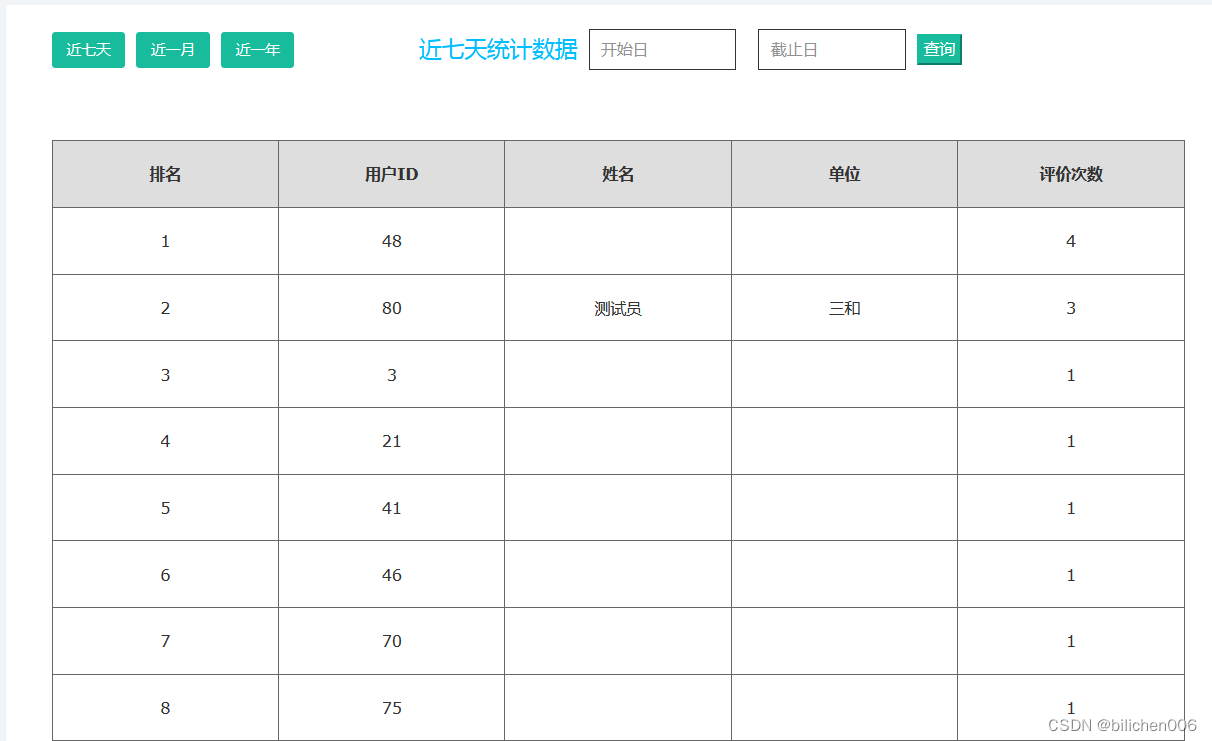
一、怎么创建自定义界面,前面的文章有说,这里省略
二、在后台(智慧食堂)中实现
1、在controll中重写index方法
 /**
     * 查看
     */
    public function index()
    {
        $startTime = $this->request->param('startTime');
        $endTime = $this->request->param('endTime');


        $userList = ZhstUserModel::select();
        $resultList = [];
        $index = $this->request->param('index');
        $now = time();
        $format='Y-m-d';
        $dateEnd = date($format ,strtotime(+1 .' days', $now));

        if($index==4){
            $this->assign('statusName','时间段查询');
            $this->assign('startTime',$startTime);
            $this->assign('endTime',$endTime);
            $endTime = $endTime .'23:59:59';
            foreach ($userList as $k => $vo) {
                $count = ZhstEvaModel::where('userId',$vo['id'])->where('createtime', 'between time', [$startTime,$endTime])->count();
                if($count>0){
                    $temp['userId'] = $vo['id'];
                    $temp['userName'] = $vo['userName'];
                    $temp['unit'] = $vo['unit'];
                    $temp['count'] = $count;
                    array_push($resultList,$temp);
                }
            }
        }else{
            $this->assign('startTime','');
            $this->assign('endTime','');
            if($index==3) {//近一年
                $this->assign('statusName', '近一年');
                $dateStart = date($format, strtotime(-365 . ' days', $now));
            }else if($index=='' || $index==1){
                    $this->assign('statusName','近七天');
                    $dateStart = date($format ,strtotime(-7 .' days', $now));

                }else if($index==2){
                    $this->assign('statusName','近一月');
                    $dateStart = date($format ,strtotime(-30 .' days', $now));
            }
            foreach ($userList as $k => $vo) {
                $count = ZhstEvaModel::where('userId',$vo['id'])->where('createtime', 'between time', [$dateStart,$dateEnd])->count();
                if($count>0){
                    $temp['userId'] = $vo['id'];
                    $temp['userName'] = $vo['userName'];
                    $temp['unit'] = $vo['unit'];
                    $temp['count'] = $count;
                    array_push($resultList,$temp);
                }
            }
         }


        //按距离重新排序,从近到远
        $temp = array();
        foreach ($resultList as $vo) {
            $temp[] = $vo['count'];
        }
        array_multisort($temp,SORT_DESC,$resultList);

        $this->assign('userList',$resultList);

        return $this->view->fetch();
    }
2、在js文件的index中,引入bootstrap-datetimepicker
index: function () {
            require(['bootstrap-datetimepicker'], function () {
                var options = {
                    format: 'Y-M-D',
                    icons: {
                        time: 'fa fa-clock-o',
                        date: 'fa fa-calendar',
                        up: 'fa fa-chevron-up',
                        down: 'fa fa-chevron-down',
                        previous: 'fa fa-chevron-left',
                        next: 'fa fa-chevron-right',
                        today: 'fa fa-history',
                        clear: 'fa fa-trash',
                        close: 'fa fa-remove'
                    },
                    showTodayButton: true,
                    showClose: true
                };
                $('.datetimepickerY').parent().css('position', 'relative');
                $('.datetimepickerY').datetimepicker(options);
                $('.datetimepickerY1').parent().css('position', 'relative');
                $('.datetimepickerY1').datetimepicker(options);
            });
            $("#startDate").on("dp.update", function(){
                var that = this;
                $("select[name='quarter']").val('');
                $("select[name='month']").val('');
                var options = table.bootstrapTable('getOptions');
                options.pageNumber = 1;
                options.queryParams = function (params) {
                    params.year = $(that).val(); // 值
                    console.log(params);
                    return params;
                };
                table.bootstrapTable('refresh', {});
                return false;
            });
            $("#endDate").on("dp.update", function(){
                var that = this;
                $("select[name='quarter']").val('');
                $("select[name='month']").val('');
                var options = table.bootstrapTable('getOptions');
                options.pageNumber = 1;
                options.queryParams = function (params) {
                    params.year = $(that).val(); // 值
                    console.log(params);
                    return params;
                };
                table.bootstrapTable('refresh', {});
                return false;
            });
        },
3、在view中编写index.xml
<style>


    .searchTime{
        width: 130px;
        height: 36px;
        margin-left: 10px;
        margin-right: 10px;
        border:1px solid;
        padding-left: 10px;
    }
    .top{
        width: 100%;
        height:80px;
        display: flex;
        align-items: center;
        margin-left: 40px;
    }
    .statusName{
        margin-left: 100px;
        font-size: 20px;
        color: deepskyblue;
    }
    table.gridtable {
        font-family: verdana,arial,sans-serif;
        /*font-size:12px;*/
        color:#333333;
        border-width: 1px;
        border-color: #666666;
        border-collapse: collapse;
        margin-left: 40px;
        margin-top: 40px;
    }
    table.gridtable th {
        border-width: 1px;
        padding: 18px;
        border-style: solid;
        border-color: #666666;
        background-color: #dedede;
        width: 200px;
        text-align: center;
    }
    table.gridtable td {
        border-width: 1px;
        padding: 18px;
        border-style: solid;
        border-color: #666666;
        background-color: #ffffff;
        width: 200px;
        text-align: center;
    }
    .panel{
        width: 100%;
        height: 100%;
        background: #FFFFFF;
        padding-bottom: 40px;
    }
    .searchTime{
        width: 130px;
        height: 36px;
        margin-left: 10px;
        margin-right: 10px;
        border:1px solid;
        padding-left: 10px;
    }
</style>
<div class="panel panel-default panel-intro">
    {:build_heading()}

    <div class="top">
        <button class="btn btn-success" style="margin-right: 10px"  onclick="searResult2Time(1)">近七天</button>
        <button class="btn btn-success" style="margin-right: 10px" onclick="searResult2Time(2)">近一月</button>
        <button class="btn btn-success" style="margin-right: 10px" onclick="searResult2Time(3)">近一年</button>
        <span class="statusName">{$statusName}统计数据</span>

        <input type="text" class="searchTime datetimepicker datetimepickerY" placeholder="开始日" name="start" id="startDate" value="{$startTime}">
        <input type="text" class="searchTime datetimepicker datetimepickerY1" placeholder="截止日" name="endDate" id="endDate" value="{$endTime}">
        <button class="btn-success"  onclick="searResult2Time(4)">查询</button>

    </div>
    <table class="gridtable">
        <thead>
        <tr>
            <th>排名</th>
            <th>用户ID</th>
            <th>姓名</th>
            <th>单位</th>
            <th>评价次数</th>
        </thead>
        <tbody>

        {volist name="userList" id="vo" key='k'}
        <tr>
            <td>{$k}</td>
            <td >{$vo.userId}</td>
            <td >{$vo.userName}</td>
            <td >{$vo.unit}</td>
            <td >{$vo.count}</td>
        </tr>
        {/volist}
        </tbody>
    </table>


    <script>

        //指定时间段查询记录(近三天,上月、本月、近一年)
        function searResult2Time(index){
            var startTime = $("#startDate").val();
            var endTime = $("#endDate").val();
            var timeStart = Date.parse(startTime);
            var timeEnd = Date.parse(endTime);
            if(index==4){
                if(startTime=='' || endTime==''){
                    alert('请选择正确的查询时间')
                }else if(timeStart>timeEnd){
                    alert('开始时间不能大于结束时间')
                }
            }
            window.location.href='{:url("index")}?index='+ index+ '&startTime=' + startTime + '&endTime='+endTime;

        }
    </script>
</div>
最后,date的input框,有时要点击一下旁边去除焦点,再点击input才弹出日期选择控件,具体是什么原因,暂未知





 扫一扫
扫一扫


 3万+
3万+

 被折叠的 条评论
为什么被折叠?
被折叠的 条评论
为什么被折叠?
 到【灌水乐园】发言





