





 本文介绍了在Vue中如何使用ref属性从父组件调用子组件的方法,以及通过自定义事件实现子组件调用父组件的方法。两种方式分别展示了在常规<script>和<script setup>语法下的实践例子,强调了在<script setup>中使用defineExpose和defineEmits来暴露组件方法和事件。
写法1
父组件通过为子组件绑定ref属性调用子组件的方法
- 父组件的内容
<template>
  <div class="container">
    <childComponent ref="childRef"></childComponent>
    <el-button type="primary" size="default" @click="touchEvent">点击触发子组件方法</el-button>
  </div>
</template>

<script>
import { ref } from 'vue'
import childComponent from '../components/childComponent.vue'

export default {
  components: {
    childComponent
  },

  setup() {
    const childRef = ref(null)

    const touchEvent = () => {
      childRef.value.firstEvent()
    }

    return {
      childRef,
      touchEvent
    }
  }
}
</script>
- 子组件的内容
<template>
  <div class="container">
    <div>
      <span>父组件触发了{{ count }}次子组件的方法</span>
    </div>
  </div>
</template>

<script>
import { ref } from 'vue'

export default {
  setup() {

    const count = ref(0)

    const firstEvent = () => {
      count.value++
    }

    return {
      count,
      firstEvent
    }
  }
}
</script>
![[外链图片转存失败,源站可能有防盗链机制,建议将图片保存下来直接上传(img-eOEed4gH-1658307849413)(C:\Users\zll\AppData\Roaming\Typora\typora-user-images\1658306031165.png)]](https://i-blog.csdnimg.cn/blog_migrate/01b955d30302f02d682d306bafa962b2.png)
父组件通过自定义事件,子组件通过emit调用父组件的方法
- 父组件的内容
<template>
  <div class="container">
    <span>子组件调用了{{ count }}次父组件的方法</span>
    <childComponent @parentEvent="touchEvent"></childComponent>
  </div>
</template>

<script>
import { ref } from 'vue'
import childComponent from '../components/childComponent.vue'

export default {
  components: {
    childComponent
  },
  setup() {
    const count = ref(0)

    const touchEvent = (data) => {
      count.value++
      console.log(data) // 接受子组件传递过来的值
    }

    return {
      count,
      touchEvent
    }
  }
}
</script>
- 子组件的内容
<template>
  <div class="container">
    <el-button type="primary" size="default" @click="parentEvent">点击触发父组件方法</el-button>
  </div>
</template>

<script>
import { ref } from 'vue'

export default {
  setup(props, ctx) {
    console.log(props, ctx);
    const parentEvent = () => {
      ctx.emit('parentEvent');
      ctx.emit('parentEvent', '向父组件传递的值') //可以向父组件传值
    }

    return {
      parentEvent
    }
  }
}
</script>
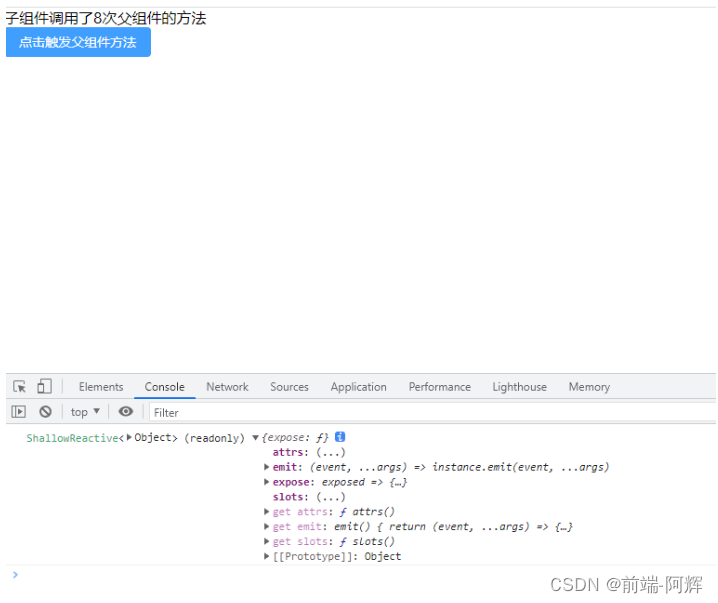
写法2
使用
<script setup>的组件是默认关闭的,即通过模板 ref 或者 $parent 获取到组件的公开实例,不会暴露任何在<script setup>中声明的绑定。 为了在<script setup>组件中明确要暴露出去的属性,使用defineExpose编译器宏, 同样必须使用defineProps和defineEmitsAPI来声明props和emit。
父组件通过为子组件绑定ref属性调用子组件的方法
2.1 父组件的内容
<template>
  <div class="container">
    <childComponent ref="childRef"></childComponent>
    <el-button type="primary" size="default" @click="touchEvent">点击触发子组件方法</el-button>
  </div>
</template>
<script setup>
import { ref } from 'vue';
import childComponent from '../components/childComponent.vue'

const childRef = ref(null)
const touchEvent = () => {
  childRef.value.firstEvent()
}

</script>
2.2 子组件的内容
- 子组件的方法使用
defineExpose暴露出来
<template>
  <div class="container">
    <div>
      <span>父组件触发了{{ count }}次子组件的方法</span>
    </div>
  </div>
</template>

<script setup>
import { ref } from "vue";

const count = ref(0)
const firstEvent = () => {
  count.value++
}

defineExpose({ firstEvent })
</script>
子组件通过emit调用父组件的方法
2.1 父组件的内容
<template>
  <div class="container">
    <span>子组件调用了{{ count }}次父组件的方法</span>
    <childComponent @parentEvent="touchEvent"></childComponent>
  </div>
</template>
<script setup>
import { ref } from 'vue';
import childComponent from '../components/childComponent.vue'

const count = ref(0)
const touchEvent = (data) => {
  console.log(data) //data接收子组件传过来的值 user: {...}
  count.value++
}
</script>
2.2 子组件的内容
- 子组件的方法使用
defineEmits暴露出来
<template>
  <div class="container">
    <el-button type="primary" size="default" @click="parentEvent">点击触发父组件方法</el-button>
  </div>
</template>

<script setup>
import { onMounted } from "vue";
const user = {
	name: '小明',
	age: 25,
}
const emit = defineEmits([ "parentEvent" ]);
const parentEvent = () => {
  // 传递user到父组件
  emit('parentEvent', user);
}
</script>






 扫一扫
扫一扫


 8835
8835

 被折叠的 条评论
为什么被折叠?
被折叠的 条评论
为什么被折叠?
 到【灌水乐园】发言





