



 本文详细介绍了如何在SpringBoot项目中整合Dubbo,包括创建服务接口、实现服务提供者(Provider)、配置Dubbo、创建服务消费者(Consumer)并进行远程调用的全过程。涉及的内容包括添加依赖、实现接口、配置Zookeeper注册中心以及启动和测试。
Spring Boot 整合 Dubbo
1.创建服务接口
1.1 创建项目
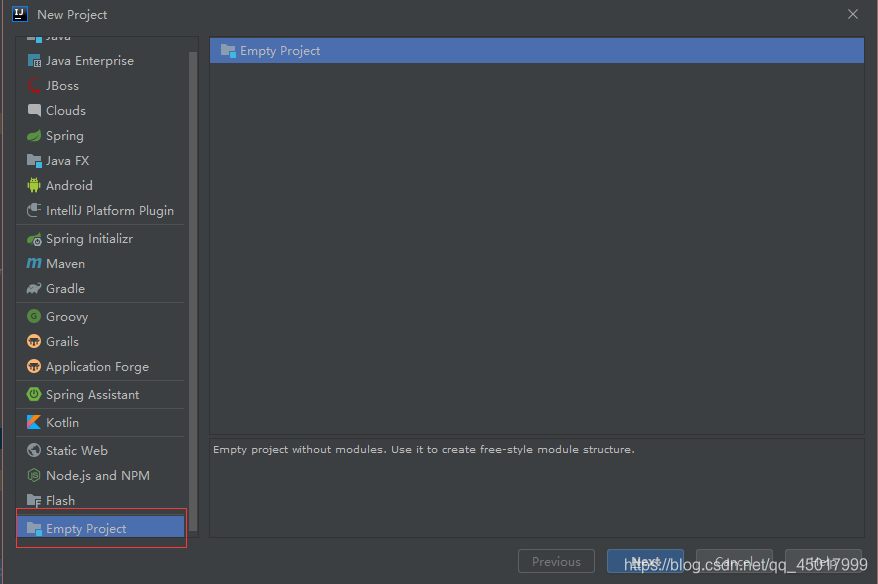
- 首先通过这个选项创建一个空的框架
- 而后在里面创建model
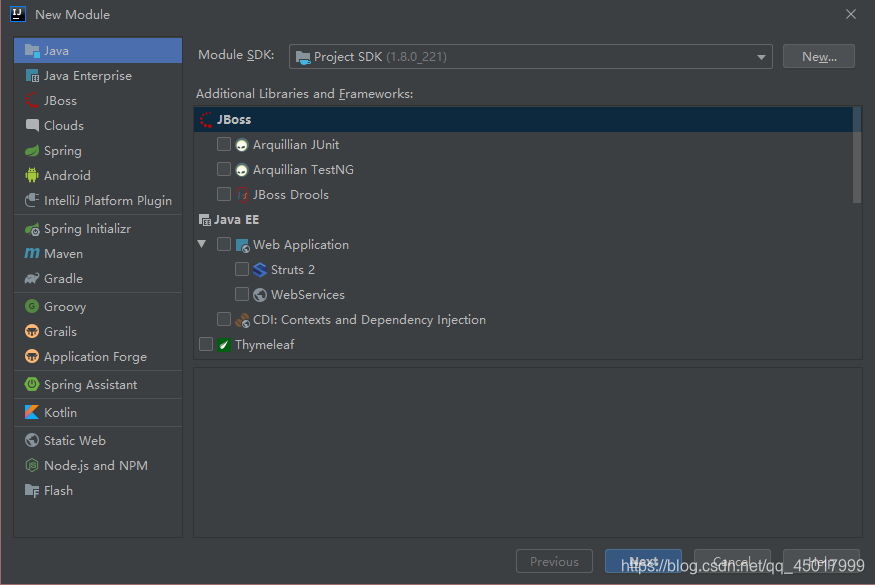
- 第一个项目为普通的maven项目
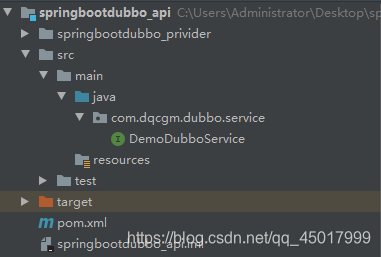
1.2 添加接口
package com.dqcgm.dubbo.service;

public interface DemoDubboService {
    String showMsg(String str);
}
2.创建 Provider
2.1 创建项目
- spring boot项目
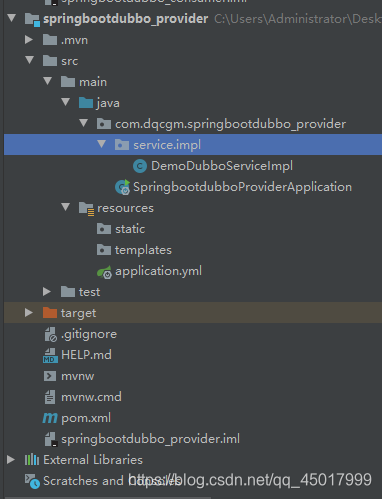
2.2 修改 POM 文件添加依赖
-
(今天不知道为什么我dubbo-registry-zookeeper中的curator-recipes4.0.1版本老是下载不了,于是我就把他剔除了,然后重新下的,大家下载没有问题的话可以忽略这步)
<?xml version="1.0" encoding="UTF-8"?>
4.0.0
org.springframework.boot
spring-boot-starter-parent
2.3.2.RELEASE
com.dqcgm
springbootdubbo_provider
0.0.1-SNAPSHOT
springbootdubbo_provider
Demo project for Spring Boot<properties> <java.version>1.8</java.version> </properties> <dependencies> <dependency> <groupId>com.dqcgm</groupId> <artifactId>springbootdubbo_api</artifactId> <version>1.0-SNAPSHOT</version> </dependency> <dependency> <groupId>org.springframework.boot</groupId> <artifactId>spring-boot-starter</artifactId> </dependency> <dependency> <groupId>org.apache.dubbo</groupId> <artifactId>dubbo-spring-boot-starter</artifactId> <version>2.7.6</version> </dependency> <dependency> <groupId>org.apache.dubbo</groupId> <artifactId>dubbo-registry-zookeeper</artifactId> <version>2.7.4</version> <exclusions> <exclusion> <groupId>org.apache.curator</groupId> <artifactId>curator-recipes</artifactId> </exclusion> </exclusions> </dependency> <dependency> <groupId>org.apache.curator</groupId> <artifactId>curator-recipes</artifactId> <version>4.2.0</version> </dependency> <dependency> <groupId>org.springframework.boot</groupId> <artifactId>spring-boot-starter-test</artifactId> <scope>test</scope> <exclusions> <exclusion> <groupId>org.junit.vintage</groupId> <artifactId>junit-vintage-engine</artifactId> </exclusion> </exclusions> </dependency> </dependencies> <build> <plugins> <plugin> <groupId>org.springframework.boot</groupId> <artifactId>spring-boot-maven-plugin</artifactId> </plugin> </plugins> </build>
2.3 添加接口实现
package com.dqcgm.springbootdubbo_provider.service.impl;

import com.dqcgm.dubbo.service.DemoDubboService;
import org.apache.dubbo.config.annotation.Service;

@Service
public class DemoDubboServiceImpl implements DemoDubboService {
    @Override
    public String showMsg(String str) {
        return "Hello Dubbo "+str;
    }
}
2.4 在配置文件中配置 Dubbo
-
原本是application.properties(自动生成的),改了后缀变成了application.yml
dubbo:
application:
name: myProvider
registry:
address: zookeeper://192.168.0.110:2181?backup=192.168.0.110:2182,192.168.0.110:2183
timeout: 15000protocol:
name: dubbo
port: 20880
scan:
base-packages: com.dqcgm.springbootdubbo_provider.service.impl
2.5 启动 Provider
2.5.1 通过 spring-boot-starter-web 启动 Dubbo(POM文件中的启动器)
- 如果在项目中添加的是 spring-boot-starter-web 启动器,那么在启动 dubbo 后还会监听一个端口,因为在 web 启动器中内置了一个 Tomcat,Tomcat 的启动不会影响 dubbo 的运行,但是会多占用一个端口,未来在其他的 Provider 中还需要考虑端口分配的问题,避免端口抢占
2.5.2 通过 spring-boot-starter 启动 Dubbo
- 可以使用 spring-boot-starter 起来启动 Dubbo,在该启动器中并未包含 Tomcat 所以并不会监听端口。
3.创建 Consumer
3.1创建项目
- spring boot项目
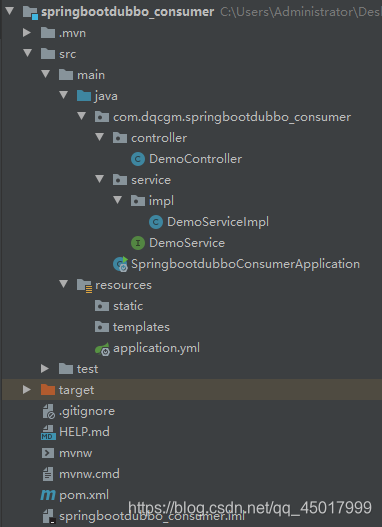
3.2修改 POM 文件添加依赖
<?xml version="1.0" encoding="UTF-8"?>
<project xmlns="http://maven.apache.org/POM/4.0.0" xmlns:xsi="http://www.w3.org/2001/XMLSchema-instance"
         xsi:schemaLocation="http://maven.apache.org/POM/4.0.0 https://maven.apache.org/xsd/maven-4.0.0.xsd">
    <modelVersion>4.0.0</modelVersion>
    <parent>
        <groupId>org.springframework.boot</groupId>
        <artifactId>spring-boot-starter-parent</artifactId>
        <version>2.3.2.RELEASE</version>
        <relativePath/> <!-- lookup parent from repository -->
    </parent>
    <groupId>com.dqcgm</groupId>
    <artifactId>springbootdubbo_consumer</artifactId>
    <version>0.0.1-SNAPSHOT</version>
    <name>springbootdubbo_consumer</name>
    <description>Demo project for Spring Boot</description>

    <properties>
        <java.version>1.8</java.version>
    </properties>

    <dependencies>
        <dependency>
            <groupId>com.dqcgm</groupId>
            <artifactId>springbootdubbo_api</artifactId>
            <version>1.0-SNAPSHOT</version>
        </dependency>
        <dependency>
            <groupId>org.springframework.boot</groupId>
            <artifactId>spring-boot-starter-web</artifactId>
        </dependency>
        <dependency>
            <groupId>org.apache.dubbo</groupId>
            <artifactId>dubbo-spring-boot-starter</artifactId>
            <version>2.7.6</version>
        </dependency>
        <dependency>
            <groupId>org.apache.dubbo</groupId>
            <artifactId>dubbo-registry-zookeeper</artifactId>
            <version>2.7.4</version>
            <exclusions>
                <exclusion>
                    <groupId>org.apache.curator</groupId>
                    <artifactId>curator-recipes</artifactId>
                </exclusion>
            </exclusions>
        </dependency>
        <dependency>
            <groupId>org.apache.curator</groupId>
            <artifactId>curator-recipes</artifactId>
            <version>4.2.0</version>
        </dependency>
        <dependency>
            <groupId>org.springframework.boot</groupId>
            <artifactId>spring-boot-starter-test</artifactId>
            <scope>test</scope>
            <exclusions>
                <exclusion>
                    <groupId>org.junit.vintage</groupId>
                    <artifactId>junit-vintage-engine</artifactId>
                </exclusion>
            </exclusions>
        </dependency>
    </dependencies>

    <build>
        <plugins>
            <plugin>
                <groupId>org.springframework.boot</groupId>
                <artifactId>spring-boot-maven-plugin</artifactId>
            </plugin>
        </plugins>
    </build>
</project>
3.3编写配置文件
-
application.yml
dubbo:
application:
name: myConsumer
registry:
address: zookeeper://192.168.0.110:2181?backup=192.168.0.110:2182,192.168.0.110:2183
timeout: 10000protocol:
name: dubbo
3.4实现远程调用
3.4.1创建业务层
package com.dqcgm.springbootdubbo_consumer.service;

public interface DemoService {
    String getMsg(String str);
}


package com.dqcgm.springbootdubbo_consumer.service.impl;

import com.dqcgm.dubbo.service.DemoDubboService;
import com.dqcgm.springbootdubbo_consumer.service.DemoService;
import org.apache.dubbo.config.annotation.Reference;
import org.springframework.stereotype.Service;

@Service
public class DemoServiceImpl implements DemoService {

    @Reference
    private DemoDubboService demoDubboService;

    @Override
    public String getMsg(String str) {
        return this.demoDubboService.showMsg(str);
    }
}
3.4.2创建 Controller 层
package com.dqcgm.springbootdubbo_consumer.controller;

import com.dqcgm.springbootdubbo_consumer.service.DemoService;
import org.springframework.beans.factory.annotation.Autowired;
import org.springframework.web.bind.annotation.RequestMapping;
import org.springframework.web.bind.annotation.RestController;

@RestController
public class DemoController {

    @Autowired
    private DemoService demoService;

    @RequestMapping("/getMsg")
    public String getMsg(String str) {
        return this.demoService.getMsg(str);
    }
}
3.4.3测试结果







 扫一扫
扫一扫


 665
665

 被折叠的 条评论
为什么被折叠?
被折叠的 条评论
为什么被折叠?
 到【灌水乐园】发言





