How WebKit Loads a Web Page

WebKit加载网页解析
本文介绍了WebKit如何加载网页及其子资源的过程。WebKit包含两个加载管道,一个用于将文档加载到帧中,另一个用于加载子资源(如图像和脚本)。文章详细解释了FrameLoader和DocumentLoader的角色,以及它们如何交互来实现高效加载。

原文链接:https://www.webkit.org/blog/1188/how-webkit-loads-a-web-page/

How WebKit Loads a Web Page

Posted by abarth on Sunday, April 18th, 2010 at 1:57 pm

Before WebKit can render a web page, it needs to load the page and all of its subresources from the network. There are many layers involved in loading resources from the web. In this post, I’ll focus on explaining how WebCore, the main rendering component of WebKit, is involved in the loading process.

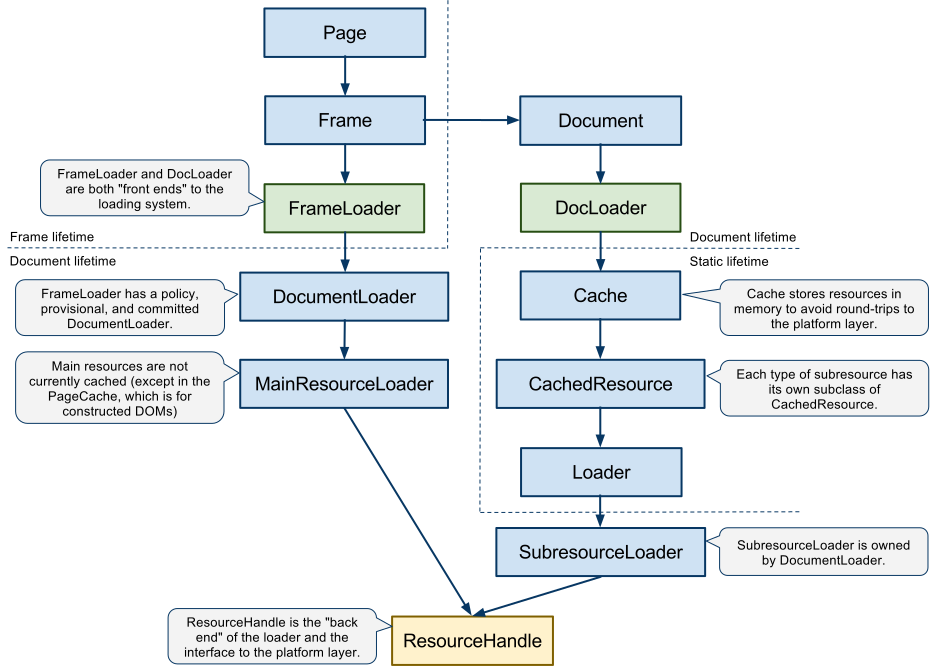
WebKit contains two loading pipelines, one for loading documents into frames and another for loading the subresources (such as images and scripts). The diagram below summarizes the major objects involved in the two pipelines:

Loading Frames

The FrameLoader is in charge of loading documents into Frames. Whenever you click a link, the FrameLoader begins by creating a new DocumentLoader object in the “policy” state, where it awaits a decision by the WebKit client about how it should handle this load. Typically, the client will instruct the FrameLoader to treat the load as a navigation (instead of blocking the load, for example).

Once the client instructs the FrameLoader to treat the load as a navigation, the FrameLoader advances the DocumentLoader to the “provisional” state, which kicks off a network request and waits to determine whether the network request will result in a download or a new document.

The DocumentLoader, in turn, creates a MainResourceLoader, whose job is to interact with the platform’s network library via the ResourceHandle interface. Separating the MainResourceLoader from DocumentLoader serves two purposes: (1) the MainResourceLoader insulates the DocumentLoader from details of handling the callbacks from the ResourceHandle and (2) the lifetime of the MainResourceLoader is decoupled from the lifetime of the DocumentLoader (which is tied to the Document).

Once the loading system has received sufficient information from the network to determine that the resource actually represents a document, the FrameLoader advances the DocumentLoader to the “committed” state, which transitions the Frame to displaying the new document.

Loading Subresources

Of course, displaying a web page requires more than just the HTML that comprises the document. We also need to load the images, scripts, and other subresources referenced by the document. The DocLoader is in charge of loading these subresources. (Note that although DocumentLoader and DocLoader have similar names, their roles are quite different.)

Let’s take loading an image as a typical example. To load an image, the DocLoader first asks the Cache whether it already has a copy of the image in memory (as a CachedImage object). If the image is already in the Cache, the DocLoader can respond immediately with the image. For even greater efficiency, the Cache often keeps the decoded image in video memory so that WebKit does not have to uncompress the same image twice.

If the image is not in the Cache, the Cache creates a new CachedImage object to represent the image. The CachedImage object asks the “Loader” object to kick off a network request, which the Loader does by creating a SubresourceLoader. The SubresourceLoader plays a similar role in the subresource loading pipeline as the MainResourceLoader does in the main resource loading pipeline in that it interacts most directly with the ResourceHandle interface to the platform.

Areas for Improvement

There are many areas in which we can improve WebKit’s loading pipelines. The FrameLoader is significantly more complex than necessary and encompasses more tasks than simply loading a frame. For example, FrameLoader has a several subtly different methods named “load,” which can be confusing, and is responsible for creating new windows, which seems only tangentially related to loading a frame. Also, the various stages of the loading pipeline are more tightly coupled than necessary and there are a number of “layering” violations in which a lower-level object interacts directly with a higher-level object. For example, the MainResourceLoader delivers bytes received from the network directly to FrameLoader instead of delivering them to DocumentLoader.

If you study the diagram above, you will notice that the Cache is used only for subresources. In particular, main resource loads do not get the benefits of WebKit’s memory cache. If we can unify these two loading pipelines, we might be able to improve the performance of main resource loads. Over time, we hope to improve the performance of the loader to make loading web pages as fast as possible.


python爬取房价数据import requests from bs4 import BeautifulSoup import pandas as pd import re import logging import time import os import random from urllib.parse import urljoin # 配置日志 logging.basicConfig(level=logging.INFO, format='%(asctime)s - %(levelname)s: %(message)s') # CSS选择器常量 LIST_ITEM_SELECTOR = '.sellListContent li' TITLE_SELECTOR = '.title a' PRICE_SELECTOR = '.totalPrice span' UNIT_PRICE_SELECTOR = '.unitPrice span' HOUSE_INFO_SELECTOR = '.houseInfo' POSITION_INFO_SELECTOR = '.positionInfo' SOURCE_INFO_SELECTOR = '.sourceInfo' FLOOD_INFO_SELECTOR = '.floodInfo' FOLLOW_INFO_SELECTOR = '.followInfo' PAGINATION_SELECTOR = '.page-box.house-lst-page-box' # 分页控件选择器 # 城市列表及对应的链家域名 CITIES = { "北京": "bj", "上海": "sh", "广州": "gz", "深圳": "sz", "青岛": "qd", "菏泽": "heze", "永州": "yongzhou" } # 请求头 HEADERS = { "User-Agent": "Mozilla/5.0 (Windows NT 10.0; Win64; x64) AppleWebKit/537.36 (KHTML, like Gecko) Chrome/91.0.4472.124 Safari/537.36", "Accept-Language": "zh-CN,zh;q=0.9,en;q=0.8", "Referer": "https://www.ke.com/" } # 最大重试次数 MAX_RETRIES = 3 # 每页房屋数量 HOUSES_PER_PAGE = 30 # 每个城市爬取的房屋数量 HOUSES_PER_CITY = 300 def _parse_house_item(item, city_name): """解析单个房屋信息""" data = { '城市': city_name, '行政区': None, '小区名称': None, '户型': None, '建筑面积(㎡)': None, '总价(万元)': None, '单价(元/㎡)': None, '挂牌时间': None, '房源描述': None, '标题': None } try: # 1. 标题 title_elem = item.select_one(TITLE_SELECTOR) if title_elem: data['标题'] = title_elem.text.strip() # 2. 总价(万元) price_elem = item.select_one(PRICE_SELECTOR) if price_elem: price_text = price_elem.text.strip() price_match = re.search(r'(\d+\.?\d*)', price_text) if price_match: data['总价(万元)'] = float(price_match.group(1)) # 3. 单价(元/㎡) unit_price_elem = item.select_one(UNIT_PRICE_SELECTOR) if unit_price_elem: unit_price_text = unit_price_elem.text.strip() unit_price_match = re.search(r'(\d+)', unit_price_text) if unit_price_match: data['单价(元/㎡)'] = float(unit_price_match.group(1)) # 4. 房屋信息(包含户型、面积、朝向、装修、楼层等) house_info_elem = item.select_one(HOUSE_INFO_SELECTOR) if house_info_elem: house_info = house_info_elem.text.strip() parts = [part.strip() for part in house_info.split('|')] # 小区名称通常是第一个信息 if parts: data['小区名称'] = parts[0] # 尝试提取户型(如"2室1厅") for part in parts: if '室' in part and '厅' in part: data['户型'] = part break # 尝试提取面积 for part in parts: if '平米' in part: area_match = re.search(r'(\d+\.?\d*)', part) if area_match: data['建筑面积(㎡)'] = float(area_match.group(1)) break # 房源描述(剩余信息) desc_parts = [] for p in parts: if p != data['小区名称'] and p != data['户型'] and ('平米' not in p or data['建筑面积(㎡)'] is None): desc_parts.append(p) if desc_parts: data['房源描述'] = ' | '.join(desc_parts) # 5. 位置信息(行政区) position_elem = item.select_one(POSITION_INFO_SELECTOR) if position_elem: position_text = position_elem.text.strip() # 格式通常为:武侯 - 神仙树 | 3室2厅 | 125.07平米 if ' - ' in position_text: data['行政区'] = position_text.split(' - ')[0].strip() else: data['行政区'] = position_text # 6. 挂牌时间 source_elem = item.select_one(SOURCE_INFO_SELECTOR) if source_elem: data['挂牌时间'] = source_elem.text.strip() # 7. 楼层信息(补充房源描述) flood_elem = item.select_one(FLOOD_INFO_SELECTOR) if flood_elem: flood_text = flood_elem.text.strip() if data['房源描述']: data['房源描述'] += f" | {flood_text}" else: data['房源描述'] = flood_text # 8. 关注信息(补充挂牌时间) follow_elem = item.select_one(FOLLOW_INFO_SELECTOR) if follow_elem and not data['挂牌时间']: follow_text = follow_elem.text.strip() if '发布' in follow_text: data['挂牌时间'] = follow_text return data except Exception as e: logging.error(f"解析错误: {e}") # 返回已解析的部分数据 return data def get_total_pages(soup): """从页面中提取总页数""" pagination = soup.select_one(PAGINATION_SELECTOR) if pagination: try: # 分页信息在data-pageres属性中,格式为: '{"totalPage":100,"curPage":1}' page_data = pagination.get('page-data') if page_data: import json page_info = json.loads(page_data) return page_info.get('totalPage', 1) except: logging.warning("解析分页信息失败") return 1 def crawl_city_houses(city_name, city_code): """爬取单个城市的房屋数据""" base_url = f"https://{city_code}.ke.com/ershoufang/" houses = [] page = 1 collected = 0 # 计算需要爬取的页数 (每页30条,爬取300条需要10页) pages_to_crawl = min(10, HOUSES_PER_CITY // HOUSES_PER_PAGE + 1) logging.info(f"开始爬取 {city_name},计划爬取 {pages_to_crawl} 页数据...") while collected < HOUSES_PER_CITY and page <= pages_to_crawl: url = f"{base_url}pg{page}/" retries = 0 success = False while retries < MAX_RETRIES and not success: try: # 添加随机延迟避免被封 delay = random.uniform(1.5, 3.5) time.sleep(delay) logging.info(f"爬取 {city_name} 第 {page} 页: {url}") response = requests.get(url, headers=HEADERS, timeout=15) response.raise_for_status() # 检查是否重定向到验证页面 if "verify.ke.com" in response.url: logging.error(f"{city_name} 第 {page} 页请求被重定向到验证页面,可能需要人工验证") retries = MAX_RETRIES # 跳过重试 break # 解析HTML soup = BeautifulSoup(response.text, 'html.parser') # 如果是第一页,获取总页数 if page == 1: total_pages = get_total_pages(soup) logging.info(f"{city_name} 共有 {total_pages} 页数据") # 更新需要爬取的页数 pages_to_crawl = min(pages_to_crawl, total_pages) # 提取房屋列表 house_items = soup.select(LIST_ITEM_SELECTOR) logging.info(f"{city_name} 第 {page} 页找到 {len(house_items)} 个房屋条目") # 解析每个房屋条目 for item in house_items: house = _parse_house_item(item, city_name) if house: houses.append(house) collected += 1 if collected >= HOUSES_PER_CITY: break # 达到目标数量,跳出循环 success = True logging.info(f"{city_name} 第 {page} 页成功解析 {len(house_items)} 条数据,总计 {collected} 条") except requests.RequestException as e: retries += 1 logging.warning(f"{city_name} 第 {page} 页请求失败 (尝试 {retries}/{MAX_RETRIES}): {e}") if retries < MAX_RETRIES: time.sleep(5) # 重试前等待 except Exception as e: logging.error(f"{city_name} 第 {page} 页处理时发生错误: {e}") break page += 1 if collected >= HOUSES_PER_CITY: break logging.info(f"{city_name} 爬取完成,共获取 {len(houses)} 条数据") return houses def correct_housing_data(df): """修正房屋数据中的异常值""" # 删除完全空白的行 df = df.dropna(how='all') # 填充城市列的空值 df['城市'] = df['城市'].ffill() # 修正异常单价 def correct_unit_price(row): try: # 如果单价无效或异常低(小于1000元/㎡)且总价和面积都有有效值 if pd.isna(row['单价(元/㎡)']) or (row['单价(元/㎡)'] < 1000 and pd.notnull(row['总价(万元)']) and pd.notnull(row['建筑面积(㎡)'])): # 重新计算单价:(总价 * 10000) / 建筑面积 total_price = row['总价(万元)'] area = row['建筑面积(㎡)'] if area > 0: # 避免除以零 return round((total_price * 10000) / area, 0) return row['单价(元/㎡)'] except Exception as e: logging.error(f"修正单价时出错: {e}") return row['单价(元/㎡)'] # 应用修正函数 df['单价(元/㎡)'] = df.apply(correct_unit_price, axis=1) # 处理特殊字符和格式问题 df['挂牌时间'] = df['挂牌时间'].astype(str).str.replace(r'\s+', '', regex=True) # 移除空白字符 df['房源描述'] = df['房源描述'].astype(str).str.replace(r'\s{2,}', ' ', regex=True) # 规范空格 return df def crawl_and_correct_all_cities(): """爬取所有城市数据并修正异常值""" # 创建数据目录 data_dir = "house_data" os.makedirs(data_dir, exist_ok=True) all_houses = [] # 爬取所有城市数据 for city_name, city_code in CITIES.items(): try: houses = crawl_city_houses(city_name, city_code) all_houses.extend(houses) # 每个城市爬取完成后保存一次 if houses: city_df = pd.DataFrame(houses) city_csv = os.path.join(data_dir, f"{city_name}_houses.csv") city_df.to_csv(city_csv, index=False, encoding='utf-8-sig') logging.info(f"{city_name} 数据已保存: {city_csv}") # 添加城市间延迟 time.sleep(random.uniform(3, 7)) except Exception as e: logging.error(f"爬取 {city_name} 时发生严重错误: {e}") continue # 保存所有城市的原始数据 if all_houses: # 创建DataFrame df = pd.DataFrame(all_houses) # 保存原始CSV original_csv = os.path.join(data_dir, "all_cities_houses.csv") df.to_csv(original_csv, index=False, encoding='utf-8-sig') logging.info(f"所有城市原始数据已保存到: {original_csv}, 共 {len(df)} 条记录") # 保存原始JSON original_json = os.path.join(data_dir, "all_cities_houses.json") df.to_json(original_json, orient='records', force_ascii=False) logging.info(f"原始JSON文件已保存: {original_json}") # 修正数据 corrected_df = correct_housing_data(df) # 保存修正后的CSV corrected_csv = os.path.join(data_dir, "corrected_all_cities_houses.csv") corrected_df.to_csv(corrected_csv, index=False, encoding='utf-8-sig') logging.info(f"修正后的数据已保存到: {corrected_csv}") # 保存修正后的JSON corrected_json = os.path.join(data_dir, "corrected_all_cities_houses.json") corrected_df.to_json(corrected_json, orient='records', force_ascii=False) logging.info(f"修正后的JSON文件已保存: {corrected_json}") # 按城市保存修正后的单独文件 for city_name in CITIES.keys(): city_corrected_df = corrected_df[corrected_df['城市'] == city_name] if not city_corrected_df.empty: city_corrected_csv = os.path.join(data_dir, f"corrected_{city_name}_houses.csv") city_corrected_df.to_csv(city_corrected_csv, index=False, encoding='utf-8-sig') logging.info(f"{city_name} 修正后的数据已保存: {city_corrected_csv}") # 显示修正效果示例 logging.info("\n修正效果示例:") sample = corrected_df.sample(min(3, len(corrected_df))) for _, row in sample.iterrows(): logging.info(f"城市: {row['城市']}, 小区: {row.get('小区名称', '未知')}") logging.info(f" 总价: {row['总价(万元)']} 万元, 面积: {row['建筑面积(㎡)']} ㎡") logging.info(f" 单价: {row['单价(元/㎡)']} 元/㎡") logging.info("-" * 60) else: logging.warning("未找到有效的房屋数据") if __name__ == '__main__': logging.info(f"开始爬取,每个城市目标爬取 {HOUSES_PER_CITY} 条数据") crawl_and_correct_all_cities() logging.info("程序执行完毕") 基于这个为我设计一个爬取小说网站(如番茄小说,七猫等)的爬虫代码,爬取的内容要方便我做阅读偏好数据分析与可视化
08-12
评论
成就一亿技术人!
拼手气红包6.0元
还能输入1000个字符
 
红包 添加红包
表情包 插入表情
 条评论被折叠 查看
添加红包

请填写红包祝福语或标题

红包个数最小为10个

红包金额最低5元

当前余额3.43前往充值 >
需支付:10.00
成就一亿技术人!
领取后你会自动成为博主和红包主的粉丝 规则
hope_wisdom
发出的红包
实付
使用余额支付
点击重新获取
扫码支付
钱包余额 0

抵扣说明:

1.余额是钱包充值的虚拟货币,按照1:1的比例进行支付金额的抵扣。
2.余额无法直接购买下载,可以购买VIP、付费专栏及课程。

余额充值




