



 本文详细介绍Nexus私服的安装、配置及应用实践,包括如何搭建Nexus私服、配置maven项目对接私服、解决国内访问速度慢的问题以及权限管理等内容。
1、下载nexus
https://www.sonatype.com/download-oss-sonatype
bundle自带了jetty容器
下载其中一个,解压后内容是一样的,tar.gz下载更快,因为压缩比更高。

2、安装 nexus
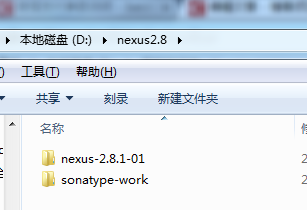
2.1解压压缩包

得到

2,2安装nexus
由于下载的版本bundle自带jetty容器,故不需要额外的配置就可以启动。
在windows环境安装
找到路径:D:\nexus2.8\nexus-2.8.1-01\bin\jsw\windows-x86-32
事实上,你需要先安装好jdk,你的jdk是32位的就选择windows-x86-32,你的jdk是64位的就选择windows-x86-64
可以参考:JDK安装和JAVA环境变量的设置
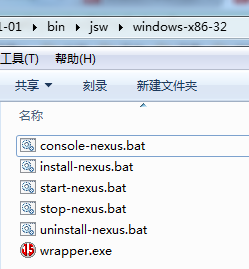
然后,先尝试一下环境是否正常:
点击 console-nexus.bat
如果没有报错,访问 http://localhost:8081/nexus/#welcome
8081端口是默认的,如果要修改,打开路径 D:\nexus2.8\nexus-2.8.1-01\conf 下的nexus.properties 文件进行修改
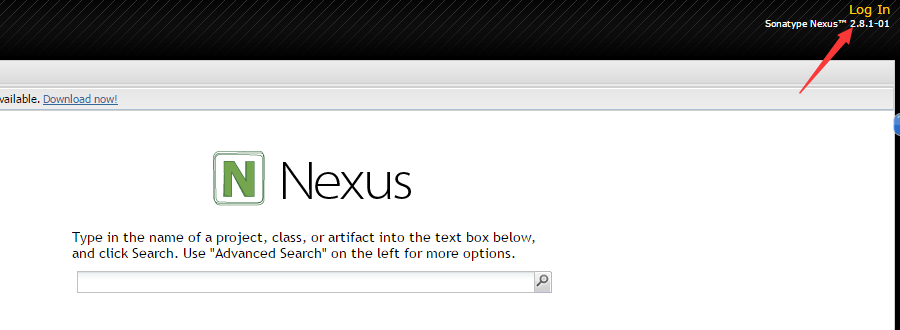
点击右上角的 Log In 登陆,
默认登陆用户名:admin,密码:admin123
3、nexus 仓库分类
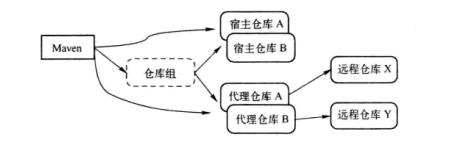
maven会向nexus请求jar包,nexus可以有多个仓库,每个仓库都有一个地址,maven的配置文件可以像从maven的中央仓库请求资源一样从nexus请求资源。
maven的中央仓库缺少一些特定版权的jar包,本地的正在开发的jar包,nexus则可以进行对这些归类管理,比如apache的,Oracle jdbc驱动的 ,包括本地项目等。
nexus即可以建立多个仓库,也可以把已存的仓库组合起来作为一个仓库。
分类示意图如下:
4、maven的依赖范围(scope)

当存在依赖关系时
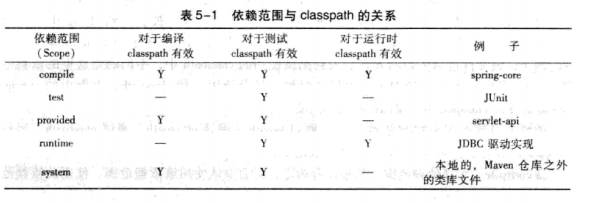
5、maven的快照(SNAPSHOT)版本和发布(release)版本
当项目处于开发阶段,版本要被声明为类似于 2.1-SNAPSHOT的模式,当该项目版本稳定则可将版本写为 2.1
开发阶段的版本不应对外发布,发布版本的不应依赖快照(SNAPSHOT)版本。
此外,maven还有一个 最新版本,即latest,这个是取最新的版本,包含快照版本和发布版本。
6、maven镜像
如果仓库X可以提供仓库Y存储的所有内容,那么就可以认为X是Y的一个镜像。换句话说,任何一个可以从仓库Y获得的构件,都能够从它的镜像中获取。
比如,http://maven.net.cn/content/groups/public/是中央仓库http://repo1.maven.org/maven2/在中国的镜像,同样,我们也可以使用私服来作为镜像。
所以,目前就是这样的结构,nexus负责组织各种仓库作为私服,对外提供访问地址,然后在maven的配置文件settings.xml中配置<mirror>
<mirror>
  <id>internal-respository</id>
  <name>Internal Repository manager</name>
  <url>http://localhost:8081/maven2/</url>
   <mirrorOf>*</mirrorOf>
</mirror>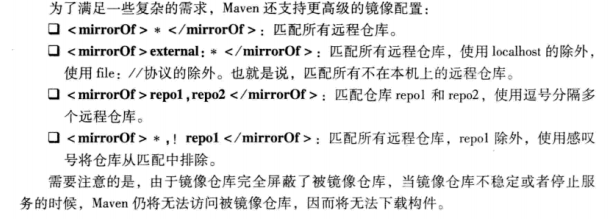
7、在neuxs中新建宿主仓库,
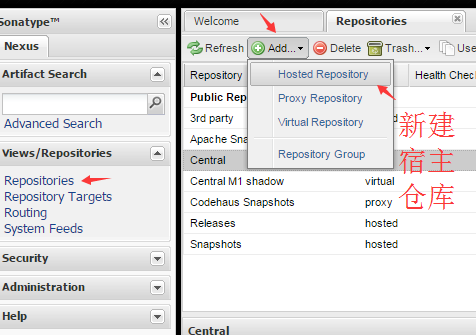
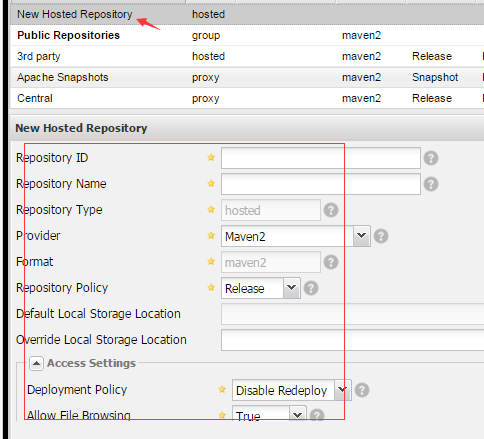
双击新建宿主仓库,在下面面板填写配置信息
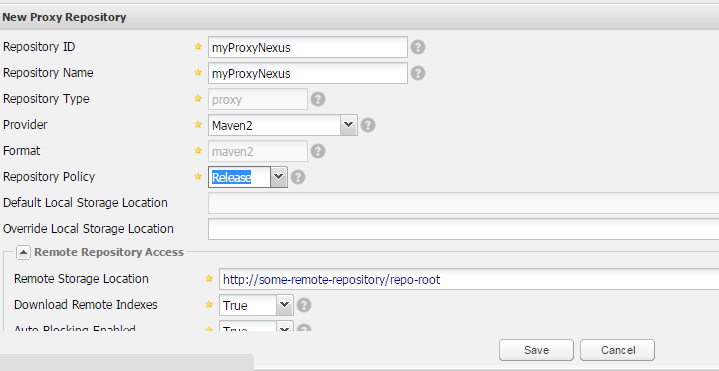
8、新建代理仓库
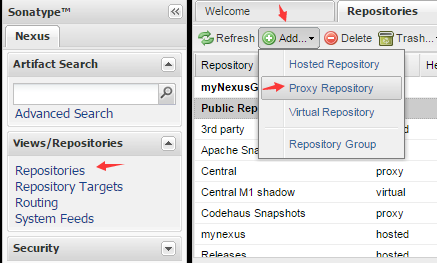
代理仓库的背后是远程仓库。
9、创建仓库组
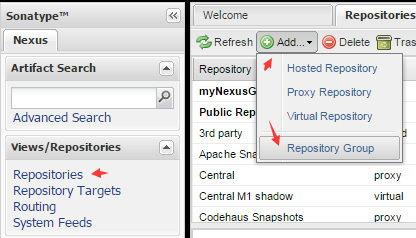
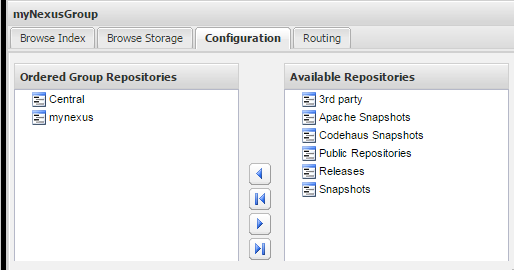
然后选择已经配置好的宿主仓库和代理仓库
9.1、解决国内访问maven中央仓库速度慢的问题-将aliyun的maven镜像作为一个代理仓库添加到仓库组
在国内访问中央仓库时,有时会遇到速度比较慢的情况,而且有时候最终请求不到,尽管等待时间是可以设置的。
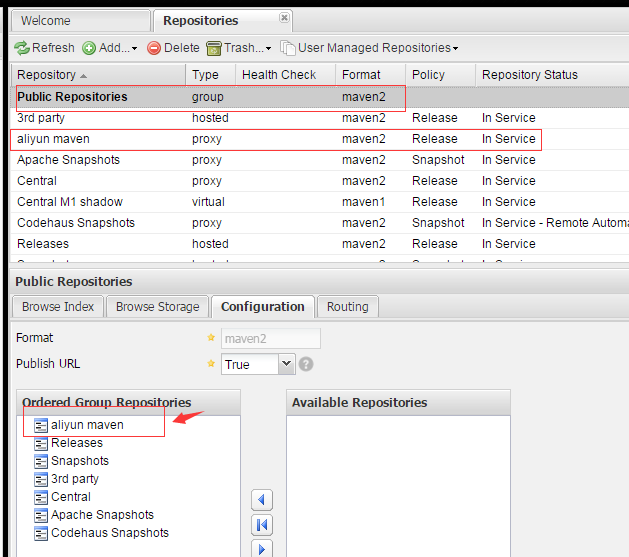
为此,我们可以讲aliyun的仓库镜像以代理仓库的形式添加到仓库组,并且最为第一的位置,最后将我们项目的请求设置为请求我们的私服即可。
首先是为nexus添加代理仓库
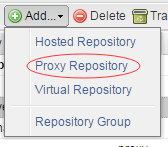
其中所有的设置可以参考Central(即nexus自带的中央镜像),唯一不同的是名字和地址
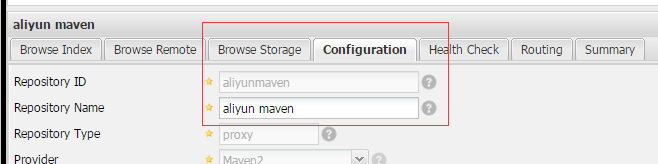
地址为 https://maven.aliyun.com/repository/public
更多:仓库服务
  <mirror>
        <id>nexus-aliyun</id>
        <mirrorOf>*</mirrorOf>
        <name>Nexus aliyun</name>
        <url>https://maven.aliyun.com/repository/public</url>
</mirror> 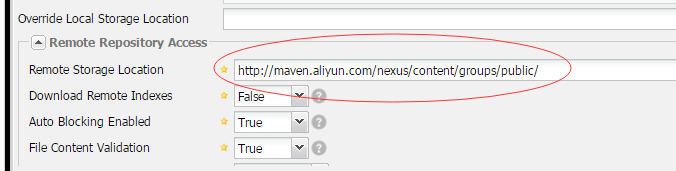
然后是为仓库组增加这个aliyunmaven镜像,保存就ok了
10、在maven中配置nexus
10.1 在maven项目的pom.xml文件中配置远程仓库(或者私服),maven默认的中央仓库id为central,如果重写,会直接覆盖。
依赖的远程仓库配置
<repositories>
  <repository>
      <id>jboss</id>
     <name>JBoss Repository</name>
     <url>http://repository.jboss.com/maven2/</url>
    <releases><enabled>true</enabled></releases>
    <snapshots><enabled>false</enabled></snapshots>
  </repository>
</repositories>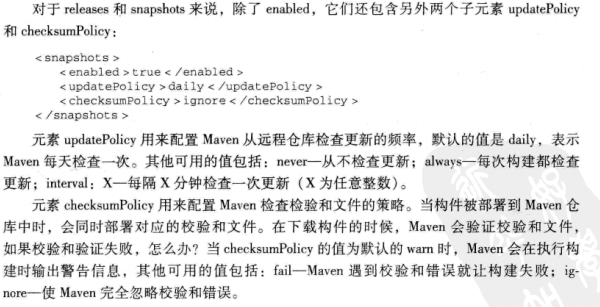
以及插件的远程仓库配置
<pluginRepositories>
  <pluginRepository>
      <id>jboss</id>
     <name>JBoss Repository</name>
     <url>http://repository.jboss.com/maven2/</url>
    <releases><enabled>true</enabled></releases>
    <snapshots><enabled>false</enabled></snapshots>
  </pluginRepository>
</pluginRepositories>
10.2 如果访问私服需要设置权限
则在maven的settings.xml中配置neuxs的用户名和密码
<!-- server
     | Specifies the authentication information to use when connecting to a particular server, identified by
     | a unique name within the system (referred to by the 'id' attribute below).
     |
     | NOTE: You should either specify username/password OR privateKey/passphrase, since these pairings are
     |       used together.
     |
    <server>
      <id>deploymentRepo</id>
      <username>repouser</username>
      <password>repopwd</password>
    </server>
10.3 将本地项目部署到远程仓库(或者私服),供团队其他成员使用
编写完毕后,运行 mvn clean deploy 就会部署到私服,具体操作请看目录11,mynexus是有含义的,在setting.xml文件中配置了nexus的用户名和密码
<distributionManagement>
 <repository>
   <id>mynexus</id>
   <name>Releases</name>
   <url>http://localhost:8081/nexus/content/repositories/releases/</url>
 </repository>
 <snapshotRepository>
    <id>mynexus</id>
    <name>Snapshots</name>
    <url>http://localhost:8081/nexus/content/repositories/snapshots/</url>
 </snapshotRepository>
</distributionManagement>
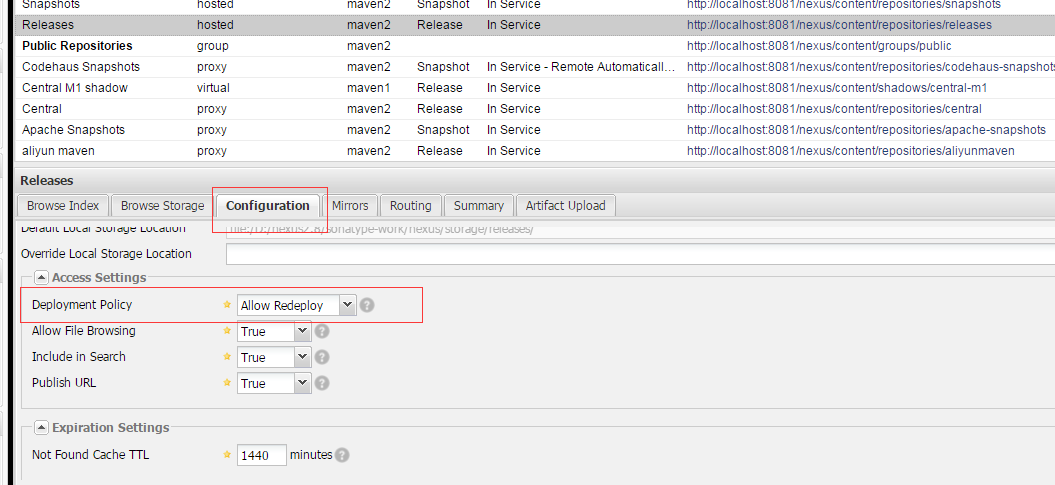
需要注意的是,nexus的release模式默认不允许重复上传,注意修改为如下所示的值
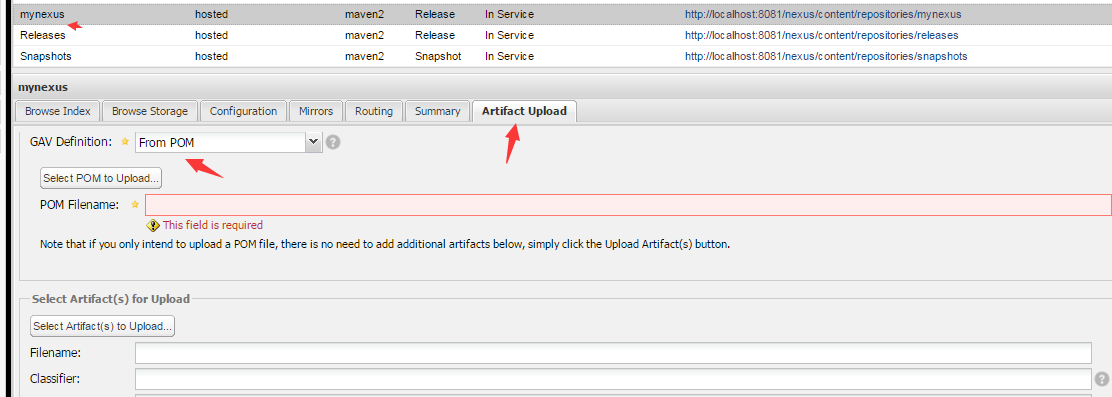
10.4 手动部署
10.5 maven在settings.xml文件中配置nexus
 <profiles>

  <!--配置mynexus-->
	<profile>
		<id>mynexus</id>
		<repositories>
            <repository>
                <id>public</id>
                <url>http://localhost:8081/nexus/content/groups/public/</url>
                <releases>
                    <enabled>true</enabled>
                </releases>
                <snapshots>
                    <enabled>true</enabled>
                </snapshots>
            </repository>
        </repositories>
         <pluginRepositories>
            <pluginRepository>
              <id>public</id>
              <url>http://localhost:8081/nexus/content/groups/public/</url>
              <releases>
                <enabled>true</enabled>
              </releases>
              <snapshots>
                <enabled>false</enabled>
              </snapshots>
            </pluginRepository>
        </pluginRepositories>
	</profile>
</profiles>
然后是激活我们的nexus配置,同样是在maven的settings.xml文件中
<activeProfiles>
    <activeProfile>mynexus</activeProfile>
  </activeProfiles>
10.6 如果仅仅是10.5,maven还是会去时不时的请求中央仓库
在settings.xml中增加如下配置即可使maven的所有的请求都被nexus拦截。
<mirrors>
	 <mirror>
		<id>mynexus</id>
		<mirrorOf>*</mirrorOf>
		<url>http://localhost:8081/nexus/content/groups/public/</url>
	 </mirror>
  </mirrors>
11、一个实际maven项目的私服配置文件
11.1当安装好nexus后,运行console-nexus.bat
访问 http://localhost:8081/nexus/#welcome
登陆 admin/admin123
之后选择Repositories
右边显示的7个仓库是nexus自带的,右边的链接是maven项目访问私服的具体链接

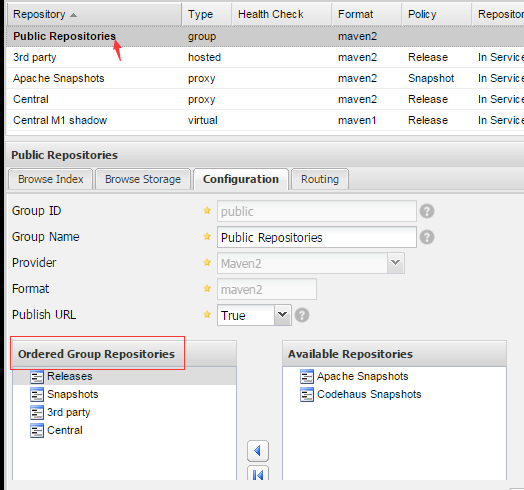
点击开 Public Repositories,可以看到这个仓库组包含了其他仓库
11.2、我们的maven项目的配置文件会直接显示的表达出和其中的3个仓库(组)打交道
11.2.1 Repository的名字为 Public repositories,其作为替代maven中央仓库和其他仓库的和作为私服的对外接口,
其配置的位置位于 maven的settings.xml文件,尤其注意其id的值,不单在settings。xml中保持一致,在maven项目的pom.xml文件中的部署配置中
也要保持id值与之一致
(1)maven的settings.xml声明nexus的仓库组,这里id自定义为 mynexus
注意里面的url路径,是
http://localhost:8081/nexus/content/groups/public/
这是Public repositories
 <profiles>

  <!--配置mynexus-->
	<profile>
		<id>mynexus</id>
		<repositories>
            <repository>
                <id>public</id>
                <url>http://localhost:8081/nexus/content/groups/public/</url>
                <releases>
                    <enabled>true</enabled>
                </releases>
                <snapshots>
                    <enabled>true</enabled>
                </snapshots>
            </repository>
        </repositories>
         <pluginRepositories>
            <pluginRepository>
              <id>public</id>
              <url>http://localhost:8081/nexus/content/groups/public/</url>
              <releases>
                <enabled>true</enabled>
              </releases>
              <snapshots>
                <enabled>false</enabled>
              </snapshots>
            </pluginRepository>
        </pluginRepositories>
	</profile>
</profiles>
(2)maven的settings.xml激活仓库组,注意这里id自定义为 mynexus,与上面的声明一致
 <!--激活 mynexus-->
  <activeProfiles>
    <activeProfile>mynexus</activeProfile>
  </activeProfiles>
(3) maven的settings.xml 声明的仓库组拦截一切maven的jar包请求(不再访问maven的默认的central即中央仓库)
注意这里id自定义为 mynexus,与上面的声明一致
<mirrors>
	 <mirror>
		<id>mynexus</id>
		<mirrorOf>*</mirrorOf>
		<url>http://localhost:8081/nexus/content/groups/public/</url>
	 </mirror>
  </mirrors>
(4)这是权限,nexus有多种权限,其中用户名为admin的具有所有权限,默认密码为admin123
 <servers>
	<server>
	   <id>mynexus</id>
      <username>admin</username>
      <password>admin123</password>
	</server>
</servers>
11.2.2 Releases 是发布版本,当maven项目开发为稳定版本时,可以部署到这个仓库
11.2.3 Snapshots 是不稳定版本,如果上传可以选择上传到私服的这个仓库
11.2.4 决定上传时版本状态的是maven项目的pom.xml文件的<version></version>标签

注意,不稳定版本有-SNAPSHOT后缀
11.2.5 maven的pom.xml部署到私服的配置
当项目需要部署到私服时,需要上传,在下面的配置文件之后,运行 mvn clean deploy命令即可
注意id为mynexus,和settings.xml文件中的一致
 <distributionManagement>
  <repository>
    <id>mynexus</id>
    <name>Releases</name>
    <url>http://localhost:8081/nexus/content/repositories/releases/</url>
  </repository>
  <snapshotRepository>
  	<id>mynexus</id>
  	<name>Snapshots</name>
  	<url>http://localhost:8081/nexus/content/repositories/snapshots/</url>
  </snapshotRepository>
 </distributionManagement>
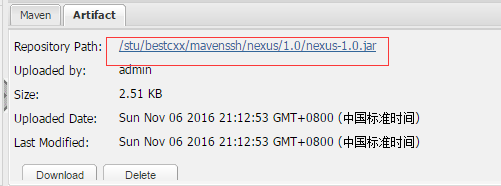
运行deploy命令后,我们可以到nexus的仓库中查看
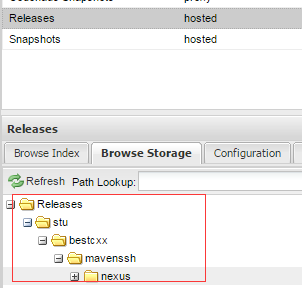
是一个jar包了
而我的项目结构为
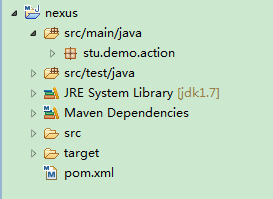
12 附属可能遇到的报错,这个是在eclipse中操作的,jdk1.7
在eclipse中使用m2e构建maven项目-可能遇到的问题
新增nexus的最佳实践
由于国内网络的问题,访问maven中央仓库会比较慢
所以可以使用阿里提供的私服
需要的配置是,
1、你的maven指向nexus的public Repositories
2、新增阿里的maven私服
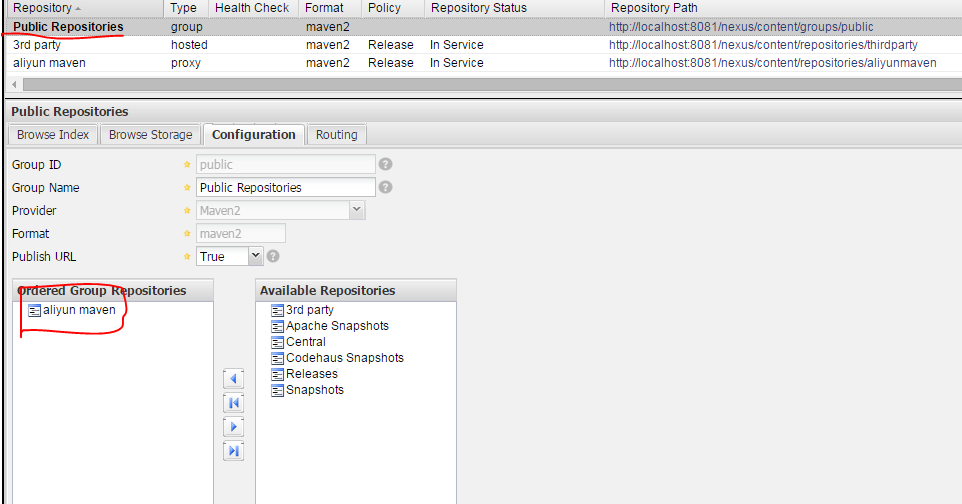
3、然后把nexus中默认的包含的私服都去掉,新增2中的阿里Maven私服
对于2
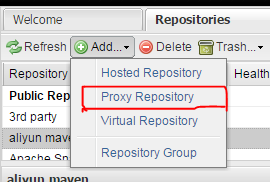
然后
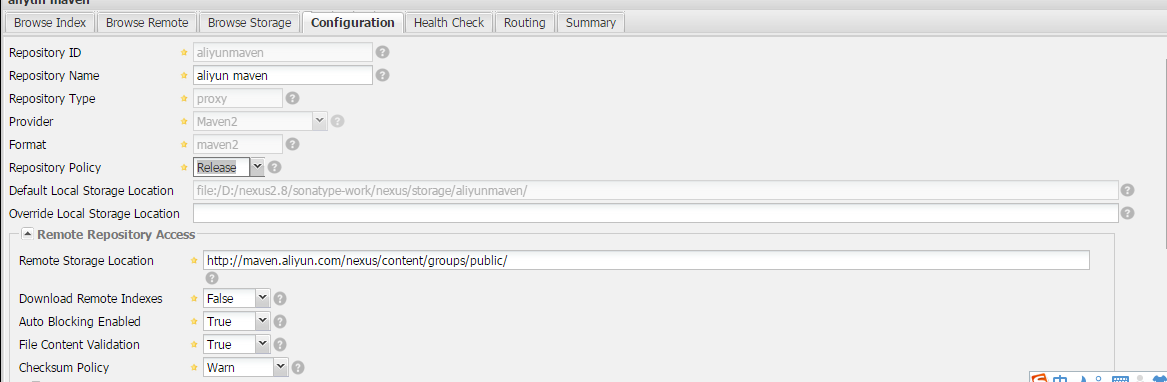
下面的内容
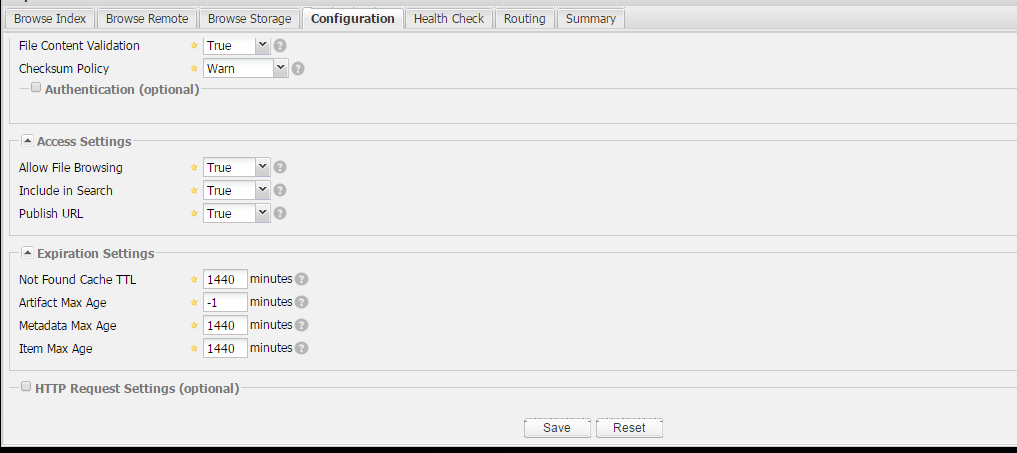
涉及到的字符
aliyun maven
http://maven.aliyun.com/nexus/content/groups/public/
然后是修改 Public Repositories,如下图
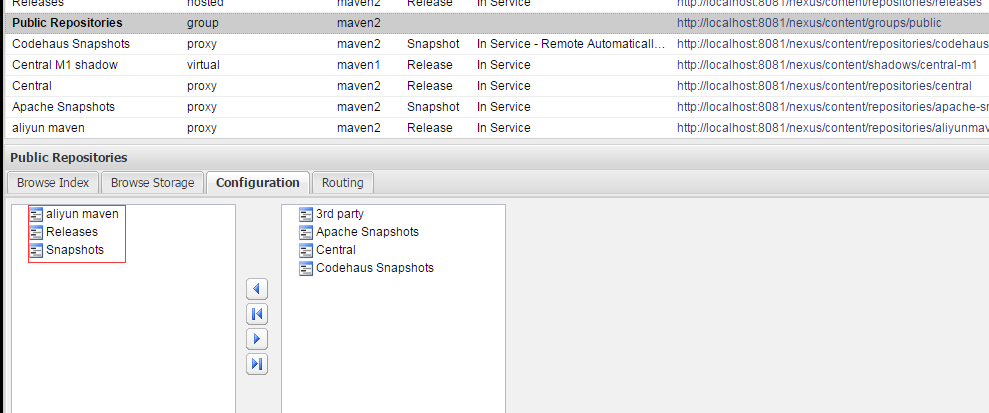
此外,因为本地上传到的地址是 http://localhost:8081/nexus/content/repositories/releases/
和 http://localhost:8081/nexus/content/repositories/snapshots/
所以,group还应该包含 Releases和Snapshots
如下图





 扫一扫
扫一扫


 3590
3590

 被折叠的 条评论
为什么被折叠?
被折叠的 条评论
为什么被折叠?
 到【灌水乐园】发言





