


仪器用,基本都用后端代码实现
鼠标移动到点上面会显示坐标。
话不多说 直接看代码和图 有问题可以提问
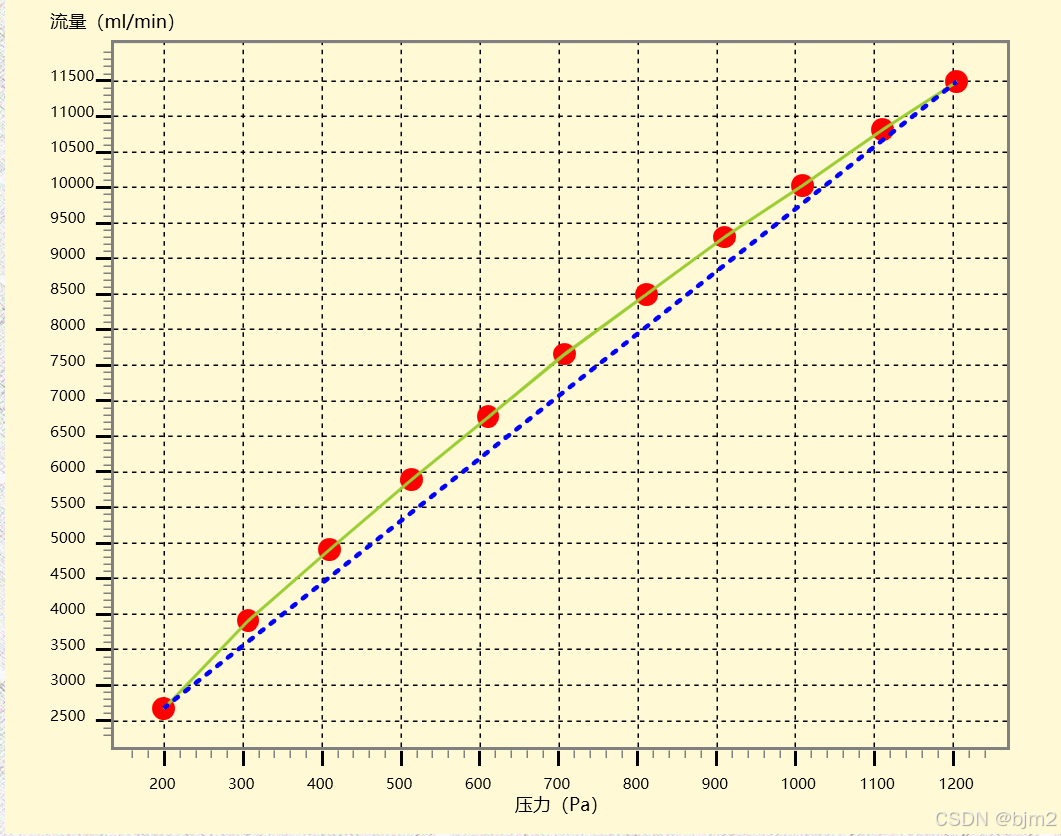
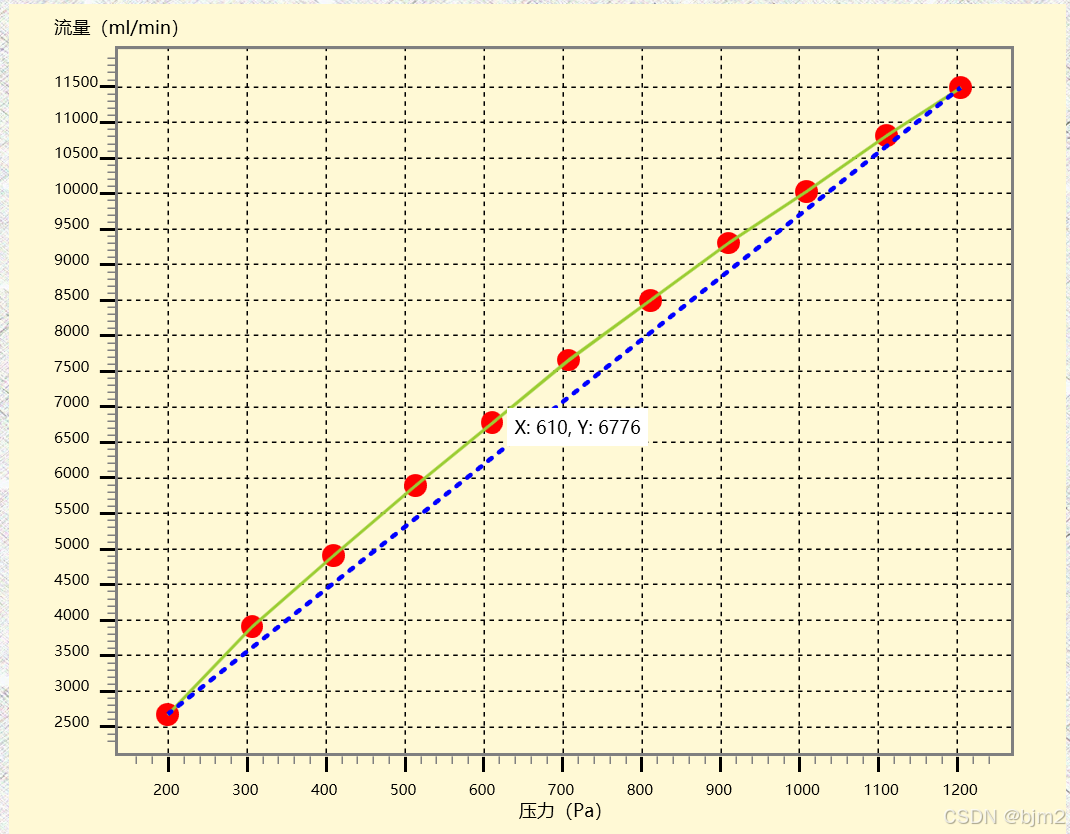
private void drawBrokenline()
{
// 清空之前的内容
cvs_brokenline.Children.Clear();
// 数据点
List<PointInCVS> dataPoints = new List<PointInCVS> {
new PointInCVS { X = 199, Y = 2671 },
new PointInCVS { X = 306, Y = 3911 },
new PointInCVS { X = 409, Y = 4910 },
new PointInCVS { X = 513, Y = 5895 },
new PointInCVS { X = 610, Y = 6776 },
new PointInCVS { X = 707, Y = 7659 },
new PointInCVS { X = 811, Y = 8500 },
new PointInCVS { X = 910, Y = 9305 },
new PointInCVS { X = 1009, Y = 10031 },
new PointInCVS { X = 1110, Y = 10813 },
new PointInCVS { X = 1204, Y = 11486 },
};
// 创建 Polyline 控件来绘制折线
Polyline polyline = new Polyline
{
Stroke = new SolidColorBrush(Colors.YellowGreen), // 设置线条颜色
StrokeThickness = 2 // 设置线条宽度
};
// 定义点集合
PointCollection points = new PointCollection();
// 获取 Canvas 的高度和宽度
double canvasHeight = cvs_brokenline.ActualHeight;
double canvasWidth = cvs_brokenline.ActualWidth;
// 计算数据的最小值和最大值
double minX = dataPoints.Min(p => p.X);
double maxX = dataPoints.Max(p => p.X);
double minY = dataPoints.Min(p => p.Y);
double maxY = dataPoints.Max(p => p.Y);
// 设置 X 轴和 Y 轴的映射范围
double xMinPos = canvasWidth * 0.15;
double xMaxPos = canvasWidth * 0.90;
double yMinPos = canvasHeight * 0.1;
double yMaxPos = canvasHeight * 0.85;
// 如果只有一个数据点,不绘制折线
if (dataPoints.Count == 1)
{
//不绘制
return;
}
else
{
// 计算边界扩展5%的尺寸
double paddingPersent = 0.05;
double paddingX = canvasWidth * paddingPersent;
double paddingY = canvasHeight * paddingPersent;
double rectangleX = (xMinPos - paddingX);
double rectangleY = (yMinPos - paddingY);
double rectangleWidth = (xMaxPos - xMinPos) + 2 * paddingX;
double rectangleHeight = (yMaxPos - yMinPos) + 2 * paddingY;
// 创建一个矩形控件
Rectangle borderRectangle = new Rectangle
{
Stroke = new SolidColorBrush(Colors.Gray),
StrokeThickness = 2,
Width = rectangleWidth,
Height = rectangleHeight,
Margin = new Thickness(rectangleX, rectangleY, 0, 0) // 设置矩形的位置
};
// 将矩形添加到 Canvas
cvs_brokenline.Children.Add(borderRectangle);
// 在 Y 轴刻度线上方添加描述文本
TextBlock yDescription = new TextBlock
{
Text = "流量(ml/min)",
Foreground = new SolidColorBrush(Colors.Black),
FontSize = 12,
HorizontalAlignment = HorizontalAlignment.Center,
VerticalAlignment = VerticalAlignment.Top
};
Canvas.SetLeft(yDescription, rectangleX - 40); // 描述文本位于 Y 轴刻度线左侧
Canvas.SetTop(yDescription, rectangleY - 20); // 描述文本位于 Y 轴刻度线上方
cvs_brokenline.Children.Add(yDescription);
// 在 X 轴刻度线上方添加描述文本
TextBlock xDescription = new TextBlock
{
Text = "压力(Pa)",
Foreground = new SolidColorBrush(Colors.Black),
FontSize = 12,
HorizontalAlignment = HorizontalAlignment.Center,
VerticalAlignment = VerticalAlignment.Top,
Width = 60
};
Canvas.SetLeft(xDescription, rectangleX + rectangleWidth / 2 - 30); // 描述文本位于 Y 轴刻度线左侧
Canvas.SetTop(xDescription, rectangleY + rectangleHeight + 28); // 描述文本位于 Y 轴刻度线上方
cvs_brokenline.Children.Add(xDescription);
// 计算矩形下边界位置
double borderBottomY = yMaxPos + paddingY;
// 绘制 X 轴刻度线和标签
for (int x = (int)(minX - (maxX - minX) * paddingPersent);
x <= maxX + (maxX - minX) * paddingPersent;
x++)
{
// 计算当前 X 值在 Canvas 上的位置
double xPosition = xMinPos + (x - minX) / (maxX - minX) * (xMaxPos - xMinPos);
// 如果 X 值是 100 的倍数,绘制大刻度线
if (x % 100 == 0)
{
// 大刻度线
Line largeTick = new Line
{
X1 = xPosition,
Y1 = borderBottomY, // 刻度线起始位置对齐矩形下边界
X2 = xPosition,
Y2 = borderBottomY + 10, // 大刻度线向下延伸
Stroke = new SolidColorBrush(Colors.Black),
StrokeThickness = 2
};
cvs_brokenline.Children.Add(largeTick);
// 绘制虚线(从大刻度线的顶部延伸到矩形顶部)
Line dashedLine = new Line
{
X1 = xPosition,
Y1 = borderBottomY - 2, // 起点为大刻度线顶部
X2 = xPosition,
Y2 = rectangleY + 2, // 终点为矩形顶部
Stroke = new SolidColorBrush(Colors.Black),
StrokeThickness = 1,
StrokeDashArray = new DoubleCollection() { 3, 3 } // 设置虚线样式
};
cvs_brokenline.Children.Add(dashedLine);
// 标注 X 值
TextBlock xLabel = new TextBlock
{
Text = x.ToString(),
Foreground = new SolidColorBrush(Colors.Black),
FontSize = 10,
Width = 30,
HorizontalAlignment = HorizontalAlignment.Right,
};
Canvas.SetLeft(xLabel, xPosition - 10);
Canvas.SetTop(xLabel, borderBottomY + 15); // 标签位于刻度线下方
cvs_brokenline.Children.Add(xLabel);
}
// 如果 X 值是 20 的倍数,绘制小刻度线
else if (x % 20 == 0)
{
// 小刻度线
Line smallTick = new Line
{
X1 = xPosition,
Y1 = borderBottomY, // 刻度线起始位置对齐矩形下边界
X2 = xPosition,
Y2 = borderBottomY + 5, // 小刻度线向下延伸
Stroke = new SolidColorBrush(Colors.Gray),
StrokeThickness = 1
};
cvs_brokenline.Children.Add(smallTick);
}
}
// 绘制 Y 轴刻度线和标签
for (int y = (int)(minY - (maxY - minY) * paddingPersent);
y <= maxY + (maxY - minY) * paddingPersent;
y++)
{
// 计算当前 Y 值在 Canvas 上的位置
double yPosition = yMaxPos - (y - minY) / (maxY - minY) * (yMaxPos - yMinPos);
// 如果 Y 值是 100 的倍数,绘制大刻度线
if (y % 500 == 0)
{
// 大刻度线
Line largeTick = new Line
{
X1 = rectangleX, // 刻度线起始位置对齐矩形左边界
Y1 = yPosition,
X2 = rectangleX - 10, // 大刻度线向左延伸
Y2 = yPosition,
Stroke = new SolidColorBrush(Colors.Black),
StrokeThickness = 2
};
cvs_brokenline.Children.Add(largeTick);
// 绘制虚线(从大刻度线的右侧延伸到矩形右侧)
Line dashedLine = new Line
{
X1 = rectangleX + 2, // 起点为大刻度线右侧
Y1 = yPosition,
X2 = rectangleX + rectangleWidth - 2, // 终点为矩形右侧
Y2 = yPosition,
Stroke = new SolidColorBrush(Colors.Black),
StrokeThickness = 1,
StrokeDashArray = new DoubleCollection() { 3, 3 } // 设置虚线样式
};
cvs_brokenline.Children.Add(dashedLine);
// 标注 Y 值
TextBlock yLabel = new TextBlock
{
Text = y.ToString(),
Foreground = new SolidColorBrush(Colors.Black),
FontSize = 10,
Width = 30,
HorizontalAlignment = HorizontalAlignment.Right,
};
Canvas.SetLeft(yLabel, rectangleX - 40); // 标签位于刻度线左侧
Canvas.SetTop(yLabel, yPosition - 10); // 标签位于刻度线上方
cvs_brokenline.Children.Add(yLabel);
}
// 如果 Y 值是 100 的倍数,绘制小刻度线
else if (y % 100 == 0)
{
// 小刻度线
Line smallTick = new Line
{
X1 = rectangleX, // 刻度线起始位置对齐矩形左边界
Y1 = yPosition,
X2 = rectangleX - 5, // 小刻度线向左延伸
Y2 = yPosition,
Stroke = new SolidColorBrush(Colors.Gray),
StrokeThickness = 1
};
cvs_brokenline.Children.Add(smallTick);
}
}
// 根据数据点生成折线的点
for (int i = 0; i < dataPoints.Count; i++)
{
// 将 X 值从 minX/maxX 映射到画布的 xMinPos/xMaxPos 区间
double x = (dataPoints[i].X - minX) / (maxX - minX) * (xMaxPos - xMinPos) + xMinPos;
// 将 Y 值从 minY/maxY 映射到画布的 yMinPos/yMaxPos 区间
double y = yMaxPos - (dataPoints[i].Y - minY) / (maxY - minY) * (yMaxPos - yMinPos);
points.Add(new Point(x, y));
double pointDiameter = 15;
// 绘制数据点(Ellipse)
Ellipse pointEllipse = new Ellipse
{
Width = pointDiameter,
Height = pointDiameter,
Fill = new SolidColorBrush(Colors.Red) // 设置点的颜色
};
// 设置数据点的位置
Canvas.SetLeft(pointEllipse, x - pointDiameter / 2); // 调整点的位置,使其居中
Canvas.SetTop(pointEllipse, y - pointDiameter / 2); // 调整点的位置,使其居中
// 将点添加到 Canvas 上
cvs_brokenline.Children.Add(pointEllipse);
// 添加鼠标事件处理程序
int xPointValue = dataPoints[i].X;
int yPointValue = dataPoints[i].Y;
pointEllipse.MouseEnter += (sender, e) => PointEllipse_MouseEnter(sender, e, xPointValue, yPointValue);
pointEllipse.MouseLeave += PointEllipse_MouseLeave;
}
// 将点集合赋值给 Polyline
polyline.Points = points;
// 添加 Polyline 到 Canvas 中
cvs_brokenline.Children.Add(polyline);
// 绘制起点和终点的蓝色点状直线
Point startPoint = points.First();
Point endPoint = points.Last();
// 如果有多个数据点,绘制蓝色的连接线
Line blueLine = new Line
{
X1 = startPoint.X,
Y1 = startPoint.Y,
X2 = endPoint.X,
Y2 = endPoint.Y,
Stroke = new SolidColorBrush(Colors.Blue),
StrokeThickness = 3,
StrokeDashArray = new DoubleCollection() { 1, 2 }, // 设置虚线效果
StrokeDashCap = PenLineCap.Round // 设置虚线末端为圆形
};
cvs_brokenline.Children.Add(blueLine);
}
}
// 鼠标进入事件处理程序
private void PointEllipse_MouseEnter(object sender, MouseEventArgs e, int x, int y)
{
Ellipse ellipse = sender as Ellipse;
if (ellipse != null)
{
// 获取椭圆的中心点
double centerX = Canvas.GetLeft(ellipse) + ellipse.Width / 2;
double centerY = Canvas.GetTop(ellipse) + ellipse.Height / 2;
// 将 X 和 Y 坐标转换为整数
int intCenterX = (int)Math.Round(centerX); // 或者使用 Convert.ToInt32(centerX)
int intCenterY = (int)Math.Round(centerY); // 或者使用 Convert.ToInt32(centerY)
// 将 X 和 Y 坐标转换为整数
int intX = x; // 或者使用 Convert.ToInt32(x)
int intY = y; // 或者使用 Convert.ToInt32(y)
// 创建一个 TextBlock 来显示 X 和 Y 值
TextBlock valueText = new TextBlock
{
Text = $"X: {intX}, Y: {intY}",
Foreground = new SolidColorBrush(Colors.Black),
FontSize = 12,
Background = new SolidColorBrush(Colors.White),
Padding = new Thickness(5),
Name = $"ValueText_{intCenterX}_{intCenterY}" // 设置唯一名称,使用整数值
};
// 设置 TextBlock 的位置
Canvas.SetLeft(valueText, centerX + 10);
Canvas.SetTop(valueText, centerY - 10);
// 将 TextBlock 添加到 Canvas 上
cvs_brokenline.Children.Add(valueText);
}
}
// 鼠标离开事件处理程序
private void PointEllipse_MouseLeave(object sender, MouseEventArgs e)
{
Ellipse ellipse = sender as Ellipse;
if (ellipse != null)
{
// 获取椭圆的中心点
double centerX = Canvas.GetLeft(ellipse) + ellipse.Width / 2;
double centerY = Canvas.GetTop(ellipse) + ellipse.Height / 2;
// 将 X 和 Y 坐标转换为整数
int intCenterX = (int)Math.Round(centerX); // 或者使用 Convert.ToInt32(centerX)
int intCenterY = (int)Math.Round(centerY); // 或者使用 Convert.ToInt32(centerY)
// 创建对应的 TextBlock 名称
string textBlockName = $"ValueText_{intCenterX}_{intCenterY}"; // 使用整数值
// 查找并删除对应名称的 TextBlock
var textBlockToRemove = cvs_brokenline.Children.OfType<TextBlock>()
.FirstOrDefault(t => t.Name == textBlockName);
if (textBlockToRemove != null)
{
cvs_brokenline.Children.Remove(textBlockToRemove);
}
}
}





 扫一扫
扫一扫


 2488
2488

 被折叠的 条评论
为什么被折叠?
被折叠的 条评论
为什么被折叠?
 到【灌水乐园】发言





