



使用vsCode进行platformIO进行ESP32程序开发时,通过串口查看输出日志,但有时候出现意外错误,比如访问非法内存等,此时就只能看到一个错误原因和一大堆的堆栈数据,又不知道是哪一行代码引起的,排查问题比较麻烦。
开启使用ESP-IDF查看backtrace
- 在platofmrio.ini中增加两个配置
monitor_filters = esp32_exception_decoder
build_type = debug
如果是esp8266的话改成
monitor_filters = esp8266_exception_decoder
build_type = debug- 然后重新上传固件,并启用串口监视器
当发生错误时,会显示如下信息
Guru Meditation Error: Core  0 panic'ed (Store access fault). Exception was unhandled.

Core  0 register dump:
MEPC    : 0x420017a8  RA      : 0x42001790  SP      : 0x3fc95870  GP      : 0x3fc8bc00
TP      : 0x3fc89d74  T0      : 0x00000000  T1      : 0xffc3ffff  T2      : 0x00000001
S0/FP   : 0x3fc8d0d0  S1      : 0x00000000  A0      : 0x00000001  A1      : 0xffffffff
A2      : 0x00000000  A3      : 0x00000000  A4      : 0x08000000  A5      : 0x00000010
A6      : 0x00000001  A7      : 0x04c4b400  S2      : 0x00000000  S3      : 0x00000000
S4      : 0x00000000  S5      : 0x00000000  S6      : 0x00000000  S7      : 0x00000000
S8      : 0x00000000  S9      : 0x00000000  S10     : 0x00000000  S11     : 0x00000000
T3      : 0x00000000  T4      : 0x0000000f  T5      : 0x003c0000  T6      : 0x00000003
MSTATUS : 0x00001881  MTVEC   : 0x40380001  MCAUSE  : 0x00000007  MTVAL   : 0x00000010
MHARTID : 0x00000000

Stack memory:
3fc95870: 0x00000000 0x3fc8d000 0x01312d00 0x00000001 0x00000000 0x3fc8d000 0x3fc8d0d0 0x42001a50
  #0  0x3fc8d000 in __global_pointer$ at ??:?
  #1  0x3fc8d000 in __global_pointer$ at ??:?
  #2  0x3fc8d0d0 in ?? at src/main.cpp:28
  #3  0x42001a50 in TFT_eSPI::init(unsigned char) at .pio/libdeps/wifiduino32c3/TFT_eSPI/TFT_eSPI.cpp:693

3fc95890: 0x00000000 0x00000000 0x00000000 0x00000000 0x00000000 0x3fc8d000 0x3fc8d000 0x420000fc
  #0  0x3fc8d000 in __global_pointer$ at ??:?
  #1  0x3fc8d000 in __global_pointer$ at ??:?
  #2  0x420000fc in setup() at src/main.cpp:253

3fc958b0: 0x00000000 0x3fc8f000 0x42003000 0x42004dd6 0x00000000 0x00000000 0x00000000 0x403873a8
  #0  0x42003000 in Stream::readString() at C:/Users/Administrator/.platformio/packages/framework-arduinoespressif32/cores/esp32/Stream.cpp:320
  #1  0x42004dd6 in loopTask(void*) at C:/Users/Administrator/.platformio/packages/framework-arduinoespressif32/cores/esp32/main.cpp:51
  #2  0x403873a8 in _prvTaskExitError at /home/runner/work/esp32-arduino-lib-builder/esp32-arduino-lib-builder/esp-idf/components/freertos/port/riscv/port.c:126
      (inlined by) prvTaskExitError at /home/runner/work/esp32-arduino-lib-builder/esp32-arduino-lib-builder/esp-idf/components/freertos/port/riscv/port.c:140

3fc958d0: 0x00000000 0x00000000 0x00000000 0x00000000 0x00000000 0xa5a5a5a5 0xa5a5a5a5 0xa5a5a5a5
3fc958f0: 0xa5a5a5a5 0xbaad5678 0x00000160 0xabba1234 0x00000154 0x3fc95790 0xff0afad5 0x3fc8de0c
3fc95910: 0x3fc8de0c 0x3fc95904 0x3fc8de04 0x00000018 0x8cba16ee 0xeafa516c 0x3fc95904 0x00000000
3fc95930: 0x00000001 0x3fc938f4 0x706f6f6c 0x6b736154 0x67661c00 0x00d4b199 0x00000000 0x3fc958f0
3fc95950: 0x00000001 0x00000002 0x00000000 0x00000000 0x00000000 0x3fc8f4f4 0x3fc8f55c 0x3fc8f5c4
3fc95970: 0x00000000 0x00000000 0x00000001 0x00000000 0x00000000 0x00000000 0x4201dc5e 0x00000000
  #0  0x4201dc5e in _cleanup_r at /builds/idf/crosstool-NG/.build/HOST-x86_64-w64-mingw32/riscv32-esp-elf/src/newlib/newlib/libc/stdio/findfp.c:229

3fc95990: 0x00000000 0x00000000 0x00000000 0x00000000 0x00000000 0x00000000 0x00000000 0x00000000
3fc959b0: 0x00000000 0x00000000 0x00000000 0x00000000 0x00000000 0x00000000 0x00000000


ELF file SHA256: b7059677e947a7da
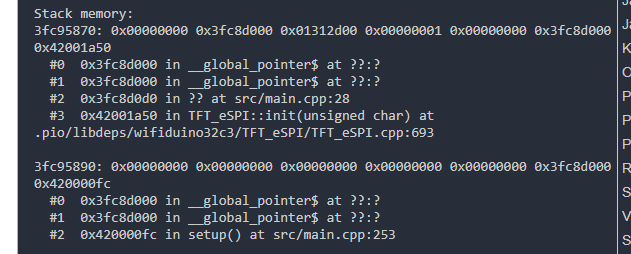
在下面就可以看到,发重错误的大概源代码位置了
如:
#3 0x42001a50 in TFT_eSPI::init(unsigned char) at
.pio/libdeps/wifiduino32c3/TFT_eSPI/TFT_eSPI.cpp:693
参考





 扫一扫
扫一扫


 1157
1157

 被折叠的 条评论
为什么被折叠?
被折叠的 条评论
为什么被折叠?
 到【灌水乐园】发言





