


 文章详细介绍了在Vue2和Vue3项目中如何配置和使用SVG图标。对于Vue3,使用vite-plugin-svg-icons插件进行打包,而在Vue2中,则依赖于vue-svg-icon和svg-sprite-loader来处理SVG图标。通过配置vite.config.ts或vue.config.js,以及封装SVG组件,可以实现SVG图标的全局注册和使用。
Vue3
打包svg地图
npm install vite-plugin-svg-icons -D
配置:vite.config.ts
// svg插件
import { createSvgIconsPlugin } from 'vite-plugin-svg-icons'
import path from 'path'
export default defineConfig({
  plugins: [
    vue(),
    createSvgIconsPlugin({
      iconDirs: [path.resolve(process.cwd(), 'src/icons')]  //'src/icons'图标文件夹自行更换
    })
  ]
})
导入:main.ts
import 'virtual:svg-icons-register'
封装
<script setup lang="ts">
// 使用时传入name
defineProps<{
  name: string
}>()
</script>
<template>
  <svg aria-hidden="true" class="svg-icon">
    <use :href="`#icon-${name}`"></use> // name格式: 图标文件夹-图标名称
  </svg>
</template>

<style lang="scss" scoped>
.svg-icon {
  width: 1em;
  height: 1em;
}
</style>
使用:当前图片地址(src/icons/svg/to.svg)
<svg-icon name="svg-to"></svg-icon>
Vue2
下载
npm install vue-svg-icon xml-loader -D
下载的.svg的文件,存放于src/icons/svg文件
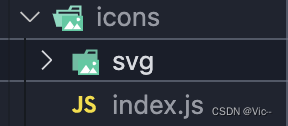
配置src/icons/index.js文件
import Vue from 'vue'
import SvgIcon from '@/components/SvgIcon'// svg component

// register globally
Vue.component('svg-icon', SvgIcon)

// require.contex(目标目录,是否扫描子目录,正则) 扫描目录中的文件
const req = require.context('./svg', false, /\.svg$/)
const requireAll = requireContext => requireContext.keys().map(requireContext)
// map循环每一项 svg图片,req函数能够引用图片到项目中
requireAll(req) // 调用函数,将所有的svg都引用到项目中
在main.js中引入icon/index.js文件中全局设置
//全局加载就可以了
import '@/icons/index.js'
封装组件 /src/components/svgIcon/index.vue
<template>
  <div v-if="isExternal" :style="styleExternalIcon" class="svg-external-icon svg-icon" v-on="$listeners" />
  <svg v-else :class="svgClass" aria-hidden="true" v-on="$listeners">
    <use :xlink:href="iconName" />
  </svg>
</template>

<script>
// doc: https://panjiachen.github.io/vue-element-admin-site/feature/component/svg-icon.html#usage
import { isExternal } from '@/utils/validate'

export default {
  name: 'SvgIcon',
  props: {
    iconClass: {
      type: String,
      required: true
    },
    className: {
      type: String,
      default: ''
    }
  },
  computed: {
    isExternal () {
      return isExternal(this.iconClass)
    },
    iconName () {
      return `#icon-${this.iconClass}`
    },
    svgClass () {
      if (this.className) {
        return 'svg-icon ' + this.className
      } else {
        return 'svg-icon'
      }
    },
    styleExternalIcon () {
      return {
        mask: `url(${this.iconClass}) no-repeat 50% 50%`,
        '-webkit-mask': `url(${this.iconClass}) no-repeat 50% 50%`
      }
    }
  }
}
</script>

<style scoped>
.svg-icon {
  width: 1em;
  height: 1em;
  vertical-align: -0.15em;
  fill: currentColor;
  overflow: hidden;
}

.svg-external-icon {
  background-color: currentColor;
  mask-size: cover!important;
  display: inline-block;
}
</style>
页面使用
<div>
  <svg-icon icon-class="home" />
</div>
目前还没效果,继续配置
vue.config.js 中配置 svg-sprite-loader
安装
npm install svg-sprite-loader -D
配置 vue.config.js:
使用chainWebpack方法可自定义配置 loader vue.config.js
const path = require('path')

function resolve(dir) {
  return path.join(__dirname, dir)
}


module.exports = {
   	 chainWebpack: config => {
   	    config.module
   	    .rule('svg')
   	    .exclude.add(resolve('src/icons'))
   	    .end()

   	    config.module
   	    .rule('icons')
   	    .test(/\.svg$/)
   	    .include.add(resolve('src/icons'))
   	    .end()
   	    .use('svg-sprite-loader')
   	    .loader('svg-sprite-loader')
   	    .options({
   	      symbolId: 'icon-[name]'
   	    })
   	    .end()
   	  }
   }
完成






 扫一扫
扫一扫


 1123
1123

 被折叠的 条评论
为什么被折叠?
被折叠的 条评论
为什么被折叠?
 到【灌水乐园】发言





