



小编下面这段代码使用了Python的turtle模块来绘制一个哆啦A梦的简单图形。turtle模块是Python的一个标准库,用于简单的图形绘制,特别是为初学者设计的。
以下是代码的总结和分析:
导入turtle模块:首先,代码导入了turtle模块,以便可以使用其中的绘图功能。
创建turtle对象:使用turtle.Turtle()创建了一个名为doraemon的turtle对象,用于后续的绘图操作。
设置绘图速度:通过doraemon.speed(10)设置了绘图的速度,其中10是turtle模块中定义的一个速度常量,表示“最快”。
定义绘制眼睛的函数:
draw_eye_white_circle(x):这个函数用于绘制眼睛的白色部分。它接受一个参数x,表示眼睛的水平位置。函数内部,turtle被移动到指定位置,然后绘制一个填充为白色的圆。
draw_eye_black_circle(x):这个函数用于绘制眼睛的黑色部分。它也接受一个参数x,表示眼睛的水平位置。然后,turtle被移动到稍高的位置,并绘制一个填充为黑色的圆。
绘制哆啦A梦的脸部:
首先,绘制了一个蓝色的大圆,表示哆啦A梦的脸部。
然后,在大圆内部绘制了一个白色的小圆,表示脸部的亮部。
绘制眼睛:
使用之前定义的函数,绘制了哆啦A梦的两只眼睛。右眼的白色部分在x=15的位置,黑色部分在x=6的位置。左眼的白色部分在x=-15的位置,黑色部分在x=-24的位置。
绘制鼻子:
使用turtle移动到鼻子的位置,并绘制了一个红色的圆,表示哆啦A梦的鼻子。
设置朝向并绘制嘴巴:
使用doraemon.setheading(-90)设置了turtle的朝向为朝南(在turtle模块中,-90度表示朝南)。
然后,turtle向前移动了40个单位,这可能是为了准备绘制嘴巴的位置。
最后,使用circle函数绘制了一个半圆,表示哆啦A梦的嘴巴。
结束绘图:使用turtle.done()结束了绘图过程,并保持绘图窗口打开,直到用户关闭它。
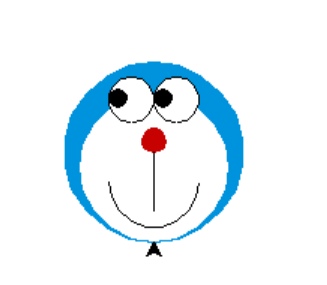
总体而言,这段代码使用turtle模块绘制了一个简单的哆啦A梦的面部图形,包括脸部、眼睛、鼻子和嘴巴。代码结构清晰,功能明确,适合作为初学者的练习代码。
完整的实例代码:
import turtle

# 创建哆啦A梦
doraemon = turtle.Turtle()
doraemon.speed(10)

def draw_eye_white_circle(x):
  doraemon.goto(x, 80)
  doraemon.pendown()
  doraemon.color('black')
  doraemon.begin_fill()
  doraemon.circle(15)
  doraemon.color('white')
  doraemon.end_fill()

def draw_eye_black_circle(x):
  doraemon.goto(x, 90)
  doraemon.color('black')
  doraemon.begin_fill()
  doraemon.begin_fill()
  doraemon.circle(6)
  doraemon.end_fill()
  doraemon.penup()

# 画蓝色圆
doraemon.color('#0093dd')
doraemon.begin_fill()
doraemon.circle(60)
doraemon.end_fill()

# 画白色圆
doraemon.begin_fill()
doraemon.circle(50)
doraemon.color('white')
doraemon.end_fill()

# 画右眼白
draw_eye_white_circle(15)

# 画右眼黑
draw_eye_black_circle(6)

# 画左眼白
draw_eye_white_circle(-15)

# 画左眼黑
draw_eye_black_circle(-24)

# 画鼻子
doraemon.goto(0, 60)
doraemon.pendown()
doraemon.color('#c70000')
doraemon.begin_fill()
doraemon.circle(8)
doraemon.end_fill()

doraemon.color('black')
# 设置朝向(对应上北下南,左西右东)
# 0 为东,90 为北,180 为西,270 为南(同 -90)
doraemon.setheading(-90)
# 沿着刚刚设定的朝下方向绘制 40px
doraemon.forward(40)
doraemon.penup()

# 画嘴巴
doraemon.goto(-30, 40)
doraemon.pendown()
doraemon.circle(30, 180)
doraemon.penup()
doraemon.goto(0, 0)
turtle.done()
绘制后的图像:






 扫一扫
扫一扫


 490
490

 被折叠的 条评论
为什么被折叠?
被折叠的 条评论
为什么被折叠?
 到【灌水乐园】发言





