



 本文介绍了Angular中的管道,包括内置的UpperCasePipe、LowerCasePipe、TitleCasePipe、DecimalPipe等,以及如何自定义管道。示例展示了管道在处理字符串、数字、对象、日期等方面的应用,强调了纯管道与非纯管道的区别。
angular 管道(相当于1.x中的filter过滤器):主要用于格式化源数据,而不改变源数据
angular内置过滤器:
Angular 2 内建管道及分类
String -> String
UpperCasePipe 大写转换
LowerCasePipe 小写转换
TitleCasePipe 将文本转换为标题大小写,将每个单词的第一个字母大写,并将单词的其余部分转换为小写。单词由任何空格字符分隔,例如空格,制表符或换行符
Number -> String
DecimalPipe 将数字转换为字符串,根据确定组大小和分隔符,小数点字符以及其他特定于语言环境的配置的区域设置规则进行格式化。
PercentPipe 百分比管道,根据区域设置规则将数字格式化为百分比。
CurrencyPipe 货币管道
Object -> String
JsonPipe 将JavaScript 对象转化为JSON字符串
DatePipe 返回指定格式的日期
Tools
SlicePipe 截取
AsyncPipe
I18nPluralPipe
I18nSelectPipe
demo:
大写转换:<p>{{ 'Angular' | uppercase }}</p><!-- Output: ANGULAR -->
小写转换:<p>{{ 'Angular' | lowercase }}</p><!-- Output: angular -->
标题转换:<p>{{'one,two,three' | titlecase}}</p> <!-- output is expected to be "One,two,three" -->数字转字符串:
{{ value_expression | number [ : digitsInfo [ : locale ] ] }}
十进制表示选项,由以下格式的字符串指定:
digitsInfo={minIntegerDigits}.{minFractionDigits}-{maxFractionDigits}。minIntegerDigits:小数点前的最小整数位数。默认是1。
minFractionDigits:小数点后的最小位数。默认是0。
maxFractionDigits:小数点后的最大位数。默认是3。
<!--output '0,002.71828'-->
<p>e (4.5-5): {{2.718281828459045 | number:'4.5-5'}}</p>
百分比: {{ 00.54565 | percent }}
货币管道:
<b>{{6589.23 | currency:"USD"}}</b><!--output 'USD 6589.23'-->
<b>{{6589.23 | currency:"USD":true}}</b><!--output '$6589.23'--> //true 显示货币标示. false不显示货币标示
json:
let jsonVal = {
name: 'zhangsan',
address: {
a: '12',
b: '23'
}
}
<p>{{jsonVal|json}}</p><!-- Output: {"name": "zhangsan","address": {"a": "12","b": "23"}}-->
日期:
<p>{{ ‘2020-10-10 13:00’ | date: 'shortTime' }}</p> <!-- Output: 以当前时间为准,输出时间,输出格式:1:00 PM -->
<p>{{ ‘2020-10-10 13:00’ | date: 'yy/mm/dd hh:mm:ss' }}</p> <!-- Output: 2020/10/10 13:00:00 -->
截取字符串:
let months = ["Jan", "Feb", "Mar", "April", "May", "Jun","July", "Aug", "Sept", "Oct", "Nov", "Dec"']
<b>{{months | slice:2:5}}</b><!--output Mar,April,May,Jun-->// here 2 and 5 refers to the start and the end index
管道链:我们可以将多个管道连接在一起,组成管道链对数据进行处理。
<p>{{ 'semlinker' | slice:0:3 | uppercase }}</p> <!-- Output: SEM -->
自定义管道:
在Angular中可以自定义带参数的管道;只要遵循下面三条规则:
1.使用 @Pipe 装饰器声明管道的名称,即定义 Pipe 的 metadata 信息,如 Pipe 的名称 ----即 name 属性
2.实现 PipeTransform 接口中定义的 transform 方法
3.如果是全局使用,则 include your pipe in the declarations array of the AppModule; 如果想要局部使用, 则 provide it in the providers array of your NgModule.
demo:
        //定义
        import { Pipe, PipeTransform } from '@angular/core';

        @Pipe({ name: 'welcome' })
        export class WelcomePipe implements PipeTransform {
          transform(value: string): string {
            if(!value) return value;
            if(typeof value !== 'string') {
              throw new Error('Invalid pipe argument for WelcomePipe');
            }
            return "Welcome to " + value;
          }
        }

        //使用
        <div>
           <p ngNonBindable>{{ 'semlinker' | welcome }}</p>
           <p>{{ 'semlinker' | welcome }}</p> <!-- Output: Welcome to semlinker -->
        </div>
        //当 WelcomePipe 的输入参数,即 value 值为非字符串时,如使用 123,则控制台将会抛出异常
纯管道和非传管道:
同时,Angular中,pipe分为 pure pipe (纯管道) 和 impure pipe (非纯管道)。
纯管道和非纯管道是相对于管道所传的参数(如上例的 filterKey)而言的。
如果管道是纯管道,则管道的触发只会针对基本类型的参数的变化或者引用类型引用的变化( a primitive input value (String, Number, Boolean, Symbol) or a changed object reference (Date, Array, Function, Object));
然而, 对于非纯管道,不管是基本类型参数的改变还是引用类型内部数据变化(而非引用变化)都可以触发管道。
@Pipe({
name: 'myFilter',
pure: false // false:非纯管道 true:纯管道
})
demo:
html:
<div class="test">
    <table class="a-table">
        <thead class="a-thead">
            <tr>
                <th>Name</th>
                <th>Sex</th>
            </tr>
        </thead>
        <tbody class="a-tbody">
            <ng-container *ngFor="let student of students|myFilter: filterObj">
                <tr>
                    <td> {{ student.name }}</td>
                    <td> {{ student.sex }}</td>
                </tr>
            </ng-container>
        </tbody>
    </table>
    <div class="a-p-20">
        <label class="a-form-label">带参的纯管道:过滤male/female</label>
        <!-- <input class="a-text-input" #filterKey /> -->
    </div>
    <div class="a-p-20">
        <label class="a-form-label">过滤 name</label>
        <input class="a-text-input" #name />
    </div>
    <div class="a-p-20">
        <label class="a-form-label">过滤 sex</label>
        <input class="a-text-input" #sex />
    </div>
    <button class="a-btn a-btn-secondary a-btn-lg" (click)="constructFilterObj(name.value, sex.value)">Go Filter</button>
</div>
angular ts:
private students: any[]; // 需要被管道处理的数据
  private filterObj = Object.create({});   // 对象: 创建一个空对象并作为传给管道的参数,

    this.students = [
        {
          name:'Tom',
          sex: 'male'
        },
        {
          name:'Jerry',
          sex: 'male'
        },
        {
          name:'Alice',
          sex: 'female'
        },
        {
          name:'Henry',
          sex: 'male'
        }
      ];
    });


............
  constructFilterObj(name: string, sex: string) {  // 该方法用于构造传给管道的参数 filterObj
    this.filterObj['name'] = name;
    this.filterObj['sex'] = sex;
  }
纯管道:
import { Pipe, PipeTransform } from '@angular/core';

@Pipe({
  name: 'myFilter',
  pure: true // default
})
export class MyFilterPipe implements PipeTransform {
  transform(value: any, filterKey: any) {
    if (!filterKey['name']) {
      return value;
    }
    return value.filter(item => item.name === filterKey.name && item.sex === filterKey.sex );
  }
}
结果:
说明:
上述demo中,filterObj 初始化是一个空对象 filterObj = Object.create({});
当点击button按钮的时候,传入name:Tom和Sex:male时,触发constructFilterObj方法改变了this.filterObj的值,但是没有改变的this.filterObj对象的引用。
所以,对于纯管道来说,它是检测不到这个输入的变化的,因此数据不会被过滤。当将该管道改为非纯管道后,过滤就起作用了。
非纯管道:
import { Pipe, PipeTransform } from '@angular/core';

@Pipe({
  name: 'myFilter',
  pure: false //  非纯管道
})
export class MyFilterPipe implements PipeTransform {
  transform(value: any, filterKey: any) {
    if (!filterKey['name']) {
      return value;
    }
    return value.filter(item => item.name === filterKey.name && item.sex === filterKey.sex );
  }
}
结果:
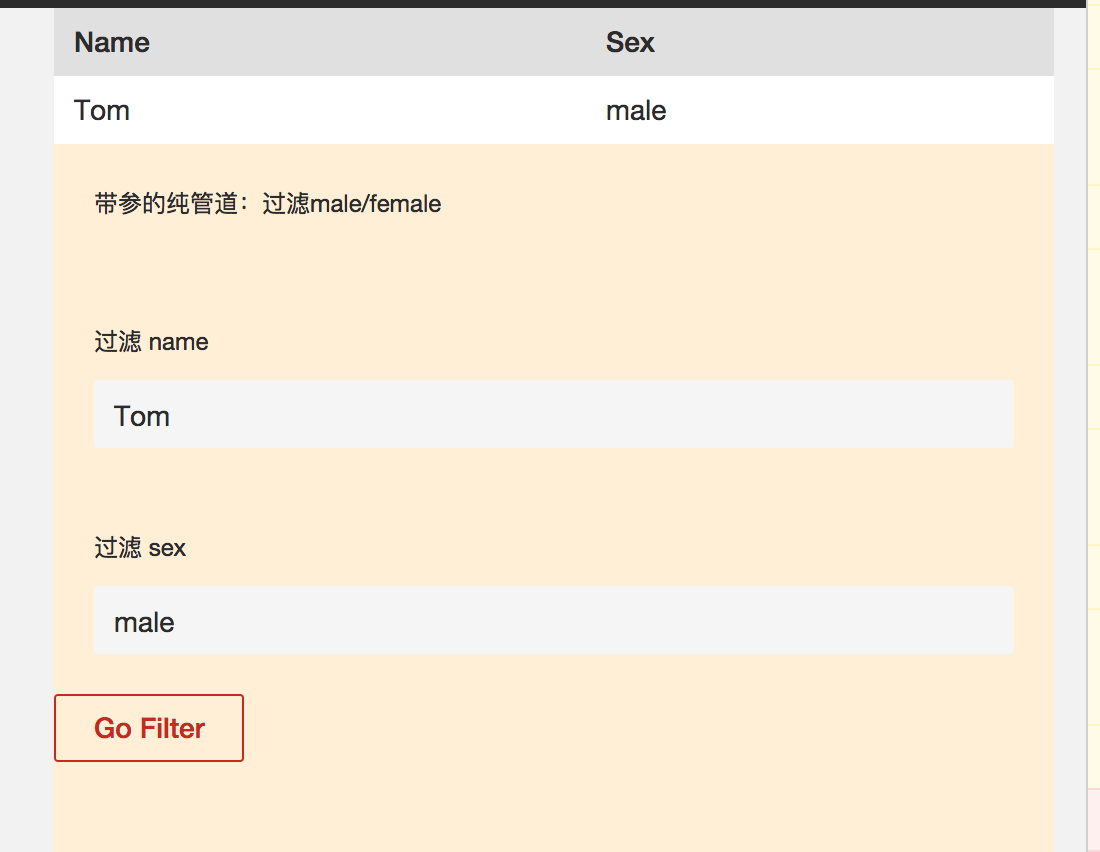
可以看到, Tom被过滤出来了
每天一点点





 扫一扫
扫一扫


 106
106

 被折叠的 条评论
为什么被折叠?
被折叠的 条评论
为什么被折叠?
 到【灌水乐园】发言





