



 本文介绍了三种常见的数据库连接池实现:C3P0、DBCP及Druid。详细讲解了每种连接池的配置方法和使用步骤,并对比了它们的特点。
数据库连接池(DBCP、C3P0、Druid)
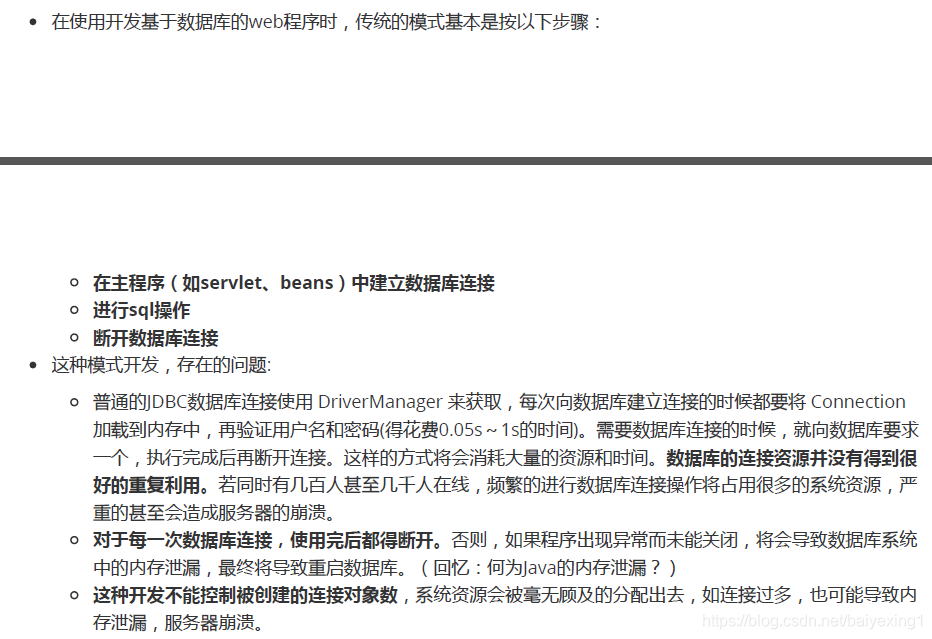

1.多种开源的数据库连接池
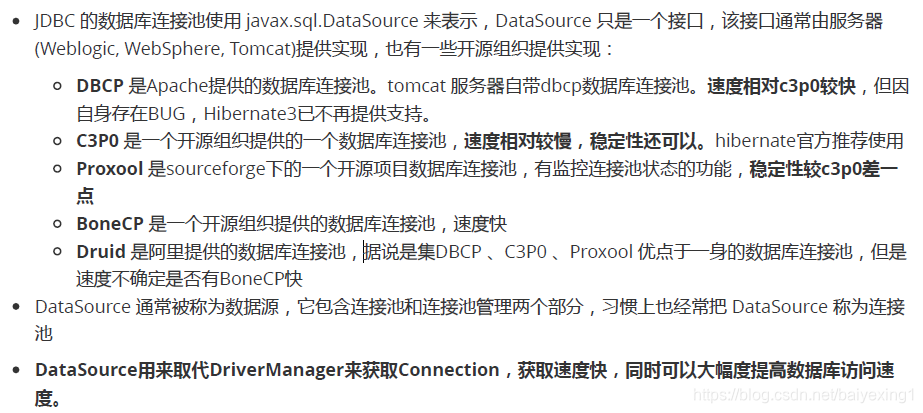
注意:
- 数据源和数据库连接不同,数据源无需创建多个,它是产生数据库连接的工厂,因此整个应用只需要一个数据源即可。
- 当数据库访问结束后,程序还是像以前一样关闭数据库连接:conn.close();但conn.close()并没有关闭数据库的物理连接,它仅仅把数据库连接释放,归还给了数据库连接池。
2. C3P0
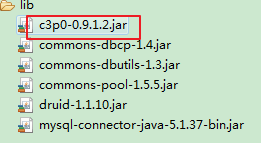
1.导入jar包:
2.测试连接的代码:
public class C3P0Test {
	//方式一:硬编码方式(不提倡)
	@Test
	public void testGetConnection() throws Exception{
		//获取c3p0数据库连接池
		ComboPooledDataSource cpds = new ComboPooledDataSource();
		cpds.setDriverClass( "com.mysql.jdbc.Driver" ); //loads the jdbc driver
		cpds.setJdbcUrl( "jdbc:mysql://localhost:3306/test" );
		cpds.setUser("root");
		cpds.setPassword("root");
		//通过设置相关参数对数据库连接池进行管理
		//设置初始时数据库连接池中的连接数
		cpds.setInitialPoolSize(10);

		Connection conn = cpds.getConnection();
		System.out.println(conn);

		//销毁c3p0数据库连接池
		DataSources.destroy(cpds);
	}

	//方式二:使用配置文件
	@Test
	public void testGetConnection1() throws Exception{

		ComboPooledDataSource cpds = new ComboPooledDataSource("helloc3p0");
		Connection conn = cpds.getConnection();
		System.out.println(conn);
	}


}
其中,配置文件定义在src下。名为:c3p0-config.xml
<?xml version="1.0" encoding="UTF-8"?>
<c3p0-config>


  <named-config name="helloc3p0">
    <!-- 提供获取连接的4个基本信息 -->
    <property name="driverClass">com.mysql.jdbc.Driver</property>
    <property name="jdbcUrl">jdbc:mysql://localhost:3306/test</property>
    <property name="user">root</property>
    <property name="password">root</property>

    <!-- 进行数据库连接池管理的基本信息 -->
    <!-- 当数据库连接池中连接不够时,c3p0一次性向mysql申请的连接数 -->
    <property name="acquireIncrement">5</property>
    <!-- c3p0数据库连接池中初始化时的连接数 -->
    <property name="initialPoolSize">10</property>
    <!-- c3p0数据库连接池中维护的最少的连接数 -->
    <property name="minPoolSize">10</property>
    <!-- c3p0数据库连接池中维护的最多的连接数 -->
    <property name="maxPoolSize">100</property>
	<!-- c3p0数据库连接池中最多维护的Statement的个数 -->
    <property name="maxStatements">50</property>
    <!-- 每个连接中可以最多使用的Statement的个数 -->
    <property name="maxStatementsPerConnection">2</property>


  </named-config>
</c3p0-config>
3.DBCP
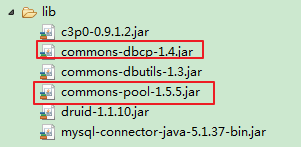
1.导入jar包:
Commons-dbcp.jar:连接池的实现
Commons-pool.jar:连接池实现的依赖库
2.测试连接的代码:
public class DBCPTest {

	/**
	 *
	 * @Description 测试DBCP的连接池技术
	 * @author baiyexing
	 * @version
	 * @throws Exception
	 * @date2020年12月5日上午9:57:31
	 */

	//方式一:硬编码方式(不提倡)
	@Test
	public void testGetConnection() throws Exception{
		//创建了DBCP的数据库连接池
		BasicDataSource source = new BasicDataSource();

		//设置基本信息
		source.setDriverClassName("com.mysql.jdbc.Driver");
		source.setUrl("jdbc:mysql:///test");
		source.setUsername("root");
		source.setPassword("root");

		//还可以设置数据库管理的其他相关属性
		source.setInitialSize(10);
		source.setMaxActive(10);
		//...

		Connection conn = source.getConnection();
		System.out.println(conn);
	}

	//方式二:使用配置文件
	@Test
	public void testGetConnection1() throws Exception{

		Properties pros = new Properties();
		//方式一:使用类加载器
//		InputStream is = ClassLoader.getSystemClassLoader().getResourceAsStream("dbcp.properties");
//		pros.load(is);
		//方式二:
		FileInputStream fis = new FileInputStream(new File("src/dbcp.properties"));
		pros.load(fis);

		//创建一个DBCP数据库连接池
		DataSource source = BasicDataSourceFactory.createDataSource(pros);

		Connection conn = source.getConnection();
		System.out.println(conn);

	}

}
其中,配置文件定义在src下:dbcp.properties
driverClassName=com.mysql.jdbc.Driver
url=jdbc:mysql:///test
username=root
password=root
initialSize=10
maxActive=10
4.Druid
Druid是阿里巴巴开源平台上一个数据库连接池实现,它结合了C3P0、DBCP、Proxool等DB池的优点,同时加入了日志监控,可以很好的监控DB池连接和SQL的执行情况,可以说是针对监控而生的DB连接池,可以说是目前最好的连接池之一。
1.导入jar包:
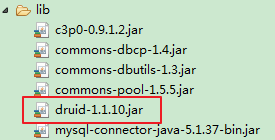
2.测试连接的代码:
public class DruidTest {

	@Test
	public void getConnection() throws Exception{
		//方式一:硬编码不演示了
//		DruidDataSource source = new DruidDataSource();

		//方式二:配置文件
		Properties pros = new Properties();
		InputStream is = ClassLoader.getSystemClassLoader().getResourceAsStream("druid.properties");
		pros.load(is);

		DataSource source = DruidDataSourceFactory.createDataSource(pros);

		Connection conn = source.getConnection();

		System.out.println(conn);
	}

}
其中,配置文件定义在src下:druid.properties
username=root
password=root
url=jdbc:mysql:///test
driverClassName=com.mysql.jdbc.Driver
initialSize=8





 扫一扫
扫一扫


 909
909

 被折叠的 条评论
为什么被折叠?
被折叠的 条评论
为什么被折叠?
 到【灌水乐园】发言





