


 本文分享了使用Python的Turtle模块绘制彩虹糖图案和同心圆的方法,通过随机颜色填充,创造出绚丽多彩的视觉效果。文章提供了完整的代码示例,适合初学者实践。
最近给女儿看了一个用turtle画图的功能,她很喜欢,每天晚上下班回家就让我画图给她看。特此收集了一些画图的代码,保留下。
题一:彩虹糖
from turtle import *
from random import random
import contextlib def draw_circle(r): a, b, c = random(), random(), random() #pencolor(a, b, c) fillcolor(a, b, c) begin_fill() circle(r) end_fill() def pen_skip(step): penup() forward(step) pendown() speed(5) setup(width=800,height=600) screensize(600,400, "gray") long = 600 high = 450 left(180) pen_skip(250) left(90) pen_skip(200) left(90) high_start = 50 high_step = 50 long_start = 50 long_step = 50 for i in range(high_start,high,high_step): for j in range(long_start,long,long_step): if (i//high_step)%2 ==1: if j == long-long_step: draw_circle(long_step//2) continue draw_circle(long_step // 2) pen_skip(long_step) else: if j == long-long_step: draw_circle(-long_step // 2) continue draw_circle(-long_step // 2) pen_skip(long_step) if (i//50)%2 == 1: left(90) pen_skip(high_step) left(90) else: right(90) pen_skip(high_step) right(90) exitonclick()
效果图如下: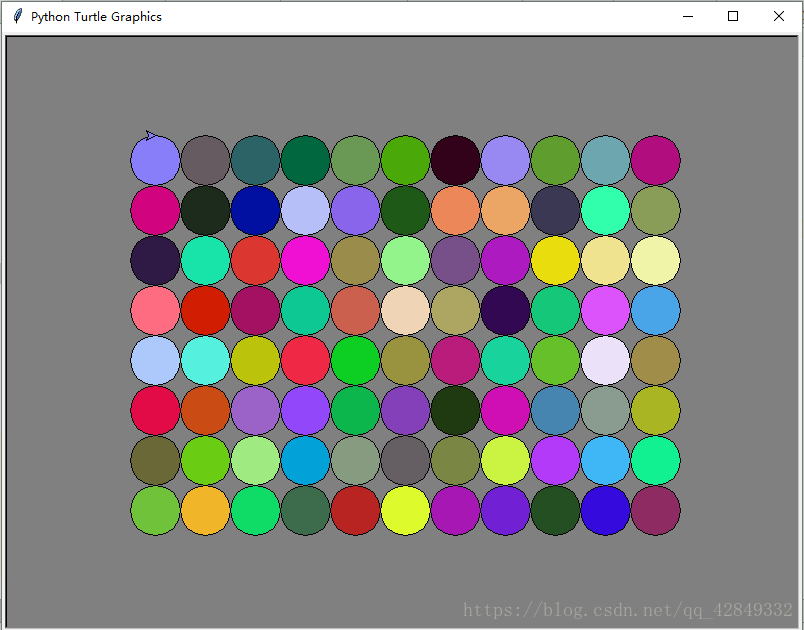
题二:同心圆
from turtle import *
import random
def pen_skip(step): penup() forward(step) pendown() color = ['blue','red','yellow','pink','black'] for i in range(100,10,-10): fillcolor(random.sample(color,1)[0]) begin_fill() circle(i) end_fill() left(90) pen_skip(10) right(90) exitonclick()
效果图如下: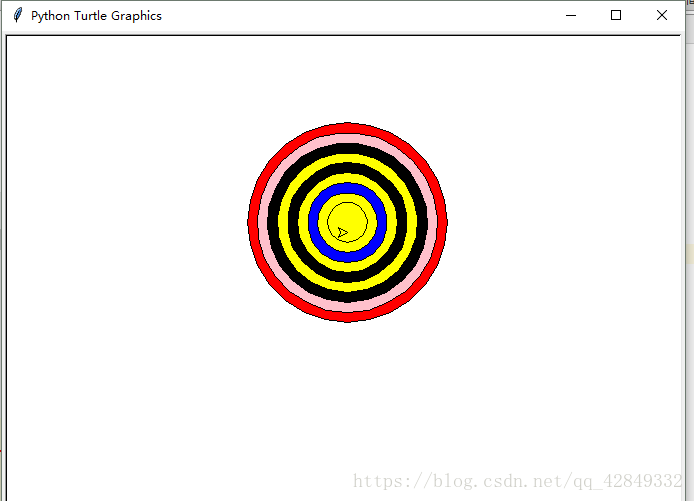
python 笔记之“海龟”画图 演示画小猪佩奇,机器猫:https://blog.youkuaiyun.com/qq_42179526/article/details/83031653





 扫一扫
扫一扫


 1万+
1万+

 被折叠的 条评论
为什么被折叠?
被折叠的 条评论
为什么被折叠?
 到【灌水乐园】发言





