ElasticSearch学习笔记(安装与使用)

本文介绍了ElasticSearch,它是基于JSON的分布式搜索和分析引擎。阐述了其由来、功能与优势,详细说明了在Windows下的安装、运行方法,介绍了结合Chrome插件和Kibana工具的使用方式,还讲解了基本术语和CRUD操作。

问题一、ElasticSearch是什么?有什么用处?

答:截至2018年12月28日,从ElasticSearch官网(https://www.elastic.co/cn/products)上,得知:ElasticSearch是基于 JSON 的分布式搜索和分析引擎,专为实现水平扩展、高可靠性和管理便捷性而设计。用于搜索、分析和存储您的数据。

问题二、ElasticSearch的由来?

答:大约在2010年,一个叫Shay Banon的待业工程师跟随他的新婚妻子来到伦敦,他的妻子想在伦敦学习做一名厨师。而他在伦敦寻找工作的期间,接触到了Lucene的早期版本,他想为自己的妻子开发一个方便搜索菜谱的应用。直接使用Lucene构建搜索会有很多的坑以及重复性的工作,所以Shay便在Lucene的基础上不断进行抽象来让Java程序嵌入搜索变得更容易一些,经过一段时间的打磨,就诞生了他的第一个开源作品,他给自己的这个作品起了个名字,叫 “Compass”,中文即“指南针”的意思。之后,Shay找到了一份新工作,新工作是处在一个高性能分布式的开发环境中。他在工作中渐渐发现,越来越需要一个易用的高性能、实时、分布式搜索服务,于是他决定重写Compass,将它从一个库打造成了一个独立的server,并将其改名为Elasticsearch。Elasticsearch发布的第一个版本是在2010年的二月份,从那之后,Elasticsearch便成了Github上最受人瞩目的项目之一,并且很快就有超过300名开发者加入进来贡献了自己的代码。后来Shay和另一位合伙人成立了公司专注打造Elasticsearch,他们对Elasticsearch进行了一些商业化的包装和支持。但是,Elasticsearch承诺,永远都将是开源并且免费的。不过悲剧的是,Shay承诺为妻子开发的菜谱搜索应用,到现在还没做出来……(划重点:ElasticSearch基于Lucene)

问题三、ElasticSearch有什么功能?有什么优势?

答:截至2018年12月28日,从ElasticSearch官网(https://www.elastic.co/cn/products/elasticsearch)上,得知:Elasticsearch 是一个分布式、Restful风格的搜索和数据分析引擎,能够解决不断涌现出的各种用例。作为 Elastic Stack 的核心,它集中存储您的数据,帮助您发现意料之中以及意料之外的情况。具备存储、查询和分析功能。具备速度、可扩展性、弹性、灵活性、操作友好、客户端库丰富等优势,是开源的、分布式、基于 Restful API、支持 PB 甚至更高数量级的搜索引擎工具。


-------------------------------------------------------------------------------------------------------------------------


1、ElasticSearch的安装及结构

ElasticSearch支持Windows安装,直接到官网的下载页面(https://www.elastic.co/cn/downloads/elasticsearch)下载即可。

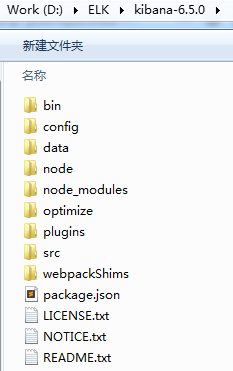
注意,如果使用ELK全家桶,官方建议ElasticSearch、Logstash、Kibana三个产品选择同一版本号。截至2018年12月28日,ElasticSearch的最新版本是6.5.4。本篇笔记使用的是6.5.0。下载后放在D:\ELK目录下。
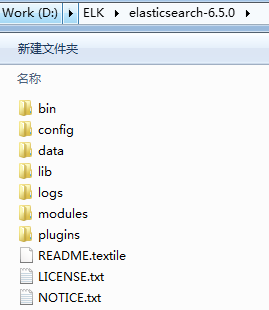
bin:elasticsearch的启动脚本等
config:配置文件目录
data:当前节点的分片数据
lib:运行依赖的jar包
logs:日志文件目录
modules:模块库
plugins:插件目录


2、ElasticSearch的运行

Windows版本的Elasticsearch运行还是很简单的,直接在bin目录下,找到elasticsearch.bat这个批处理文件,双击运行就可以了。当然也可以通过命令行窗口进入到该目录下,输入elasticsearch回车进行执行。

出现如下信息说明Elasticsearch已经启动起来了,并且运行在本机的9200端口上。
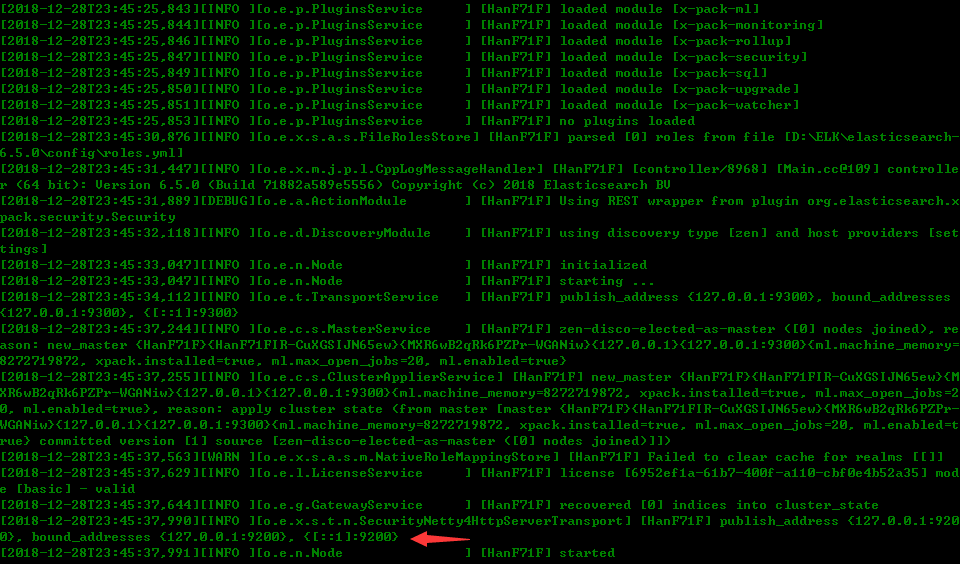
在浏览器的地址栏中输入:localhost:9200,如果能看到如下信息,说明启动成功

1

2

3

4

5

6

7

8

9

10

11

12

13

14

15

16

17

{

  "name" "HanF71F",

  "cluster_name" "elasticsearch",

  "cluster_uuid" "kYp2rOofTwWN1-kj7Qjw_A",

  "version" : {

    "number" "6.5.0",

    "build_flavor" "default",

    "build_type" "zip",

    "build_hash" "816e6f6",

    "build_date" "2018-11-09T18:58:36.352602Z",

    "build_snapshot" false,

    "lucene_version" "7.5.0",

    "minimum_wire_compatibility_version" "5.6.0",

    "minimum_index_compatibility_version" "5.0.0"

  },

  "tagline" "You Know, for Search"

}

cluster_name: ElasticSearch配置的集群名称,默认是elasticsearch,es服务会通过广播方式自动连接在同一网段下的es服务,通过多播方式进行通信,同一网段下可以有多个集群,通过集群名称这个属性来区分不同的集群。

cluster_uuid:ElasticSearch配置的集群唯一编号
build_flavor:编译特点
lucene_version:ElasticSearch基于lucene的,lucene的版本号


3、ElasticSearch的工具

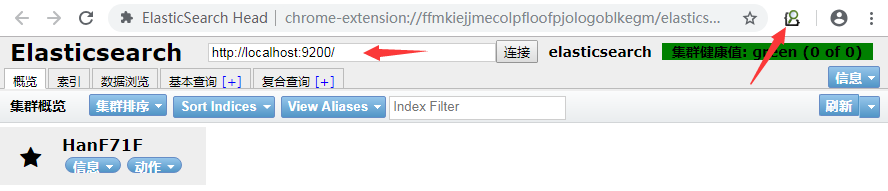
1、结合Chrome浏览器的ElasticSearchHead插件使用

下载名为chromeFOR.COM_elasticsearch-head_v0.1.3.crx的Chrome插件,安装后,在Chrome浏览器的右上角点击Elastic Search Head这个图标即可使用
2、结合Kibana工具使用

个人觉得Kibana是和ElasticSearch结合是很好的,毕竟都是一家的产品。Windows下的Kibana使用也很简单,直接下载同ElasticSearch一样版本的Kibana(https://www.elastic.co/downloads/kibana

直接在bin目录下,找到kibana.bat这个批处理文件,双击运行就可以了。当然也可以通过命令行窗口进入到该目录下,输入kibana回车进行执行。

出现如下信息说明Kibana已经启动起来了,并且运行在本机的5601端口上。
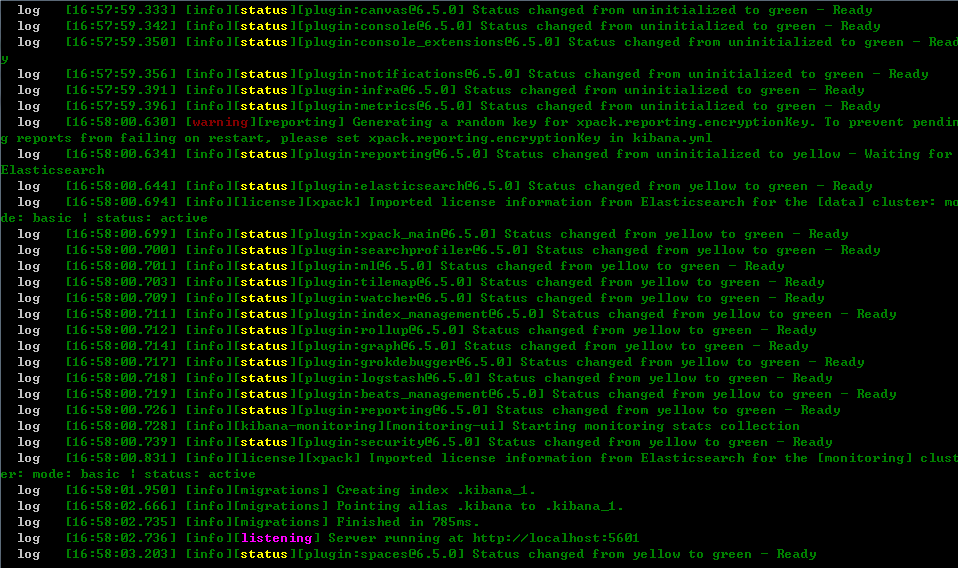
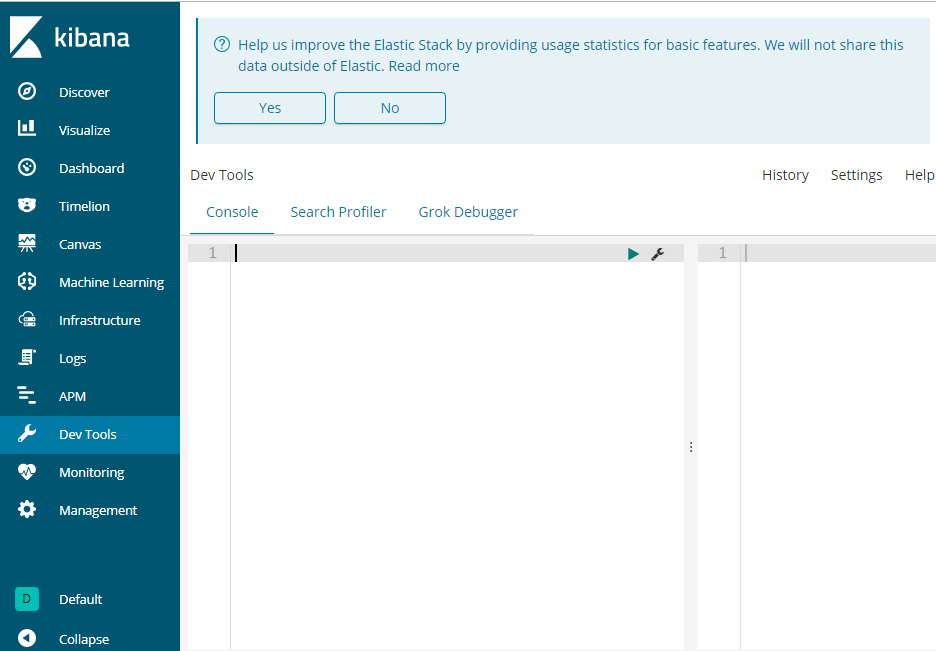
在浏览器的地址栏中输入:localhost:5601,如果能看到如下信息,说明Kibana启动成功。
3、 ElasticSearch的基本术语

将ElasticSearch和关系型数据库做一个类比

关系型数据库数据库(Database)表(Table)行(Rows)列(Columns)
ElasticSearch索引(Index)类型(Type)文档(Docments)字段(Fields)

一个ElasticSearch集群可以包含多个索引(数据库),一个索引中可以包含多个类型(表),一个类型中可以包含多个文档(行),一个文档中可以包含多个字段(列)。

Elasticsearch可以理解为是面向文档型数据库。数据用JSON作为文档序列化的格式。

① Near Realtime(NRT):近实时的意思,表示从写入数据到数据可以被搜索有一个小延迟(大概1秒);基于es执行搜索和分析可以达到秒级。

② Cluster:集群,包含多个节点,每个节点属于哪个集群是通过配置(集群名称,默认是elasticsearch)来决定的,对于中小型应用来说,开始阶段常常一个集群对应一个节点。

③ Node:节点,集群中的一个节点,节点也有一个名称(默认是随机分配的),在执行运维管理操作时节点名称很重要,默认节点会加入一个名称为“elasticsearch”的集群,如果直接启动一堆节点,那么它们会自动组成一个elasticsearch集群,当然一个节点也可以组成一个elasticsearch集群。

④ Document&field:文档,es中的最小数据单元,一个document可以是一条客户数据,一条商品分类数据,一条订单数据,通常用JSON数据结构表示,每个index下的type中,都可以去存储多个document。一个document里面有多个field,每个field就是一个数据字段。

⑤ Index:索引,包含一堆有相似结构的文档数据,比如可以有一个客户索引,商品分类索引,订单索引,索引有一个名称。一个index包含很多document,一个index就代表了一类类似的或者相同的document。比如说建立一个product index,商品索引,里面可能就存放了所有的商品数据,所有的商品document。

⑥ Type:类型,每个索引里都可以有一个或多个type,type是index中的一个逻辑数据分类,一个type下的document,都有相同的field,比如博客系统,有一个索引,可以定义用户数据type,博客数据type,评论数据type。

⑦ Shard:单台机器无法存储大量数据,es可以将一个索引中的数据切分为多个shard,分布在多台服务器上存储。有了shard就可以横向扩展,存储更多数据,让搜索和分析等操作分布到多台服务器上去执行,提升吞吐量和性能。每个shard都是一个lucene index。

⑧ Replica:任何一个服务器随时可能故障或宕机,此时shard可能就会丢失,因此可以为每个shard创建多个replica副本。replica可以在shard故障时提供备用服务,保证数据不丢失,多个replica还可以提升搜索操作的吞吐量和性能。primary shard(建立索引时一次设置,不能修改,默认5个),replica shard(随时修改数量,默认1个),默认每个索引10个shard,5个primary shard,5个replica shard,最小的高可用配置,是2台服务器。

4、ElasticSearch的基本使用(CRUD)

首先对Restful风格的动作有一个了解:GET(查询操作),POST(新增/修改操作),PUT(修改操作),DELETE(删除操作)

下列命令均在Kibana的DevTools中执行,DevTools中输入关键字有相应的提示,很不错。

① 检查集群的健康状况

GET /_cat/health?v
epoch      timestamp cluster       status node.total node.data shards pri relo init unassign pending_tasks max_task_wait_time active_shards_percent
1546176515 13:28:35  elasticsearch green           1         1      1   1    0    0        0             0                  -                100.0%

② 查看集群中所有的索引

GET /_cat/indices?v
​
health status index     uuid                   pri rep docs.count docs.deleted store.size pri.store.size
green  open   .kibana_1 qqZcESKyTvCWJjF7ToyUWw   1   0          1            0      5.1kb          5.1kb

​

 ③ 创建索引(可以使用ElasticSearchHead插件的图形化创建方式,也可以手写命令)

PUT /study_elasticsearch?pretty
#! Deprecation: the default number of shards will change from [5] to [1] in 7.0.0; if you wish to continue using the default of [5] shards, 
you must manage this on the create index request or with an index template
{
  "acknowledged" : true,
  "shards_acknowledged" : true,
  "index" : "study_elasticsearch"
}

创建后再次执行查看索引的命令,可以看到这时有两个索引存在了。

GET /_cat/indices?v
health status index               uuid                   pri rep docs.count docs.deleted store.size pri.store.size
green  open   .kibana_1           qqZcESKyTvCWJjF7ToyUWw   1   0          1            0      5.1kb          5.1kb
yellow open   study_elasticsearch P1yCgFQiS1Si2Nc0IlZflA   5   1          0            0      1.1kb          1.1kb

④ 删除索引

DELETE /study_elasticsearch?pretty
{
  "acknowledged" : true
}

删除后再次执行查看索引的命令,可以看到这时剩一个索引存在了。

GET /_cat/indices?v
health status index     uuid                   pri rep docs.count docs.deleted store.size pri.store.size
green  open   .kibana_1 qqZcESKyTvCWJjF7ToyUWw   1   0          1            0      5.1kb          5.1kb

⑤ 新增文档

PUT /study_elasticsearch/person/1
{
  "name" : "zhang yang",
  "age" : 21,
  "job" : "boss"
}
{
  "error": {
    "root_cause": [
      {
        "type": "cluster_block_exception",
        "reason": "blocked by: [FORBIDDEN/12/index read-only / allow delete (api)];"
      }
    ],
    "type": "cluster_block_exception",
    "reason": "blocked by: [FORBIDDEN/12/index read-only / allow delete (api)];"
  },
  "status": 403
}

从错误信息清晰的看到是索引只读的提示,所以考虑放开索引的只读设置。

PUT _settings
{
  "index": {
    "blocks": {
      "read_only_allow_delete": "false"
    }
  }
}
{
  "acknowledged" : true
}

再次尝试新增文档

PUT /study_elasticsearch/person/1
{
  "name" : "zhang yang",
  "age" : 21,
  "job" : "boss"
}
{
  "_index" : "study_elasticsearch",
  "_type" : "person",
  "_id" : "1",
  "_version" : 1,
  "result" : "created",
  "_shards" : {
    "total" : 2,
    "successful" : 1,
    "failed" : 0
  },
  "_seq_no" : 0,
  "_primary_term" : 1
}
PUT /study_elasticsearch/person/2
{
  "name" : "zhang xiong jia",
  "age" : 20,
  "job" : "employee"
}
{
  "_index" : "study_elasticsearch",
  "_type" : "person",
  "_id" : "2",
  "_version" : 1,
  "result" : "created",
  "_shards" : {
    "total" : 2,
    "successful" : 1,
    "failed" : 0
  },
  "_seq_no" : 0,
  "_primary_term" : 1
}
PUT /study_elasticsearch/person/3
{
  "name" : "wu qing qing",
  "age" : 22,
  "job" : "manager"
}
{
  "_index" : "study_elasticsearch",
  "_type" : "person",
  "_id" : "3",
  "_version" : 1,
  "result" : "created",
  "_shards" : {
    "total" : 2,
    "successful" : 1,
    "failed" : 0
  },
  "_seq_no" : 0,
  "_primary_term" : 1
}

注意,此时的文档版本version为1

⑥ 查询文档数量

GET /study_elasticsearch/person/_count
{
  "count" : 3,
  "_shards" : {
    "total" : 5,
    "successful" : 5,
    "skipped" : 0,
    "failed" : 0
  }
}

⑦ 查询文档(不加任何查询条件,本篇用的都是Search Lite API的写法)

GET /study_elasticsearch/person/_search
{
  "took" : 2,
  "timed_out" : false,
  "_shards" : {
    "total" : 5,
    "successful" : 5,
    "skipped" : 0,
    "failed" : 0
  },
  "hits" : {
    "total" : 3,
    "max_score" : 1.0,
    "hits" : [
      {
        "_index" : "study_elasticsearch",
        "_type" : "person",
        "_id" : "2",
        "_score" : 1.0,
        "_source" : {
          "name" : "zhang xiong jia",
          "age" : 20,
          "job" : "employee"
        }
      },
      {
        "_index" : "study_elasticsearch",
        "_type" : "person",
        "_id" : "1",
        "_score" : 1.0,
        "_source" : {
          "name" : "zhang yang",
          "age" : 21,
          "job" : "boss"
        }
      },
      {
        "_index" : "study_elasticsearch",
        "_type" : "person",
        "_id" : "3",
        "_score" : 1.0,
        "_source" : {
          "name" : "wu qing qing",
          "age" : 22,
          "job" : "manager"
        }
      }
    ]
  }
}

注意:对某个索引(Index)下某个类型(Type)没加任何条件的查询,结果默认会展示出前20条文档(Documents)

⑧ 查询文档(带查询条件,本篇用的都是Search Lite API的写法)

直接通过id获取文档:

GET /study_elasticsearch/person/1
{
  "_index" : "study_elasticsearch",
  "_type" : "person",
  "_id" : "1",
  "_version" : 1,
  "found" : true,
  "_source" : {
    "name" : "zhang yang",
    "age" : 21,
    "job" : "boss"
  }
}

通过查询字段的值获取文档:(按age赋值22查询,找到了吴局)

GET /study_elasticsearch/person/_search?q=age:22
{
  "took" : 10,
  "timed_out" : false,
  "_shards" : {
    "total" : 5,
    "successful" : 5,
    "skipped" : 0,
    "failed" : 0
  },
  "hits" : {
    "total" : 1,
    "max_score" : 1.0,
    "hits" : [
      {
        "_index" : "study_elasticsearch",
        "_type" : "person",
        "_id" : "3",
        "_score" : 1.0,
        "_source" : {
          "name" : "wu qing qing",
          "age" : 22,
          "job" : "manager"
        }
      }
    ]
  }
}

通过查询字段的值获取文档:(按name赋值zhang查询,找到了名字中有zhang的大小张行长)

GET /study_elasticsearch/person/_search?q=name:zhang
{
  "took" : 3,
  "timed_out" : false,
  "_shards" : {
    "total" : 5,
    "successful" : 5,
    "skipped" : 0,
    "failed" : 0
  },
  "hits" : {
    "total" : 2,
    "max_score" : 0.2876821,
    "hits" : [
      {
        "_index" : "study_elasticsearch",
        "_type" : "person",
        "_id" : "2",
        "_score" : 0.2876821,
        "_source" : {
          "name" : "zhang xiong jia",
          "age" : 20,
          "job" : "employee"
        }
      },
      {
        "_index" : "study_elasticsearch",
        "_type" : "person",
        "_id" : "1",
        "_score" : 0.2876821,
        "_source" : {
          "name" : "zhang yang",
          "age" : 21,
          "job" : "boss"
        }
      }
    ]
  }
}

⑨ 更新文档(替换)

PUT /study_elasticsearch/person/1
{
  "name" : "hong zi jun",
  "age" : 21,
  "job" : "CEO"
}
{
  "_index" : "study_elasticsearch",
  "_type" : "person",
  "_id" : "1",
  "_version" : 2,
  "result" : "updated",
  "_shards" : {
    "total" : 2,
    "successful" : 1,
    "failed" : 0
  },
  "_seq_no" : 1,
  "_primary_term" : 1
}

注意:此时id为1的这条文档的版本version变成了2,文档的内容也变成了洪行长

GET /study_elasticsearch/person/1
{
  "_index" : "study_elasticsearch",
  "_type" : "person",
  "_id" : "1",
  "_version" : 2,
  "found" : true,
  "_source" : {
    "name" : "hong zi jun",
    "age" : 21,
    "job" : "CEO"
  }
}

这种替换的方式做更新,需要替换的内容和原先的内容字段一致,如果不一致就会用替换内容替换掉原先的内容

PUT /study_elasticsearch/person/1
{
  "name" : "ye yu",
  "gender" : "female"
}
{
  "_index" : "study_elasticsearch",
  "_type" : "person",
  "_id" : "1",
  "_version" : 3,
  "result" : "updated",
  "_shards" : {
    "total" : 2,
    "successful" : 1,
    "failed" : 0
  },
  "_seq_no" : 2,
  "_primary_term" : 1
}

再次查询,发现person的字段和内容均发生了变化,变成叶阿姨了。显然,这种替换方式的缺点在于全量替换了,不想替换的也被替换了。

GET /study_elasticsearch/person/1
{
  "_index" : "study_elasticsearch",
  "_type" : "person",
  "_id" : "1",
  "_version" : 3,
  "found" : true,
  "_source" : {
    "name" : "ye yu",
    "gender" : "female"
  }
}

⑩ 更新文档(更新)

先把id为1的数据替换回去

PUT /study_elasticsearch/person/1
{
  "name" : "zhang yang",
  "age" : 21,
  "job" : "boss"
}
{
  "_index" : "study_elasticsearch",
  "_type" : "person",
  "_id" : "1",
  "_version" : 4,
  "result" : "updated",
  "_shards" : {
    "total" : 2,
    "successful" : 1,
    "failed" : 0
  },
  "_seq_no" : 3,
  "_primary_term" : 1
}
GET /study_elasticsearch/person/1
{
  "_index" : "study_elasticsearch",
  "_type" : "person",
  "_id" : "1",
  "_version" : 4,
  "found" : true,
  "_source" : {
    "name" : "zhang yang",
    "age" : 21,
    "job" : "boss"
  }
}

使用POST结合_update做更新

POST /study_elasticsearch/person/1/_update
{
  "doc" : {
    "job" : "CTO"
  }
}
{
  "_index" : "study_elasticsearch",
  "_type" : "person",
  "_id" : "1",
  "_version" : 5,
  "result" : "noop",
  "_shards" : {
    "total" : 0,
    "successful" : 0,
    "failed" : 0
  }
}

再查询一下,发现id为1的文档的job字段发生了改变,其他的字段及内容没有变化

GET /study_elasticsearch/person/1
{
  "_index" : "study_elasticsearch",
  "_type" : "person",
  "_id" : "1",
  "_version" : 5,
  "found" : true,
  "_source" : {
    "name" : "zhang yang",
    "age" : 21,
    "job" : "CTO"
  }
}

⑪ 删除文档

DELETE /study_elasticsearch/person/1
{
  "_index" : "study_elasticsearch",
  "_type" : "person",
  "_id" : "1",
  "_version" : 6,
  "result" : "deleted",
  "_shards" : {
    "total" : 2,
    "successful" : 1,
    "failed" : 0
  },
  "_seq_no" : 5,
  "_primary_term" : 1
}

再查询一下,找不到该条文档了

GET /study_elasticsearch/person/1
{
  "_index" : "study_elasticsearch",
  "_type" : "person",
  "_id" : "1",
  "found" : false
}

如果是想删除所有的文档,可以如下操作

POST /study_elasticsearch/person/_delete_by_query
{
  "query": {
    "match_all": {}
  }
}
{
  "took" : 42,
  "timed_out" : false,
  "total" : 2,
  "deleted" : 2,
  "batches" : 1,
  "version_conflicts" : 0,
  "noops" : 0,
  "retries" : {
    "bulk" : 0,
    "search" : 0
  },
  "throttled_millis" : 0,
  "requests_per_second" : -1.0,
  "throttled_until_millis" : 0,
  "failures" : [ ]
}

再查询一下,发现没有数据了

GET /study_elasticsearch/person/_search
{
  "took" : 0,
  "timed_out" : false,
  "_shards" : {
    "total" : 5,
    "successful" : 5,
    "skipped" : 0,
    "failed" : 0
  },
  "hits" : {
    "total" : 0,
    "max_score" : null,
    "hits" : [ ]
  }
}


[2025-11-26T15:52:40,750][INFO ][o.e.b.Elasticsearch ] [node-1] version[9.2.1], pid[26788], build[zip/4ad0ef0e98a2e72fafbd79a19fa5cae2f026117d/2025-11-06T22:07:39.673130621Z], OS[Windows 11/10.0/amd64], JVM[Oracle Corporation/OpenJDK 64-Bit Server VM/25.0.1/25.0.1+8-27] [2025-11-26T15:52:40,841][INFO ][o.e.b.Elasticsearch ] [node-1] JVM home [D:\soft\ES\elasticsearch-9.2.1-windows-x86_64\elasticsearch-9.2.1\jdk], using bundled JDK [true] [2025-11-26T15:52:40,846][INFO ][o.e.b.Elasticsearch ] [node-1] JVM arguments [-Des.networkaddress.cache.ttl=60, -Des.networkaddress.cache.negative.ttl=10, -XX:+AlwaysPreTouch, -Xss1m, -Djava.awt.headless=true, -Dfile.encoding=UTF-8, -Djna.nosys=true, -XX:-OmitStackTraceInFastThrow, -Dio.netty.noUnsafe=true, -Dio.netty.noKeySetOptimization=true, -Dio.netty.recycler.maxCapacityPerThread=0, --add-opens=org.apache.lucene.core/org.apache.lucene.codecs.lucene99=org.elasticsearch.server, --add-opens=org.apache.lucene.core/org.apache.lucene.internal.vectorization=org.elasticsearch.server, -Dlog4j.shutdownHookEnabled=false, -Dlog4j2.disable.jmx=true, -Dlog4j2.formatMsgNoLookups=true, -Djava.locale.providers=CLDR, -Dorg.apache.lucene.vectorization.upperJavaFeatureVersion=25, -Des.path.home=D:\soft\ES\elasticsearch-9.2.1-windows-x86_64\elasticsearch-9.2.1, -Des.distribution.type=zip, -Des.java.type=bundled JDK, --enable-native-access=org.elasticsearch.nativeaccess,org.apache.lucene.core, --enable-native-access=ALL-UNNAMED, --illegal-native-access=deny, -XX:ReplayDataFile=logs/replay_pid%p.log, -XX:+EnableDynamicAgentLoading, -Djdk.attach.allowAttachSelf=true, --patch-module=java.base=D:\soft\ES\elasticsearch-9.2.1-windows-x86_64\elasticsearch-9.2.1\lib\entitlement-bridge\elasticsearch-entitlement-bridge-9.2.1.jar, --add-exports=java.base/org.elasticsearch.entitlement.bridge=org.elasticsearch.entitlement,java.logging,java.net.http,java.naming,jdk.net, -XX:+UseG1GC, -Djava.io.tmpdir=C:\Users\ADMINI~1\AppData\Local\Temp\elasticsearch, --add-modules=jdk.incubator.vector, -Dorg.apache.lucene.store.defaultReadAdvice=normal, -Dorg.apache.lucene.store.MMapDirectory.sharedArenaMaxPermits=1, -XX:+HeapDumpOnOutOfMemoryError, -XX:+ExitOnOutOfMemoryError, -XX:ErrorFile=hs_err_pid%p.log, -Xlog:gc*,gc+age=trace,safepoint:file=gc.log:utctime,level,pid,tags:filecount=32,filesize=64m, -Xms8123m, -Xmx8123m, -XX:MaxDirectMemorySize=4259315712, -XX:G1HeapRegionSize=4m, -XX:InitiatingHeapOccupancyPercent=30, -XX:G1ReservePercent=15, --module-path=D:\soft\ES\elasticsearch-9.2.1-windows-x86_64\elasticsearch-9.2.1\lib, --add-modules=jdk.net, --add-modules=jdk.management.agent, --add-modules=ALL-MODULE-PATH, -Djdk.module.main=org.elasticsearch.server] [2025-11-26T15:52:40,854][INFO ][o.e.b.Elasticsearch ] [node-1] Default Locale [zh_CN] [2025-11-26T15:52:42,139][INFO ][o.e.n.NativeAccess ] [node-1] Using [jdk] native provider and native methods for [Windows] [2025-11-26T15:52:43,849][INFO ][o.a.l.i.v.PanamaVectorizationProvider] [node-1] Java vector incubator API enabled; uses preferredBitSize=256; FMA enabled [2025-11-26T15:52:44,054][INFO ][o.e.b.Elasticsearch ] [node-1] Bootstrapping Entitlements [2025-11-26T15:52:57,527][WARN ][o.e.x.g.GPUSupport ] [node-1] GPU based vector indexing is not supported on this platform; cuvs-java supports only Linux [2025-11-26T15:52:58,687][INFO ][o.e.p.PluginsService ] [node-1] loaded module [repository-url] [2025-11-26T15:52:58,687][INFO ][o.e.p.PluginsService ] [node-1] loaded module [rest-root] [2025-11-26T15:52:58,688][INFO ][o.e.p.PluginsService ] [node-1] loaded module [x-pack-core] [2025-11-26T15:52:58,688][INFO ][o.e.p.PluginsService ] [node-1] loaded module [x-pack-redact] [2025-11-26T15:52:58,688][INFO ][o.e.p.PluginsService ] [node-1] loaded module [ingest-user-agent] [2025-11-26T15:52:58,689][INFO ][o.e.p.PluginsService ] [node-1] loaded module [x-pack-async-search] [2025-11-26T15:52:58,689][INFO ][o.e.p.PluginsService ] [node-1] loaded module [x-pack-monitoring] [2025-11-26T15:52:58,689][INFO ][o.e.p.PluginsService ] [node-1] loaded module [repository-s3] [2025-11-26T15:52:58,690][INFO ][o.e.p.PluginsService ] [node-1] loaded module [x-pack-analytics] [2025-11-26T15:52:58,690][INFO ][o.e.p.PluginsService ] [node-1] loaded module [x-pack-esql-core] [2025-11-26T15:52:58,690][INFO ][o.e.p.PluginsService ] [node-1] loaded module [search-business-rules] [2025-11-26T15:52:58,691][INFO ][o.e.p.PluginsService ] [node-1] loaded module [x-pack-ent-search] [2025-11-26T15:52:58,691][INFO ][o.e.p.PluginsService ] [node-1] loaded module [x-pack-autoscaling] [2025-11-26T15:52:58,691][INFO ][o.e.p.PluginsService ] [node-1] loaded module [lang-painless] [2025-11-26T15:52:58,692][INFO ][o.e.p.PluginsService ] [node-1] loaded module [x-pack-ml] [2025-11-26T15:52:58,692][INFO ][o.e.p.PluginsService ] [node-1] loaded module [lang-mustache] [2025-11-26T15:52:58,692][INFO ][o.e.p.PluginsService ] [node-1] loaded module [legacy-geo] [2025-11-26T15:52:58,693][INFO ][o.e.p.PluginsService ] [node-1] loaded module [logsdb] [2025-11-26T15:52:58,693][INFO ][o.e.p.PluginsService ] [node-1] loaded module [x-pack-ql] [2025-11-26T15:52:58,693][INFO ][o.e.p.PluginsService ] [node-1] loaded module [rank-rrf] [2025-11-26T15:52:58,693][INFO ][o.e.p.PluginsService ] [node-1] loaded module [analysis-common] [2025-11-26T15:52:58,694][INFO ][o.e.p.PluginsService ] [node-1] loaded module [health-shards-availability] [2025-11-26T15:52:58,694][INFO ][o.e.p.PluginsService ] [node-1] loaded module [transport-netty4] [2025-11-26T15:52:58,694][INFO ][o.e.p.PluginsService ] [node-1] loaded module [aggregations] [2025-11-26T15:52:58,694][INFO ][o.e.p.PluginsService ] [node-1] loaded module [ingest-common] [2025-11-26T15:52:58,694][INFO ][o.e.p.PluginsService ] [node-1] loaded module [frozen-indices] [2025-11-26T15:52:58,695][INFO ][o.e.p.PluginsService ] [node-1] loaded module [x-pack-identity-provider] [2025-11-26T15:52:58,695][INFO ][o.e.p.PluginsService ] [node-1] loaded module [x-pack-shutdown] [2025-11-26T15:52:58,695][INFO ][o.e.p.PluginsService ] [node-1] loaded module [x-pack-text-structure] [2025-11-26T15:52:58,695][INFO ][o.e.p.PluginsService ] [node-1] loaded module [snapshot-repo-test-kit] [2025-11-26T15:52:58,695][INFO ][o.e.p.PluginsService ] [node-1] loaded module [ml-package-loader] [2025-11-26T15:52:58,695][INFO ][o.e.p.PluginsService ] [node-1] loaded module [kibana] [2025-11-26T15:52:58,696][INFO ][o.e.p.PluginsService ] [node-1] loaded module [constant-keyword] [2025-11-26T15:52:58,696][INFO ][o.e.p.PluginsService ] [node-1] loaded module [x-pack-logstash] [2025-11-26T15:52:58,696][INFO ][o.e.p.PluginsService ] [node-1] loaded module [x-pack-ccr] [2025-11-26T15:52:58,697][INFO ][o.e.p.PluginsService ] [node-1] loaded module [x-pack-graph] [2025-11-26T15:52:58,703][INFO ][o.e.p.PluginsService ] [node-1] loaded module [rank-vectors] [2025-11-26T15:52:58,704][INFO ][o.e.p.PluginsService ] [node-1] loaded module [x-pack-esql] [2025-11-26T15:52:58,705][INFO ][o.e.p.PluginsService ] [node-1] loaded module [parent-join] [2025-11-26T15:52:58,707][INFO ][o.e.p.PluginsService ] [node-1] loaded module [counted-keyword] [2025-11-26T15:52:58,708][INFO ][o.e.p.PluginsService ] [node-1] loaded module [x-pack-enrich] [2025-11-26T15:52:58,708][INFO ][o.e.p.PluginsService ] [node-1] loaded module [repositories-metering-api] [2025-11-26T15:52:58,709][INFO ][o.e.p.PluginsService ] [node-1] loaded module [transform] [2025-11-26T15:52:58,710][INFO ][o.e.p.PluginsService ] [node-1] loaded module [repository-azure] [2025-11-26T15:52:58,710][INFO ][o.e.p.PluginsService ] [node-1] loaded module [dot-prefix-validation] [2025-11-26T15:52:58,711][INFO ][o.e.p.PluginsService ] [node-1] loaded module [repository-gcs] [2025-11-26T15:52:58,711][INFO ][o.e.p.PluginsService ] [node-1] loaded module [spatial] [2025-11-26T15:52:58,712][INFO ][o.e.p.PluginsService ] [node-1] loaded module [x-pack-otel-data] [2025-11-26T15:52:58,712][INFO ][o.e.p.PluginsService ] [node-1] loaded module [apm] [2025-11-26T15:52:58,713][INFO ][o.e.p.PluginsService ] [node-1] loaded module [mapper-extras] [2025-11-26T15:52:58,717][INFO ][o.e.p.PluginsService ] [node-1] loaded module [mapper-version] [2025-11-26T15:52:58,717][INFO ][o.e.p.PluginsService ] [node-1] loaded module [x-pack-rollup] [2025-11-26T15:52:58,718][INFO ][o.e.p.PluginsService ] [node-1] loaded module [percolator] [2025-11-26T15:52:58,718][INFO ][o.e.p.PluginsService ] [node-1] loaded module [x-pack-migrate] [2025-11-26T15:52:58,718][INFO ][o.e.p.PluginsService ] [node-1] loaded module [data-streams] [2025-11-26T15:52:58,718][INFO ][o.e.p.PluginsService ] [node-1] loaded module [x-pack-stack] [2025-11-26T15:52:58,719][INFO ][o.e.p.PluginsService ] [node-1] loaded module [rank-eval] [2025-11-26T15:52:58,719][INFO ][o.e.p.PluginsService ] [node-1] loaded module [reindex] [2025-11-26T15:52:58,719][INFO ][o.e.p.PluginsService ] [node-1] loaded module [streams] [2025-11-26T15:52:58,720][INFO ][o.e.p.PluginsService ] [node-1] loaded module [x-pack-security] [2025-11-26T15:52:58,720][INFO ][o.e.p.PluginsService ] [node-1] loaded module [blob-cache] [2025-11-26T15:52:58,720][INFO ][o.e.p.PluginsService ] [node-1] loaded module [searchable-snapshots] [2025-11-26T15:52:58,720][INFO ][o.e.p.PluginsService ] [node-1] loaded module [gpu] [2025-11-26T15:52:58,721][INFO ][o.e.p.PluginsService ] [node-1] loaded module [x-pack-slm] [2025-11-26T15:52:58,721][INFO ][o.e.p.PluginsService ] [node-1] loaded module [x-pack-geoip-enterprise-downloader] [2025-11-26T15:52:58,721][INFO ][o.e.p.PluginsService ] [node-1] loaded module [snapshot-based-recoveries] [2025-11-26T15:52:58,722][INFO ][o.e.p.PluginsService ] [node-1] loaded module [x-pack-watcher] [2025-11-26T15:52:58,722][INFO ][o.e.p.PluginsService ] [node-1] loaded module [old-lucene-versions] [2025-11-26T15:52:58,722][INFO ][o.e.p.PluginsService ] [node-1] loaded module [x-pack-ilm] [2025-11-26T15:52:58,722][INFO ][o.e.p.PluginsService ] [node-1] loaded module [x-pack-inference] [2025-11-26T15:52:58,722][INFO ][o.e.p.PluginsService ] [node-1] loaded module [x-pack-voting-only-node] [2025-11-26T15:52:58,723][INFO ][o.e.p.PluginsService ] [node-1] loaded module [x-pack-deprecation] [2025-11-26T15:52:58,723][INFO ][o.e.p.PluginsService ] [node-1] loaded module [x-pack-fleet] [2025-11-26T15:52:58,723][INFO ][o.e.p.PluginsService ] [node-1] loaded module [x-pack-aggregate-metric] [2025-11-26T15:52:58,723][INFO ][o.e.p.PluginsService ] [node-1] loaded module [x-pack-downsample] [2025-11-26T15:52:58,723][INFO ][o.e.p.PluginsService ] [node-1] loaded module [x-pack-profiling] [2025-11-26T15:52:58,724][INFO ][o.e.p.PluginsService ] [node-1] loaded module [ingest-geoip] [2025-11-26T15:52:58,724][INFO ][o.e.p.PluginsService ] [node-1] loaded module [x-pack-write-load-forecaster] [2025-11-26T15:52:58,724][INFO ][o.e.p.PluginsService ] [node-1] loaded module [exponential-histogram] [2025-11-26T15:52:58,724][INFO ][o.e.p.PluginsService ] [node-1] loaded module [ingest-attachment] [2025-11-26T15:52:58,724][INFO ][o.e.p.PluginsService ] [node-1] loaded module [wildcard] [2025-11-26T15:52:58,725][INFO ][o.e.p.PluginsService ] [node-1] loaded module [x-pack-apm-data] [2025-11-26T15:52:58,725][INFO ][o.e.p.PluginsService ] [node-1] loaded module [unsigned-long] [2025-11-26T15:52:58,725][INFO ][o.e.p.PluginsService ] [node-1] loaded module [x-pack-sql] [2025-11-26T15:52:58,725][INFO ][o.e.p.PluginsService ] [node-1] loaded module [runtime-fields-common] [2025-11-26T15:52:58,726][INFO ][o.e.p.PluginsService ] [node-1] loaded module [x-pack-async] [2025-11-26T15:52:58,726][INFO ][o.e.p.PluginsService ] [node-1] loaded module [vector-tile] [2025-11-26T15:52:58,726][INFO ][o.e.p.PluginsService ] [node-1] loaded module [x-pack-kql] [2025-11-26T15:52:58,727][INFO ][o.e.p.PluginsService ] [node-1] loaded module [lang-expression] [2025-11-26T15:52:58,727][INFO ][o.e.p.PluginsService ] [node-1] loaded module [ingest-otel] [2025-11-26T15:52:58,727][INFO ][o.e.p.PluginsService ] [node-1] loaded module [x-pack-eql] [2025-11-26T15:53:02,856][WARN ][stderr ] [node-1] SLF4J: No SLF4J providers were found. [2025-11-26T15:53:02,857][WARN ][stderr ] [node-1] SLF4J: Defaulting to no-operation (NOP) logger implementation [2025-11-26T15:53:02,858][WARN ][stderr ] [node-1] SLF4J: See https://www.slf4j.org/codes.html#noProviders for further details. [2025-11-26T15:53:05,305][INFO ][o.e.e.NodeEnvironment ] [node-1] using [1] data paths, mounts [[(D:)]], net usable_space [246.8gb], net total_space [310gb], types [NTFS] [2025-11-26T15:53:05,306][INFO ][o.e.e.NodeEnvironment ] [node-1] heap size [7.9gb], compressed ordinary object pointers [true] [2025-11-26T15:53:05,549][INFO ][o.e.n.Node ] [node-1] node name [node-1], node ID [dWfo4MO3STGwlTnFuIzuYw], cluster name [my-application], roles [master, remote_cluster_client, data, data_cold, ingest, data_frozen, ml, data_hot, transform, data_content, data_warm] [2025-11-26T15:53:12,703][INFO ][o.e.f.FeatureService ] [node-1] Registered local node features [ES_V_8, ES_V_9, cluster.reroute.ignores_metric_param, cluster.stats.source_modes, data_stream.failure_store, inference.endpoint.cache, ingest.field_access_pattern, linear_retriever_supported, lucene_10_1_upgrade, lucene_10_upgrade, resolve_index_returns_mode, security.queryable_built_in_roles, security_stats_endpoint, simulate.ignored.fields, snapshots.get.state_parameter] [2025-11-26T15:53:13,177][INFO ][o.e.i.r.RecoverySettings ] [node-1] using rate limit [40mb] with [default=40mb, read=0b, write=0b, max=0b] [2025-11-26T15:53:14,062][INFO ][o.e.c.m.DataStreamGlobalRetentionSettings] [node-1] Updated global default retention to [null] [2025-11-26T15:53:14,067][INFO ][o.e.c.m.DataStreamGlobalRetentionSettings] [node-1] Updated global max retention to [null] [2025-11-26T15:53:14,069][INFO ][o.e.c.m.DataStreamGlobalRetentionSettings] [node-1] Updated failures default retention to [30d] [2025-11-26T15:53:14,070][INFO ][o.e.c.m.DataStreamFailureStoreSettings] [node-1] Updated data stream name patterns for enabling failure store to [[]] [2025-11-26T15:53:15,902][INFO ][o.e.x.m.p.l.CppLogMessageHandler] [node-1] [controller/6344] [Main.cc@123] controller (64 bit): Version 9.2.1 (Build 5b1f3417ee0e02) Copyright (c) 2025 Elasticsearch BV [2025-11-26T15:53:16,964][INFO ][o.e.x.o.OTelPlugin ] [node-1] OTel ingest plugin is enabled [2025-11-26T15:53:17,011][INFO ][o.e.x.c.t.YamlTemplateRegistry] [node-1] OpenTelemetry index template registry is enabled [2025-11-26T15:53:17,015][INFO ][o.e.t.a.APM ] [node-1] Sending apm metrics is disabled [2025-11-26T15:53:17,020][INFO ][o.e.t.a.APM ] [node-1] Sending apm tracing is disabled [2025-11-26T15:53:17,074][INFO ][o.e.x.s.Security ] [node-1] Security is enabled [2025-11-26T15:53:17,569][INFO ][o.e.x.s.a.s.FileRolesStore] [node-1] parsed [0] roles from file [D:\soft\ES\elasticsearch-9.2.1-windows-x86_64\elasticsearch-9.2.1\config\roles.yml] [2025-11-26T15:53:18,378][INFO ][o.e.x.w.Watcher ] [node-1] Watcher initialized components at 2025-11-26T07:53:18.378Z [2025-11-26T15:53:18,579][INFO ][o.e.x.p.ProfilingPlugin ] [node-1] Profiling is enabled [2025-11-26T15:53:18,618][INFO ][o.e.x.p.ProfilingPlugin ] [node-1] profiling index templates will not be installed or reinstalled [2025-11-26T15:53:18,628][INFO ][o.e.x.a.APMPlugin ] [node-1] APM ingest plugin is enabled [2025-11-26T15:53:18,674][INFO ][o.e.x.c.t.YamlTemplateRegistry] [node-1] apm index template registry is enabled [2025-11-26T15:53:19,598][WARN ][stderr ] [node-1] SLF4J: No SLF4J providers were found. [2025-11-26T15:53:19,598][WARN ][stderr ] [node-1] SLF4J: Defaulting to no-operation (NOP) logger implementation [2025-11-26T15:53:19,599][WARN ][stderr ] [node-1] SLF4J: See https://www.slf4j.org/codes.html#noProviders for further details. [2025-11-26T15:53:19,600][WARN ][stderr ] [node-1] SLF4J: Class path contains SLF4J bindings targeting slf4j-api versions 1.7.x or earlier. [2025-11-26T15:53:19,600][WARN ][stderr ] [node-1] SLF4J: Ignoring binding found at [jar:file:///D:/soft/ES/elasticsearch-9.2.1-windows-x86_64/elasticsearch-9.2.1/modules/x-pack-core/log4j-slf4j-impl-2.19.0.jar!/org/slf4j/impl/StaticLoggerBinder.class] [2025-11-26T15:53:19,600][WARN ][stderr ] [node-1] SLF4J: See https://www.slf4j.org/codes.html#ignoredBindings for an explanation. [2025-11-26T15:53:19,727][INFO ][o.e.t.n.NettyAllocator ] [node-1] creating NettyAllocator with the following configs: [name=elasticsearch_configured, chunk_size=1mb, suggested_max_allocation_size=1mb, factors={es.unsafe.use_netty_default_chunk_and_page_size=false, g1gc_enabled=true, g1gc_region_size=4mb}] [2025-11-26T15:53:19,904][INFO ][o.e.d.DiscoveryModule ] [node-1] using discovery type [multi-node] and seed hosts providers [settings] [2025-11-26T15:53:22,000][INFO ][o.e.n.Node ] [node-1] initialized [2025-11-26T15:53:22,001][INFO ][o.e.n.Node ] [node-1] starting ... [2025-11-26T15:53:28,976][INFO ][o.e.x.s.c.f.PersistentCache] [node-1] persistent cache index loaded [2025-11-26T15:53:28,977][INFO ][o.e.x.d.l.DeprecationIndexingComponent] [node-1] deprecation component started [2025-11-26T15:53:29,180][INFO ][o.e.t.TransportService ] [node-1] publish_address {192.168.192.141:9300}, bound_addresses {[::]:9300} [2025-11-26T15:53:29,770][INFO ][o.e.b.BootstrapChecks ] [node-1] bound or publishing to a non-loopback address, enforcing bootstrap checks [2025-11-26T15:53:29,774][WARN ][o.e.c.c.ClusterBootstrapService] [node-1] this node is locked into cluster UUID [R0iGpbgjTlqpz5TLri_5jw] but [cluster.initial_master_nodes] is set to [node-1]; remove this setting to avoid possible data loss caused by subsequent cluster bootstrap attempts; for further information see https://www.elastic.co/docs/deploy-manage/deploy/self-managed/important-settings-configuration?version=9.2#initial_master_nodes [2025-11-26T15:53:30,045][INFO ][o.e.c.s.MasterService ] [node-1] elected-as-master ([1] nodes joined in term 2)[_FINISH_ELECTION_, {node-1}{dWfo4MO3STGwlTnFuIzuYw}{5dxl-uQnS1Kkrcq0gRMQ_w}{node-1}{192.168.192.141}{192.168.192.141:9300}{cdfhilmrstw}{9.2.1}{8000099-9039001} completing election], term: 2, version: 35, delta: master node changed {previous [], current [{node-1}{dWfo4MO3STGwlTnFuIzuYw}{5dxl-uQnS1Kkrcq0gRMQ_w}{node-1}{192.168.192.141}{192.168.192.141:9300}{cdfhilmrstw}{9.2.1}{8000099-9039001}]} [2025-11-26T15:53:30,375][INFO ][o.e.c.s.ClusterApplierService] [node-1] master node changed {previous [], current [{node-1}{dWfo4MO3STGwlTnFuIzuYw}{5dxl-uQnS1Kkrcq0gRMQ_w}{node-1}{192.168.192.141}{192.168.192.141:9300}{cdfhilmrstw}{9.2.1}{8000099-9039001}]}, term: 2, version: 35, reason: Publication{term=2, version=35} [2025-11-26T15:53:30,429][INFO ][o.e.c.c.NodeJoinExecutor ] [node-1] node-join: [{node-1}{dWfo4MO3STGwlTnFuIzuYw}{5dxl-uQnS1Kkrcq0gRMQ_w}{node-1}{192.168.192.141}{192.168.192.141:9300}{cdfhilmrstw}{9.2.1}{8000099-9039001}] with reason [completing election] [2025-11-26T15:53:30,465][INFO ][o.e.h.AbstractHttpServerTransport] [node-1] publish_address {192.168.192.141:9200}, bound_addresses {[::]:9200} [2025-11-26T15:53:30,474][INFO ][o.e.n.Node ] [node-1] started {node-1}{dWfo4MO3STGwlTnFuIzuYw}{5dxl-uQnS1Kkrcq0gRMQ_w}{node-1}{192.168.192.141}{192.168.192.141:9300}{cdfhilmrstw}{9.2.1}{8000099-9039001}{transform.config_version=10.0.0, ml.machine_memory=17036365824, ml.allocated_processors=6, ml.allocated_processors_double=6.0, ml.max_jvm_size=8518631424, ml.config_version=12.0.0, xpack.installed=true} [2025-11-26T15:53:30,520][INFO ][o.e.x.w.LicensedWriteLoadForecaster] [node-1] license state changed, now [valid] [2025-11-26T15:53:30,535][WARN ][o.e.x.i.s.e.a.ElasticInferenceServiceAuthorizationHandler] [node-1] Failed to revoke access to default inference endpoint IDs: [elser_model_2, rainbow-sprinkles, jina-embeddings-v3, elastic-rerank-v1], error: org.elasticsearch.cluster.block.ClusterBlockException: blocked by: [SERVICE_UNAVAILABLE/1/state not recovered / initialized]; [2025-11-26T15:53:31,043][INFO ][o.e.x.m.MlIndexRollover ] [node-1] ML legacy indices rolled over [2025-11-26T15:53:31,044][INFO ][o.e.x.m.MlAnomaliesIndexUpdate] [node-1] legacy ml anomalies indices rolled over and aliases updated [2025-11-26T15:53:31,095][INFO ][o.e.x.s.a.Realms ] [node-1] license mode is [basic], currently licensed security realms are [reserved/reserved,file/default_file,native/default_native] [2025-11-26T15:53:31,104][INFO ][o.e.l.ClusterStateLicenseService] [node-1] license [f5f77e2b-c130-4e78-b10a-474f4684da84] mode [basic] - valid [2025-11-26T15:53:31,108][INFO ][o.e.c.f.AbstractFileWatchingService] [node-1] starting file watcher ... [2025-11-26T15:53:31,124][INFO ][o.e.c.f.AbstractFileWatchingService] [node-1] file settings service up and running [tid=75] [2025-11-26T15:53:31,125][INFO ][o.e.r.s.FileSettingsService] [node-1] setting file [D:\soft\ES\elasticsearch-9.2.1-windows-x86_64\elasticsearch-9.2.1\config\operator\settings.json] not found, initializing [file_settings] as empty [2025-11-26T15:53:31,154][INFO ][o.e.g.GatewayService ] [node-1] recovered [3] indices into cluster_state [2025-11-26T15:53:31,173][INFO ][o.e.x.w.LicensedWriteLoadForecaster] [node-1] license state changed, now [not valid] [2025-11-26T15:53:32,507][INFO ][o.e.h.n.s.HealthNodeTaskExecutor] [node-1] Node [{node-1}{dWfo4MO3STGwlTnFuIzuYw}] is selected as the current health node. 这是否表明es启动成功了
最新发布
11-27
要根据 Elasticsearch 9.2.1 在 Windows 11 系统下的启动日志判断 ES 是否启动成功,可以关注以下几个关键信息: ### 成功启动的标志 - **服务绑定信息**:日志中会显示 Elasticsearch 成功绑定到指定的网络地址和端口,通常是 `9200` 和 `9300` 端口。例如: ```plaintext [2024-01-01T12:00:00,000][INFO ][o.e.h.AbstractHttpServerTransport] [node-1] publish_address {127.0.0.1:9200}, bound_addresses {[::1]:9200}, {127.0.0.1:9200} ``` 这表明 Elasticsearch 已经成功绑定到 `127.0.0.1` 的 `9200` 端口,可以对外提供服务。 - **集群节点加入信息**:如果是集群模式,日志中会显示节点成功加入集群的信息。例如: ```plaintext [2024-01-01T12:00:01,000][INFO ][o.e.c.s.ClusterApplierService] [node-1] added {{node-2}{abcdefg}{127.0.0.2}{127.0.0.2:9300},}, reason: apply cluster state (from master [master {node-1}{1234567}{127.0.0.1}{127.0.0.1:9300} committed version [1] source [zen-disco-elected-as-master ([0] nodes joined)[{node-1}{1234567}{127.0.0.1}{127.0.0.1:9300}]]]) ``` 这表明节点 `node-2` 成功加入了由 `node-1` 作为主节点的集群。 - **启动完成信息**:日志中会有明确的启动完成提示。例如: ```plaintext [2024-01-01T12:00:02,000][INFO ][o.e.n.Node ] [node-1] started ``` 这表明 Elasticsearch 节点 `node-1` 已经成功启动。 ### 启动失败的标志 - **异常堆栈信息**:日志中出现异常堆栈信息,通常表示启动过程中遇到了错误。例如: ```plaintext [2024-01-01T12:00:03,000][ERROR][o.e.b.Bootstrap ] [node-1] Exception in thread [main] java.lang.RuntimeException: Failed to bind to [9200] at org.elasticsearch.bootstrap.BootstrapInfo.handleBindFailure(BootstrapInfo.java:123) ~[elasticsearch-9.2.1.jar:9.2.1] at org.elasticsearch.bootstrap.BootstrapInfo.bootstrap(BootstrapInfo.java:202) ~[elasticsearch-9.2.1.jar:9.2.1] at org.elasticsearch.bootstrap.Elasticsearch.init(Elasticsearch.java:172) ~[elasticsearch-9.2.1.jar:9.2.1] at org.elasticsearch.bootstrap.Elasticsearch.execute(Elasticsearch.java:163) ~[elasticsearch-9.2.1.jar:9.2.1] at org.elasticsearch.cli.EnvironmentAwareCommand.execute(EnvironmentAwareCommand.java:81) ~[elasticsearch-cli-9.2.1.jar:9.2.1] at org.elasticsearch.cli.Command.mainWithoutErrorHandling(Command.java:112) ~[elasticsearch-cli-9.2.1.jar:9.2.1] at org.elasticsearch.cli.Command.main(Command.java:77) ~[elasticsearch-cli-9.2.1.jar:9.2.1] at org.elasticsearch.bootstrap.Elasticsearch.main(Elasticsearch.java:129) ~[elasticsearch-9.2.1.jar:9.2.1] at org.elasticsearch.bootstrap.Elasticsearch.main(Elasticsearch.java:92) ~[elasticsearch-9.2.1.jar:9.2.1] Caused by: java.net.BindException: Address already in use: bind at sun.nio.ch.Net.bind0(Native Method) ~[?:?] at sun.nio.ch.Net.bind(Net.java:459) ~[?:?] at sun.nio.ch.Net.bind(Net.java:448) ~[?:?] at sun.nio.ch.ServerSocketChannelImpl.bind(ServerSocketChannelImpl.java:227) ~[?:?] at org.elasticsearch.http.netty4.Netty4HttpServerTransport$HttpPublishingChannelConnector.bind(Netty4HttpServerTransport.java:477) ~[elasticsearch-netty4-9.2.1.jar:9.2.1] at org.elasticsearch.http.netty4.Netty4HttpServerTransport$HttpPublishingChannelConnector.bind(Netty4HttpServerTransport.java:453) ~[elasticsearch-netty4-9.2.1.jar:9.2.1] at org.elasticsearch.http.AbstractHttpServerTransport.bindServerChannel(AbstractHttpServerTransport.java:247) ~[elasticsearch-9.2.1.jar:9.2.1] ... 8 more ``` 这表明 Elasticsearch 无法绑定到 `9200` 端口,因为该端口已经被其他程序占用。 - **配置错误信息**:日志中出现配置错误提示,通常是由于配置文件中的参数设置不正确导致的。例如: ```plaintext [2024-01-01T12:00:04,000][ERROR][o.e.b.Bootstrap ] [node-1] Exception in thread [main] org.elasticsearch.common.settings.SettingsException: Failed to load settings from [elasticsearch.yml] at org.elasticsearch.common.settings.Settings$Builder.loadFromPath(Settings.java:1234) ~[elasticsearch-9.2.1.jar:9.2.1] at org.elasticsearch.common.settings.Settings$Builder.loadFromFile(Settings.java:1219) ~[elasticsearch-9.2.1.jar:9.2.1] at org.elasticsearch.bootstrap.BootstrapSettings.init(BootstrapSettings.java:102) ~[elasticsearch-9.2.1.jar:9.2.1] at org.elasticsearch.bootstrap.Bootstrap.init(Bootstrap.java:270) ~[elasticsearch-9.2.1.jar:9.2.1] at org.elasticsearch.bootstrap.Elasticsearch.init(Elasticsearch.java:172) ~[elasticsearch-9.2.1.jar:9.2.1] at org.elasticsearch.bootstrap.Elasticsearch.execute(Elasticsearch.java:163) ~[elasticsearch-9.2.1.jar:9.2.1] at org.elasticsearch.cli.EnvironmentAwareCommand.execute(EnvironmentAwareCommand.java:81) ~[elasticsearch-cli-9.2.1.jar:9.2.1] at org.elasticsearch.cli.Command.mainWithoutErrorHandling(Command.java:112) ~[elasticsearch-cli-9.2.1.jar:9.2.1] at org.elasticsearch.cli.Command.main(Command.java:77) ~[elasticsearch-cli-9.2.1.jar:9.2.1] at org.elasticsearch.bootstrap.Elasticsearch.main(Elasticsearch.java:129) ~[elasticsearch-9.2.1.jar:9.2.1] at org.elasticsearch.bootstrap.Elasticsearch.main(Elasticsearch.java:92) ~[elasticsearch-9.2.1.jar:9.2.1] Caused by: java.io.FileNotFoundException: elasticsearch.yml (The system cannot find the file specified) at java.io.FileInputStream.open0(Native Method) ~[?:?] at java.io.FileInputStream.open(FileInputStream.java:219) ~[?:?] at java.io.FileInputStream.<init>(FileInputStream.java:157) ~[?:?] at org.elasticsearch.common.settings.Settings$Builder.loadFromPath(Settings.java:1231) ~[elasticsearch-9.2.1.jar:9.2.1] ... 9 more ``` 这表明 Elasticsearch 无法找到 `elasticsearch.yml` 配置文件。 ### 示例代码检查 ES 是否启动成功 可以使用以下 Python 代码检查 ES 是否启动成功: ```python from elasticsearch import Elasticsearch try: es = Elasticsearch(['http://localhost:9200']) if es.ping(): print('Elasticsearch is running.') else: print('Elasticsearch is not running.') except Exception as e: print(f'Error connecting to Elasticsearch: {e}') ```
评论 1
添加红包

请填写红包祝福语或标题

红包个数最小为10个

红包金额最低5元

当前余额3.43前往充值 >
需支付:10.00
成就一亿技术人!
领取后你会自动成为博主和红包主的粉丝 规则
hope_wisdom
发出的红包
实付
使用余额支付
点击重新获取
扫码支付
钱包余额 0

抵扣说明:

1.余额是钱包充值的虚拟货币,按照1:1的比例进行支付金额的抵扣。
2.余额无法直接购买下载,可以购买VIP、付费专栏及课程。

余额充值