



今天我们用HTML和CSS实现一个前端笑脸的页面效果,首先看一下效果图。
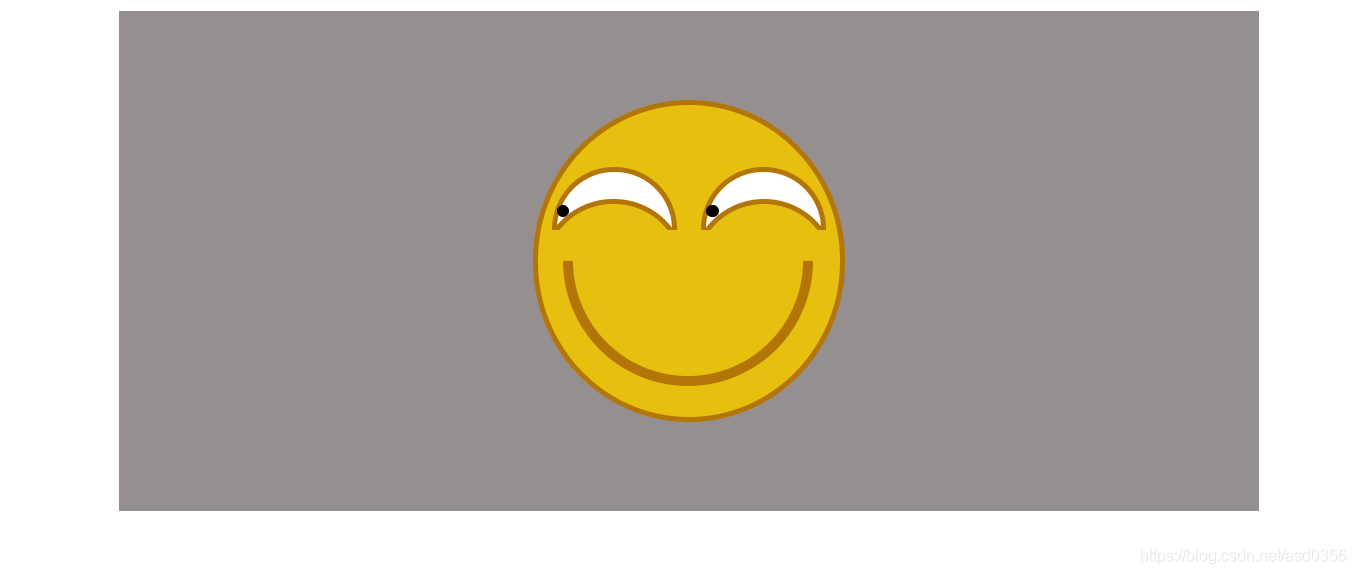
看到这个效果图之后,我们来分析一下此页面的布局。
首先最外层有一个最大的div(图中灰色背景盒子),然后在大div的正中间有一个核心的div盒子(图中淡黄色背景盒子以及其边框),在核心div里面又可以大致分成两个区域:上面的两个眼睛(包括眼眶)和下面的一个微笑。
微笑,比较简单,直接用盒子的边框表示(隐藏盒子的上边框)。
眼睛部分,有些难度,需要用定位以及伪类。
由于两只眼睛一模一样,所以我们只需单独看一只眼睛部分。
这个部分又可细分成三个部分:上眼眶,下眼眶以及眼珠。
上眼眶类似微笑,直接用盒子边框表示。
而下眼眶这里用的是定位和after伪类共同实现。(由于上眼眶和下眼眶必须完全相交且曲率又不能相同,所以此处只能用定位来完成,有妙招的读者欢迎评论区留言)
至于眼珠,为了便利,也是用定位实现。
清楚了实现原理,以下来看看具体实现代码:
HTML代码:
<!DOCTYPE html>
<html lang="en">
<head>
    <meta charset="UTF-8">
    <meta name="viewport" content="width=device-width, initial-scale=1.0">
    <meta http-equiv="X-UA-Compatible" content="ie=edge">
    <title>leer</title>
    <link rel="stylesheet" href="leer.css">
</head>
<body>
    <div class="container">
        <div class="face">
            <div class="eyesbox">
                <div class="eyeAbl"></div>
                <div class="eyeLeft">
                    <div class="pupil"></div>
                </div>
                <div class="eyeAbr"></div>
                <div class="eyeRight">
                    <div class="pupil"></div>
                </div>
            </div>
            <div class="smile">
            </div>
        </div>
    </div>
</body>
</html>
CSS部分:
.container {
    width: 60%;
    min-height: 400px;
    background-color: #968f90;
    overflow: auto;
    margin: 0 auto;
    display: flex;
    justify-content: center;
    align-items: center;
}


@keyframes spin {
    to {
        transform: rotate(75deg);
    }
}

.container:hover .pupil {
    animation: spin 3s infinite linear alternate-reverse;
    transform-origin: 45px 60px;
}

.face {
    margin: 0 auto;
    height: 258px;
    width: 250px;
    background-color: rgb(231, 191, 14);
    border: 4px solid rgb(179, 118, 6);
    border-radius: 100%;
    position: relative;
    overflow: hidden;
}

.eyesbox {
    height: 125px;
    width: 250px;
}

.eyeLeft {
    height: 50px;
    width: 100px;
    margin-left: 11px;
    margin-top: 50px;
    border-radius: 100px 100px 0 0;
    border: 4px solid rgb(179, 118, 6);
    display: inline-block;
    background-color: white;
    position: relative;
}

.eyeRight {
    height: 50px;
    width: 100px;
    margin-left: 15px;
    margin-top: 50px;
    border-radius: 100px 100px 0 0;
    border: 4px solid rgb(179, 118, 6);
    display: inline-block;
    background-color: white;
    position: relative;
}

.eyeAbl {
    height: 25px;
    width: 100px;
    display: inline-block;
    margin-top: 75px;
    margin-left: 10px;
    position: absolute;
    overflow: hidden;
    z-index: 1;
}

.eyeAbr {
    height: 25px;
    width: 100px;
    display: inline-block;
    margin-top: 75px;
    margin-left: 15px;
    position: absolute;
    overflow: hidden;
    z-index: 1;
}

.eyeAbl::after,
.eyeAbr::after {
    content: '';
    width: 109px;
    height: 109px;
    border: 4px solid;
    border-color: rgb(179, 118, 6);
    border-radius: 90px;
    display: inline-block;
    margin-left: -8px;
    background-color: rgb(231, 191, 14);
}


.pupil {
    height: 10px;
    width: 10px;
    border-radius: 100%;
    background-color: black;
    margin-top: 26px;
    position: absolute;
}

.smile {
    margin-left: 20px;
    height: 100px;
    width: 200px;
    border-radius: 0 0 150px 150px;
    border: 8px solid rgb(179, 118, 6);
    border-top-style: hidden;
}

* {
    box-sizing: border-box;
}
注:此处为了好看,我还添加了CSS3里面的动画效果。(这里本应该用JS来实现动画效果:眼睛随着鼠标方位的移动而移动)。待到我后续学会了JS后再补上此效果,有兴趣的读者可以自己尝试做做。





 扫一扫
扫一扫


 1223
1223


 到【灌水乐园】发言



