Jupyter Notebook最新版本(7.xx.xx)不好安装,降级安装能用的(亲测)

解决PythonNotebook版本兼容问题及安装教程
文章讲述了用户在升级Python到3.10后遇到nb_conda不支持的问题,通过降级到3.8版本并详细介绍了如何安装Notebook6.4、nbextensions和configurator的过程,提供了解决类似问题的步骤作为参考。
部署运行你感兴趣的模型镜像

已经安装了7版本的可以先卸载,具体按照这篇文章来做就可以
安装notebook 6.4


--------2023-12-30------------(昨天用的还好好的。。。)
这个博主安装的是3.10版本的python,我也是这样安装的,使用清华源,后面使用conda install nb_conda 又出现报错,告诉我没有支持3.10版本的nb_conda。所以我在降级到3.8试一下。

终于完美了。
conda create -n jupyter python=3.8

python版本
conda activate jupyter
conda install notebook=6.4

notebook版本
巨详细知乎链接

安装nbextensions
conda install -c conda-forge jupyter_contrib_nbextensions
jupyter contrib nbextension install --user

安装nbextensions_configurator
conda install -c conda-forge jupyter_nbextensions_configurator
jupyter nbextensions_configurator enable --user

dangdang!完美!都能用。不知道哪里就会出问题,仅供参考!
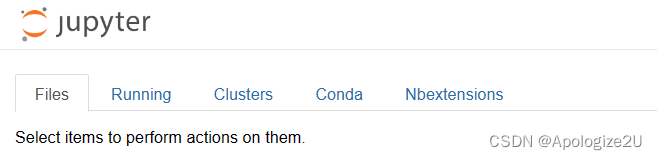
在这里插入图片描述

您可能感兴趣的与本文相关的镜像

Python3.10

Python3.10

Conda
Python

Python 是一种高级、解释型、通用的编程语言,以其简洁易读的语法而闻名,适用于广泛的应用,包括Web开发、数据分析、人工智能和自动化脚本

E 15:09:07.613 NotebookApp] Exception while loading config file /root/.jupyter/jupyter_notebook_config.py Traceback (most recent call last): File "/usr/local/lib/python3.6/site-packages/traitlets/config/application.py", line 563, in _load_config_files config = loader.load_config() File "/usr/local/lib/python3.6/site-packages/traitlets/config/loader.py", line 457, in load_config self._read_file_as_dict() File "/usr/local/lib/python3.6/site-packages/traitlets/config/loader.py", line 489, in _read_file_as_dict py3compat.execfile(conf_filename, namespace) File "/usr/local/lib/python3.6/site-packages/ipython_genutils/py3compat.py", line 198, in execfile exec(compiler(f.read(), fname, 'exec'), glob, loc) File "/root/.jupyter/jupyter_notebook_config.py", line 85, in <module> c.NotebookApp.allow_root = true NameError: name 'true' is not defined [W 2025-11-11 15:09:08.665 LabApp] 'allow_root' has moved from NotebookApp to ServerApp. This config will be passed to ServerApp. Be sure to update your config before our next release. [W 2025-11-11 15:09:08.666 LabApp] 'allow_root' has moved from NotebookApp to ServerApp. This config will be passed to ServerApp. Be sure to update your config before our next release. [I 2025-11-11 15:09:08.678 LabApp] JupyterLab extension loaded from /usr/local/lib/python3.6/site-packages/jupyterlab [I 2025-11-11 15:09:08.678 LabApp] JupyterLab application directory is /usr/local/share/jupyter/lab [I 15:09:08.729 NotebookApp] notebooks 运行所在的本地路径: /root [I 15:09:08.730 NotebookApp] Jupyter Notebook 6.4.10 is running at: [I 15:09:08.730 NotebookApp] http://localhost:8888/?token=ad8b756802285ad04147303b6b7e297e0ec01bc82bf12968 [I 15:09:08.730 NotebookApp] or http://127.0.0.1:8888/?token=ad8b756802285ad04147303b6b7e297e0ec01bc82bf12968 [I 15:09:08.730 NotebookApp] 使用 Control-C 停止此服务器并关闭所有内核(连续操作两次便可跳过确认界面)。 [W 15:09:08.739 NotebookApp] 没有找到网页浏览器: could not locate runnable browser。 [C 15:09:08.740 NotebookApp]
最新发布
11-12
评论 2
成就一亿技术人!
拼手气红包6.0元
还能输入1000个字符
 
红包 添加红包
表情包 插入表情
 条评论被折叠 查看
添加红包

请填写红包祝福语或标题

红包个数最小为10个

红包金额最低5元

当前余额3.43前往充值 >
需支付:10.00
成就一亿技术人!
领取后你会自动成为博主和红包主的粉丝 规则
hope_wisdom
发出的红包
实付
使用余额支付
点击重新获取
扫码支付
钱包余额 0

抵扣说明:

1.余额是钱包充值的虚拟货币,按照1:1的比例进行支付金额的抵扣。
2.余额无法直接购买下载,可以购买VIP、付费专栏及课程。

余额充值




