
Microsoft Exchange Retention Policy

本文详细解析了Exchange服务器中的邮件保留策略,包括RetentionPolicy、RetentionTag的类型与区别,如DeleteandAllowRecovery、PermanentlyDelete及MovetoArchive等。同时介绍了保留策略的设置流程,从创建保留标签到将其应用于邮箱的过程。

这个图是最重要的一个图,需要熟记。
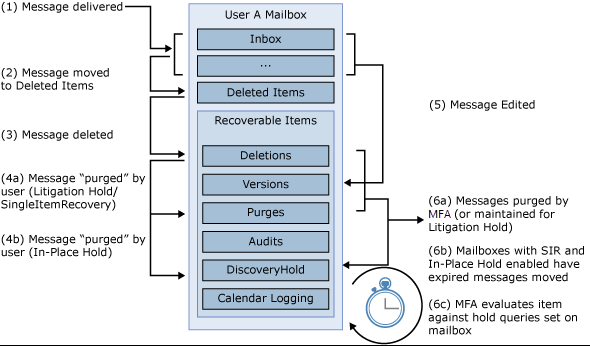


Retention Policy

Retention tag 是给邮件添加保留设置的,有delete and allow recover,Permanently Delete永久删除,move to archive

  • Delete and Allow Recovery allows the user to recover deleted items until the deleted item retention period for the mailbox database or the user is reached.
  • Permanently Delete purges the item from the mailbox database.
  • Move to Archive moves the item to the user's archive mailbox, if it exists. If a user doesn't have an archive mailbox, no action is taken. This action is available only for tags that are automatically applied to the entire mailbox (default) and tags applied by users to items or folders (personal tags).

Regention tag有三种类型:

  1. Default policy tag (DPT)
  2. Retention policy tag (RPT)
  3. Personal tag 

优先级是 3 - 2 - 1.


区别:

  1. DPT和Persional tag 有delete and allow recover,Permanently Delete 和 Move to Archive, 而 RPT 没有Move to Archive。
  2. DPT是针对整个mailbox,RPT是针对系统文件夹(比如: Inbox, Sent Items, Deleted Items, Junk E-mail)
  3. DPT, RPT 只能是管理员应用,用户无法改变; Personal tag 是用户自己应用。


Note:设置了Retention Policy后,是不能立即生效的,需要cmdlet 强制生效 

Start-ManagedFolderAssistant –Identity <mailbox>


Retention policy是将设置好的不同的tag组合起来,然后配置给mailbox
流程:

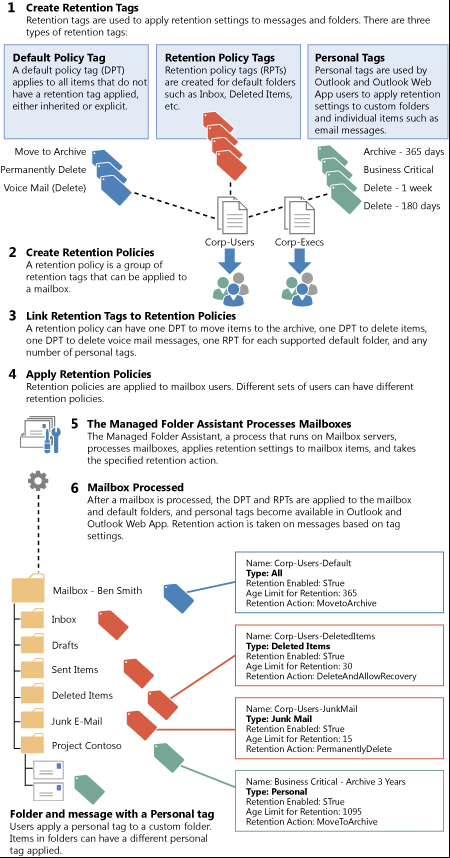
  1. 创建 retention tags
  2. 创建 retention policies
  3. 把retention tags 添加到 retention policies中,即Retention Policy是用来组合Retention tags的
  4. 然后在mailbox中apply mail feature中添加一种policy
  5. Managed Folder Assistant 处理 mailboxes
  6. Mailbox 被处理。

 下图是流程图,和Retention Tag的类型和区别。


转载于:https://www.cnblogs.com/ningxin/p/10213318.html

在 InfluxDB 2.x 中,可以通过 **CLI、API 或 Terraform** 在自动化创建 bucket 时指定 **retention policy(保留策略)**。以下是具体实现方法: --- ## **1. 使用 `influx` CLI 指定 Retention Policy** ```bash # 创建 bucket 并设置 30 天保留策略(30d) influx bucket create \ --name mybucket \ --org myorg \ --retention 30d # 支持 ns, us, ms, s, m, h, d, w # 检查现有 bucket 的 retention 设置 influx bucket list --org myorg --name mybucket ``` **关键参数**: - `--retention 0`:无限期保留(默认) - `--retention 72h`:保留 72 小时 - `--retention 4w`:保留 4 周 --- ## **2. 通过 InfluxDB API 动态设置 Retention** ```python import requests INFLUX_URL = "http://localhost:8086" ADMIN_TOKEN = "your-admin-token" ORG = "myorg" BUCKET = "mybucket" # 获取 org_id orgs = requests.get( f"{INFLUX_URL}/api/v2/orgs", headers={"Authorization": f"Token {ADMIN_TOKEN}"} ).json() org_id = next(org["id"] for org in orgs["orgs"] if org["name"] == ORG) # 创建 bucket 并设置 7 天保留策略 requests.post( f"{INFLUX_URL}/api/v2/buckets", headers={"Authorization": f"Token {ADMIN_TOKEN}"}, json={ "orgID": org_id, "name": BUCKET, "retentionRules": [{ "type": "expire", "everySeconds": 604800 # 7 天(单位:秒) }] } ) ``` **Retention Rules 参数说明**: | 字段 | 说明 | |------|------| | `type` | 固定为 `"expire"` | | `everySeconds` | 保留时长(秒),例如 `86400` = 1 天 | | `shardGroupDurationSeconds` | (可选)分片组持续时间 | --- ## **3. 使用 Terraform 管理 Retention Policy** ```hcl resource "influxdb-v2_bucket" "metrics" { name = "metrics" org_id = influxdb-v2_organization.main.id retention_rules { every_seconds = 2592000 # 30 天 } } ``` --- ## **4. 动态调整现有 Bucket 的 Retention** 如果 bucket 已存在但需要修改 retention,可通过 API 更新: ```python # 获取 bucket_id buckets = requests.get( f"{INFLUX_URL}/api/v2/buckets?org={ORG}", headers={"Authorization": f"Token {ADMIN_TOKEN}"} ).json() bucket_id = next(b["id"] for b in buckets["buckets"] if b["name"] == BUCKET) # 更新 retention 为 1 天 requests.patch( f"{INFLUX_URL}/api/v2/buckets/{bucket_id}", headers={"Authorization": f"Token {ADMIN_TOKEN}"}, json={"retentionRules": [{"everySeconds": 86400}]} ) ``` --- ## **5. 高级场景:分片组持续时间(Shard Group Duration)** 对于高频写入场景,可优化分片组持续时间(默认自动计算): ```python retention_rules = [{ "everySeconds": 2592000, # 30 天 "shardGroupDurationSeconds": 604800 # 分片组跨度 7 天 }] ``` --- ## **最佳实践** 1. **生产环境推荐**: - 使用 **API 或 Terraform**,而非 CLI(更适合脚本化)。 2. **关键检查逻辑**: - 先调用 `GET /api/v2/buckets` 检查 bucket 是否存在及当前 retention 设置。 3. **错误处理**: - 捕获 `409 Conflict`(bucket 已存在)和 `401 Unauthorized`(token 无效)。 ---
评论
添加红包

请填写红包祝福语或标题

红包个数最小为10个

红包金额最低5元

当前余额3.43前往充值 >
需支付:10.00
成就一亿技术人!
领取后你会自动成为博主和红包主的粉丝 规则
hope_wisdom
发出的红包
实付
使用余额支付
点击重新获取
扫码支付
钱包余额 0

抵扣说明:

1.余额是钱包充值的虚拟货币,按照1:1的比例进行支付金额的抵扣。
2.余额无法直接购买下载,可以购买VIP、付费专栏及课程。

余额充值


