


 本文详细介绍了在计算机视觉中如何使用掩码操作来增强图像对比度,包括手工实现和使用OpenCV的filter2D函数。通过具体的C++代码示例,展示了如何应用特定的掩码矩阵来调整图像的每个像素值。
在矩阵中的掩码操作
在矩阵中的掩码操作非常简单。我们根据掩码矩阵(也就是所谓的核)来重新计算图像中的每一个像素值。掩码的数值将会调整对相邻的像素(以及当前像素)转变为新的像素值的影响。从数学的角度上来说,使用我们指定的数值类似于加权平均值。
测试案例
我们来考虑一下一个图像的对比度增强问题。我们想要将图像中的每一个像素都应用于下面的的方程当中:
I(i,j)=5*I(i,j)-[I(i-1,j)+I(i+1,j]+I(i,j-1)+I(i,j+1)]<=====>I(i,j)*M,这里M=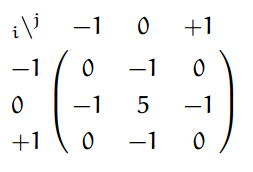
这里第一个式子是要使用的方程,第二个是使用掩码后的第一个方程的压缩版本。你在使用掩码的时候,通过把掩码矩阵的中心(在上面的例子中就是坐标的(0,0)位置)放置在你想要计算的位置,然后将与之重叠的掩码值相乘,最后将所有的结果进行求和就可以得出最后的结果。在后面的大的矩阵中,你会更加容易的看到这些都是一样的。
现在,让我们看一下我们如何通过使用基本的像素读取技术或者使用filter2D函数来实现。
基本的方法
例子:
void Sharpen(const Mat & myImage ,Mat &Result)
{
CV_Assert(myImage.depth()==CV_8U);
Result.create(myImage.size(),myImage.type());
const int nChannels=myImage.channels();
for(int j=1;j<myImage.rows-1;++j)
{
const uchar*previous=myImage.ptr<uchar>(j-1);
const uchar*current=myImage.ptr<uchar>(j);
const uchar*next=myImage.ptr<uchar>(j+1);
uchar*output=Result.ptr<uchar>(j);

for(int i=nChannels;i<nChannels*(myImage.cols-1);++i)
{
*output++=saturate_cast<uchar>(5*current[i]-current[i-nChannels]-current[i+nChannels]-previous[i]-next[i]);
}
}
Result.row(0).setTo(Scalar(0));
Result.row(Result.rows-1).setTo(Scalar(0));
Result.col(0).setTo(Scalar(0));
Result.col(Result.cols-1).setTo(Scalar(0));
}

}
As a computer vision library, OpenCV deals a lot with image pixels that are often encoded in a compact, 8- or 16-bit per channel, form and thus have a limited value range. Furthermore, certain operations on images, like color space conversions, brightness/contrast adjustments, sharpening, complex interpolation (bi-cubic, Lanczos) can produce values out of the available range. If you just store the lowest 8 (16) bits of the result, this results in visual artifacts and may affect a further image analysis. To solve this problem, the so-called saturation arithmetics is used. For example, to store r, the result of an operation, to an 8-bit image, you find the nearest value within the 0..255 range:

Similar rules are applied to 8-bit signed, 16-bit signed and unsigned types. This semantics is used everywhere in the library. In C++ code, it is done using the saturate_cast<> functions that resemble standard C++ cast operations. See below the implementation of the formula provided above:
I.at<uchar>(y, x) = saturate_cast<uchar>(r);
where cv::uchar is an OpenCV 8-bit unsigned integer type. In the optimized SIMD code, such SSE2 instructions as paddusb, packuswb, and so on are used. They help achieve exactly the same behavior as in C++ code.
Note
Saturation is not applied when the result is 32-bit integer.
首先,我们确保输入的图像数据是unsigned char 格式的。我们使用CV_Assert函数,当表达式内部结果是false的时候,抛出错误。
CV_Assert(myImage.detpth()==CV_8U);
我们创建了一个和输入相同大小相同类型的输出图像。就像我们在“How The image matrix stored in the memory?”这一章节中看到的一样,根据通道数量的不同,可能会有一个或者更多的子列。我们使用指针(pointer)迭代遍历他们,因此元素总数在这里是这样确定的。
Result.create(myImage.size(),myImage.type());
const int nChannels=myImage.channels();
我们在这里使用C语言中[]操作符来读取像素。这里我们需要同时读取多个行,因此我们为每一个需要的行设置指针(一个是previous,一个current以及一个next line)。我们需要另一个指针来存储计算结果。用简单的[]操作符来读取想要读取的元素。我们通过简单的在每一个操作完成之后递增(增加一个byte)来向前移动输出指针。
for(int j=1;j<myImage.rows-1;++j)
{
const uchar* previous=myImage.ptr<uchar>(j-1);
const uchar* current=myImage.ptr<uchar>(j);
const uchar* next=myImage.pr<uchar>(j+1);
uchar* output=Result.ptr<uchar>(j);
for(int i=nChannels;i<nChannels*(myImage.cols-1);++i)
{
*output++=saturate_cast<uchar>(5*current[i]-current[i-nChannels]-current[i+nChannels]-previous[i]-next[i];
}
}
在上面所示的程序会导致图像的边界不存在像素问题(类似于-1- -1)。我们的方程在这里并没有将这种情况作出定义。一个简单的解决方案是不在这些区域使用核,例如设置这些边界像素为0:
Result.row(0).setTo(Scalar(0));
Result.row(Result.rows-1).setTo(Scalar(0));
Result.col(0).setTo(Scalar(0));
Result.col(Result.cols-1).setTo(Scalar(0));
filter2D函数
在图像处理使用过滤器中是稀疏平常的事情,在OpenCV中存在一个关注使用掩码(在某些地方同样被称作核)的函数。你首先应当做的事情是定义一个Mat对象来存放这个掩码:
Mat kern=(Mat_<char>(3,3)<<0,-1,0,
                          -1,5,-1,
                           0,-1,0);
在调用filter2D函数的时候指定输入,输出图像以及所使用的内核:
filter2D(I,K,I.depth(),kern);
这个函数甚至拥有第五个可原则的参数来指定核的中心,以及第六个参数来决定在未定义(边界)行为的区域处进行什么操作。使用这个函数拥有一些有点:更短,更精简而且因为在实现的时候使用了一些优化技术,因此在使用时要比手动编码的方法更快一些。例如在我的测试中,第二个方法使用了13微秒,第一个方法使用了31微秒。确实有一些差距。
例如:
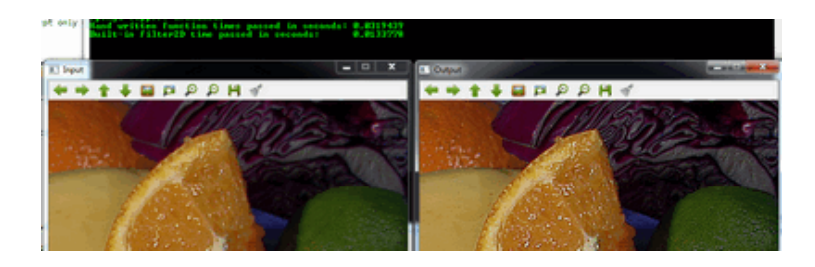
你可以从这里下载源码或者从OpenCV源代码库的事例文件夹的samples/cpp/tutorial_code/core/mat_mask_operations/mat_mask_operations.cpp位置中查看源码。





 扫一扫
扫一扫


 被折叠的 条评论
为什么被折叠?
被折叠的 条评论
为什么被折叠?
 到【灌水乐园】发言





