



 本文详细介绍了如何在Android应用中构建音乐播放器的用户界面和逻辑控制,包括使用SeekBar进行进度控制,实现播放、暂停、停止等功能,以及音量调节。同时,文章展示了如何通过MediaPlayer和AudioManager管理音频播放和音量。
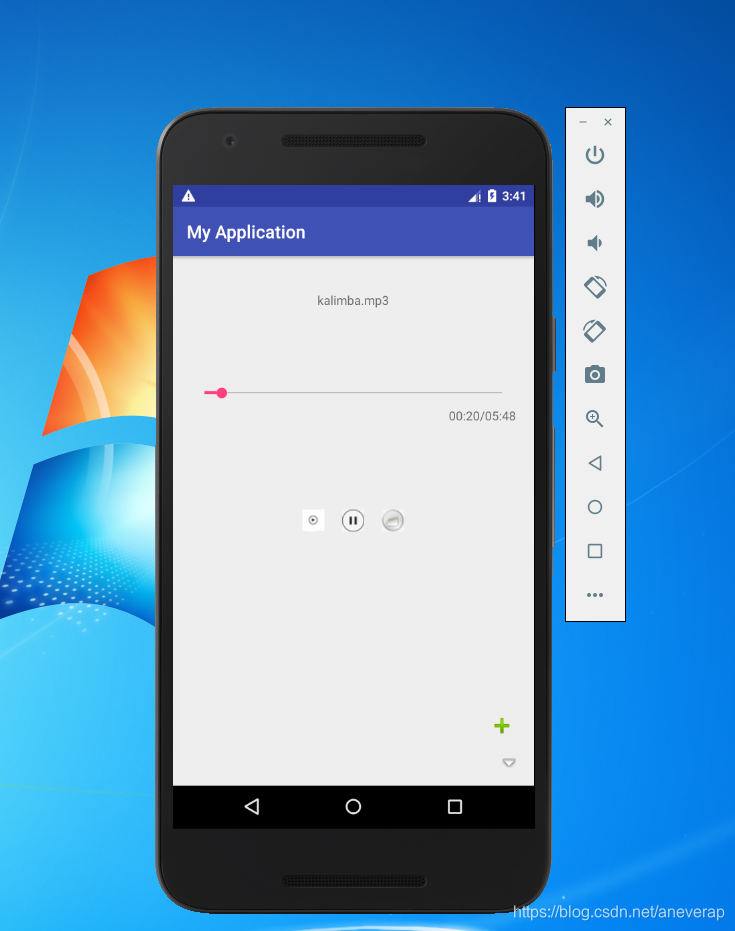
效果图如上:
在activity_main.xml中:
<?xml version="1.0" encoding="utf-8"?>
<RelativeLayout
    xmlns:android="http://schemas.android.com/apk/res/android"
    android:layout_margin="20dp"
    android:layout_width="match_parent"
    android:layout_height="match_parent">

    <LinearLayout
        android:orientation="vertical"
        android:layout_marginTop="20dp"
        android:layout_width="match_parent"
        android:layout_height="wrap_content">

        <TextView
            android:id="@+id/music_name"
            android:layout_gravity="center_horizontal"
            android:layout_width="wrap_content"
            android:layout_height="wrap_content"/>

        <RelativeLayout
            android:layout_width="match_parent"
            android:layout_height="wrap_content">

            <SeekBar
                android:id="@+id/seekBar"
                android:layout_marginTop="80dp"
                android:layout_width="match_parent"
                android:layout_height="wrap_content"/>

            <LinearLayout
                android:layout_below="@id/seekBar"
                android:layout_alignEnd="@id/seekBar"
                android:layout_width="wrap_content"
                android:layout_height="wrap_content">

                <TextView
                    android:id="@+id/music_cur"
                    android:layout_width="wrap_content"
                    android:layout_height="wrap_content"/>

                <TextView
                    android:layout_width="wrap_content"
                    android:layout_height="wrap_content"
                    android:text="/"/>

                <TextView
                    android:id="@+id/music_length"
                    android:layout_width="wrap_content"
                    android:layout_height="wrap_content"/>

            </LinearLayout>

        </RelativeLayout>

    </LinearLayout>

    <LinearLayout
        android:gravity="center"
        android:layout_width="match_parent"
        android:layout_height="match_parent">

        <ImageButton
            android:id="@+id/play"
            android:src="@drawable/play"
            android:background="@null"
            android:layout_width="25dp"
            android:layout_height="25dp"/>

        <ImageButton
            android:id="@+id/pause"
            android:src="@drawable/pause"
            android:background="@null"
            android:layout_marginLeft="20dp"
            android:layout_width="25dp"
            android:layout_height="25dp"/>

        <ImageButton
            android:id="@+id/stop"
            android:src="@drawable/stop"
            android:background="@null"
            android:layout_marginLeft="20dp"
            android:layout_width="25dp"
            android:layout_height="25dp"/>

    </LinearLayout>

    <LinearLayout
        android:gravity="bottom|right"
        android:orientation="vertical"
        android:layout_width="match_parent"
        android:layout_height="match_parent">

        <ImageButton
            android:id="@+id/volume_plus"
            android:src="@android:drawable/ic_input_add"
            android:background="@null"
            android:layout_width="wrap_content"
            android:layout_height="wrap_content"/>

        <ImageButton
            android:id="@+id/volume_decrease"
            android:src="@android:drawable/arrow_down_float"
            android:background="@null"
            android:layout_marginTop="20dp"
            android:layout_width="wrap_content"
            android:layout_height="wrap_content"/>

    </LinearLayout>

</RelativeLayout>
在MainActivity.java中:
package com.example.administrator.myapplication;

import android.Manifest;
import android.app.Service;
import android.content.Intent;
import android.content.pm.PackageManager;
import android.graphics.Bitmap;
import android.graphics.BitmapFactory;
import android.media.AudioManager;
import android.media.MediaPlayer;
import android.os.Environment;
import android.os.Handler;
import android.os.Message;
import android.support.annotation.NonNull;
import android.support.v4.app.ActivityCompat;
import android.support.v4.content.ContextCompat;
import android.support.v4.os.EnvironmentCompat;
import android.support.v7.app.AppCompatActivity;
import android.os.Bundle;
import android.util.Log;
import android.view.View;
import android.widget.Button;
import android.widget.ImageButton;
import android.widget.ImageView;
import android.widget.SeekBar;
import android.widget.TextView;
import android.widget.Toast;

import java.io.File;
import java.io.FilenameFilter;
import java.io.IOException;
import java.text.SimpleDateFormat;
import java.util.Date;
import java.util.List;
import java.util.Timer;
import java.util.TimerTask;

public class MainActivity extends AppCompatActivity implements View.OnClickListener {

    private ImageButton play, pause, stop, volume_plus, volume_decrease;
    private TextView musicName, musicLength, musicCur;
    private SeekBar seekBar;

    private MediaPlayer mediaPlayer = new MediaPlayer();

    private AudioManager audioManager;

    private Timer timer;

    int maxVolume, currentVolume;

    private boolean isSeekBarChanging;//互斥变量,防止进度条与定时器冲突。
    private int currentPosition;//当前音乐播放的进度

    SimpleDateFormat format;

    @Override
    protected void onCreate(Bundle savedInstanceState) {
        super.onCreate(savedInstanceState);
        setContentView(R.layout.activity_main);

        audioManager = (AudioManager) getSystemService(Service.AUDIO_SERVICE);

        format = new SimpleDateFormat("mm:ss");

        play = (ImageButton) findViewById(R.id.play);
        pause = (ImageButton) findViewById(R.id.pause);
        stop = (ImageButton) findViewById(R.id.stop);
        volume_plus = (ImageButton) findViewById(R.id.volume_plus);
        volume_decrease = (ImageButton) findViewById(R.id.volume_decrease);

        musicName = (TextView) findViewById(R.id.music_name);
        musicLength = (TextView) findViewById(R.id.music_length);
        musicCur = (TextView) findViewById(R.id.music_cur);

        seekBar = (SeekBar) findViewById(R.id.seekBar);
        seekBar.setOnSeekBarChangeListener(new MySeekBar());

        play.setOnClickListener(MainActivity.this);
        pause.setOnClickListener(MainActivity.this);
        stop.setOnClickListener(MainActivity.this);
        volume_plus.setOnClickListener(MainActivity.this);
        volume_decrease.setOnClickListener(MainActivity.this);

        if (ContextCompat.checkSelfPermission(MainActivity.this, Manifest.permission.WRITE_EXTERNAL_STORAGE) !=
                PackageManager.PERMISSION_GRANTED) {
            ActivityCompat.requestPermissions(MainActivity.this,
                    new String[]{Manifest.permission.WRITE_EXTERNAL_STORAGE}, 1);
        } else {
            initMediaPlayer();//初始化mediaplayer
        }

    }

    private void initMediaPlayer() {
        try {
            mediaPlayer.setDataSource("/storage/sdcard/kalimba.mp3");//指定音频文件的路径
            mediaPlayer.prepare();//让mediaplayer进入准备状态
            mediaPlayer.setLooping(true);
            mediaPlayer.setOnPreparedListener(new MediaPlayer.OnPreparedListener() {
                public void onPrepared(MediaPlayer mp) {
                    seekBar.setMax(mediaPlayer.getDuration());
                    musicLength.setText(format.format(mediaPlayer.getDuration()) + "");
                    musicCur.setText("00:00");
                    musicName.setText("kalimba.mp3");
                }
            });
        } catch (Exception e) {
            e.printStackTrace();
        }
    }

    @Override
    public void onRequestPermissionsResult(int requestCode, @NonNull String[] permissions, @NonNull int[] grantResults) {
        switch (requestCode) {
            case 1:
                if (grantResults.length > 0 &&
                        grantResults[0] == PackageManager.PERMISSION_GRANTED) {
                    initMediaPlayer();
                } else {
                    Toast.makeText(MainActivity.this, "denied access", Toast.LENGTH_SHORT).show();
                    finish();
                }
                break;
            default:
        }
    }

    @Override
    public void onClick(View view) {
        switch (view.getId()) {
            case R.id.play:
                if (!mediaPlayer.isPlaying()) {
                    mediaPlayer.start();//开始播放
                    mediaPlayer.seekTo(currentPosition);

                    //监听播放时回调函数
                    timer = new Timer();
                    timer.schedule(new TimerTask() {

                        Runnable updateUI = new Runnable() {
                            @Override
                            public void run() {
                                musicCur.setText(format.format(mediaPlayer.getCurrentPosition()) + "");
                            }
                        };

                        @Override
                        public void run() {
                            if (!isSeekBarChanging) {
                                seekBar.setProgress(mediaPlayer.getCurrentPosition());
                                runOnUiThread(updateUI);
                            }
                        }
                    }, 0, 50);
                }
                break;
            case R.id.pause:
                if (mediaPlayer.isPlaying()) {
                    mediaPlayer.pause();//暂停播放
                }
                break;
            case R.id.stop:
                Toast.makeText(MainActivity.this, "停止播放", Toast.LENGTH_SHORT).show();
                if (mediaPlayer.isPlaying()) {
                    mediaPlayer.reset();//停止播放
                    initMediaPlayer();
                }
                break;
            //音量加
            case R.id.volume_plus:
                maxVolume = audioManager.getStreamMaxVolume(AudioManager.STREAM_MUSIC);
                audioManager.adjustStreamVolume(AudioManager.STREAM_MUSIC, AudioManager.ADJUST_RAISE, AudioManager.FLAG_SHOW_UI);
                currentVolume = audioManager.getStreamVolume(AudioManager.STREAM_MUSIC);
                Toast.makeText(MainActivity.this, "音量增加,最大音量是:" + maxVolume + ",当前音量" + currentVolume,
                        Toast.LENGTH_SHORT).show();
                break;
            //音量减
            case R.id.volume_decrease:
                maxVolume = audioManager.getStreamMaxVolume(AudioManager.STREAM_MUSIC);
                audioManager.adjustStreamVolume(AudioManager.STREAM_MUSIC, AudioManager.ADJUST_LOWER, AudioManager.FLAG_SHOW_UI);
                currentVolume = audioManager.getStreamVolume(AudioManager.STREAM_MUSIC);
                Toast.makeText(MainActivity.this, "音量减小,最大音量是:" + maxVolume + ",当前音量" + currentVolume,
                        Toast.LENGTH_SHORT).show();
                break;
            default:
                break;
        }
    }

    @Override
    protected void onDestroy() {
        super.onDestroy();
        isSeekBarChanging = true;
        if (mediaPlayer != null) {
            mediaPlayer.stop();
            mediaPlayer.release();
            mediaPlayer = null;
        }
        if (timer != null) {
            timer.cancel();
            timer = null;
        }
    }

    /*进度条处理*/
    public class MySeekBar implements SeekBar.OnSeekBarChangeListener {

        public void onProgressChanged(SeekBar seekBar, int progress,
                                      boolean fromUser) {
        }

        /*滚动时,应当暂停后台定时器*/
        public void onStartTrackingTouch(SeekBar seekBar) {
            isSeekBarChanging = true;
        }

        /*滑动结束后,重新设置值*/
        public void onStopTrackingTouch(SeekBar seekBar) {
            isSeekBarChanging = false;
            mediaPlayer.seekTo(seekBar.getProgress());
        }
    }
}
设置权限:
   <uses-permission android:name="android.permission.WRITE_EXTERNAL_STORAGE"/>

    <uses-permission android:name="android.permission.READ_EXTERNAL_STORAGE" />
    <!-- 在SD卡中创建与删除文件权限 -->
    <uses-permission android:name="android.permission.MOUNT_UNMOUNT_FILESYSTEMS"
        tools:ignore="ProtectedPermissions" />
来自转载:忘了原链接了,原作者看到,请联系!!!





 扫一扫
扫一扫


 566
566

 被折叠的 条评论
为什么被折叠?
被折叠的 条评论
为什么被折叠?
 到【灌水乐园】发言





