


 本文介绍了在.NET中使用配置文件的方法,包括使用appSettings、实现自定义配置节点以及使用Settings.settings等三种方式,并提供了详细的实现步骤。
当我们开发系统的时候要把一部分设置提取到外部的时候,那么就要用到.NET的配置文件了。比如我的框架中使用哪个IOC容器需要可以灵活的选择,那我就需要把IOC容器的设置提取到配置文件中去配置。实现有几种方法。
1.使用appSettings
这个是最简单的可以设置和读取的用户设置

程序中可以用key去读取:
string objContainer = ConfigurationManager.AppSettings["objectContainer"];简单实用但是不够优雅。
2.实现自己的配置节点
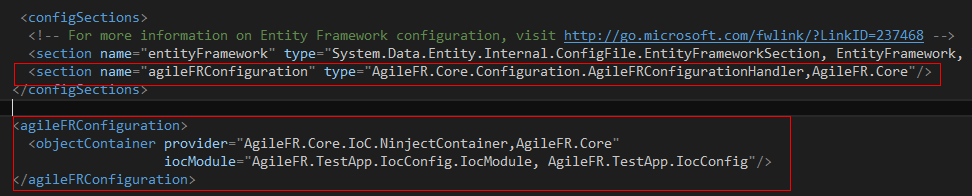
首先在configSections节点配置自己的配置解析类。
那么如何来解析这段配置呢?有两个办法。
方法1:
实现IConfigurationSectionHandler接口来自己解析配置文件的xml文件。
public class ObjectContainerElement
{
          public string Provider {get;set;}
          public string IocModule {get; set;}
}
public class AgileFRConfigurationHandler: IConfigurationSectionHandler
{
public object Create(object parent, object configContext, XmlNode section)
{
var node =section.ChildNodes[0];
if (node.Name != "objectContainer")
throw new ConfigurationErrorsException("不可识别的配置项", node);
var config = new ObjectContainerElement();
foreach (XmlAttribute attr in node.Attributes)
{
switch (attr.Name)
{
case "provider":
config. Provider = attr.Value;
break;
case "iocModule":
config .IocModule = attr.Value;
break;
default:
throw new ConfigurationErrorsException("不可识别的配置属性", attr);
}
}
}
return config;
} //使用
var config = ConfigurationManager.GetSection("agileFRConfiguration") as ObjectContainerElement;这个方法看上去就略屌了,不过就是太麻烦了。
方法2:
继承ConfigurationSection类,配合ConfigurationProperty特性来实现
 public class ObjectContainerElement : ConfigurationElement
    {
        [ConfigurationProperty("provider", IsRequired = true)]
        public string Provider
        {
            get
            {
                return (string)this["provider"];
            }
            set
            {
                this["provider"] = (object)value;
            }
        }
        [ConfigurationProperty("iocModule", IsRequired = false)]
        public string IocModule
        {
            get
            {
                return (string)this["iocModule"];
            }
            set
            {
                this["iocModule"] = (object)value;
            }
        }
    }

 /// <summary>
    /// 配置处理类
    /// </summary>
    public class AgileFRConfigurationHandler : ConfigurationSection
    {
        [ConfigurationProperty("objectContainer", IsRequired = true)]
        public ObjectContainerElement ObjectContainer
        {
            get
            {
                return (ObjectContainerElement)this["objectContainer"];
            }
            set
            {
                this["objectContainer"] = (object)value;
            }
        }
}//使用var configurationHandler = (AgileFRConfigurationHandler)ConfigurationManager.GetSection("agileFRConfiguration");
var objectContainer=configurationHandler.ObjectContainer; 这个方法简单优雅,我喜欢。 3.Settings.settings
这个方法我不太喜欢,它会自己生成配置文件对应的Class。不说了。





 扫一扫
扫一扫


 被折叠的 条评论
为什么被折叠?
被折叠的 条评论
为什么被折叠?
 到【灌水乐园】发言





