



在使用自己编译的内核进linux开发的时候,好像所示哪一个环节没有修改好,使用nfs的过程中一直出现这种情况,设备能够正常的进行挂载但是挂载成功之后进行文件拷贝的时候一直提示:
nfs: server 192.168.1.107 not responding still trying
如果检查了你的服务器上的文件已经有权限的,并且一切的配置也是没有问题的那么就可能使是因为nfs使用的是udp进行的通讯,相对于电脑来说你的设备的网卡实在是太慢了,所以使用的时候需要进行设置,使用一下命令进行:
mount -t nfs -o intr,nolock,rsize=1024,wsize=1024 192.168.199.142:/home/wxp/nfs_root /mnt
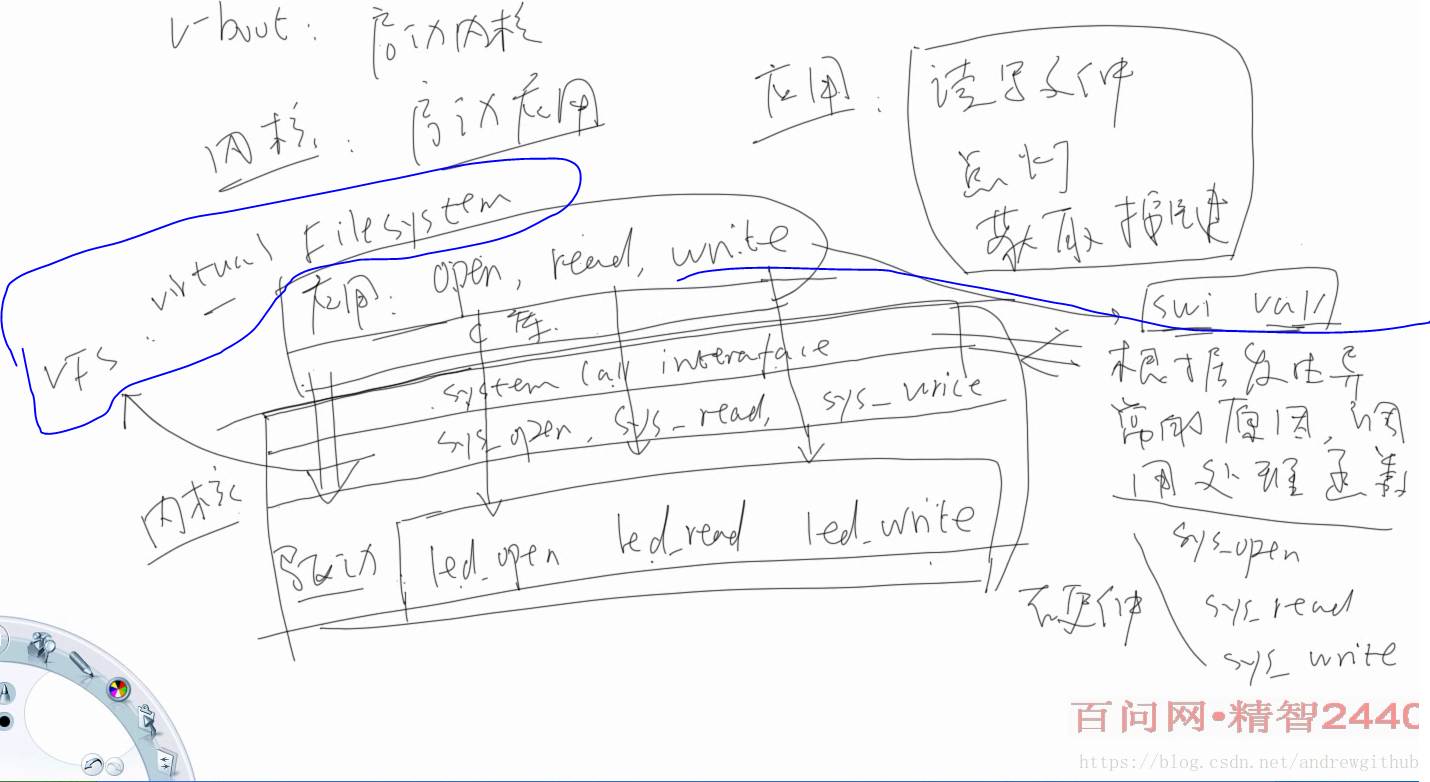
proc文件与dev文件的区别
1、proc目录是一个虚拟文件系统,可以为linux用户空间和内核空间提供交互
它只存在于内存中,而不占实际的flash或硬盘空间
2、/proc/devices/里的设备是加载驱动程序时生成的
3、/dev/下的设备是通过创建设备节点生成的,用户通过此设备节点来访问内核里的驱动
开发2440的led驱动程序
驱动程序 first_drv.c
#include <linux/module.h>
#include <linux/kernel.h>
#include <linux/fs.h>
#include <linux/init.h>
#include <linux/delay.h>
#include <asm/uaccess.h>
#include <asm/irq.h>
#include <asm/io.h>
#include <asm/arch/regs-gpio.h>
#include <asm/hardware.h>

static struct class *firstdrv_class;
static struct class_device	*firstdrv_class_dev;

volatile unsigned long *gpfcon = NULL;
volatile unsigned long *gpfdat = NULL;

//从用户空间向内核复制数据
static int first_drv_open(struct inode *inode, struct file *file)
{
	printk("first_drv_open\n");
	/* ,5, */
	*gpfcon &= ~((0x3<<(4*2)) | (0x3<<(5*2)) | (0x3<<(6*2)));
	*gpfcon |= ((0x1<<(4*2)) | (0x1<<(5*2)) | (0x1<<(6*2)));
	return 0;
}

static ssize_t first_drv_write(struct file *file, const char __user *buf, size_t count, loff_t * ppos)
{
	int val;

	printk("first_drv_write\n");

	//从用户向内核复制数值

	copy_from_user(&val, buf, count); //	copy_to_user();
	//copy_to_user从内核向用户复制
	if (val == 1)
	{
		//
		*gpfdat &= ~((1<<4) | (1<<5) | (1<<6));
	}
	else
	{
		//
		*gpfdat |= (1<<4) | (1<<5) | (1<<6);
	}

	return 0;
}


//声明一个结构体成员,用于初始化驱动函数
static struct file_operations first_drv_fops = {
	//. + 结构体成员是  C99以上的结构体使用的是结构体成员,定义一个这样的结构体,并对结构体进行部分成员进行复制
	//结构体成员都是函数指针
    .owner  =   THIS_MODULE,    /*   */
    .open   =   first_drv_open,
	.write	=	first_drv_write,
};


int major;
static int first_drv_init(void)
{
	//major  主设备号
	major = register_chrdev(0, "first_drv", &first_drv_fops); //注册驱动程序
	//这里的第一个参数0的意思是让内核为设备分配主设备号
	//major是写0分配之后的设备号

	firstdrv_class = class_create(THIS_MODULE, "firstdrv");

	firstdrv_class_dev = class_device_create(firstdrv_class, NULL, MKDEV(major, 0), NULL, "xyz"); /* /dev/xyz */

	gpfcon = (volatile unsigned long *)ioremap(0x56000050, 16);
	gpfdat = gpfcon + 1;

	return 0;
}

static void first_drv_exit(void)
{
	unregister_chrdev(major, "first_drv"); // �

	class_device_unregister(firstdrv_class_dev);
	class_destroy(firstdrv_class);
	iounmap(gpfcon);
}

module_init(first_drv_init);
module_exit(first_drv_exit);


MODULE_LICENSE("GPL");
Makefile文件
KERN_DIR = /work/svn_linux/linux
#  KERN_DIR是内核的目录位置
#注意指向的内核一定是编译过测内核,并且使用的是和你设备中是同一版本,最好是同一个内核
#指到这个位置是为了使用内核目录下的makefile对该文件进行编译
all:
	make -C $(KERN_DIR) M=`pwd` modules

clean:
	make -C $(KERN_DIR) M=`pwd` modules clean
	rm -rf modules.order

obj-m	+= first_drv.o
在编译之后会生成相应的.ko文件
然后编辑相应的的测试文件;
firstdrvtest.c
#include <sys/types.h>
#include <sys/stat.h>
#include <fcntl.h>
#include <stdio.h>

/* firstdrvtest on
  * firstdrvtest off
  */
int main(int argc, char **argv)
{
	int fd;
	int val = 1;
	///dev/xyz  这个名字随便起,因为最终决定 /dev下面的设备节点和/proc/devices装载驱动程序时生成的节点进行连接的是设备的编号,这个是驱动程序决定的,也就是register_chrdev 函数的第一个参数决定
	//若 register_chrdev 函数的第一个参数是 0 内核将根据情况为设备分配一个设备节点号
	fd = open("/dev/xyz", O_RDWR);
	if (fd < 0)
	{
		printf("can't open!\n");
	}
	if (argc != 2)
	{
		printf("Usage :\n");
		printf("%s <on|off>\n", argv[0]);
		return 0;
	}

	if (strcmp(argv[1], "on") == 0)
	{
		val  = 1;
	}
	else
	{
		val = 0;
	}

	write(fd, &val, 4);
	return 0;
}
然后就是使用mount 进行设备的挂载
mount -t nfs -o intr,nolock,rsize=1024,wsize=1024 192.168.199.142:/home/wxp/nfs_root /mnt
挂载之后使用
insmod xxx.ko
手动进行驱动程序的安装
安装完成之后使用 mknod 在/dev目录下创建相应的设备节点,注意节点是在驱动程序助攻确定的,要是自己不确定可以再设备中的a/proc目录中使用
cat /proc/devices
命令进行查看相应的设备的节点编号
比如是252
就可以使用命令:
mknod /dev/xyz c 252 0
/dev/xyz 是设备节点 在测试函数进行打开文件设备的时候确定
c说明是创建字符型设备节点
252是创建与/proc/devices中加载的驱动程序的设备节点号对应的数值,也就是主设备节点
0是次设备节点 若是只有一个,就直接为0

mdev会根据系统的信息创建设备节点
怎样查看自己的设备节点
进入到 /sys/class/dev 目录下面会有相应的驱动名称的信息,相应的信息在与驱动文件名相关的,目录中之中





 扫一扫
扫一扫


 4119
4119

 被折叠的 条评论
为什么被折叠?
被折叠的 条评论
为什么被折叠?
 到【灌水乐园】发言





