VS 2008 JavaScript Intellisense

VS 2008 JavaScript Intellisense

One of the features that web developers will really like with VS 2008 is its built-in support for JavaScript intellisense.  This is enabled in both the free Visual Web Developer 2008 Express edition as well as in Visual Studio, and makes using JavaScript and building AJAX applications significantly easier. 

Below is a quick tour of some of the new JavaScript intellisense features to take advantage of:

JavaScript Type Inference

One of the things you'll notice immediately when you start typing within a script block is the richer support that Visual Studio 2008 now has for JavaScript keywords and language features:

JavaScript is a dynamic language, and doesn't support explicit type declarations, which has made implementing good intellisense difficult in the past.

Visual Studio 2008 adds support for type inference, which means that it evaluates and computes how a JavaScript block is being used and dynamically infers the variable usage and type information of the code to provide accurate intellisense support.

For example, Visual Studio below will infer that an html element is being retrieved by the document.getElementById() method, and provide appropriate html element intellisense for the variable result:

If I later assign a numeric value to the "myElement" variable (which in JavaScript converts it to a number), notice how VS will detect this and now provide integer intellisense for the variable later in the method:

Intellisense for External JavaScript Libraries

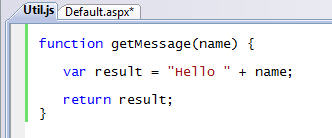
VS 2008 supports intellisense not just for in-line script, but also for externally referenced JavaScript files.  For example, assume we have a "getMessage" function like below defined within a "Util.js" javascript file:
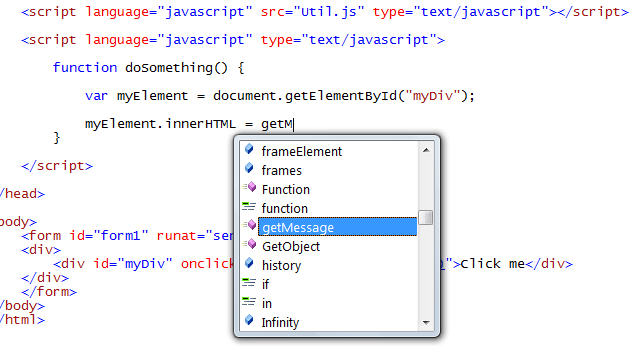
I can then simply add a standard JavaScript script refrence element to my page, and I will then automatically receive intellisense support for it as I code:
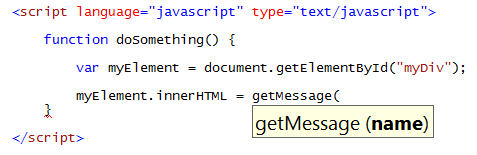
Notice how VS automatically provides basic parameter intellisense information on the method without us having to do anything special to the JavaScript for it to appear:
Adding Intellisense Hints to JavaScript

As you saw above, Visual Studio will automatically provide basic intellisense help information for the method name and parameters of standard JavaScript.

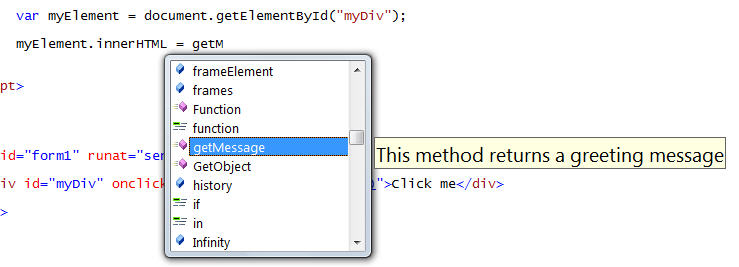
You can optionally make this intellisense richer by adding comments to your JavaScript code that the intellisense engine can then pick up and use when you consume a method or library.  For example, I could add the below comments to the getMessage function in my util.js file:
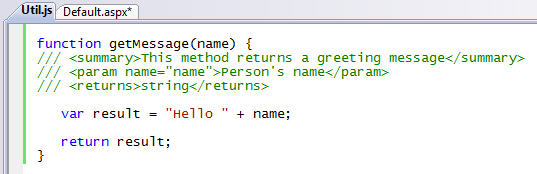
And when I then code against it within my "Default.aspx" file Visual Studio will automatically display this summary information for the method:
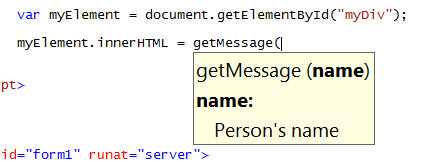
As well as the parameter details:
We'll provide a tool that then allows you to automatically strip out your comments (and compress the whitespace and size) of your JavaScript once you've finished building your application.  For more details about the comment format that both VS and ASP.NET AJAX support, please read Bertrand Le Roy's post here.

Intellisense within External JavaScript files

Obviously you get full intellisense support within external JavaScript files, just like you do within script blocks inside .htm and .aspx files.

One of the interesting characteristics about external JavaScript files is that they can call and use the JavaScript functions and variables declared within other JavaScript files that a page loads. 

For example, if we declare two external Javascript files referenced on a page like so:

The JavaScript code within the "MyLibrary.js" javascript file will be able to call the methods declared within the Util.js file.

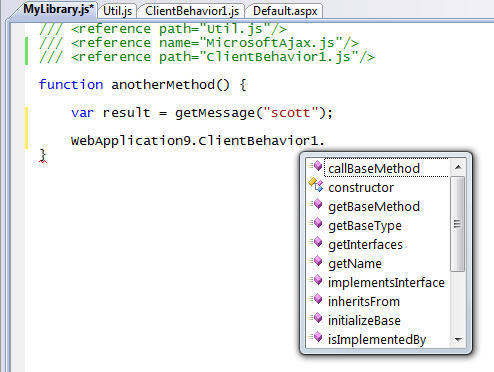
You can tell Visual Studio to provide intellisense for the "Util.js" library within the "MyLibrary.js" file by adding a /// <reference> comment at the top of the external library.  Once you do this, you'll get full intellisense support for those methods and variables:
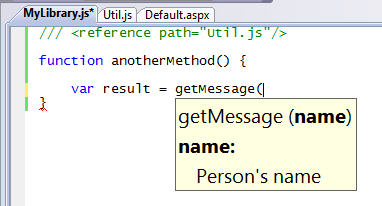
This ends up being super useful when partitioning your JavaScript routines across multiple files.

To reference the ASP.NET AJAX client side JavaScript libraries, you can either add a <refrence> that points to your own copy of the .JS file (if you are manually including it in your project), or add a <reference> element with a name value if the library is being dynamically output by the <asp:scriptmanager> control on the host page:
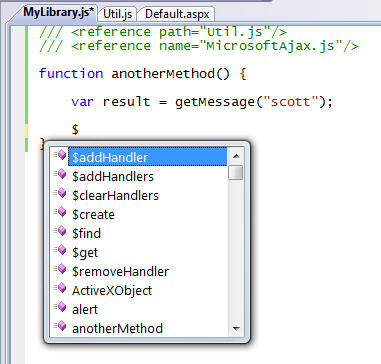
Once you do this you'll get full intellisense for all of the JavaScript libraries and type-library patterns inside ASP.NET AJAX.

Calling Web Services using ASP.NET AJAX

ASP.NET AJAX makes it easy to expose methods on the server that can be called and accessed via client-side JavaScript.  For example, assume we define a simple webmethod in a .asmx web-service like below:
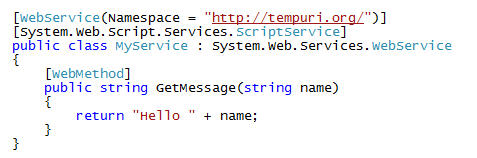
I could then have ASP.NET AJAX automatically create a client-side JavaScript proxy object that uses the JSON protocol to call and use it from the client by adding a reference to it with a <asp:scriptmanager> control in my page like below:

What is cool about VS 2008 is that when you declare a reference to a web-service using the <asp:scriptmanager> control like above, it will add client JavaScript intellisense support for it within the page automatically:
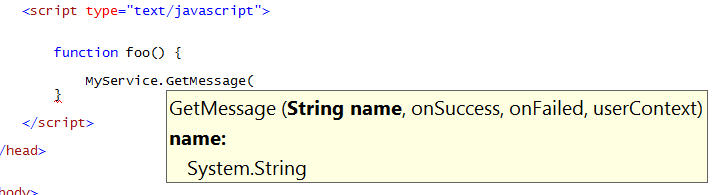
Obviously this makes it much easier to identify methods on the server and asynchronously call and invoke them.  You can use this to both exchange data between the client and server.  You can also use the AJAX UI templating technique I described here to retrieve HTML UI from the server using these callbacks and then dynamically update the page with them.

Creating Re-Usable ASP.NET AJAX Behaviors, Controls and Libraries

ASP.NET AJAX provides type-system support within JavaScript for defining classes, interfaces, and other object oriented concepts.  This makes it much easier to define re-usable libraries of JavaScript that encapsulate functionality and re-use it safely across pages and applications (without having to worry about the JavaScript conflicting with other JavaScript or libraries).

VS 2008 provides new "Add-Item" templates that makes it easy to create new ASP.NET AJAX behaviors, controls and libraries:
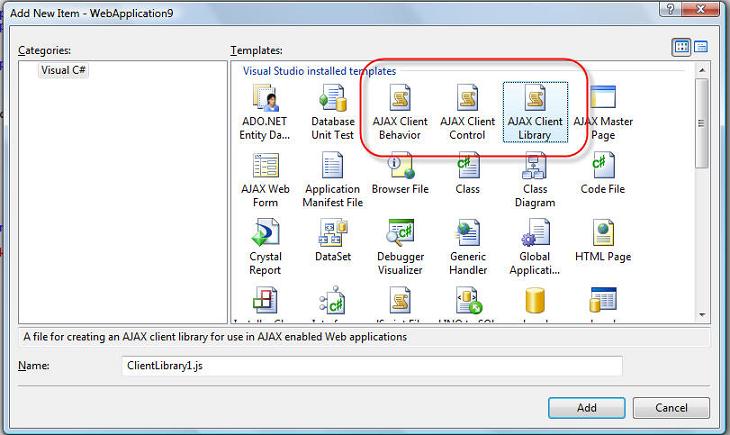
ASP.NET AJAX uses the "prototype" pattern within JavaScript to enable you to define classes and interfaces.  For example, I can create an encapsulated JavaScript class using this pattern using one of the project item templates above (notice below how the namespace created by Visual Studio by default is the same as my project namespace):
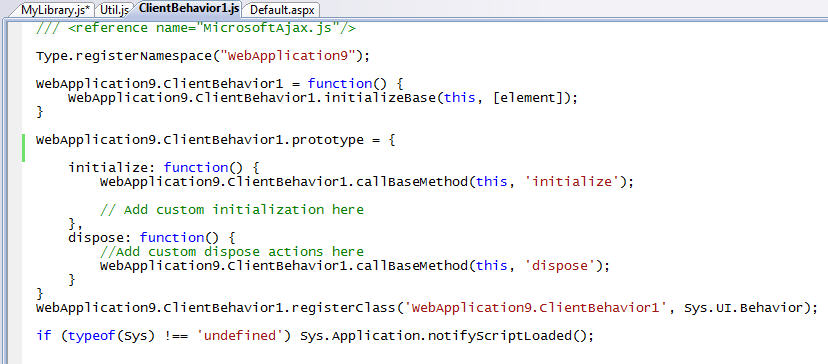
Obviously I then get full intellisense support when consuming my new library from any page or other JavaScript file:
Summary

Hopefully the above walkthrough provides a first look at some of the new JavaScript intellisense features coming soon (there are more - but this is a start).  In future blog-posts I'll also cover some of the new JavaScript debugging features that VS 2008 brings, as well as some of the WYSIWYG designer support for ASP.NET AJAX and the ASP.NET AJAX Control Toolkit.

To learn more about ASP.NET AJAX (and how you can use all of the runtime features I described above starting today with ASP.NET 2.0), I'd also highly recommend checking out these two new books that have recently been published and which cover the official ASP.NET AJAX 1.0 release:

Note that because of the new VS 2008 multi-targeting support, you can use the JavaScript intellisense features I showed above with both ASP.NET applications built using .NET 3.5 (which has ASP.NET AJAX built-in), as well as with existing ASP.NET 2.0 applications (including ones that use the separate ASP.NET AJAX 1.0 download). This provides a very compelling reason to start using VS 2008 - even if you are using it to only target .NET 2.0 applications.

Hope this helps,

Scott

转载于:https://www.cnblogs.com/kklt2002/archive/2008/11/20/1337381.html

MobileNet V3 图像分类 MobileNet V3 阅读详情

相关推荐

2024年最全scrapy+scrapyd+gerapy 爬虫调度框架,字节跳动面试时间

scrapyd是一个用于部署和运行scrapy爬虫的程序,它允许你通过JSON API来部署爬虫项目和控制爬虫运行,scrapyd是一个守护进程,监听爬虫的运行和请求,然后启动进程来执行它们方便地控制爬虫运行直观地查看爬虫状态实时地查看爬取结果简单地实现项目部署统一地实现主机管理轻松地编写爬虫代码。

2401_84140653的博客 1201

VS 2008 JavaScript Intellisense for Silverlight

http://weblogs.asp.net/scottgu/archive/2007/08/01/vs-2008-javascript-intellisense-for-silverlight.aspx感谢Justin-Josef Angel ,简直太棒了! 转载于:https://www.cnblogs.com/silverlighter/archive/2007/08/08/847999...

weixin_30374009的博客 103

Zemax光学设计——单透镜设计

(1)在镜头数据编辑器中面2那一栏中的“曲率半径”栏右侧的方格中单击,弹出“在面2上的曲率解”对话框(2)将对话框中的求解类型设为“F数”(3)将“F/#”设置为10设置完成后,其中的一些数据会发生变化在初始结构中,透镜的曲率半径和厚度未知,,这些参数需要软件自动优化得到,但可以使用透镜后表面上边缘厚度解得到近轴焦平面的位置在透镜后表面的厚度上单击鼠标右键,选择边缘光线求解类型,它表示近轴边缘光线会自动在下一个表面上聚焦并确定距离值。

yangSHU21的博客 2万+

VS2008 Beta2, 我碰到的Javascript Intellisense问题。

1.我们用的是Visual Studio Team System 2008 Beta 2 Team Suite。 试过了 ORCAS Beta1, 当然期待Beta2的出来。 一听说出来就开始装上去了,根据安装向导,先卸载后安装。 安装完Beta2和 OrcasBeta2TFSX1394648.iso(team explorer), 中间没出现什么问题。 但一打开...

dilv2578的博客 131

手把手教你解锁TI MSPM0G3507开发板(2025新版,附XDS110接线图)

本文详细解析了2025版TI MSPM0G3507开发板的解锁方法,针对新版硬件中BSL引脚的电路设计变化提供了精准接线方案和UniFlash软件配置步骤。通过实测数据和专业指导,帮助开发者解决芯片锁定问题,确保调试接口正常响应。

weixin_42696271的博客 807

基于Q-learning的无人机三维路径规划(含完整C++代码)

基于Q-learning的无人机三维路径规划(含完整C++代码)

weixin_54186646的博客 1万+

变频器模拟量输入调试实战:从接线到参数设置的完整指南

在工业自动化控制系统中,模拟量信号(如0-10V或4-20mA)是实现过程变量精确调节的核心手段,其本质是将连续变化的物理量转换为电信号进行传输与控制。其工作原理基于信号与设定值的线性映射,通过模数转换实现精准反馈。这项技术的核心价值在于为闭环控制提供了高精度、连续可调的输入基准,是实现恒压供水、温度调节、速度同步等复杂工艺的关键。在变频调速领域,模拟量输入直接决定了电机的转速控制精度与响应特性,是连接PLC、DCS等上位机与执行机构的重要桥梁。本文将聚焦变频器应用中模拟量输入的参数设置与调试技巧,涵盖信号

weixin_34166472的博客 418

SRS流媒体服务器在Windows下的安装

在之前的流媒体开发中(视频会议),我基本上使用nginx加模块的方式进行学习、测试,正式开发的时候改为服务器端用EasyDarwin,客户端用rtsp-simple-server(这些流媒体服务器的用法见我以前的博文),这样可以充分利用客户端的资源,降低服务器端的压力。在流媒体协议方案,我选择相对较快的rtsp。这个协议优点是支持UDP协议,优化好的环境下可以实现3秒以下的延迟,基本满足甲方要求,缺点就是不支持网页播放。

dgnankai的专栏 2023

010、Zephyr RTOS开发环境搭建(Docker)

摘要 本文分享了使用Docker搭建Zephyr RTOS开发环境的实践经验。作者通过团队新人配置环境的真实案例,指出传统安装方式存在版本冲突、缓存污染等问题,而Docker方案能确保环境一致性。文章详细介绍了自定义Docker镜像的设计思路,重点解决工具链版本匹配、Python虚拟环境隔离等问题,将镜像体积从2GB优化到800MB。提供了从拉取镜像到点亮LED的完整工作流程,并总结了USB设备直通、文件权限、缓存问题等常见陷阱。还探讨了多阶段构建、CI集成等进阶用法,同时客观分析了Docker方案的局限性

m0_50546716的博客 80

WCK Operation (WCK 操作)

LPDDR6 SDRAM采用双时钟系统(WCK和CK),其中WCK频率是CK的两倍。为确保数据正确传输,需通过WCK2CK同步操作使两种时钟对齐。LPDDR6支持两种同步模式:Auto-sync off模式和WCK Always on模式,可通过MR22寄存器选择。同步操作由特定命令(Read/Write/MRR等)触发,需在满足特定时序参数(如tWCKENL、tWCKPRE等)后完成。同步前必须完成WCK2CK训练,且不同操作(读取/写入/CAS)有各自的时序要求。该机制确保数据在正确时钟相位下传输,是L

李家小院 650

vs2008的JavaScript 语法提示(Intellisense)功能

一直想这javascript能提供注释功能就好了,vs2008里提供了智能感知(Intellisense)功能,想用这个功能的童鞋可以在html里开发javascript,最后再保存在js文件中。下面我们就介绍下javascript的智能感知(Intellisense)功能 转载地址:http://www.css88.com/archives/990 JavaScript已经发展成为进

kaosini的专栏 968

把 LDB 讲透:SAP ABAP 逻辑数据库的结构、事件模型、动态选择与现代替代方案

摘要:SAP中的Logical Database(LDB)是一种将表组织成树形结构并统一生成选择屏幕的技术,通过事件驱动方式向报表程序传递数据。虽然被标记为过时,但在理解标准代码和优化性能方面仍有价值。LDB通过SE36事务码创建,其结构包含层级关系、选择屏幕和数据库程序。报表通过NODES声明和GET事件处理数据,支持动态选择以减少数据库访问。在S/4HANA和ABAP Cloud环境下,建议使用CDS View和ABAP SQL等现代方案替代LDB,以提升可测试性和架构清晰度。

2007 年 ~ 2025 年,深耕 SAP 技术 18 年 216

vs2008 JQuery的自动提示

【原文地址】jQuery Intellisense in VS 2008 【原文发表日期】 Friday, November 21, 2008 2:07 AM 上个月,我在博客里宣布了微软将对jQuery提供支持。在过去的几个星期里,我们与jQuery开发团队合作,在Studio 2008 和 Visual Web Developer 2008 Express版本(免费的)中增加了很好...

agol83082486的博客 145

Outlook Express 6 (OE6) for Win7/Win8/Win10

英文版 Outlook Express6.0, 兼容Win7/Win10/WinXP,解压就可用。

大中型超市收银系统(可直接运行)

光步前台收银系统系统功能:商品销售、商品退货、挂单、收银员权限、会员销售、单品取消、整单取消、商品查询、脱机销售、脱机数据上传,基本资料下载,开钱箱、小票打印、收款结算,支持多币种付款方式(现金、储值卡、礼券、微信等),支持多种促销。运行环境:.net 4.0登陆信息用户名:1001 密码:123456内置商品信息,商品编码可输入00001000 - 00010000,测试效果相关功能键F5 结算 F9挂单 F11商品查询 F8退货 Insert单品取消 Del整单取消 F12开钱箱F2 会员 Ctrl+Z退出系统 Home 锁屏 相关源码待公开

[JS.IntelliSense]VS2008(Orcas) So Cool

我很早以前就想找一个能够像VS中C#一样可以有很强的IntelliSense开发工具来写脚本JS,但是到现在还没有能够真正找到一理想的工具。很早以前听说VS2008能够给我带来一点震撼,但是又有人说那只是对ASP.NET AJAX有IntelliSense,又有点失落感。今天看到ScottGu的一篇博客发现VS2008能够提供几乎和C#一样的IntelliSense,让我激动万分,也由于很久没有写

717

Statistics and Machine Learning Toolbox

Statistics and Machine Learning Toolbox(带书签),MATLAB统计学习工具

vs 2008中使用jQuery 1.3.2

第一步: 安装VS 2008 SP1VS 2008 SP1 在Visual Studio中加了更丰富的JavaScript intellisense支持,对很大部分的JavaScript库加了代码完成支持。你可以在这里下载VS 2008 SP1 和 Visual Web Developer 2008 Express SP1。 第二步: 安装VS 2008 Patch KB95850

redheart47的专栏 5051

深度学习工具包 DeepLearningToolbox

深度学习工具包Deprecation notice.-----This toolbox is outdated and no longer maintained.There are much better tools available for deep learning than this toolbox, e.g. [Theano](http://deeplearning.net/software/theano/), [torch](http://torch.ch/) or [tensorflow](http://www.tensorflow.org/)I would suggest you use one of the tools mentioned above rather than use this toolbox.Best, Rasmus.DeepLearnToolbox================A Matlab toolbox for Deep Learning.Deep Learning is a new subfield of machine learning that focuses on learning deep hierarchical models of data.It is inspired by the human brain's apparent deep (layered, hierarchical) architecture.A good overview of the theory of Deep Learning theory is[Learning Deep Architectures for AI](http://www.iro.umontreal.ca/~bengioy/papers/ftml_book.pdf)For a more informal introduction, see the following videos by Geoffrey Hinton and Andrew Ng.* [The Next Generation of Neural Networks](http://www.youtube.com/watch?v=AyzOUbkUf3M) (Hinton, 2007)* [Recent Developments in Deep Learning](http://www.youtube.com/watch?v=VdIURAu1-aU) (Hinton, 2010)* [Unsupervised Feature Learning and Deep Learning](http://www.youtube.com/watch?v=ZmNOAtZIgIk) (Ng, 2011)If you use this toolbox in your research please cite [Prediction as a candidate for learning deep hierarchical models of data](http://www2.imm.dtu.dk/pubdb/views/publication_details.php?id=6284)```@MASTERSTHESIS\{IMM2012-06284, author = "R. B. Palm", title = "Prediction as a candidate for learning deep hierarchical models of data", year = "2012",}```Contact: rasmusbergpalm at gmail dot comDirectories included in the toolbox-----------------------------------`NN/` - A library for Feedforward Backpropagation Neural Networks`CNN/` - A library for Convolutional Neural Networks`DBN/` - A library for Deep Belief Networks`SAE/` - A library for Stacked Auto-Encoders`CAE/` - A library for Convolutional Auto-Encoders`util/` - Utility functions used by the libraries`data/` - Data used by the examples`tests/` - unit tests to verify toolbox is workingFor references on each library check REFS.mdSetup-----1. Download.2. addpath(genpath('DeepLearnToolbox'));Example: Deep Belief Network---------------------```matlabfunction test_example_DBNload mnist_uint8;train_x = double(train_x) / 255;test_x = double(test_x) / 255;train_y = double(train_y);test_y = double(test_y);%% ex1 train a 100 hidden unit RBM and visualize its weightsrand('state',0)dbn.sizes = [100];opts.numepochs = 1;opts.batchsize = 100;opts.momentum = 0;opts.alpha = 1;dbn = dbnsetup(dbn, train_x, opts);dbn = dbntrain(dbn, train_x, opts);figure; visualize(dbn.rbm{1}.W'); % Visualize the RBM weights%% ex2 train a 100-100 hidden unit DBN and use its weights to initialize a NNrand('state',0)%train dbndbn.sizes = [100 100];opts.numepochs = 1;opts.batchsize = 100;opts.momentum = 0;opts.alpha = 1;dbn = dbnsetup(dbn, train_x, opts);dbn = dbntrain(dbn, train_x, opts);%unfold dbn to nnnn = dbnunfoldtonn(dbn, 10);nn.activation_function = 'sigm';%train nnopts.numepochs = 1;opts.batchsize = 100;nn = nntrain(nn, train_x, train_y, opts);[er, bad] = nntest(nn, test_x, test_y);assert(er < 0.10, 'Too big error');```Example: Stacked Auto-Encoders---------------------```matlabfunction test_example_SAEload mnist_uint8;train_x = double(train_x)/255;test_x = double(test_x)/255;train_y = double(train_y);test_y = double(test_y);%% ex1 train a 100 hidden unit SDAE and use it to initialize a FFNN% Setup and train a stacked denoising autoencoder (SDAE)rand('state',0)sae = saesetup([784 100]);sae.ae{1}.activation_function = 'sigm';sae.ae{1}.learningRate = 1;sae.ae{1}.inputZeroMaskedFraction = 0.5;opts.numepochs = 1;opts.batchsize = 100;sae = saetrain(sae, train_x, opts);visualize(sae.ae{1}.W{1}(:,2:end)')% Use the SDAE to initialize a FFNNnn = nnsetup([784 100 10]);nn.activation_function = 'sigm';nn.learningRate = 1;nn.W{1} = sae.ae{1}.W{1};% Train the FFNNopts.numepochs = 1;opts.batchsize = 100;nn = nntrain(nn, train_x, train_y, opts);[er, bad] = nntest(nn, test_x, test_y);assert(er < 0.16, 'Too big error');```Example: Convolutional Neural Nets---------------------```matlabfunction test_example_CNNload mnist_uint8;train_x = double(reshape(train_x',28,28,60000))/255;test_x = double(reshape(test_x',28,28,10000))/255;train_y = double(train_y');test_y = double(test_y');%% ex1 Train a 6c-2s-12c-2s Convolutional neural network %will run 1 epoch in about 200 second and get around 11% error. %With 100 epochs you'll get around 1.2% errorrand('state',0)cnn.layers = { struct('type', 'i') %input layer struct('type', 'c', 'outputmaps', 6, 'kernelsize', 5) %convolution layer struct('type', 's', 'scale', 2) %sub sampling layer struct('type', 'c', 'outputmaps', 12, 'kernelsize', 5) %convolution layer struct('type', 's', 'scale', 2) %subsampling layer};cnn = cnnsetup(cnn, train_x, train_y);opts.alpha = 1;opts.batchsize = 50;opts.numepochs = 1;cnn = cnntrain(cnn, train_x, train_y, opts);[er, bad] = cnntest(cnn, test_x, test_y);%plot mean squared errorfigure; plot(cnn.rL);assert(er<0.12, 'Too big error');```Example: Neural Networks---------------------```matlabfunction test_example_NNload mnist_uint8;train_x = double(train_x) / 255;test_x = double(test_x) / 255;train_y = double(train_y);test_y = double(test_y);% normalize[train_x, mu, sigma] = zscore(train_x);test_x = normalize(test_x, mu, sigma);%% ex1 vanilla neural netrand('state',0)nn = nnsetup([784 100 10]);opts.numepochs = 1; % Number of full sweeps through dataopts.batchsize = 100; % Take a mean gradient step over this many samples[nn, L] = nntrain(nn, train_x, train_y, opts);[er, bad] = nntest(nn, test_x, test_y);assert(er < 0.08, 'Too big error');%% ex2 neural net with L2 weight decayrand('state',0)nn = nnsetup([784 100 10]);nn.weightPenaltyL2 = 1e-4; % L2 weight decayopts.numepochs = 1; % Number of full sweeps through dataopts.batchsize = 100; % Take a mean gradient step over this many samplesnn = nntrain(nn, train_x, train_y, opts);[er, bad] = nntest(nn, test_x, test_y);assert(er < 0.1, 'Too big error');%% ex3 neural net with dropoutrand('state',0)nn = nnsetup([784 100 10]);nn.dropoutFraction = 0.5; % Dropout fraction opts.numepochs = 1; % Number of full sweeps through dataopts.batchsize = 100; % Take a mean gradient step over this many samplesnn = nntrain(nn, train_x, train_y, opts);[er, bad] = nntest(nn, test_x, test_y);assert(er < 0.1, 'Too big error');%% ex4 neural net with sigmoid activation functionrand('state',0)nn = nnsetup([784 100 10]);nn.activation_function = 'sigm'; % Sigmoid activation functionnn.learningRate = 1; % Sigm require a lower learning rateopts.numepochs = 1; % Number of full sweeps through dataopts.batchsize = 100; % Take a mean gradient step over this many samplesnn = nntrain(nn, train_x, train_y, opts);[er, bad] = nntest(nn, test_x, test_y);assert(er < 0.1, 'Too big error');%% ex5 plotting functionalityrand('state',0)nn = nnsetup([784 20 10]);opts.numepochs = 5; % Number of full sweeps through datann.output = 'softmax'; % use softmax outputopts.batchsize = 1000; % Take a mean gradient step over this many samplesopts.plot = 1; % enable plottingnn = nntrain(nn, train_x, train_y, opts);[er, bad] = nntest(nn, test_x, test_y);assert(er < 0.1, 'Too big error');%% ex6 neural net with sigmoid activation and plotting of validation and training error% split training data into training and validation datavx = train_x(1:10000,:);tx = train_x(10001:end,:);vy = train_y(1:10000,:);ty = train_y(10001:end,:);rand('state',0)nn = nnsetup([784 20 10]); nn.output = 'softmax'; % use softmax outputopts.numepochs = 5; % Number of full sweeps through dataopts.batchsize = 1000; % Take a mean gradient step over this many samplesopts.plot = 1; % enable plottingnn = nntrain(nn, tx, ty, opts, vx, vy); % nntrain takes validation set as last two arguments (optionally)[er, bad] = nntest(nn, test_x, test_y);assert(er < 0.1, 'Too big error');```[![Bitdeli Badge](https://d2weczhvl823v0.cloudfront.net/rasmusbergpalm/deeplearntoolbox/trend.png)](https://bitdeli.com/free "Bitdeli Badge")

VS2008 中 JS IntelliSense出错的解决

JScript 智能提示(IntelliSense)是 Visual Studio 2008 的一个重要新特性,尤其是现在 Visual Studio 2008 还提供了 jQuery 智能提示的官方支持。遗憾的是在实际应用中经常遇到如图所示的错误提示,并且出现这样的错误以后,包括jQuery在内的智能提示统统失效。非常让人恼火。我最开始的时候仅从提示“Error updating JScript...

weixin_30770783的博客 286

JS.IntelliSense_VS2008(Orcas) So Cool

JS.IntelliSense_VS2008(Orcas) So Cool 2007年10月13日 星期六 上午 10:23 [JS.IntelliSense]VS2008(Orcas) So Cool 我很早以前就想找一个能够像VS中C#一样可以有很强的IntelliSense开发工具来写脚本JS,但是到现在还没有能够真正找到一理想的工具。很早以前听说VS2008能够给我...

weixin_30267785的博客 161

VS2008中的新功能JavaScript Intellisense和JavaScript debugging

有很多朋友可能希望在写JS脚本代码时,希望能想写C#代码时一样,在使用自己在其它页面中定义的一个方法或者一个类时,输入前面的某个字母,后面就跟着出来,现在VS2008提供这个功能啦,这就是JavaScript Intellisense。 在JS文件中体验JavaScript Intellisense功能,很方便吧。 在ASPX页面中体验JavaScript Intellisense...

weixin_34124939的博客 71

jQuery IntelliSense使用与设定

在使用jQuery時,VS2008有提供整合jQuery IntelliSense,這樣在寫jQuery時更簡單容易,設定的方式如下: 安裝VS2008 sp1 (已經安裝過就可以跳過此步驟)安裝hotfix讓VS2008 可以自動去讀取 “-vsdoc.js”來提供Javascript Lib 的 InterlliSense下載jQuery-1.3.2.min.js以及j...

weixin_30246221的博客 619

JavaScript Debugging and Intellisense, JavaScript obfuscator etc from VS 2005 to VS 2008 (VS2005到200...

JavaScript Debugging and Intellisense, JavaScript obfuscator etc from VS 2005 to VS 2008 VS2005到2008的变迁,JavaScript调试,智能感知/智能感应功能,JavaScript的混淆、压缩等功能的海变桑田 上篇blog中曾说到了我向Scott提的那个问题,这篇blog中我...

144

vs 2008中使用jQuery智能提示

第一步: 安装VS 2008 SP1VS 2008 SP1 在Visual Studio中加了更丰富的JavaScript intellisense支持,对很大部分的JavaScript库加了代码完成支持。你可以在这里下载VS 2008 SP1 和 Visual Web Deve

筱筱的专栏 762
上一篇: Ext中的get、getDom、getCmp、getBody、getDoc的区别
下一篇: 用xslt格式化xml文件
andao9621
博客等级 码龄11年 0粉丝 0原创
评论
成就一亿技术人!
拼手气红包6.0元
还能输入1000个字符  | 博主筛选后可见
 
 条评论被折叠 查看
添加红包

请填写红包祝福语或标题

个

红包个数最小为10个

元

红包金额最低5元

当前余额3.43元 前往充值 >
需支付:10.00元
成就一亿技术人!
领取后你会自动成为博主和红包主的粉丝 规则
hope_wisdom
发出的红包
实付元
使用余额支付
点击重新获取
扫码支付
钱包余额 0

抵扣说明:

1.余额是钱包充值的虚拟货币,按照1:1的比例进行支付金额的抵扣。
2.余额无法直接购买下载,可以购买VIP、付费专栏及课程。

余额充值