



 本文介绍了一种利用HTML、CSS及JavaScript实现视网膜显示屏效果的方法,通过精确定位和图片缩放技术,使页面元素能够模拟高分辨率显示效果。
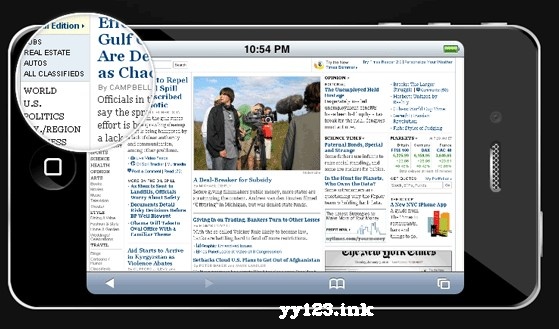
苹果一直应用的一个成功的营销策略——创造精心设计的产品,有一个专门的粉丝,让每个产品发布前宣传建立。这也是最新版本的iPhone的情况。但是我发现有趣的是他们创造的术语——“视网膜显示屏”和促销形象伴随着它。HTML

CSS#iphone{ /* The iphone frame div */ width:750px; height:400px; background:url("img/iphone_4G.png") no-repeat center center;}#webpage{ /* Contains the webpage screenshot */ width:499px; height:283px; position:absolute; top:50%; left:50%; margin:-141px 0 0 -249px;}#retina{ /* The Retina effect */ background:url("img/webpage.png") no-repeat center center white; border:2px solid white; /* Positioned absolutely, so we can move it around */ position:absolute; height:180px; width:180px; /* Hidden by default */ display:none; /* A blank cursor, notice the default fallback */ cursor:url("img/blank.cur"),default; /* CSS3 Box Shadow */ -moz-box-shadow:0 0 5px #777, 0 0 10px #aaa inset; -webkit-box-shadow:0 0 5px #777; box-shadow:0 0 5px #777, 0 0 10px #aaa inset; /* CSS3 rounded corners */ -moz-border-radius:90px; -webkit-border-radius:90px; border-radius:90px;}#retina.chrome{ /* A special chrome version of the cursor */ cursor:url("img/blank_google_chrome.cur"),default;}#main{ /* The main div */ margin:40px auto; position:relative; width:750px;}通过指定网页div的绝对定位,我们可以应用垂直和水平定心技术,有效地把iphone的网页截图在中间帧。视网膜div也分配一个绝对定位,所以可以把它在jQuery教程的一部分指定一个顶部和左偏移量。这个div也有网页截图作为其背景(在原来的大小)。抵消背景div的运动放大了视网膜div也应用边界半径值的一半的宽度,这使它成为一个完美的圆(至少在浏览器支持border - radius CSS3属性——Chrome,Safari,歌剧和Firefox)。最后,我们隐藏鼠标指针通过提供一个空白的光标文件(Google Chrome未能呈现完全空白的游标,所以我们提供了一个特殊的1 px白色光标——至少总比没有的好)。Opera浏览器完全忽略了自定义游标和没有解决方法,因此用户使用这个浏览器可能无法享受完整的体验。jquery$(document).ready(function(){ /* This code is uted on the document ready event */ var left = 0, top = 0, sizes = { retina: { width:190, height:190 }, webpage:{ width:500, height:283 } }, webpage = $("#webpage"), offset = { left: webpage.offset().left, top: webpage.offset().top }, retina = $("#retina"); if(navigator.userAgent.indexOf("Chrome")!=-1) { /* Applying a special chrome curosor, as it fails to render completely blank curosrs. */ retina.addClass("chrome"); } webpage.mousemove(function(e){ left = (e.pageX-offset.left); top = (e.pageY-offset.top); if(retina.is(":not(:animated):hidden")){ /* Fixes a bug where the retina div is not shown */ webpage.trigger("mouseenter"); } if(left<0 || top<0 || left > sizes.webpage.width || top > sizes.webpage.height) { /* If we are out of the bondaries of the webpage screenshot, hide the retina div */ if(!retina.is(":animated")){ webpage.trigger("mouseleave"); } return false; } /* Moving the retina div with the mouse (and scrolling the background) */ retina.css({ left : left - sizes.retina.width/2, top : top - sizes.retina.height/2, backgroundPosition : "-"+(1.6*left)+"px -"+(1.35*top)+"px" }); }).mouseleave(function(){ retina.stop(true,true).fadeOut("fast"); }).mouseenter(function(){ retina.stop(true,true).fadeIn("fast"); });});
dd:





 扫一扫
扫一扫


 被折叠的 条评论
为什么被折叠?
被折叠的 条评论
为什么被折叠?
 到【灌水乐园】发言





