


 本文介绍如何使用JConsole工具轻松导航WebLogic的MBeans,包括查看可用的MBean方法及其参数,并直接从JConsole窗口调用MBean功能。通过详细步骤,读者将学会如何利用MBeans进行WebLogic服务器的管理和监控。
Using JConsole to look at WebLogic MBeans
In this blog post I will take you through a set of steps which will allow you to easily navigate the available MBeans using JConsole - a tool which comes installed with the Java Development Kit (JDK).
The WebLogic Scripting Tool (WLST) which comes pre-packaged with WebLogic is a great way to automate the monitoring or management of an OBIEE instance as well as your WebLogic domains in general; it can, however, be a little bit tricky to understand what WebLogic operations are actually available for you to use and how to call them with the correct parameters. I recently came across an issue while trying to write a WebLogic script for a client which automated the deployment of their RPD, I needed a way to understand what methods were available and what their method signatures were so that I knew what to call from within a WLST script.
WebLogic uses something called Managed Beans (MBeans) to expose an API externally which you can use to manage or monitor your WebLogic server. In this blog post I will take you through a set of steps which will allow you to easily navigate the available MBeans using JConsole - a tool which comes installed with the Java Development Kit (JDK). We will also look at invoking an MBean method directly from JConsole.
JConsole gives you a nice interface over the top of the WebLogic MBeans and it even allows you to invoke the MBean functions directly from the JConsole window - very handy indeed! The JConsole tool comes packaged with the JDK and, if your JAVA_HOME and PATH environment variables are setup correctly, you can simply run JConsole from a command prompt.
Note that for this tutorial I am assuming that you have an Enterprise Edition instance of OBI 11g installed and running on a Windows environment, although the steps for a Linux environment will be almost identical.
At a command prompt set your JAVA_HOME and WL_HOME environment variables and start JConsole with the following JVM arguments:
%JAVA_HOME%\bin\jconsole -J-Djava.class.path=%JAVA_HOME%\lib\jconsole.jar;%WL_HOME%\server\lib\wljmxclient.jar -J-Djmx.remote.protocol.provider.pkgs=weblogic.management.remote -debug
When JConsole starts enter the JMX (Java Management Extentions) URL into the Remote Process field along with the WebLogic username and password of your installation and click Connect.
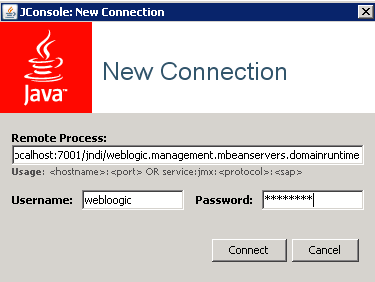
Fig 1. JConsole login screen
JMX URL: service:jmx:iiop://localhost:7001/jndi/weblogic.management.mbeanservers.domainruntime
Once connected to the JMX service you will see a JConsole window with all of the WebLogic MBean folders listed down the left side of the window. Let's have a look at the MBean which is used to manage the BI Domain. Click on the Service MBean in the oracle.biee.admin/bidomain folder to show some helpful details for the MBean including its Description and ObjectName attributes. It is a good idea to take note of the ObjectName attribute here since you will need this if you decide to run this MBean's functions using WLST.
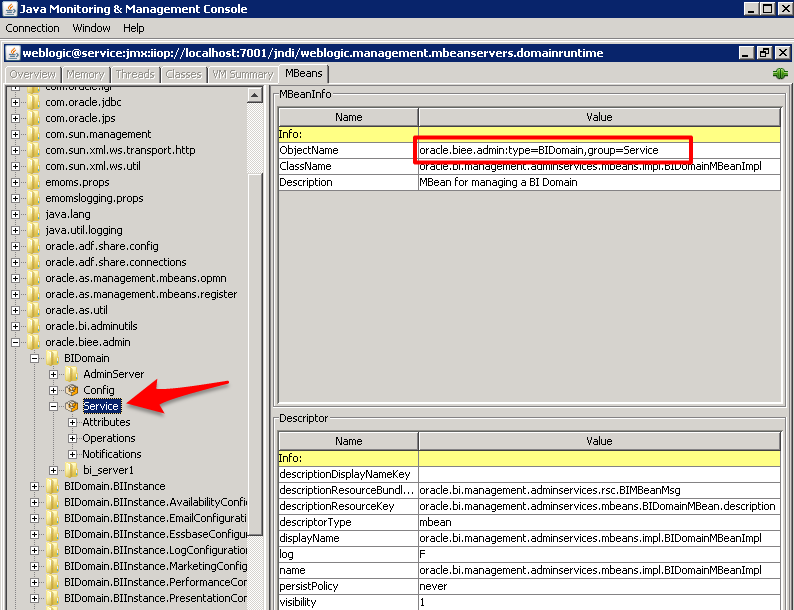
Fig 2. The Service MBean's details
Now expand the Operations node underneath the Service MBean to see what operations (methods) are available to invoke.
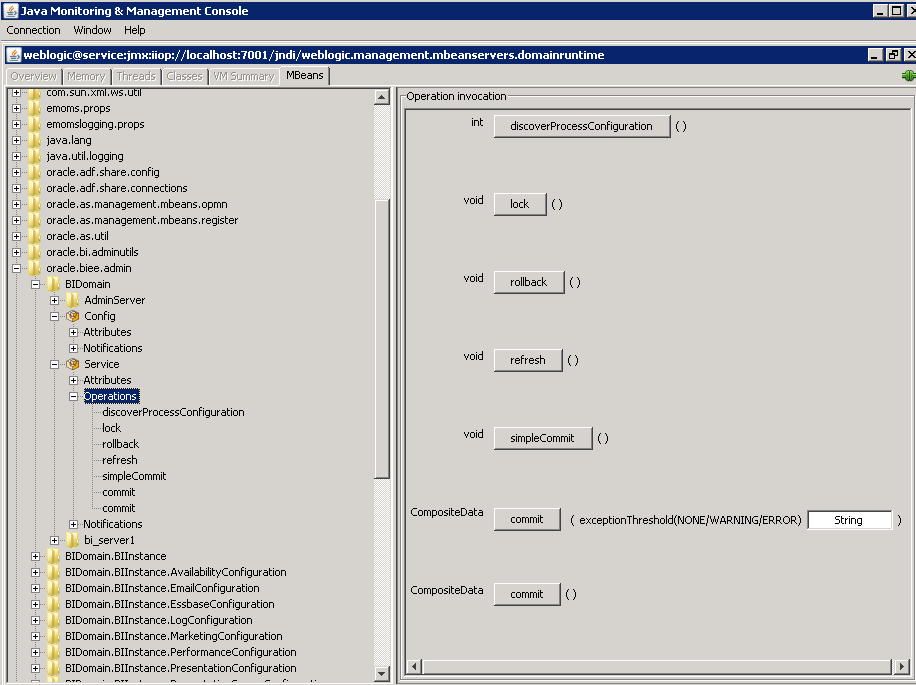
Fig 3. Available MBean operations
Note that if you click on an operation you can see its description as well as what parameters are required if you invoke it (the signature). Below is an example of the uploadRepository operation, if you wanted to invoke this method you would need to provide the rpdFilePath and the password parameters.
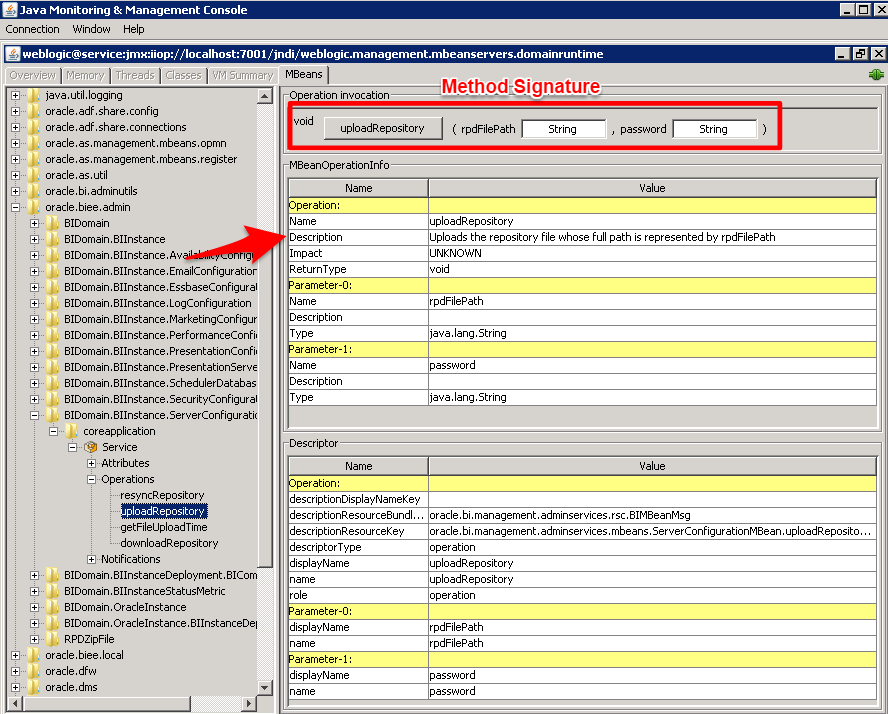
Fig 4. uploadRepository operation
Click on the lock operation in the BIDomain/Service MBean from the left navigator window and then on the lock button on the right to invoke the lock method. Invoking the lock operation will lock the BI Domain for editing just like you would if you were going make changes in WebLogic Enterprise Manager.
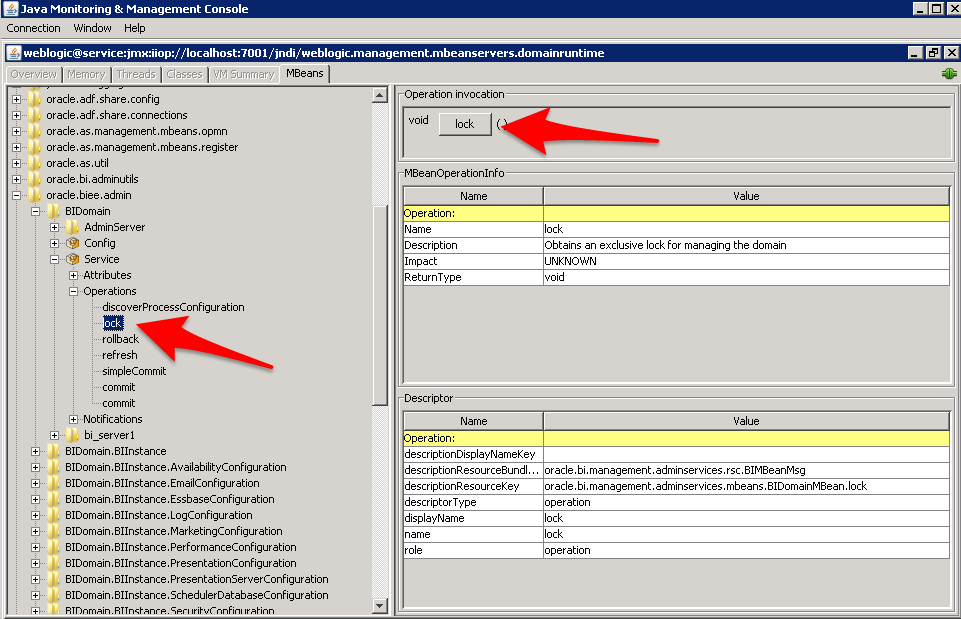
Fig 5. The lock operation
Now, to confirm this has worked, log into Enterprise Manager as the weblogic user and check that the BI Domain has been locked (http://localhost:7001/em/). Notice below how Activate Changes and Release Configuration is shown in place of the usual Lock and Edit Configuration button? Be sure to rollback by clicking Release Configuration so that your BI Domain does not remain locked.
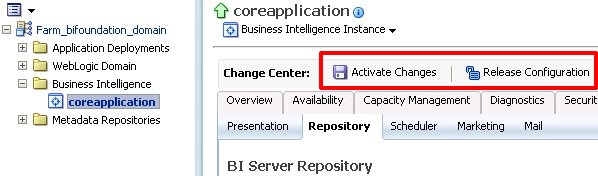
Fig 6. Enterprise Manager
Well I hope you have enjoyed this post on how to use JConsole to find and invoke WebLogic MBean methods, be sure to keep an eye out for my next post where I will be looking at executing WLST scripts using Apache Ant.





 扫一扫
扫一扫


 4476
4476

 被折叠的 条评论
为什么被折叠?
被折叠的 条评论
为什么被折叠?
 到【灌水乐园】发言





