


In this tutorial, we are going to see how to display image in JTable in Java by using the class Imageicon.
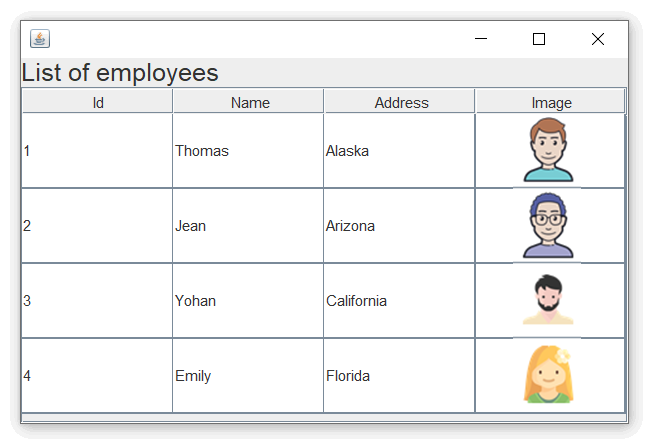
How to Display Image in JTable in Java
import javax.swing.*;
import java.awt.*;
import javax.swing.table.DefaultTableModel;
public class Main extends JFrame
{
public Main()
{
//Headers for JTable
String[] columns = {"Id", "Name", "Address", "Image"};
//data for JTable in a 2D table
Object[][] data = {
{1, "Thomas", "Alaska", new ImageIcon("user1.png") },
{2, "Jean", "Arizona", new ImageIcon("user2.png") },
{3, "Yohan", "California", new ImageIcon("user3.png") },
{4, "Emily", "Florida", new ImageIcon("user4.png") }
};
DefaultTableModel model = new DefaultTableModel(data, columns);
JTable table = new JTable(model) {
public Class getColumnClass(int column) {
return (column == 3) ? Icon.class : Object.class;
}
};
//Set row height to 60 pixels
table.setRowHeight(60);
JScrollPane scrollPane = new JScrollPane(table);
getContentPane().add(scrollPane);
JLabel labelHead = new JLabel("List of employees");
labelHead.setFont(new Font("Arial",Font.TRUETYPE_FONT,20));
getContentPane().add(labelHead,BorderLayout.PAGE_START);
}
public static void main(String[] args)
{
Main frame = new Main();
frame.setDefaultCloseOperation(EXIT_ON_CLOSE);
frame.setSize(500, 330);
frame.setVisible(true);
}
}
Output:





 扫一扫
扫一扫


 被折叠的 条评论
为什么被折叠?
被折叠的 条评论
为什么被折叠?
 到【灌水乐园】发言





