一、什么是资源
通常使用 WPF 资源作为重用通常定义的对象和值的简单方法。例如定义一种可以复用的单色的Brush对象,按钮的背景及矩形的填充颜色均使用此Brush:
1: <Window x:Class="WPFResource.WinBasicResource"
2: xmlns="http://schemas.microsoft.com/winfx/2006/xaml/presentation"
3: xmlns:x="http://schemas.microsoft.com/winfx/2006/xaml"
4: Title="Basic Resource" Height="200" Width="300">
5: <Window.Resources>
6: <SolidColorBrush x:Key="myBrush" Color="Gold" />
7: </Window.Resources>
8: <StackPanel>
9: <Button Margin="5" Content="Sample Button" Background="{StaticResource myBrush}" />
10: <Rectangle Margin="5" Width="100" Height="100" Fill="{StaticResource myBrush}" />
11: </StackPanel>
12: </Window>
在WPF中资源通常用作“样式”(Style)、样式模板、数据模板等。
二、资源的定义及XAML中引用
资源可以定义在以下几个位置:
· 应用程序级资源:定义在App.xaml文件中,作为整个应用程序共享的资源存在
在App.xaml文件中定义:
1: <Application x:Class="WPFResource.App"
2: xmlns="http://schemas.microsoft.com/winfx/2006/xaml/presentation"
3: xmlns:x="http://schemas.microsoft.com/winfx/2006/xaml"
4: StartupUri="Window1.xaml">
5: <Application.Resources>
6: <SolidColorBrush Color="Gold" x:Key="myGoldBrush" />
7: </Application.Resources>
8: </Application>
在ApplicationResourceDemo.xaml文件(窗体)中使用App.xaml中定义的Resource
1: <Window x:Class="WPFResource.ApplicationResourceDemo"
2: xmlns="http://schemas.microsoft.com/winfx/2006/xaml/presentation"
3: xmlns:x="http://schemas.microsoft.com/winfx/2006/xaml"
4: Title="Application Resource Demo" Height="300" Width="300">
5: <StackPanel>
6: <Button Margin="5" Background="{StaticResource myGoldBrush}">Sample Button</Button>
7: </StackPanel>
8: </Window>
· 窗体级资源:定义在Window或Page中,作为一个窗体或页面共享的资源存在
1: <Window x:Class="WPFResource.WindowResourceDemo"
2: xmlns="http://schemas.microsoft.com/winfx/2006/xaml/presentation"
3: xmlns:x="http://schemas.microsoft.com/winfx/2006/xaml"
4: Title="WindowResourceDemo" Height="300" Width="300">
5: <Window.Resources>
6: <SolidColorBrush x:Key="myRedBrush" Color="Red" />
7: </Window.Resources>
8: <StackPanel>
9: <Button Margin="5" Background="{StaticResource myRedBrush}">Sample Button</Button>
10: </StackPanel>
11: </Window>
· 文件级资源:定义在资源字典的XAML文件中,再引用
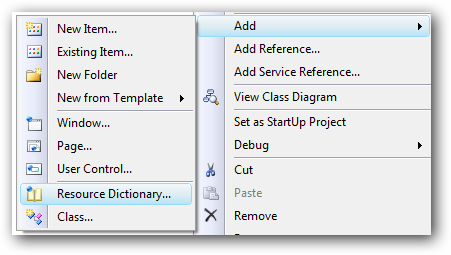
在Visual Studio的WPF应用程序项目中,添加“资源字典(Resource Dictionary)”类型的项
在其XAML文件中定义:
1: <ResourceDictionary xmlns="http://schemas.microsoft.com/winfx/2006/xaml/presentation"
2: xmlns:x="http://schemas.microsoft.com/winfx/2006/xaml">
3: <SolidColorBrush x:Key="myWhiteBrush" Color="White" />
4: </ResourceDictionary>
在FileResourceDemo.xaml文件(窗体)中,将其注册为窗体级的资源,并引用
1: <Window x:Class="WPFResource.FileResourceDemo"
2: xmlns="http://schemas.microsoft.com/winfx/2006/xaml/presentation"
3: xmlns:x="http://schemas.microsoft.com/winfx/2006/xaml"
4: Title="FileResourceDemo" Height="300" Width="300">
5: <Window.Resources>
6: <ResourceDictionary Source="MyResourceDictionary.xaml" />
7: </Window.Resources>
8: <StackPanel>
9: <Button Margin="5" Background="{StaticResource myWhiteBrush}">Sample Button</Button>
10: </StackPanel>
11: </Window>
· 对象(控件)级资源:定义在某个ContentControl中,作为其子容器、子控件共享的资源
在Button中定义一个资源,供Button内的Content控件使用
1: <Window x:Class="WPFResource.ControlResourceDemo"
2: xmlns="http://schemas.microsoft.com/winfx/2006/xaml/presentation"
3: xmlns:x="http://schemas.microsoft.com/winfx/2006/xaml"
4: Title="ControlResourceDemo" Height="300" Width="300">
5: <StackPanel>
6: <Button Margin="5">
7: <Button.Resources>
8: <SolidColorBrush x:Key="myGreenBrush" Color="Green" />
9: </Button.Resources>
10: <Button.Content>
11: <TextBlock Text="Sample Text" Background="{StaticResource myGreenBrush}" />
12: </Button.Content>
13: </Button>
14: </StackPanel>
15: </Window>
三、XAML解析资源的顺序
在XAML中解析资源按照由引用资源的控件向外层容器依次调用资源。例如在在应用程序级别、窗体级别及对象级别分为定义x:Key相的同资源:
在App.xaml文件中:
1: <Application x:Class="WPFResource.App"
2: xmlns="http://schemas.microsoft.com/winfx/2006/xaml/presentation"
3: xmlns:x="http://schemas.microsoft.com/winfx/2006/xaml"
4: StartupUri="MultiResourceReference.xaml">
5: <Application.Resources>
6: <!-- 应用程序级资源 -->
7: <SolidColorBrush Color="Gold" x:Key="myGoldBrush" />
8: <SolidColorBrush Color="Blue" x:Key="myBrush" />
9: </Application.Resources>
10: </Application>
在窗体的XAML文件中:
1: <Window x:Class="WPFResource.MultiResourceReference"
2: xmlns="http://schemas.microsoft.com/winfx/2006/xaml/presentation"
3: xmlns:x="http://schemas.microsoft.com/winfx/2006/xaml"
4: Title="MultiResourceReference" Height="265" Width="300">
5: <Window.Resources>
6: <!-- 窗体级资源 -->
7: <SolidColorBrush Color="White" x:Key="myWhiteBrush" />
8: <SolidColorBrush Color="Green" x:Key="myBrush" />
9: </Window.Resources>
10: <StackPanel>
11: <!-- 使用应用程序级定义的资源 -->
12: <Button Margin="5" Content="Sample Button" Background="{StaticResource myGoldBrush}" />
13:
14: <!-- 使用窗体级定义的资源 -->
15: <Button Margin="5" Content="Sample Button" Background="{StaticResource myWhiteBrush}" />
16:
17: <!-- 窗体级资源的值覆盖应用程序级资源的值 -->
18: <Button Margin="5" Content="Sample Button" Background="{StaticResource myBrush}" />
19:
20: <StackPanel Background="#FF999999">
21: <StackPanel.Resources>
22: <!-- 对象级资源 -->
23: <SolidColorBrush Color="Yellow" x:Key="myYellowBrush" />
24: <SolidColorBrush Color="Red" x:Key="myBrush" />
25: </StackPanel.Resources>
26:
27: <!-- 使用应用程序级定义的资源 -->
28: <Button Margin="5" Content="Sample Button" Background="{StaticResource myGoldBrush}" />
29:
30: <!-- 使用窗体级定义的资源 -->
31: <Button Margin="5" Content="Sample Button" Background="{StaticResource myWhiteBrush}" />
32:
33: <!-- 使用对象级定义的资源 -->
34: <Button Margin="5" Content="Sample Button" Background="{StaticResource myYellowBrush}" />
35:
36: <!-- 使用对象级定义的资源覆盖窗体级、应用程序级定义的资源 -->
37: <Button Margin="5" Content="Sample Button" Background="{StaticResource myBrush}" />
38: </StackPanel>
39: </StackPanel>
40: </Window>
四、静态资源(StaticResource)和动态资源(DynamicResource)
资源可以作为静态资源或动态资源进行引用。这是通过使用 StaticResource 标记扩展或 DynamicResource 标记扩展完成的。
通常来说,不需要在运行时更改的资源使用静态资源;而需要在运行时更改的资源使用动态资源。动态资源需要使用的系统开销大于静态资源的系统开销。例如以下的例子:
1: <Window x:Class="WPFResource.StaticAndDynamicResource"
2: xmlns="http://schemas.microsoft.com/winfx/2006/xaml/presentation"
3: xmlns:x="http://schemas.microsoft.com/winfx/2006/xaml"
4: Title="StaticAndDynamicResource" Height="200" Width="300">
5: <Window.Resources>
6: <SolidColorBrush x:Key="ButtonBrush" Color="Red" />
7: </Window.Resources>
8:
9: <StackPanel>
10: <Button Margin="5" Content="Static Resource Button A" Background="{StaticResource ButtonBrush}" />
11: <Button Margin="5" Content="Static Resource Button B" Background="{StaticResource ButtonBrush}">
12: <Button.Resources>
13: <SolidColorBrush x:Key="ButtonBrush" Color="Yellow" />
14: </Button.Resources>
15: </Button>
16: <Button Margin="5" Content="Change Button Resource" Click="Button_Click" />
17: <Button Margin="5" Content="Dynamic Resource Button A" Background="{DynamicResource ButtonBrush}" />
18: <Button Margin="5" Content="Dynamic Resource Button B" Background="{DynamicResource ButtonBrush}">
19: <Button.Resources>
20: <SolidColorBrush x:Key="ButtonBrush" Color="Yellow" />
21: </Button.Resources>
22: </Button>
23: </StackPanel>
24: </Window>
1: private void Button_Click(object sender, RoutedEventArgs e)
2: {
3: SolidColorBrush brush = new SolidColorBrush(Colors.Green);
4: this.Resources["ButtonBrush"] = brush;
5: }
以上的例子在运行时显示如下:
而点击“Change Button Resource”按钮后,显示的结果为:
从程序执行的结果来看,我们可以得到如下的结论:
· 静态资源引用是从控件所在的容器开始依次向上查找的,而动态资源的引用是从控件开始向上查找的(即控件的资源覆盖其父容器的同名资源)
· 更改资源时,动态引用的控件样式发生变化(即"Dynamic Resource Button A"发生变化)
如果要更改"Dynamic Resource Button B"的背景,需要在按钮的事件中添加以下代码(将"Dynamic Resource Button B"的控件的x:Name设置为"btn4")
1: SolidColorBrush brushB = new SolidColorBrush(Colors.Blue);
2: this.btn4.Resources["ButtonBrush"] = brushB;
执行的结果如下:
静态资源引用最适合于以下情况:
· 您的应用程序设计几乎将所有的应用程序资源集中到页或应用程序级别的资源字典中。静态资源引用不会基于运行时行为(例如重新加载页)进行重新求值,因此,根据您的资源和应用程序设计避免大量不必要的动态资源引用,这样可以提高性能。
· 您正在设置不在 DependencyObject 或 Freezable 上的属性的值。
· 您正在创建将编译为 DLL 并打包为应用程序的一部分或在应用程序之间共享的资源字典。
· 您正在为自定义控件创建一个主题,并定义在主题中使用的资源。对于这种情况,通常不需要动态资源引用查找行为,而需要静态资源引用行为,以使该查找可预测并且独立于该主题。使用动态资源引用时,即使是主题中的引用也会直到运行时才进行求值,并且在应用主题时,某个本地元素有可能会重新定义您的主题试图引用的键,并且本地元素在查找中会位于主题本身之前。如果发生该情况,主题将不会按预期方式运行。
· 您正在使用资源来设置大量依赖项属性。依赖项属性具有由属性系统启用的有效值缓存功能,因此,如果您为可以在加载时求值的依赖项属性提供值,该依赖项属性将不必查看重新求值的表达式,并且可以返回最后一个有效值。该方法具有性能优势。
· 您需要为所有使用者更改基础资源,或者需要通过使用 x:Shared 属性为每个使用者维护独立的可写实例。
动态资源最适合于以下情况:
· 资源的值取决于直到运行时才知道的情况。这包括系统资源,或用户可设置的资源。例如,您可以创建引用由 SystemColors、SystemFonts 或 SystemParameters 公开的系统属性的 setter 值。这些值是真正动态的,因为它们最终来自于用户和操作系统的运行时环境。您还可以使用可以更改的应用程序级别的主题,在此情况下,页级别的资源访问还必须捕获更改。
· 您正在为自定义控件创建或引用主题样式。
· 您希望在应用程序生存期调整 ResourceDictionary 的内容。
· 您有一个存在依存关系的复杂资源结构,在这种情况下,可能需要前向引用。静态资源引用不支持前向引用,但动态资源引用支持,因为资源直到运行时才需要进行求值,因此,前向引用不是一个相关概念。
· 从编译或工作集角度来说,您引用的资源特别大,并且加载页时可能无法立即使用该资源。静态资源引用始终在加载页时从 XAML 加载;而动态资源引用直到实际使用时才会加载。
· 您要创建的样式的 setter 值可能来自受主题或其他用户设置影响的其他值。
· 您正在将资源应用到元素,而在应用程序生存期中可能会在逻辑树中重新设置该元素的父级。更改此父级还可能会更改资源查找范围,因此,如果您希望基于新范围对重新设置了父级的元素的资源进行重新求值,请始终使用动态资源引用。
五、不同类型的资源
1、程序集资源。这种常见于将图片设定到程序集中,做为程序集的资源。
程序集资源在定义时,将文件复制到解决方案-项目所在的目录或其子目录中,并将文件的属性中的Build Action设置为Resource。(注意,WPF不支持项目属性中的资源)
然后在XAML文件中使用如Image的Source属性,指定到此文件:
1: <StackPanel Background="#FFC7DAFF">
2: <TextBlock Margin="5" Text="Assembly Resource" />
3: <Image Margin="5" Source="Image/Users.png" Width="32" Height="32" />
4: <Button Margin="5">
5: <Button.Content>
6: <StackPanel Orientation="Horizontal">
7: <Image Margin="5" Source="Image/Users.png" Width="32" Height="32" />
8: <TextBlock Text="My Button" VerticalAlignment="Center" />
9: </StackPanel>
10: </Button.Content>
11: </Button>
12: </StackPanel>
此项目编译后,在Assembly中将封装该图片文件。此种方法适用于较小的资源。
2、对象资源
除刚刚我们使用的图片做为程序集资源外,前面例子中所使用的资源均是对象资源。系统对于对象资源使用ResouceDictionary这个字典集合处理,其Key对应即x:Key声明的键,Value对应资源。我们前面使用的都是SolidColorBrush对象,再例如使用字符串及ImageBrush对象做为资源:
1: <StackPanel Background="#FFE6FDC8">
2: <StackPanel.Resources>
3: <c:String x:Key="strMessage">My String Value.</c:String>
4: <ImageBrush x:Key="imgBrush" ImageSource="Image/Users.png"
5: ViewportUnits="Absolute" Viewport="0 0 32 32"/>
6: </StackPanel.Resources>
7: <TextBlock Margin="5" Text="Object Resource" />
8: <TextBox Margin="5" Text="{StaticResource strMessage}" />
9: <Button Margin="5" Height="32" HorizontalContentAlignment="Right"
10: Content="{StaticResource strMessage}"
11: Background="{StaticResource imgBrush}" Width="125" />
12: </StackPanel>
程序执行结果为:





 扫一扫
扫一扫


 4万+
4万+

 被折叠的 条评论
为什么被折叠?
被折叠的 条评论
为什么被折叠?
 到【灌水乐园】发言