


 本文介绍了如何在Docker中部署Nginx容器,并将日志文件映射到宿主机,同时使用Logstash配置文件收集并发送至Elasticsearch,以便于在Kibana中监控和分析。
1、nginx容器部署
参考:nginx容器部署
将容器内的nginx日志文件映射到宿主机/home/logs/nginx目录下
注意:并且需要需要将日志的输出格式修改为json
2、编辑vim /opt/logstash-7.4.2/config/nginx-log-es.conf 文件,收集docker nginx容器日志
input{
file{
path => "/home/logs/nginx/access.log"
start_position => "beginning"
stat_interval => 3
type => "docker-nginx-accesslog"
codec => "json"
}
file{
path => "/home/logs/nginx/error.log"
start_position => "beginning"
stat_interval => 3
type => "docker-nginx-errorlog"
codec => "json"
}
}
output{
if [type] == "docker-nginx-accesslog"{
elasticsearch {
hosts => ["192.168.75.143:9200"]
index => "docker-nginx-accesslog-%{+YYYY.MM.dd}"
}}
if [type] == "docker-nginx-errorlog"{
elasticsearch {
hosts => ["192.168.75.143:9200"]
index => "docker-nginx-errorlog-%{+YYYY.MM.dd}"
}}
}
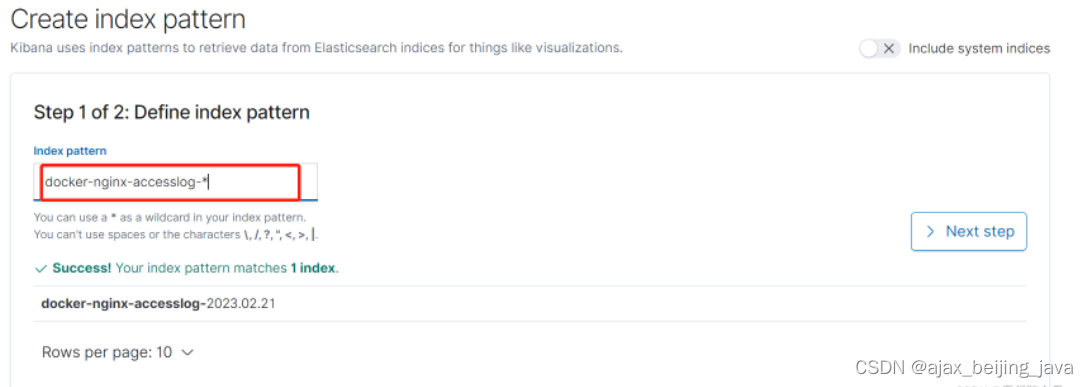
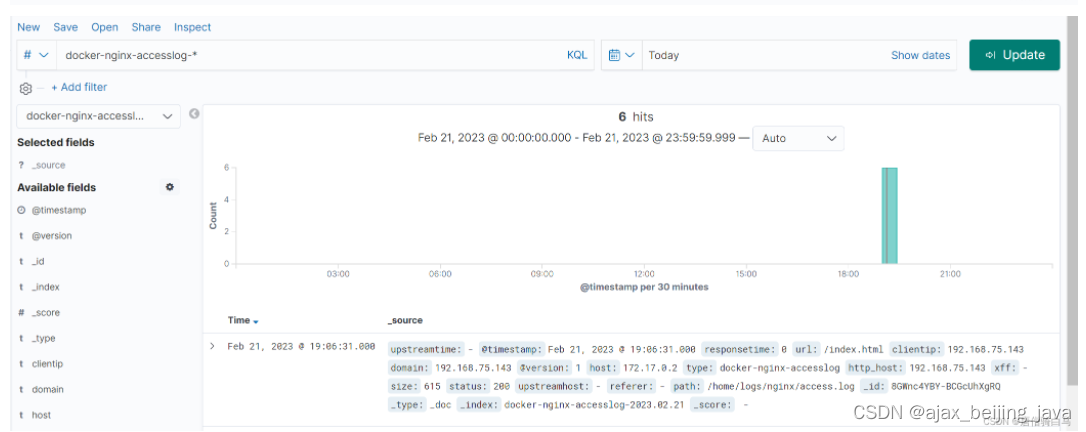
3、重启logstash,创建索引,并查看kibana






 扫一扫
扫一扫


 被折叠的 条评论
为什么被折叠?
被折叠的 条评论
为什么被折叠?
 到【灌水乐园】发言





