



 本文介绍了Spring框架中的IOC(控制反转)概念,通过创建UserDao接口及其实现类展示了如何将对象的创建权交给Spring管理。接着,讲解了如何配置Spring的XML文件`applicationContext.xml`来注入Bean,并编写测试类`Test.java`进行验证。在运行项目后,可以看到Spring如何通过ApplicationContext接口实例化并管理Bean。最后,提到了ApplicationContext的两个实现类及其用途,以及IOC的底层工作原理。
1. IOC: Inversion of Control(控制反转)。将对象的创建权反转给Spring。
2. 创建名为SpringIOC的Java工程, 并且添加Spring相关包
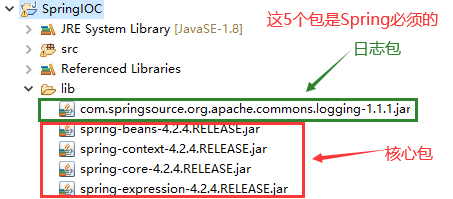
3. 创建UserDao.java接口
package com.lywgames.ioc.dao;

public interface UserDao {
	public void login();
}
4. 创建UserDao接口的实现类UserDaoImpl.java
package com.lywgames.ioc.dao.impl;

import com.lywgames.ioc.dao.UserDao;

public class UserDaoImpl implements UserDao {
	public UserDaoImpl() {
		System.out.println("实例化构造函数");
	}
	@Override
	public void login() {
		System.out.println("用户登录成功.");
	}

}
5. 在spring的解压路径下找到spring-framework-4.2.4.RELEASE\docs\spring-framework-reference\html\xsd-configuration.html, 打开查看xml文件头信息
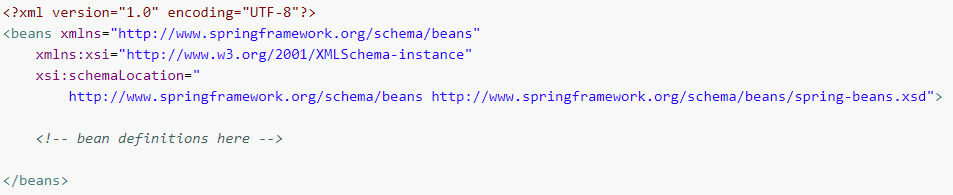
6. 在src目录下新建applicationContext.xml, 然后配置UserDao

7. 编写测试类Test.java
package com.lywgames.ioc;

import org.springframework.context.ApplicationContext;
import org.springframework.context.support.ClassPathXmlApplicationContext;
import com.lywgames.ioc.dao.UserDao;

public class Test {
	public static void main(String[] args) {
		// 类路径加载配置文件
		ApplicationContext context = new ClassPathXmlApplicationContext("applicationContext.xml");
		// 获取UserDao
		UserDao userDao = context.getBean(UserDao.class);
		// 调用UserDao的login接口
		userDao.login();
	}
}
8. 运行项目

9. IOC底层原理
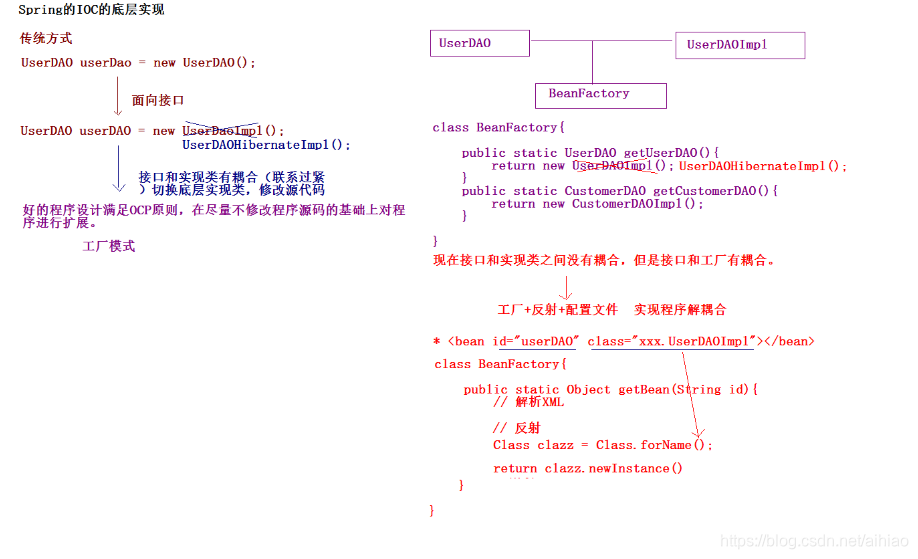
10. Spring工厂类的结构图
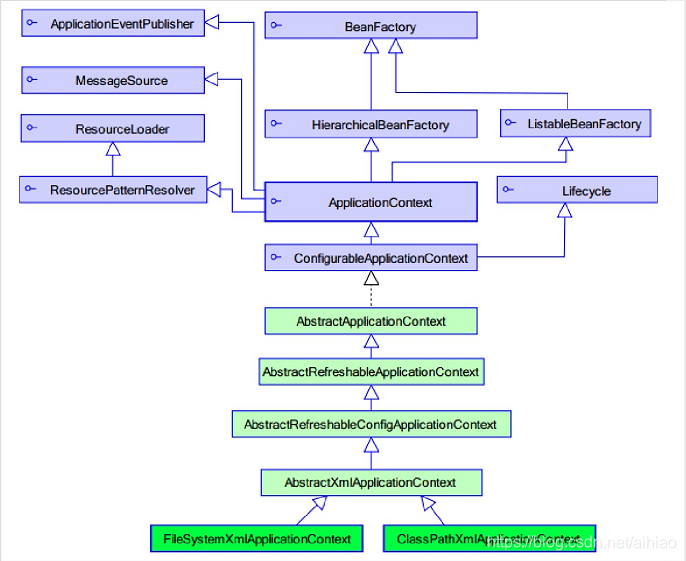
11. ApplicationContext接口
11.1. ApplicationContext: 加载配置文件的时候, 就会将Spring管理的类(单例模式)都实例化。
11.2. ApplicationContext有两个实现类
11.2.1. ClassPathXmlApplicationContext: 加载类路径下的配置文件。
11.2.2. FileSystemXmlApplicationContext: 加载文件系统下的配置文件。





 扫一扫
扫一扫


 86
86

 被折叠的 条评论
为什么被折叠?
被折叠的 条评论
为什么被折叠?
 到【灌水乐园】发言





