



1. 在JavaScript中, this关键字指的是它所属的对象。
2. this使用位置的不同, 它的值也不同:
2.1. 单独使用, this指的是全局对象。
2.2. 在函数中, this指的是全局对象。
2.3. 在函数中, 严格模式下, this是undefined。
2.4. 在方法中, this指的是所有者对象。
2.5. 在构造器函数中, this是没有值的。它是新对象的替代物。当一个新对象被创建时, this的值会成为这个新对象。
2.6. 像call()和apply()这样的方法可以将this引用到任何对象。
2.7. 在事件中, this指的是接收事件的元素。
3. 单独使用this
3.1. 在单独使用时, 拥有者是全局对象, 因此this指的是全局对象。
3.2. 在浏览器窗口中, 全局对象是[object Window]:
document.write(this + '<br />'); // 输出[object Window]
3.3. 在严格模式中, 如果单独使用, 那么this指的是全局对象[object Window]:
"use strict";
document.write(this + '<br />'); // 输出[object Window]
4. 函数中的this(默认)
4.1. 在JavaScript函数中, 函数的拥有者默认绑定this。
4.2. 因此, 在函数中, this指的是全局对象[object Window]。
function myFn1(){
	document.write(this + '<br />'); // 输出[object Window]
}
myFn1();
5. 函数中的this(严格模式)
5.1. JavaScript严格模式不允许默认绑定。
5.2. 因此, 在函数中使用时, 在严格模式下, this是未定义的undefined。
"use strict";
function myFn2(){
	document.write(this + '<br />'); // 输出undefined
}
myFn2();
6. 方法中的this
6.1. 在对象方法中, this指的是此方法的"拥有者"。
6.2. 在下面的例子中, this指的是obj1对象。obj1对象是info方法的拥有者。
var obj1 = {id: 1001, name:'华为手机', info: function(){
	document.write('id: ' + this.id + ', name: ' + this.name + '<br />');
}};
obj1.info();
7. 构造器函数中的this
7.1. 在构造器函数中, this是没有值的。它是新对象的替代物。当一个新对象被创建时, this的值会成为这个新对象。
7.2. 在下面的例子中, Computer中所有的this都是没有值的。当我们使用Computer创建了一个ctr1对象时, Computer中所有的this就是ctr1对象; 当我们使用Computer创建了一个ctr2对象时, Computer中所有的this就是ctr2对象。
function Computer(name, price){
	this.name = name;
	this.price = price;
}
Computer.prototype.info = function(){
	document.write('name: ' + this.name + ', price: ' + this.price + '<br />');
}
var ctr1 = new Computer('华为笔记本', 4000);
ctr1.info();
var ctr2 = new Computer('联想台式机', 3500);
ctr2.info();
8. 显式函数绑定
8.1. call()和apply()方法是预定义的JavaScript方法。
8.2. call()和apply()都可以用于将另一个对象作为参数调用对象方法。
8.3. 在下面的例子中, 当使用book作为参数调用Goods.prototype.print时, this将引用book; 当使用drink作为参数调用Goods.prototype.print时, this将引用drink。即使print是Goods原型上的方法:
function Goods(name, price){
	this.name = name;
	this.price = price;
}
Goods.prototype.print = function(){
	document.write('name: ' + this.name + ', price: ' + this.price + '<br />');
}
function Book(name, price){
	this.name = name;
	this.price = price;
}
var book = new Book('JavaScript高级程序设计', 80.00);
function Drink(name, price){
	this.name = name;
	this.price = price;
}
var drink = new Drink('农夫山泉', 1.50);
Goods.prototype.print.call(book);
Goods.prototype.print.apply(drink);
9. 事件处理程序中的this
9.1. 在html事件处理程序中, this指的是接收此事件的html元素:
<button onclick="this.style.display='none'">点击来删除我</button> // this是button元素
10. 请注意this并不是变量, 它是关键字。您无法改变this的值。
11. 例子
11.1. 代码
<!DOCTYPE html>
<html>
	<head>
		<meta charset="utf-8" />
		<title>this关键字</title>
	</head>
	<body>
		<button onclick="this.style.display='none'">点击来删除我</button>

		<script type="text/javascript">
			document.write('<hr />');
			document.write(this + '<br />');

			function myFn1(){
				document.write(this + '<br />');
			}
			myFn1();

			var obj1 = {id: 1001, name:'华为手机', info: function(){
				document.write('id: ' + this.id + ', name: ' + this.name + '<br />');
			}};
			obj1.info();

			function Computer(name, price){
				this.name = name;
				this.price = price;
			}
			Computer.prototype.info = function(){
				document.write('name: ' + this.name + ', price: ' + this.price + '<br />');
			}
			var ctr1 = new Computer('华为笔记本', 4000);
			ctr1.info();
			var ctr2 = new Computer('联想台式机', 3500);
			ctr2.info();

			function Goods(name, price){
				this.name = name;
				this.price = price;
			}
			Goods.prototype.print = function(){
				document.write('name: ' + this.name + ', price: ' + this.price + '<br />');
			}
			function Book(name, price){
				this.name = name;
				this.price = price;
			}
			var book = new Book('JavaScript高级程序设计', 80.00);
			function Drink(name, price){
				this.name = name;
				this.price = price;
			}
			var drink = new Drink('农夫山泉', 1.50);
			Goods.prototype.print.call(book);
			Goods.prototype.print.apply(drink);
		</script>

		<script type="text/javascript">
			"use strict";
			document.write('<hr />严格模式<br />');

			document.write(this + '<br />');

			function myFn2(){
				document.write(this + '<br />');
			}
			myFn2();
		</script>
	</body>
</html>
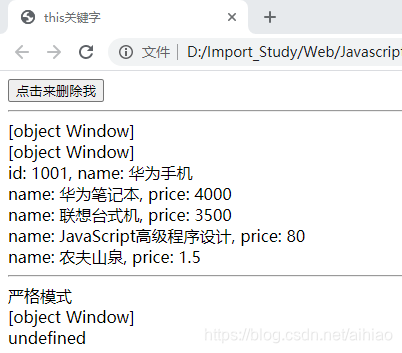
11.2. 效果图





 扫一扫
扫一扫


 6万+
6万+

 被折叠的 条评论
为什么被折叠?
被折叠的 条评论
为什么被折叠?
 到【灌水乐园】发言





