



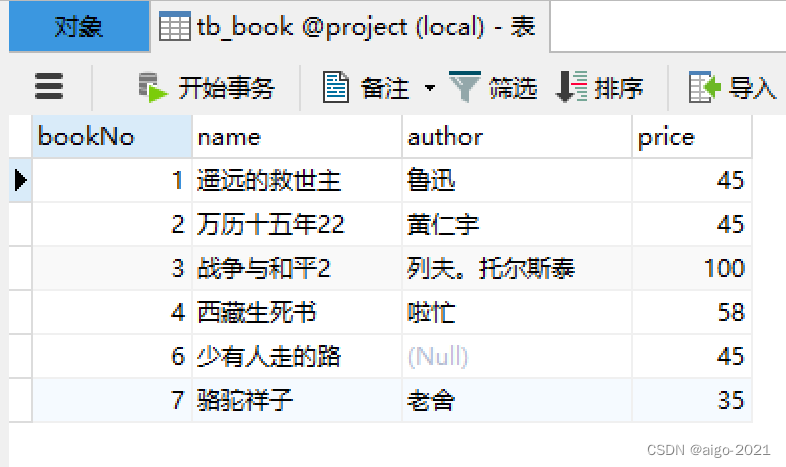
SQL语句如下
CREATE TABLE `tb_book` (
    `bookNo` int NOT NULL AUTO_INCREMENT,
    `name` varchar(20) CHARACTER SET utf8 COLLATE utf8_bin NOT NULL,
    `author` varchar(30) CHARACTER SET utf8 COLLATE utf8_bin DEFAULT NULL,
    `price` int NOT NULL, PRIMARY KEY (`bookNo`)
) ENGINE=InnoDB AUTO_INCREMENT=7 DEFAULT CHARSET=utf8mb3 COLLATE=utf8_bin;
-- ----------------------------
-- Records of tb_book
-- ----------------------------
INSERT INTO `tb_book` VALUES ('1', '遥远的救世主', '豆豆', '45');
INSERT INTO `tb_book` VALUES ('2', '万历十五年22', '黄仁宇', '45');
INSERT INTO `tb_book` VALUES ('3', '战争与和平2', '列夫。托尔斯泰', '100');
INSERT INTO `tb_book` VALUES ('4', '西藏生死书', '啦忙', '58');
INSERT INTO `tb_book` VALUES ('5', '背叛', '豆豆', '45');
INSERT INTO `tb_book` VALUES ('6', '少有人走的路', null, '45');
针对上表,使用mybatis+spring整合,完成DAO及Service的整合,并完成对图书的怎删改查(CURD)。
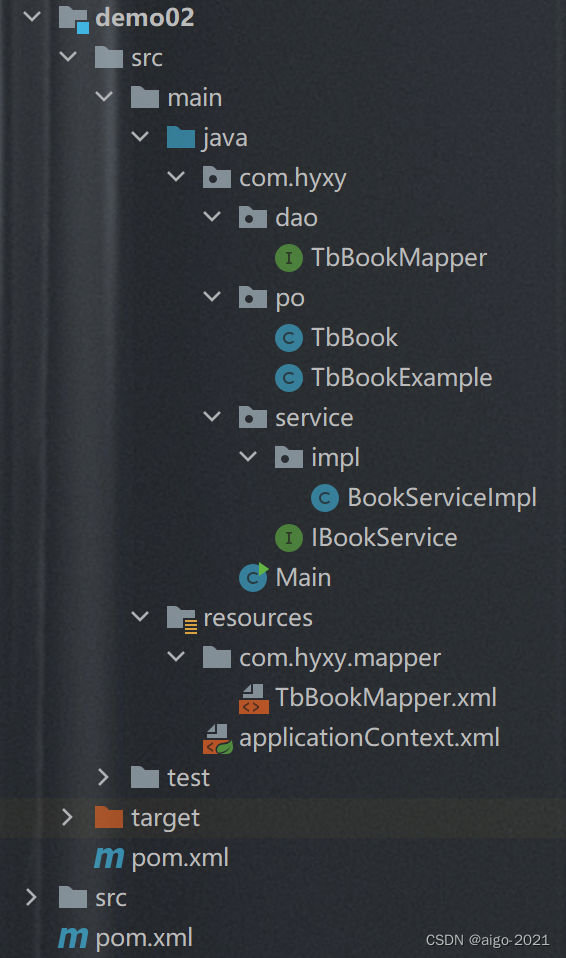
目录结构
TbBookMapper接口
package com.hyxy.dao;

import com.hyxy.po.TbBook;
import com.hyxy.po.TbBookExample;
import org.apache.ibatis.annotations.Param;

import java.util.List;

public interface TbBookMapper {
    int countByExample(TbBookExample example);

    int deleteByExample(TbBookExample example);

    int deleteByPrimaryKey(Integer bookno);

    int insert(TbBook record);

    int insertSelective(TbBook record);

    List<TbBook> selectByExample(TbBookExample example);

    TbBook selectByPrimaryKey(Integer bookno);

    int updateByExampleSelective(@Param("record") TbBook record, @Param("example") TbBookExample example);

    int updateByExample(@Param("record") TbBook record, @Param("example") TbBookExample example);

    int updateByPrimaryKeySelective(TbBook record);

    int updateByPrimaryKey(TbBook record);
}
TbBook.java
package com.hyxy.po;

public class TbBook {
    private Integer bookno;//图书编号
    private String name;//图书名称
    private String author;//作者
    private Integer price;//价格

    public Integer getBookno() {
        return bookno;
    }

    public void setBookno(Integer bookno) {
        this.bookno = bookno;
    }

    public String getName() {
        return name;
    }

    public void setName(String name) {
        this.name = name == null ? null : name.trim();
    }

    public String getAuthor() {
        return author;
    }

    public void setAuthor(String author) {
        this.author = author == null ? null : author.trim();
    }

    public Integer getPrice() {
        return price;
    }

    public void setPrice(Integer price) {
        this.price = price;
    }
}
IBookService接口
package com.hyxy.service;

public interface IBookService {
    public void delelte();
    public void update();
    public void insert();
}
BookServiceImpl.java
package com.hyxy.service.impl;

import com.hyxy.dao.TbBookMapper;
import com.hyxy.po.TbBook;
import com.hyxy.service.IBookService;
import org.springframework.beans.factory.annotation.Autowired;
import org.springframework.stereotype.Service;
import org.springframework.transaction.annotation.Transactional;
@Service//相当于@Component注解,通过扫描注解的方式,自动将该类向IOC容器中注册Bean
public class BookServiceImpl implements IBookService{
    @Autowired//该注解修饰属性,先按类型自动装配,再按名字自动装配
    private TbBookMapper bookMapper;
    @Override
    public void insert() {
        TbBook book = new TbBook();
        book.setBookno(7);
        book.setName("骆驼祥子");
        book.setAuthor("老舍");
        book.setPrice(35);
        bookMapper.insert(book);
    }

    @Override
    public void delelte() {
        bookMapper.deleteByPrimaryKey(5);//按主键删除
    }

    @Override
    /*被标注@Transactional注解的方法,Spring容器就会在启动的时候为其创建一个代理类,在调用被@Transactional 注解的 public 方法的时候,实际调用的是,TransactionInterceptor 类中的 invoke()方法。这个方法的作用就是在目标方法之前开启事务,方法执行过程中如果遇到异常的时候回滚事务,方法调用完成之后提交事务。*/
    @Transactional
    public void update() {
        TbBook book = new TbBook();
        book.setBookno(1);
        book.setAuthor("鲁迅");
        bookMapper.updateByPrimaryKeySelective(book);//选择性更新
    }

}
被标注@Transactional注解的方法,Spring容器就会在启动的时候为其创建一个代理类,在调用被@Transactional 注解的 public 方法的时候,实际调用的是,TransactionInterceptor 类中的 invoke()方法。这个方法的作用就是在目标方法之前开启事务,方法执行过程中如果遇到异常的时候回滚事务,方法调用完成之后提交事务。
TbBookMapper.xml
<?xml version="1.0" encoding="UTF-8" ?>
<!DOCTYPE mapper PUBLIC "-//mybatis.org//DTD Mapper 3.0//EN" "http://mybatis.org/dtd/mybatis-3-mapper.dtd" >
<mapper namespace="com.hyxy.dao.TbBookMapper" >
  <resultMap id="BaseResultMap" type="com.hyxy.po.TbBook" >
    <id column="bookNo" property="bookno" jdbcType="INTEGER" />
    <result column="name" property="name" jdbcType="VARCHAR" />
    <result column="author" property="author" jdbcType="VARCHAR" />
    <result column="price" property="price" jdbcType="INTEGER" />
  </resultMap>

  <select id="selectByPrimaryKey" resultMap="BaseResultMap" parameterType="java.lang.Integer" >
    select
    <include refid="Base_Column_List" />
    from tb_book
    where bookNo = #{bookno,jdbcType=INTEGER}
  </select>
  <delete id="deleteByPrimaryKey" parameterType="java.lang.Integer" >
    delete from tb_book
    where bookNo = #{bookno,jdbcType=INTEGER}
  </delete>

  <insert id="insert" parameterType="com.hyxy.po.TbBook" >
    insert into tb_book (bookNo, name, author,
      price)
    values (#{bookno,jdbcType=INTEGER}, #{name,jdbcType=VARCHAR}, #{author,jdbcType=VARCHAR},
      #{price,jdbcType=INTEGER})
  </insert>
 <select id="selectByExample" resultMap="BaseResultMap" parameterType="com.hyxy.po.TbBookExample" >
    select
    <if test="distinct" >
      distinct
    </if>
    <include refid="Base_Column_List" />
    from tb_book
    <if test="_parameter != null" >
      <include refid="Example_Where_Clause" />
    </if>
    <if test="orderByClause != null" >
      order by ${orderByClause}
    </if>
  </select>
  <update id="updateByPrimaryKeySelective" parameterType="com.hyxy.po.TbBook" >
    update tb_book
    <set >
      <if test="name != null" >
        name = #{name,jdbcType=VARCHAR},
      </if>
      <if test="author != null" >
        author = #{author,jdbcType=VARCHAR},
      </if>
      <if test="price != null" >
        price = #{price,jdbcType=INTEGER},
      </if>
    </set>
    where bookNo = #{bookno,jdbcType=INTEGER}
  </update>

</mapper>
applicationContext.xml
<?xml version="1.0" encoding="UTF-8"?>
<beans xmlns="http://www.springframework.org/schema/beans"
xmlns:xsi="http://www.w3.org/2001/XMLSchema-instance"
xmlns:mybatis-spring="http://mybatis.org/schema/mybatis-spring"
xmlns:tx="http://www.springframework.org/schema/tx" xmlns:context="http://www.springframework.org/schema/context"
xsi:schemaLocation="http://www.springframework.org/schema/beans http://www.springframework.org/schema/beans/spring-beans.xsd http://mybatis.org/schema/mybatis-spring http://mybatis.org/schema/mybatis-spring.xsd http://www.springframework.org/schema/tx http://www.springframework.org/schema/tx/spring-tx.xsd http://www.springframework.org/schema/context https://www.springframework.org/schema/context/spring-context.xsd">
<bean id="dataSource" class="org.springframework.jdbc.datasource.DriverManagerDataSource">
<property name="driverClassName" value="com.mysql.jdbc.Driver" />
<property name="url" value="jdbc:mysql://localhost:3306/project?useUnicode=true&characterEncoding=utf8" />
<property name="username" value="root" />
<property name="password" value="root" />
</bean>
<!-- 扫描所有的mybatis的DAO接口; -->
<!-- 生成绑定接口的代理对象 ,注册在Spring的IOC中 -->
<mybatis-spring:scan base-package="com.hyxy.dao"/>
<bean id="txManager" class="org.springframework.jdbc.datasource.DataSourceTransactionManager">
<property name="dataSource" ref="dataSource"></property>
</bean>
<!-- 由Annotation调度事务管理Bean -->
<tx:annotation-driven transaction-manager="txManager" />
<context:component-scan base-package="com.hyxy.service"></context:component-scan>
</beans>
pom.xml
<?xml version="1.0" encoding="UTF-8"?>
<project xmlns="http://maven.apache.org/POM/4.0.0"
         xmlns:xsi="http://www.w3.org/2001/XMLSchema-instance"
         xsi:schemaLocation="http://maven.apache.org/POM/4.0.0 http://maven.apache.org/xsd/maven-4.0.0.xsd">
    <modelVersion>4.0.0</modelVersion>

    <groupId>org.example</groupId>
    <artifactId>springMybatis</artifactId>
    <packaging>pom</packaging>
    <version>1.0-SNAPSHOT</version>
    <modules>
        <module>demo01</module>
        <module>demo02</module>
    </modules>
    <properties>
        <!-- spring版本号 -->
        <spring.version>5.2.11.RELEASE</spring.version>
        <!-- log4j日志文件管理包版本 -->
        <slf4j.version>1.6.6</slf4j.version>
        <log4j.version>1.2.12</log4j.version>
        <!-- junit版本号 -->
        <junit.version>4.10</junit.version>
        <!-- mybatis版本号 -->
        <mybatis.version>3.4.1</mybatis.version>
    </properties>
    <dependencies>
        <!-- 添加Spring依赖 -->
        <dependency>
            <groupId>org.springframework</groupId>
            <artifactId>spring-context</artifactId>
            <version>${spring.version}</version>
        </dependency>
        <dependency>
            <groupId>org.springframework</groupId>
            <artifactId>spring-webmvc</artifactId>
            <version>${spring.version}</version>
        </dependency>
        <dependency>
            <groupId>org.springframework</groupId>
            <artifactId>spring-web</artifactId>
            <version>${spring.version}</version>
        </dependency>
        <dependency>
            <groupId>org.springframework</groupId>
            <artifactId>spring-tx</artifactId>
            <version>${spring.version}</version>
        </dependency>
        <dependency>
            <groupId>org.springframework</groupId>
            <artifactId>spring-jdbc</artifactId>
            <version>${spring.version}</version>
        </dependency>
        <dependency>
            <groupId>org.springframework</groupId>
            <artifactId>spring-context-support</artifactId>
            <version>${spring.version}</version>
        </dependency>
        <dependency>
            <groupId>org.springframework</groupId>
            <artifactId>spring-aspects</artifactId>
            <version>${spring.version}</version>
        </dependency>
        <!--mybatis依赖 -->
        <dependency>
            <groupId>org.mybatis</groupId>
            <artifactId>mybatis</artifactId>
            <version>${mybatis.version}</version>
        </dependency>
        <!-- mybatis/spring包 -->
        <dependency>
            <groupId>org.mybatis</groupId>
            <artifactId>mybatis-spring</artifactId>
            <version>1.3.1</version>
        </dependency>
        <!-- mysql驱动包 -->
        <dependency>
            <groupId>mysql</groupId>
            <artifactId>mysql-connector-java</artifactId>
            <version>5.1.38</version>
        </dependency>
        <!-- Jackson包 -->
        <dependency>
            <groupId>com.fasterxml.jackson.core</groupId>
            <artifactId>jackson-databind</artifactId>
            <version>2.9.2</version>
        </dependency>
        <!-- 文件上传包 -->
        <dependency>
            <groupId>commons-fileupload</groupId>
            <artifactId>commons-fileupload</artifactId>
            <version>1.3.1</version>
        </dependency>
        <!-- 日志文件管理包 -->
        <dependency>
            <groupId>log4j</groupId>
            <artifactId>log4j</artifactId>
            <version>${log4j.version}</version>
        </dependency>
        <!-- junit包 -->
        <dependency>
            <groupId>junit</groupId>
            <artifactId>junit</artifactId>
            <version>${junit.version}</version>
            <scope>test</scope>
        </dependency>
        <dependency>
            <groupId>javax.servlet</groupId>
            <artifactId>javax.servlet-api</artifactId>
            <version>3.1.0</version>
            <scope>provided</scope>
        </dependency>
        <dependency>
            <groupId>javax.servlet</groupId>
            <artifactId>jstl</artifactId>
            <version>1.2</version>
        </dependency>
    </dependencies>

</project>
Main.java
package com.hyxy;

import com.hyxy.dao.TbBookMapper;
import com.hyxy.po.TbBook;
import com.hyxy.po.TbBookExample;
import com.hyxy.service.IBookService;
import org.springframework.context.support.ClassPathXmlApplicationContext;

import java.util.List;

public class Main {
    public static void main(String[] args) {
        ClassPathXmlApplicationContext context = new ClassPathXmlApplicationContext("applicationContext.xml");

        IBookService bookService = (IBookService) context.getBean("bookServiceImpl");

        //bookService.update();//更新
        //bookService.insert();//插入
        //bookService.delelte();//删除
        TbBookMapper bookMapper = (TbBookMapper)context.getBean("tbBookMapper");//类名首字母小写
        //查询
        List<TbBook> list =  bookMapper.selectByExample(new TbBookExample());
        for(TbBook book:list){
            System.out.println("书名:"+book.getName()+",作者:"+book.getAuthor());
        }
    }
}
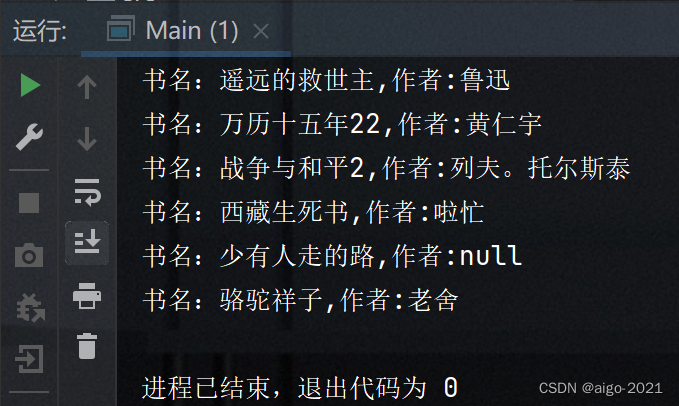
运行结果:
查询结果:





 扫一扫
扫一扫


 349
349

 被折叠的 条评论
为什么被折叠?
被折叠的 条评论
为什么被折叠?
 到【灌水乐园】发言





