


1.代码结构
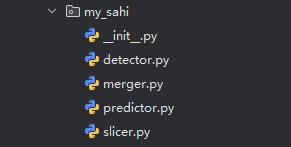
2.detector
class DetectorAdapter:
    """
    检测器适配器,用于适配不同的目标检测模型
    """
    def __init__(self, model, model_type="ultralytics", confidence_threshold=0.3):
        """
        初始化检测器适配器

        参数:
        model: 目标检测模型
        model_type: 模型类型,默认为"ultralytics"
        confidence_threshold: 置信度阈值
        """
        self.model = model
        self.model_type = model_type.lower()
        self.confidence_threshold = confidence_threshold

        # 添加类别名称属性
        self.class_names = None
        if hasattr(model, 'names'):
            self.class_names = model.names

    def detect(self, image):
        """
        在图像上执行目标检测

        参数:
        image: 输入图像

        返回:
        detections: 检测结果列表,每个元素为 (x1, y1, x2, y2, score, class_id, class_name)
        """
        if self.model_type == "ultralytics":
            # 适配Ultralytics YOLO模型
            results = self.model(image, conf=self.confidence_threshold)
            detections = []

            for result in results:
                boxes = result.boxes
                for box in boxes:
                    x1, y1, x2, y2 = box.xyxy[0].tolist()
                    score = box.conf[0].item()
                    class_id = box.cls[0].item()
                    class_name = self.class_names[int(class_id)] if self.class_names else f"Class {int(class_id)}"
                    detections.append((x1, y1, x2, y2, score, class_id, class_name))

            return detections
        elif self.model_type == "custom":
            # 自定义模型接口
            # 这里需要根据你的自定义模型实现检测逻辑
            pass
        else:
            raise NotImplementedError(f"不支持的模型类型: {self.model_type}")
3.merger.py
import numpy as np


def calculate_iou(box1, box2):
    """
    计算两个边界框的交并比(IOU)

    参数:
    box1: (x1, y1, x2, y2)
    box2: (x1, y1, x2, y2)

    返回:
    iou: 交并比
    """
    x1 = max(box1[0], box2[0])
    y1 = max(box1[1], box2[1])
    x2 = min(box1[2], box2[2])
    y2 = min(box1[3], box2[3])

    # 计算交集面积
    intersection = max(0, x2 - x1) * max(0, y2 - y1)

    # 计算每个框的面积
    area1 = (box1[2] - box1[0]) * (box1[3] - box1[1])
    area2 = (box2[2] - box2[0]) * (box2[3] - box2[1])

    # 计算并集面积
    union = area1 + area2 - intersection

    # 计算IOU
    iou = intersection / union if union > 0 else 0

    return iou


class ResultMerger:
    """
    检测结果合并器
    """
    def __init__(self, iou_threshold=0.3, confidence_threshold=0.3, max_det=1000):
        """
        初始化结果合并器

        参数:
        iou_threshold: IOU阈值,用于NMS
        confidence_threshold: 置信度阈值,低于此值的检测结果将被过滤
        max_det: 每张图像的最大检测数量
        """
        self.iou_threshold = iou_threshold
        self.confidence_threshold = confidence_threshold
        self.max_det = max_det

    def merge_results(self, all_detections, slice_coords):
        """
        合并多个切片的检测结果

        参数:
        all_detections: 所有切片的检测结果列表
        slice_coords: 切片坐标列表

        返回:
        merged_detections: 合并后的检测结果
        """
        merged_detections = []

        for i, detections in enumerate(all_detections):
            # 正确解包四元组坐标
            start_y, start_x, _, _ = slice_coords[i]

            for det in detections:
                x1, y1, x2, y2, score, class_id, class_name = det

                # 过滤低置信度检测
                if score < self.confidence_threshold:
                    continue

                # 调整坐标到原始图像
                adjusted_x1 = x1 + start_x
                adjusted_y1 = y1 + start_y
                adjusted_x2 = x2 + start_x
                adjusted_y2 = y2 + start_y

                merged_detections.append((adjusted_x1, adjusted_y1, adjusted_x2, adjusted_y2, score, class_id, class_name))

        # 应用非极大值抑制来合并重叠框
        return self.non_max_suppression(merged_detections)

    def non_max_suppression(self, detections):
        """
        非极大值抑制 - 移除同一物体上的多个重叠框

        参数:
        detections: 检测结果列表,每个元素为(x1, y1, x2, y2, score, class_id, class_name)

        返回:
        nms_detections: NMS处理后的检测结果
        """
        if not detections:
            return []

        # 按类别分组
        class_groups = {}
        for det in detections:
            class_id = det[5]
            if class_id not in class_groups:
                class_groups[class_id] = []
            class_groups[class_id].append(det)

        nms_detections = []

        # 对每个类别单独应用NMS
        for class_id, dets in class_groups.items():
            # 按置信度排序
            dets.sort(key=lambda x: x[4], reverse=True)

            keep = []
            while dets and len(keep) < self.max_det:
                # 保留置信度最高的框
                current = dets.pop(0)
                keep.append(current)

                # 移除与当前框IOU大于阈值的框
                dets = [d for d in dets if calculate_iou(current[:4], d[:4]) < self.iou_threshold]

            nms_detections.extend(keep)

        # 按置信度排序所有结果
        nms_detections.sort(key=lambda x: x[4], reverse=True)

        # 限制最大检测数量
        if len(nms_detections) > self.max_det:
            nms_detections = nms_detections[:self.max_det]

        return nms_detections
4.predict.py
import cv2
import numpy as np
import os
from pathlib import Path
from .slicer import ImageSlicer
from .detector import DetectorAdapter
from .merger import ResultMerger

class SlicedPredictor:
    """
    切片预测器,结合切片、检测和结果合并功能
    """
    def __init__(self, model, model_type="ultralytics", confidence_threshold=0.3, iou_threshold=0.5):
        """
        初始化切片预测器

        参数:
        model: 目标检测模型
        model_type: 模型类型
        confidence_threshold: 置信度阈值
        iou_threshold: IOU阈值
        """
        self.detector = DetectorAdapter(model, model_type, confidence_threshold)
        self.merger = ResultMerger(iou_threshold)
        self.slicer = None

    def predict(self, image, slice_height=256, slice_width=256, overlap_ratio=0.2):
        """
        执行切片预测

        参数:
        image: 输入图像
        slice_height: 切片高度
        slice_width: 切片宽度
        overlap_ratio: 重叠比例

        返回:
        merged_detections: 合并后的检测结果
        """
        # 初始化切片器
        self.slicer = ImageSlicer(
            slice_height=slice_height,
            slice_width=slice_width,
            overlap_height_ratio=overlap_ratio,
            overlap_width_ratio=overlap_ratio
        )

        # 切片图像
        sliced_images, slice_coords = self.slicer.slice_image(image)

        # 在每个切片上执行检测
        all_detections = []

        for sliced_img in sliced_images:
            detections = self.detector.detect(sliced_img)
            all_detections.append(detections)

        # 合并检测结果(注意:这里假设ResultMerger已经适配了新的检测结果格式)
        merged_detections = self.merger.merge_results(all_detections, slice_coords)

        return merged_detections

    def visualize_results(self, image, detections, output_path=None):
        """
        可视化检测结果

        参数:
        image: 原始图像
        detections: 检测结果
        output_path: 输出路径,None表示不保存

        返回:
        visualized_image: 可视化后的图像
        """
        visualized_image = image.copy()
        print("=========cdcvdv=======", detections)
        for (x1, y1, x2, y2, score, class_id, class_name) in detections:
            # 绘制边界框
            cv2.rectangle(visualized_image, (int(x1), int(y1)), (int(x2), int(y2)), (0, 255, 0), 2)

            # 绘制标签(使用类别名称)
            label = f"{class_name}: {score:.2f}"
            cv2.putText(visualized_image, label, (int(x1), int(y1) - 10),
                        cv2.FONT_HERSHEY_SIMPLEX, 0.5, (0, 255, 0), 2)

        # 保存图像
        if output_path:
            cv2.imwrite(output_path, visualized_image)
            print(f"可视化结果已保存至: {output_path}")

        return visualized_image

    def batch_predict(self, input_dir, output_dir, slice_height=256, slice_width=256, overlap_ratio=0.2):
        """
        批量处理文件夹中的所有图像

        参数:
        input_dir: 输入图像文件夹路径
        output_dir: 输出结果文件夹路径
        slice_height: 切片高度
        slice_width: 切片宽度
        overlap_ratio: 重叠比例
        """
        # 创建输出文件夹
        os.makedirs(output_dir, exist_ok=True)
        output_images_dir = os.path.join(output_dir, 'images')
        output_labels_dir = os.path.join(output_dir, 'labels')
        os.makedirs(output_images_dir, exist_ok=True)
        os.makedirs(output_labels_dir, exist_ok=True)

        # 获取所有图像文件
        image_exts = {'.jpg', '.jpeg', '.png', '.bmp', '.tiff', '.tif'}
        image_files = [str(p) for p in Path(input_dir).rglob('*') if p.suffix.lower() in image_exts]

        # 处理每张图像
        for i, image_path in enumerate(image_files):
            print(f"处理图像 {i+1}/{len(image_files)}: {os.path.basename(image_path)}")

            # 读取图像
            image = cv2.imread(image_path)
            if image is None:
                print(f"无法读取图像: {image_path}")
                continue

            # 执行切片预测
            detections = self.predict(
                image=image,
                slice_height=slice_height,
                slice_width=slice_width,
                overlap_ratio=overlap_ratio
            )

            # 可视化结果
            image_basename = os.path.basename(image_path)
            output_image_path = os.path.join(output_images_dir, image_basename)
            self.visualize_results(image, detections, output_image_path)

            # 保存检测结果为YOLO格式
            output_label_path = os.path.join(output_labels_dir, Path(image_basename).stem + '.txt')
            self.save_results_as_yolo(detections, image.shape[:2], output_label_path)

        print(f"批量处理完成!结果已保存至: {output_dir}")

    def save_results_as_yolo(self, detections, image_shape, output_path):
        """
        将检测结果保存为YOLO格式

        参数:
        detections: 检测结果
        image_shape: 图像形状 (height, width)
        output_path: 输出文件路径
        """
        image_height, image_width = image_shape

        with open(output_path, 'w') as f:
            for (x1, y1, x2, y2, score, class_id, _) in detections:
                # 计算YOLO格式的归一化坐标
                x_center = (x1 + x2) / 2 / image_width
                y_center = (y1 + y2) / 2 / image_height
                width = (x2 - x1) / image_width
                height = (y2 - y1) / image_height

                # 写入文件
                f.write(f"{int(class_id)} {x_center:.6f} {y_center:.6f} {width:.6f} {height:.6f} {score:.6f}\n")
5.slicer.py
import numpy as np

class ImageSlicer:
    """
    图像切片器,用于将大图像分割成小切片
    """
    def __init__(self, slice_height, slice_width, overlap_height_ratio=0.2, overlap_width_ratio=0.2):
        """
        初始化图像切片器

        参数:
        slice_height: 切片高度
        slice_width: 切片宽度
        overlap_height_ratio: 高度方向重叠比例
        overlap_width_ratio: 宽度方向重叠比例
        """
        self.slice_height = slice_height
        self.slice_width = slice_width
        self.overlap_height_ratio = overlap_height_ratio
        self.overlap_width_ratio = overlap_width_ratio

        # 计算实际重叠像素
        self.overlap_height = int(slice_height * overlap_height_ratio)
        self.overlap_width = int(slice_width * overlap_width_ratio)

        # 计算步长
        self.step_height = slice_height - self.overlap_height
        self.step_width = slice_width - self.overlap_width

    def generate_slices(self, image_height, image_width):
        """
        生成切片坐标

        参数:
        image_height: 原始图像高度
        image_width: 原始图像宽度

        返回:
        slices: 切片坐标列表,每个元素为 (start_y, start_x, end_y, end_x)
        """
        slices = []

        # 计算y方向的切片数量
        num_slices_y = 1
        if image_height > self.slice_height:
            num_slices_y = (image_height - self.overlap_height) // self.step_height
            if (image_height - self.overlap_height) % self.step_height != 0:
                num_slices_y += 1

        # 计算x方向的切片数量
        num_slices_x = 1
        if image_width > self.slice_width:
            num_slices_x = (image_width - self.overlap_width) // self.step_width
            if (image_width - self.overlap_width) % self.step_width != 0:
                num_slices_x += 1

        # 生成所有切片
        for i in range(num_slices_y):
            for j in range(num_slices_x):
                start_y = i * self.step_height
                start_x = j * self.step_width

                # 确保最后一个切片不会超出图像
                end_y = min(start_y + self.slice_height, image_height)
                end_x = min(start_x + self.slice_width, image_width)

                # 调整起始位置,确保切片大小一致
                if end_y - start_y < self.slice_height:
                    start_y = max(0, end_y - self.slice_height)
                if end_x - start_x < self.slice_width:
                    start_x = max(0, end_x - self.slice_width)

                slices.append((start_y, start_x, end_y, end_x))

        return slices

    def slice_image(self, image):
        """
        对图像进行切片

        参数:
        image: 输入图像 (numpy数组)

        返回:
        sliced_images: 切片图像列表
        slice_coords: 切片坐标列表
        """
        image_height, image_width = image.shape[:2]
        slices = self.generate_slices(image_height, image_width)

        sliced_images = []
        slice_coords = []

        for start_y, start_x, end_y, end_x in slices:
            sliced_img = image[start_y:end_y, start_x:end_x].copy()
            sliced_images.append(sliced_img)
            slice_coords.append((start_y, start_x, end_y, end_x))

        return sliced_images, slice_coords
6.batch_tset_my_sahi.py
import cv2
from ultralytics import YOLO
from my_sahi import SlicedPredictor
import os

# 加载YOLO模型
model = YOLO(r"I:\code\ultralytics-main\yolov8n.pt")

# 初始化切片预测器
predictor = SlicedPredictor(
    model=model,
    model_type="ultralytics",
    confidence_threshold=0.4,
    iou_threshold=0.5
)

# 设置输入和输出文件夹
input_dir = r"I:\code\datasets\coco128\images\train2017"
output_dir = r"I:\code\datasets\coco128\images\train"

# 确保输入文件夹存在
if not os.path.exists(input_dir):
    print(f"错误: 输入文件夹不存在 - {input_dir}")
    exit()

# 执行批量预测
predictor.batch_predict(
    input_dir=input_dir,
    output_dir=output_dir,
    slice_height=480,
    slice_width=480,
    overlap_ratio=0.1
)





 扫一扫
扫一扫


 2974
2974

 被折叠的 条评论
为什么被折叠?
被折叠的 条评论
为什么被折叠?
 到【灌水乐园】发言





