


 本文深入探讨Android应用布局加载流程,从Activity的创建到PhoneWindow和DecorView的诞生,详细分析了布局如何加载到DecorView中,包括系统默认布局和自定义布局的挂载过程。
一.首先看布局层次
看这么几张图
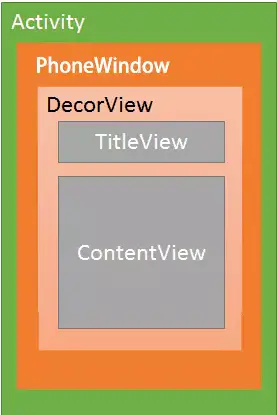
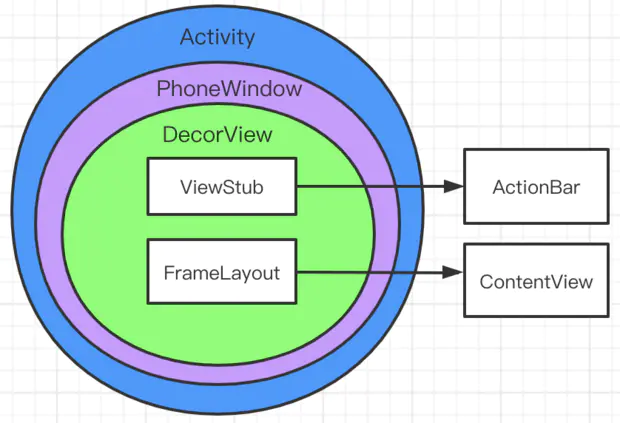
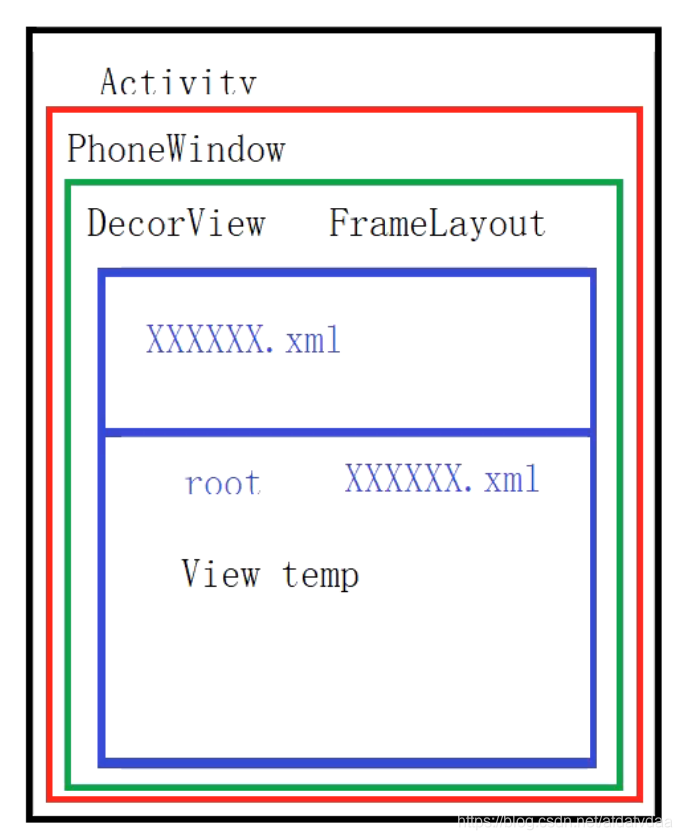
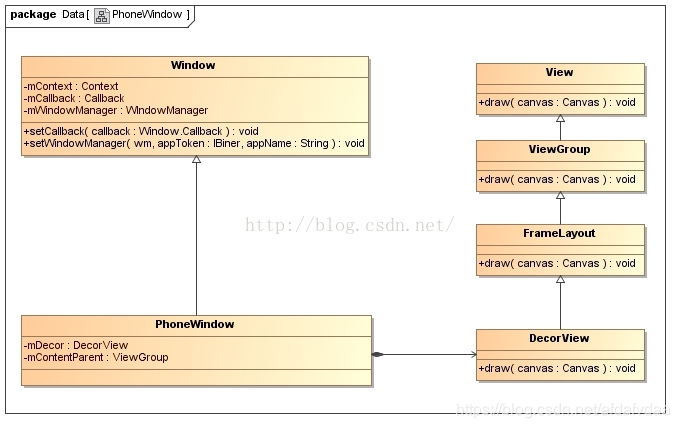
我们会发现DecorView里面包裹的内容可能会随着不同的情况而变化,但是在Decor之前的层次关系都是固定的。即Activity包裹PhoneWindow,PhoneWindow包裹DecorView。接下来我们首先看一下三者分别是如何创建的。
二.Activity是如何创建的
首先看到入口类ActivityThread的performLaunchActivity方法:
 private Activity performLaunchActivity(ActivityClientRecord r, Intent customIntent) {


		...
        ContextImpl appContext = createBaseContextForActivity(r);
        Activity activity = null;
        try {


            java.lang.ClassLoader cl = appContext.getClassLoader();
            activity = mInstrumentation.newActivity(
                    cl, component.getClassName(), r.intent);
            StrictMode.incrementExpectedActivityCount(activity.getClass());
            r.intent.setExtrasClassLoader(cl);
            r.intent.prepareToEnterProcess();
            if (r.state != null) {


                r.state.setClassLoader(cl);
            }
        } catch (Exception e) {


            ...
        }
有句特别关键的代码,即
activity = mInstrumentation.newActivity(cl, component.getClassName(), r.intent);
所以activity是Instrumentation类的newActivity方法创建的,追踪过去,源码如下
public Activity newActivity(ClassLoader cl, String className,
            Intent intent)
            throws InstantiationException, IllegalAccessException,
            ClassNotFoundException {


        String pkg = intent != null && intent.getComponent() != null
                ? intent.getComponent().getPackageName() : null;
        return getFactory(pkg).instantiateActivity(cl, className, intent);
    }
追踪源码,可知getFactory方法返回一个AppComponentFactory对象,然后调用AppComponentFactory的instantiateActivity方法,继续追踪
public @NonNull Activity instantiateActivity(@NonNull ClassLoader cl, @NonNull String className,
            @Nullable Intent intent)
            throws InstantiationException, IllegalAccessException, ClassNotFoundException {


        return (Activity) cl.loadClass(className).newInstance();
    }
到这里就结束了,我们可以发现Activity是通过反射创建的。
复习反射
三.PhoneWindow的创建
我们还是回到ActivityThread的performLaunchActivity方法,在刚刚展示的那一段的下面有如下部分代码
		Window window = null;
        if (r.mPendingRemoveWindow != null && r.mPreserveWindow) {


            window = r.mPendingRemoveWindow;
            r.mPendingRemoveWindow = null;
            r.mPendingRemoveWindowManager = null;
        }

        // Activity resources must be initialized with the same loaders as the
        // application context.
        appContext.getResources().addLoaders(
                app.getResources().getLoaders().toArray(new ResourcesLoader[0]));

        appContext.setOuterContext(activity);
        activity.attach(appContext, this, getInstrumentation(), r.token,
                r.ident, app, r.intent, r.activityInfo, title, r.parent,
                r.embeddedID, r.lastNonConfigurationInstances, config,
                r.referrer, r.voiceInteractor, window, r.configCallback,
                r.assistToken);
在activity.attach这个方法中,传入了一个Window对象,追踪这个attach方法,里面有一句关键代码
mWindow = new PhoneWindow(this, window, activityConfigCallback);
此时就创建了PhoneWindow。所以我们可以知道,在Activity创建完之后,会为当前的Activity创建一个PhoneWindow对象。
三.DecorView的创建
DecorView的创建就不是performLaunchActivity方法里面了,这次我们从Activity的setContentView的源码开始分析。下面的Activity的setContentView方法的内容。
public void setContentView(@LayoutRes int layoutResID) {


        getWindow().setContentView(layoutResID);
        initWindowDecorActionBar();
    }
我们发现,Activity的setContentView实际是调用了PhoneWindow的setContentView方法,跟踪源码。我们会首先进入Window抽象类,然后我们找其子类PhoneWindow,在里面找到setContentView方法
public void setContentView(int layoutResID) {


        if (mContentParent == null) {


            installDecor();
        } else if (!hasFeature(FEATURE_CONTENT_TRANSITIONS)) {


            mContentParent.removeAllViews();
        }
		...
当mContentParent为null时,会调用installDecor方法,追踪进入
private void installDecor() {


        mForceDecorInstall = false;
        if (mDecor == null) {


            mDecor = generateDecor(-1);
            mDecor.setDescendantFocusability(ViewGroup.FOCUS_AFTER_DESCENDANTS);
            mDecor.setIsRootNamespace(true);
            if (!mInvalidatePanelMenuPosted && mInvalidatePanelMenuFeatures != 0) {


                mDecor.postOnAnimation(mInvalidatePanelMenuRunnable);
            }
        } else {


            mDecor.setWindow(this);
        }
        ...
它调用了generateDecor方法,追踪进入
protected DecorView generateDecor(int featureId) {
// System process doesn't have application context and in that case we need to directly use
// the context we have. Otherwise we want the application context,  最低0.47元/天 解锁文章






 扫一扫
扫一扫


 1921
1921


 到【灌水乐园】发言



