



 本文深入讲解Java中的文件操作技巧,包括缓冲流的使用提升读写效率,输入输出重定向实现数据流的灵活控制,对象的序列化与反序列化保存复杂数据结构,以及RandomAccessFile的高级应用实现文件的精确读写。
内容
1.缓冲流
2.输入输出重定向
3.对象的读写
4.RandomAccessFile
一.缓冲流
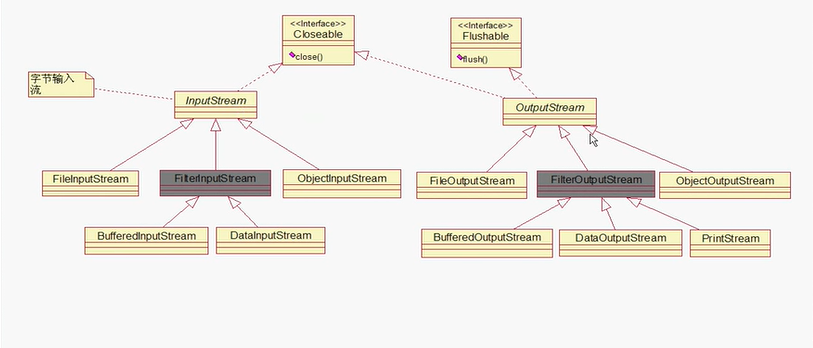
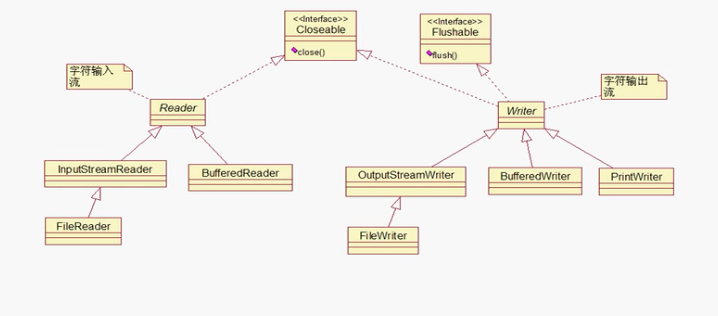
1.缓冲流作用
缓冲流的作用简单来说就是能够增加读写效率。
2.缓冲流都有哪些
BufferedInputStream BufferedReader
BufferedOutputStream BufferedWriter
3.缓冲流和节点流在使用上的联系/使用顺序
1.使用节点流从磁盘将数据读取到内存的缓冲区
2.将内存缓冲区的数据读到缓冲流对应的缓冲区
3.缓冲流从缓冲流的缓冲区将数据读取到对应的地方去
4.注意点
当使用处理流输出时,需要使用flush来刷新流
5.1使用缓冲流完成字符文件的读和写(比较低级的)
import java.io.*;
import java.util.*;

public class 测试程序   {


    public static void main(String[] args){
        String src = "C:\\Users\\刘金豪\\Desktop\\temp";
        String des = "C:\\Users\\刘金豪\\Desktop\\newfile\\temp";

        //使用处理流比较快
        //1.使用节点流从磁盘将数据读取到内存的缓冲区
        //2.将内存缓冲区的数据读到处理流对应的缓冲区
        //3.处理流从处理流的缓冲区将数据读取到对应的地方去
        try(
            //创建输入流
            FileInputStream fis = new FileInputStream(src);
            BufferedReader br = new BufferedReader(fis);

            //创建输出流
            FileOutputStream fos = new FileOutputStream(des);
            OutputStreamWriter osw = new OutputStreamWriter(fos);//将字节输出流转换为字符输出流
            BufferedWriter bw = new BufferedWriter(osw);){

            //一个字符一个字符地读
            int ch = 0;
            while(true) {
              //读取数据
              ch = br.read();

              if(ch == -1) {
                  break;
              }

              //写入数据
              bw.write(ch);
            }

            //刷新流
            bw.flush();
        }catch(Exception e) {
            e.printStackTrace();
        }


    }

}
5.2高级写法
//一个字符一个字符地读
            int ch = 0;
            while((ch = br.read()) != -1) {
                bw.write(ch);
            }
6.使用字节缓冲流并用数组 装乘 完成文件的读和写
import java.io.*;
import java.util.*;

public class 测试程序   {

    public static void main(String[] args){
        String src = "C:\\Users\\刘金豪\\Desktop\\扑克游戏UML图.jpg";
        String des = "C:\\Users\\刘金豪\\Desktop\\newfile\\扑克游戏UML图.jpg";

        try(
        //字节缓冲输入流
        FileInputStream fis = new FileInputStream(src);
        BufferedInputStream bis = new BufferedInputStream(fis);

        //字节缓冲输出流
        FileOutputStream fos = new FileOutputStream(des);
        BufferedOutputStream bos = new BufferedOutputStream(fos);){

                byte[] buffer = new byte[1024];
                int len = 0;

                while((len = bis.read(buffer)) != -1) {
                    bos.write(buffer);
                    }
                bos.flush();
            }catch(Exception e) {
                e.printStackTrace();
            }

    }

}
二.输入输出重定向。
1.简单介绍
比如本来输出到终端,那么我们可以重定向,使它输出到特定的文件中。
同样地,本来是从终端输入,但是我们可以重定向,使其从特定的文件输入。
2.输入输出重定向使用示例
import java.io.*;
import java.util.*;

public class 测试程序   {


    public static void main(String[] args){
        String src = "C:\\\\Users\\\\刘金豪\\\\Desktop\\\\newfile\\\\重定向";
        String des = "C:\\Users\\刘金豪\\Desktop\\newfile\\重定向";

        //输出重定向
 /*     try (FileOutputStream fos = new FileOutputStream(des);
             PrintStream ps = new PrintStream(fos); )
            {
            System.setOut(ps);
            System.out.println("helloworld");//对应的文件就会有helloworld,如果没有这个文件,系统会自动创建
        } catch (Exception e) {
            e.printStackTrace();
        }
*/
        //输入重定向
        try(FileInputStream fis = new FileInputStream(src);){
            Scanner scanner = new Scanner(fis);

            while(scanner.hasNext()) {
                System.out.println(scanner.next());//控制台就会输出 helloworld
            }
        } catch (Exception e) {
            e.printStackTrace();
        }


    }

}
三.对象的读写
1.注意点
①如果需要将自己定义的类的某个对象使用文件保存。那么这个类必须是实现了Sreializable接口。
(关于Serializable接口的详细介绍请参看我另一篇博客:https://www.jianshu.com/p/be6313ddba50)
②勿忘刷新。
2.使用示例
import java.io.*;
import java.util.*;

public class 测试程序   {


    public static void main(String[] args){
        String src = "C:\\\\Users\\\\刘金豪\\\\Desktop\\\\newfile\\\\重定向";
        String des = "C:\\Users\\刘金豪\\Desktop\\newfile\\重定向";

  /*    //写入对象
        try(FileOutputStream fos = new FileOutputStream(des);
        ObjectOutputStream oos = new ObjectOutputStream(fos);){
          //保存对象
          //如果需要将自己定义的类的某个对象使用文件保存
          //那么这个类必须是实现了Sreializable接口
          Person person = new Person();
          oos.writeObject(person);

         //刷新
         oos.flush();
        }catch(Exception e) {
            e.printStackTrace();
        }
 */
        //读取对象
        try(
            FileInputStream fis = new FileInputStream(src);
            ObjectInputStream ois = new ObjectInputStream(fis);){

            Person p = (Person)ois.readObject();
            System.out.println(p);
        }
        catch(Exception e) {
            e.printStackTrace();
        }
    }


}
class Person implements Serializable{

}
四.RandomAccessFile
1.引
当一个文件存在时,如果按照之前的写法,那么一般在写入数据时会把之前的数据删除,也就是从头写。这样有时候不能满足我们的需求,如果想在文件的某个位置读或者写,那么我们可以使用RandomAccessFile。
2.最基本的使用示例(使用数组装乘)
import java.io.*;
import java.util.*;

public class 测试程序   {


    public static void main(String[] args){
        String src = "C:\\\\Users\\\\刘金豪\\\\Desktop\\\\newfile\\\\重定向";
        String des = "C:\\Users\\刘金豪\\Desktop\\newfile\\重定向";

        try {
            RandomAccessFile raf = new RandomAccessFile(src,"r");//只读取

            byte[] buffer = new byte[50];

            raf.read(buffer);//这是字节
            //打印的话需要转化成String
            System.out.println(new String(buffer));
        } catch (Exception e) {
            e.printStackTrace();
        }
    }


}
3.“从第几个开始读取”使用示例
import java.io.*;
import java.util.*;

public class 测试程序   {


    public static void main(String[] args){
        String src = "C:\\\\Users\\\\刘金豪\\\\Desktop\\\\newfile\\\\重定向";
        String des = "C:\\Users\\刘金豪\\Desktop\\newfile\\重定向";

        try {
            RandomAccessFile raf = new RandomAccessFile(src,"r");//只读取

            raf.seek(2);//从第三个开始读取
            byte[] buffer = new byte[50];

            raf.read(buffer);//这是字节
            //打印的话需要转化成String
            System.out.println(new String(buffer));
        } catch (Exception e) {
            e.printStackTrace();
        }
    }


}
4.“从第几个开始写”使用示例
import java.io.*;
import java.util.*;

public class 测试程序   {


    public static void main(String[] args){
        String src = "C:\\\\Users\\\\刘金豪\\\\Desktop\\\\newfile\\\\重定向";
        String des = "C:\\Users\\刘金豪\\Desktop\\newfile\\重定向";

        try {
            RandomAccessFile raf = new RandomAccessFile(src,"rw");//可读可写

            raf.seek(2);//从第三个开始写,会覆盖后面的内容
            raf.writeChars("helllll");

            //System.out.println(new String());
        } catch (Exception e) {
            e.printStackTrace();
        }
    }


}
总结
内容比较多,虽然比第一遍学习更清晰,但是还是有很多混了的地方。不慌!等明天再学一遍,把有关文件的博客再看一遍,绝对没问题!





 扫一扫
扫一扫


 1759
1759

 被折叠的 条评论
为什么被折叠?
被折叠的 条评论
为什么被折叠?
 到【灌水乐园】发言





