<!DOCTYPE html>
<html lang="zh-CN">
<head>
    <meta charset="UTF-8">
    <meta name="viewport" content="width=device-width, initial-scale=1.0">
    <title>状态2操作流程图</title>
    <script src="https://gw.alipayobjects.com/os/lib/antv/g6/4.8.10/dist/g6.min.js"></script>
    <style>
        #container {
            width: 100%;
            height: 600px;
            border: 1px solid #e8e8e8;
            border-radius: 4px;
        }
        body {
            font-family: sans-serif;
        }
    </style>
</head>
<body>
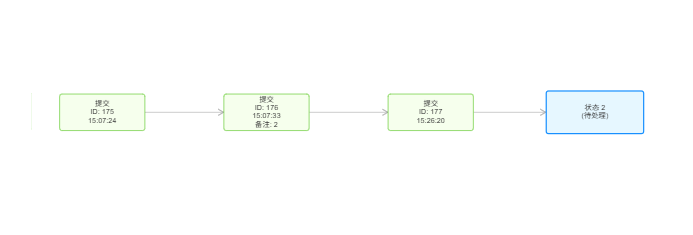
    <h2>状态 "2" 内部操作流程</h2>
    <div id="container"></div>
    <script>
        // 初始化图实例
        const graph = new G6.Graph({
            container: 'container',
            width: document.getElementById('container').scrollWidth,
            height: 600,
            fitView: true,
            fitViewPadding: 20,
            modes: {
                default: ['drag-canvas', 'zoom-canvas', 'drag-node']
            },
            defaultNode: {
                type: 'rect',
                size: [140, 60],
                style: {
                    fill: '#f6ffed',
                    stroke: '#52c41a',
                    lineWidth: 1,
                    radius: 4
                },
                labelCfg: {
                    style: {
                        fill: '#333',
                        fontSize: 12,
                        cursor: 'default'
                    },
                    position: 'center'
                }
            },
            defaultEdge: {
                style: {
                    stroke: '#aaa',
                    lineWidth: 1,
                    endArrow: true
                }
            }
        });

        // 准备数据 - 手动设置节点位置
        const data = {
            nodes: [
                // 操作节点在左侧
                {
                    id: 'op175',
                    label: '提交\nID: 175\n15:07:24',
                    x: 200,//去掉就是一条直线上
                    y: 150
                },
                {
                    id: 'op176',
                    label: '提交\nID: 176\n15:07:33\n备注: 2',
                    x: 200,
                    y: 300
                },
                {
                    id: 'op177',
                    label: '提交\nID: 177\n15:26:20',
                    x: 200,
                    y: 450
                },
                // 主状态节点在右侧
                {
                    id: 'state2',
                    label: '状态 2\n(待处理)',
                    style: {
                        fill: '#e6f7ff',
                        stroke: '#1890ff',
                        lineWidth: 2
                    },
                    size: [160, 70],
                    x: 500,
                    y: 300
                }
            ],
            edges: [
                // 提交操作之间的连线
                { source: 'op175', target: 'op176' },
                { source: 'op176', target: 'op177' },
                // 只让最后一个提交操作连接到状态2
                { source: 'op177', target: 'state2' }
            ]
        };

        // 加载数据并渲染
        graph.data(data);
        graph.render();

        // 可选:监听窗口大小变化,调整画布大小
        window.addEventListener('resize', () => {
            if (!graph.get('destroyed')) {
                graph.changeSize(document.getElementById('container').scrollWidth, 600);
                graph.fitView();
            }
        });
    </script>
</body>
</html>





 扫一扫
扫一扫


 826
826

 被折叠的 条评论
为什么被折叠?
被折叠的 条评论
为什么被折叠?
 到【灌水乐园】发言





