


1 下载百度ueditorSDK
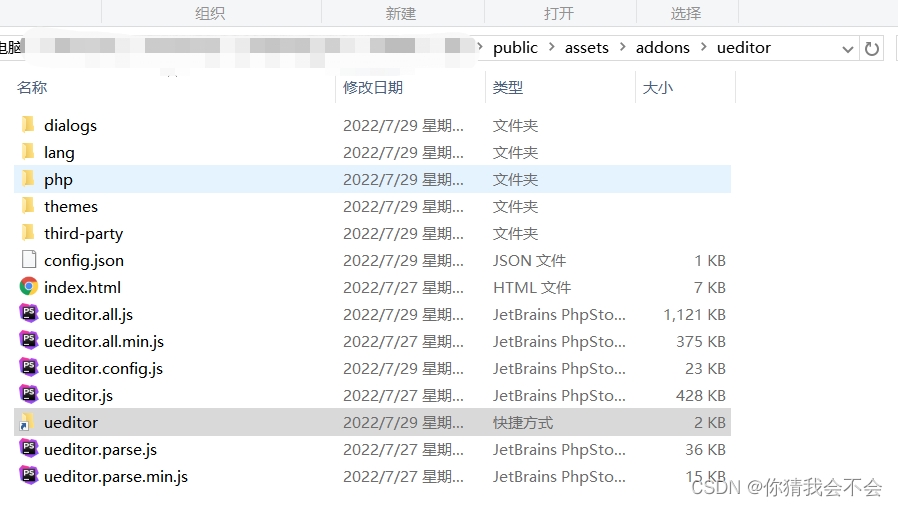
2 将安装包放到public/assets/addons/ueditor 下面
3 在edit.html加入如下代码
     <div class="form-group">
            <label class="control-label col-xs-12 col-sm-2">{:__('Content')}:</label>
            <div class="col-xs-12 col-sm-8">
             <textarea id="c-content" data-rule="required"  rows="5" name="row[content]" cols="50">{$row.content|htmlentities}</textarea>

            </div>
        </div>
4 在edit.html加入如下代码
<script src="/assets/addons/ueditor/ueditor.config.js"></script>
<script src="/assets/addons/ueditor/ueditor.all.js"></script>
5 在你的js文件里加入如下代码
   add: function () {
            UE.getEditor("c-content");
            Controller.api.bindevent();
        },
        edit: function () {
            UE.getEditor("c-content");
            require(['ZeroClipboard'], function (ZeroClipboard) {
                window['ZeroClipboard'] = ZeroClipboard;
            });
            Controller.api.bindevent();

        },
6 在你的public\assets\js\require.backend.js 加入以下代码
  paths: {
        'lang': "empty:",
        'form': 'require-form',
        'table': 'require-table',
        'ueconfig':'../addons/ueditor/ueditor.config',
        'ueditor':'../addons/ueditor/ueditor.all',
        'uelang':'../addons/ueditor/lang/zh-cn/zh-cn',
        'ZeroClipboard': "../addons/ueditor/third-party/zeroclipboard/ZeroClipboard",

    },
     // shim依赖配置
    shim: {
        'addons': ['backend'],
        'bootstrap': ['jquery'],

        // 百度编辑器--start
        'ueditor':['ueconfig','css!../addons/ueditor/themes/default/css/ueditor.css'],
        'uelang':['ueditor'],
        "ueditor.zh-cn": {
            deps:["ueditor.config","ueditor","zeroclipboard"]                    // Shim配置需要这样配置以来否则,会出现 not import language file 错误
        },
--------------------到这里去你的页面编辑器就会出现了---------------------------------

但是你的多图上传是不能使用的他会提醒你未配置后台 不能使用 你的单图上传会跨域
以下是解决方法
1 在ueditor 下面创建config.json
{
  "imageActionName": "uploadimage",
  "imageFieldName": "upfile",
  "imageMaxSize": 2048000,
  "imageAllowFiles": [".png", ".jpg", ".jpeg", ".gif", ".bmp"],
  "imageCompressEnable": true,
  "imageCompressBorder": 1600,
  "imageInsertAlign": "none",
  "imageUrlPrefix": "http://***.com",  // 这里是你的域名地址
  "imagePathFormat": "/{yyyy}{mm}{dd}/{time}{rand:6}"
  // 注释 复制进去改完后一定要把注释的文字全部删除 注释符号也要删除
}
2修改ueditor.config.js的33行处,将serverUrl改成你的上传地址
// 服务器统一请求接口路径
, serverUrl: "/EmDcAkzoTL.php/ajax/ueditorupload"
3使用此上传图片方法
public function ueditorupload()
    {

        $action = $this->request->param('action');
        switch($action){
            case 'config':
                $result = file_get_contents(ROOT_PATH.'/public/assets/addons/ueditor/config.json');
                break;
            case 'uploadimage':
                $file = $this->request->file('upfile');
                if($file){
                    $upload = new Upload($file);
                    $attachment = $upload->upload();
                    $res['state'] = 'SUCCESS';
                    $res['url'] = $attachment->url;
                    $result = json_encode($res);
                }
                break;
            default:
                break;
        }
        return $result;
    }
修改ueditor.all.js
注释ueditor.all.js 24507行一直到24571行


在24571下面加入以下代码 并且在24613行改成你自己的域名上传地址
// 单图上传
            input.onchange = function(){
                if (!input.value) return;
                var loadingId = "loading_" + (+new Date()).toString(36);
                var params =
                    utils.serializeParam(me.queryCommandValue("serverparam")) || "";

                var imageActionUrl = me.getActionUrl(me.getOpt("imageActionName"));
                var allowFiles = me.getOpt("imageAllowFiles");

                me.focus();
                me.execCommand(
                    "inserthtml",
                    '<img class="loadingclass" id="' +
                    loadingId +
                    '" src="' +
                    me.options.themePath +
                    me.options.theme +
                    '/images/spacer.gif">'
                );
                /* 判断后端配置是否没有加载成功 */
                if (!me.getOpt("imageActionName")) {
                    errorHandler(me.getLang("autoupload.errorLoadConfig"));
                    return;
                }
                // 判断文件格式是否错误
                var filename = input.value,
                    fileext = filename ? filename.substr(filename.lastIndexOf(".")) : "";
                if (
                    !fileext ||
                    (allowFiles &&
                        (allowFiles.join("") + ".").indexOf(fileext.toLowerCase() + ".") ==
                        -1)
                ) {
                    showErrorLoader(me.getLang("simpleupload.exceedTypeError"));
                    return;
                }

                var formData = new FormData()
                formData.append('upfile', input.files[0]);
                // 替换你的URL
                $.ajax('ajax/ueditorupload?action=uploadimage',{
                    data: formData,
                    processData:false,
                    contentType: false,
                    type:"post",
                    success:function(data){
                        console.log(data)
                        try{
                            var link,
                                json,
                                loader;
                            json = JSON.parse(data);
                            link = json.url;if (json.state == "SUCCESS" && json.url) {
                                loader = me.document.getElementById(loadingId);
                                domUtils.removeClasses(loader, "loadingclass");
                                loader.setAttribute("src", link);
                                loader.setAttribute("_src", link);
                                loader.setAttribute("alt", json.original || "");
                                loader.removeAttribute("id");
                                me.fireEvent("contentchange");
                            } else {
                                showErrorLoader && showErrorLoader(json.state);
                            }
                        } catch (er) {
                            console.log(er)
                            showErrorLoader &&
                            showErrorLoader(me.getLang("simpleupload.loadError"));
                        }
                    }
                })
            }
完成结束

 3100


 扫一扫


 被折叠的 条评论
为什么被折叠?
 到【灌水乐园】发言


