



 本文介绍如何使用Maven搭建Spring Data Solr项目,包括配置pom.xml引入依赖、设置applicationContext-solr.xml连接Solr服务器,以及创建TbItem实体类实现商品数据的索引管理和搜索。
目录
对sorl操作的方法:
- 官方类库 solrJ (原理:http请求和响应)
- spring data solr (原理: 对官方类库的封装)
- 手动请求solr 手动处理响应 httpClie
spring data solr maven工程搭建
目录结构
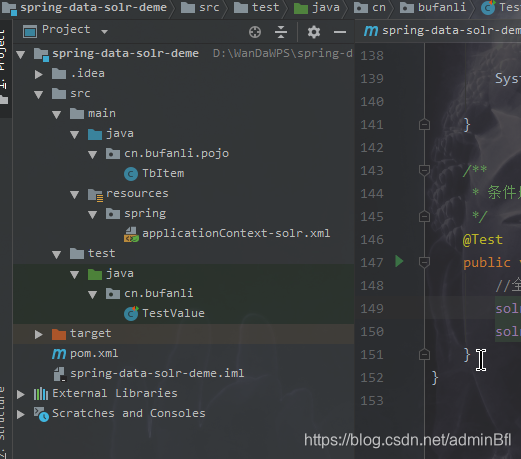
pom.xml
<?xml version="1.0" encoding="UTF-8"?>
<project xmlns="http://maven.apache.org/POM/4.0.0"
         xmlns:xsi="http://www.w3.org/2001/XMLSchema-instance"
         xsi:schemaLocation="http://maven.apache.org/POM/4.0.0 http://maven.apache.org/xsd/maven-4.0.0.xsd">
    <modelVersion>4.0.0</modelVersion>

    <groupId>cn.bufanli</groupId>
    <artifactId>spring-data-solr-deme</artifactId>
    <version>1.0-SNAPSHOT</version>
    <!-- 集中定义依赖版本号 -->

    <dependencies>
        <dependency>
            <groupId>org.springframework.data</groupId>
            <artifactId>spring-data-solr</artifactId>
            <version>1.5.5.RELEASE</version>
        </dependency>
        <dependency>
            <groupId>org.springframework</groupId>
            <artifactId>spring-test</artifactId>
            <version>4.2.4.RELEASE</version>
        </dependency>
        <dependency>
            <groupId>junit</groupId>
            <artifactId>junit</artifactId>
            <version>4.12</version>
            <scope>test</scope>
        </dependency>
    </dependencies>

</project>
applicationContext-solr.xml
<?xml version="1.0" encoding="UTF-8"?>
<beans xmlns="http://www.springframework.org/schema/beans"
       xmlns:xsi="http://www.w3.org/2001/XMLSchema-instance"
       xmlns:solr="http://www.springframework.org/schema/data/solr"
       xsi:schemaLocation="http://www.springframework.org/schema/data/solr
  		http://www.springframework.org/schema/data/solr/spring-solr-1.0.xsd
		http://www.springframework.org/schema/beans
		http://www.springframework.org/schema/beans/spring-beans.xsd">

	<!-- solr服务器地址 -->
	<solr:solr-server id="solrServer" url="http://127.0.0.1:8081/solr" />

	<!-- solr模板,使用solr模板可对索引库进行CRUD的操作 -->
	<bean id="solrTemplate" class="org.springframework.data.solr.core.SolrTemplate">
		<constructor-arg ref="solrServer" />
	</bean>
</beans>
TbItem.java
package cn.bufanli.pojo;

import org.apache.solr.client.solrj.beans.Field;

import java.io.Serializable;
import java.math.BigDecimal;
import java.util.Date;

public class TbItem implements Serializable {
	@Field("id")
    private Long id;
	@Field("item_title")
    private String title;

    private String sellPoint;
	@Field("item_price")
    private BigDecimal price;

    private Integer stockCount;

    private Integer num;

    private String barcode;
	@Field("item_image")
    private String image;
	@Field("item_categoryid")
    private Long categoryid;

    private String status;

    private Date createTime;

    private Date updateTime;

    private String itemSn;

    private BigDecimal costPirce;

    private BigDecimal marketPrice;

    private String isDefault;
	@Field("item_goodsid")
    private Long goodsId;

    private String sellerId;

    private String cartThumbnail;
	@Field("item_category")
    private String category;
	@Field("item_brand")
    private String brand;

    private String spec;
	@Field("item_seller")
    private String seller;

    public Long getId() {
        return id;
    }

    get&&set&&toString
}
solr schema.xml配置
  <field name="item_goodsid" type="long" indexed="true" stored="true" multiValued="false" />
       <field name="item_title" type="text_ik" indexed="true" stored="true" multiValued="false" />
       <field name="item_price" type="double" indexed="true" stored="true" multiValued="false" />
       <field name="item_image" type="string" indexed="false" stored="true" multiValued="false" />
       <field name="item_seller" type="text_ik" indexed="true" stored="true" multiValued="false" />
       <field name="item_brand" type="string" indexed="true" stored="true" multiValued="false" />
        <field name="item_category" type="string" indexed="true" stored="true" multiValued="false" />
        <field name="item_keywords" type="text_ik" indexed="true" stored="false" multiValued="true" />
        <copyField source="item_category" dest="item_keywords"/>
        <copyField source="item_title" dest="item_keywords"/>
        <copyField source="item_seller" dest="item_keywords"/>
        <copyField source="item_brand" dest="item_keywords"/>
        <dynamicField name="item_spec_*" type="string" indexed="true" stored="true"/>





 扫一扫
扫一扫


 933
933

 被折叠的 条评论
为什么被折叠?
被折叠的 条评论
为什么被折叠?
 到【灌水乐园】发言





