


 本文介绍了如何手动实现一个简单的Web服务器。首先,通过启动Socket服务并循环接收浏览器请求。然后,解析请求,检查资源是否存在。如果资源存在,服务器将响应发送回客户端;如果不存在,则返回404错误。文章详细讲解了Server、Request和Response类的设计与实现,并提供了测试步骤,包括创建WebContent文件夹来存储HTML资源。
整体思路
- 启动Socket服务,循环的接收浏览器请求
- 接收到请求之后,将流中的数据取出
- 判断目标资源是否存在,若不存在,返回404
- 若存在,将目标资源通过输出流响应给客户端
实现这个服务器应有的类及其功能
- Server:用于开启Socket服务
- Request:用于封装请求,处理请求相关的业务
- Response:封装响应,处理响应相关业务
- Test:测试类
具体代码实现
Server类
import java.io.IOException;
import java.io.InputStream;
import java.io.OutputStream;
import java.net.ServerSocket;
import java.net.Socket;

public class MyHttpServer {
    //端口
    private int port=8080;
    //ip为服务器的ip
    //接收请求的方法
    public void receiving(){
        try {
            //创建Socket服务
            ServerSocket serverSocket=new ServerSocket(port);
            //循环接收请求
            while (true){
                //循环接收请求,获取 Socket 对象,获取到了连接对象
                Socket socket=serverSocket.accept();
                //获取连接对象的输入流
                InputStream inputStream=socket.getInputStream();
                //创建Request对象
                MyHttpRequest request=new MyHttpRequest(inputStream);
                //解析请求
                request.parse();
                //开始响应,创建Response
                //获取连接对象的输出流
                OutputStream outputStream=socket.getOutputStream();
                MyHttpResponse response=new MyHttpResponse(outputStream);
                //根据获取的uri进行响应
                response.sendRedirect(request.getUri());
            }
        } catch (IOException e) {
            e.printStackTrace();
        }
    }
}
Request类
import java.io.IOException;
import java.io.InputStream;

public class MyHttpRequest {
    //接收连接对象的输入流并解析
    private InputStream inputStream;
    //目标资源的路径
    private  String uri;

    public MyHttpRequest(InputStream inputStream) {
        this.inputStream = inputStream;
    }
    //解析输入流
    public void parse(){
        try {
            byte[] bytes=new byte[1024];
            //把输入流中的东西读到数组中
            inputStream.read(bytes);
            //封装成字符串
            /*
            GET /a.html HTTP/1.1
            Host: localhost:8080
            Connection: keep-alive
            sec-ch-ua: "Chromium";v="106", "Microsoft Edge";v="106", "Not;A=Brand";v="99"
            sec-ch-ua-mobile: ?0
            sec-ch-ua-platform: "Windows"
            Upgrade-Insecure-Requests: 1
            User-Agent: Mozilla/5.0 (Windows NT 10.0; Win64; x64) AppleWebKit/537.36 (KHTML, like Gecko) Chrome/106.0.0.0 Safari/537.36 Edg/106.0.1370.47
            Accept: text/html,application/xhtml+xml,application/xml;q=0.9,image/webp,image/apng,*`............
            */
            String request=new String(bytes);
            //获取请求的目标资源路径,如http://localhost:8080/a.html中的a.html
            parseUri(request);

        } catch (IOException e) {
            e.printStackTrace();
        }
    }
    public void parseUri(String request){
        int index1,index2;
        index1=request.indexOf(' ');
        index2=request.indexOf(' ',index1+1);
        this.uri=request.substring(index1+1,index2);
        System.out.println(uri);
    }
    //返回uri
    public String getUri(){
        return this.uri;
    }
}
Response类
import java.io.*;
import java.lang.reflect.Field;

//根据解析得到的uri判断请求的资源是否存在,存在做出相应,不存在404
public class MyHttpResponse {
    private OutputStream outputStream;

    public MyHttpResponse(OutputStream outputStream) {
        this.outputStream = outputStream;
    }
    public void sendRedirect(String uri){
        //判断uri是否存在,是否再目标工程中
        //不存在返回404
        //存在,直接返回目标资源

        //得到请求资源的整体路径
        String path=System.getProperty("user.dir")+"/WebContent"+ uri;
        //根据路径创建一个file对象
        File file=new File(path);
        //判断文件是否存在
        if(file.exists()){
            try {
                //存在返回目标资源数据,根据目标资源路径,获取资源
                FileInputStream fileInputStream=new FileInputStream(file);
                byte[] bytes=new byte[(int)file.length()];
                fileInputStream.read(bytes);
                //得到资源内容
                String result =new String(bytes);
                //返回浏览器能显示的格式
                String response=getResponseMessage("200",result);
                this.outputStream.write(response.getBytes());
            } catch (Exception e) {
                e.printStackTrace();
            }
        }else {
            try {
                //不存在返回404,getResponseMessage返回浏览器能显示的格式
                String error=getResponseMessage("404","404 File Not Found!");
                this.outputStream.write(error.getBytes());
            } catch (IOException e) {
                e.printStackTrace();
            }
        }
    }
    //返回浏览器能显示的格式
    public String getResponseMessage(String code,String message){
        return "HTTP/1.1"+code+"\r\n"
                +"Content-type:text/html\r\n"
                +"Content-Length:"+message.length()
                +"\r\n"
                +"\r\n"
                +message;
    }
}
测试
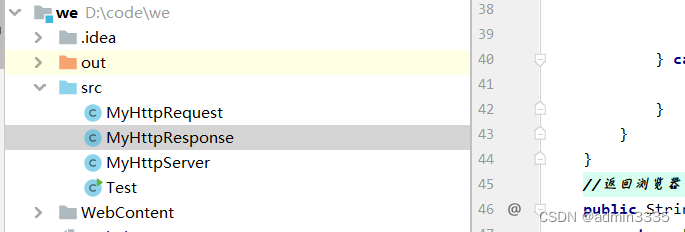
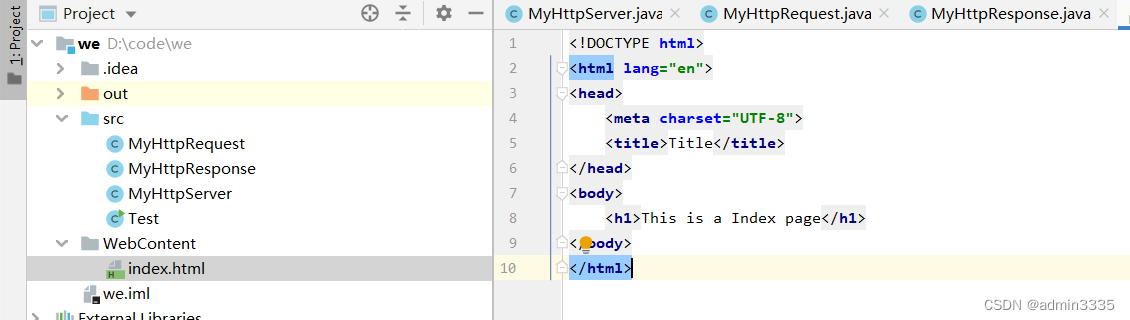
建立一个WebContent文件夹,用于存放请求的html资源
测试类
public class Test {
    public static void main(String[] args) {
        System.out.println("Server startup successfully");
        MyHttpServer server=new MyHttpServer();
        server.receiving();
    }
}
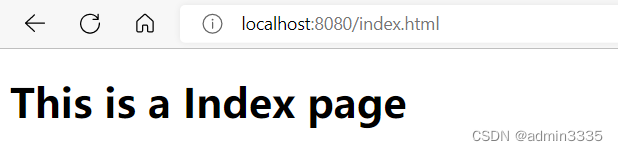
请求存在的资源时,端口号为8080
请求不存在的资源时






 扫一扫
扫一扫


 1026
1026

 被折叠的 条评论
为什么被折叠?
被折叠的 条评论
为什么被折叠?
 到【灌水乐园】发言





