





这里写自定义目录标题
花了3天做了一个小时钟。。。中途无数次想放弃。。。
最终还是做出来了,哈哈哈哈哈啊哈哈哈~~~~~~
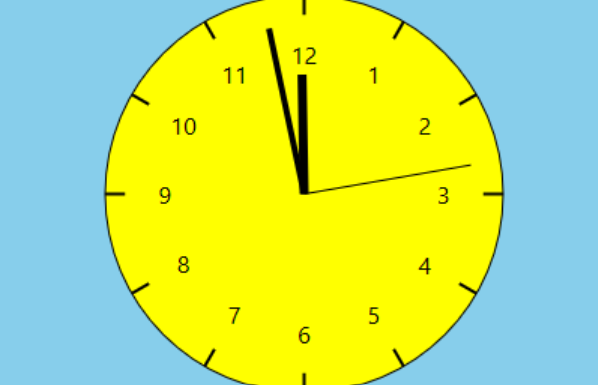
与大家分享一下源码。一起学习。
basewin.h
template <class DERIVED_TYPE>
class BaseWindow
{
public:
    static LRESULT CALLBACK WindowProc(HWND hwnd, UINT uMsg, WPARAM wParam, LPARAM lParam)
    {
        DERIVED_TYPE *pThis = NULL;

        if (uMsg == WM_NCCREATE)
        {
            CREATESTRUCT* pCreate = (CREATESTRUCT*)lParam;
            pThis = (DERIVED_TYPE*)pCreate->lpCreateParams;
            SetWindowLongPtr(hwnd, GWLP_USERDATA, (LONG_PTR)pThis);

            pThis->m_hwnd = hwnd;
        }
        else
        {
            pThis = (DERIVED_TYPE*)GetWindowLongPtr(hwnd, GWLP_USERDATA);
        }
        if (pThis)
        {
            return pThis->HandleMessage(uMsg, wParam, lParam);
        }
        else
        {
            return DefWindowProc(hwnd, uMsg, wParam, lParam);
        }
    }

    BaseWindow() : m_hwnd(NULL) { }

    BOOL Create(
        PCWSTR lpWindowName,
        DWORD dwStyle,
        DWORD dwExStyle = 0,
        int x = CW_USEDEFAULT,
        int y = CW_USEDEFAULT,
        int nWidth = CW_USEDEFAULT,
        int nHeight = CW_USEDEFAULT,
        HWND hWndParent = 0,
        HMENU hMenu = 0
        )
    {
        WNDCLASSW wc = {0};

        wc.lpfnWndProc   = DERIVED_TYPE::WindowProc;
        wc.hInstance     = GetModuleHandle(NULL);
        wc.lpszClassName = ClassName();

         if (!RegisterClassW(&wc)) // 显式调用 RegisterClassW
         {
             return FALSE;
         }

        m_hwnd = CreateWindowExW(
            dwExStyle, ClassName(), lpWindowName, dwStyle, x, y,
            nWidth, nHeight, hWndParent, hMenu, GetModuleHandle(NULL), this
            );

        return (m_hwnd ? TRUE : FALSE);
    }

    HWND Window() const { return m_hwnd; }

protected:

    virtual PCWSTR  ClassName() const = 0;
    virtual LRESULT HandleMessage(UINT uMsg, WPARAM wParam, LPARAM lParam) = 0;

    HWND m_hwnd;
};
scene.h
#pragma once

#include <d2d1.h>
#include <dwrite.h>
#include <atlbase.h>
#include <atlcomcli.h>

class GraphicsScene
{
protected:
    // D2D Resources
    CComPtr<ID2D1Factory>           m_pFactory;
    CComPtr<ID2D1HwndRenderTarget>  m_pRenderTarget;

    float   m_fScaleX;
    float   m_fScaleY;

public:
    CAdapt<CComPtr<IDWriteFactory>> m_pDWriteFactory;

    // Derived class must implement these methods.
    virtual HRESULT CreateDeviceIndependentResources() = 0;
    virtual void    DiscardDeviceIndependentResources() = 0;
    virtual HRESULT CreateDeviceDependentResources() = 0;
    virtual void    DiscardDeviceDependentResources() = 0;
    virtual void    CalculateLayout() = 0;
    virtual void    RenderScene() = 0;

protected:
    HRESULT CreateGraphicsResources(HWND hwnd)
    {
        HRESULT hr = S_OK;
        if (m_pRenderTarget == NULL)
        {
            RECT rc;
            GetClientRect(hwnd, &rc);

            D2D1_SIZE_U size = D2D1::SizeU(rc.right, rc.bottom);

            hr = m_pFactory->CreateHwndRenderTarget(
                D2D1::RenderTargetProperties(),
                D2D1::HwndRenderTargetProperties(hwnd, size),
                &m_pRenderTarget
                );

            if (SUCCEEDED(hr))
            {
                hr = CreateDeviceDependentResources();
            }
            if (SUCCEEDED(hr))
            {
                CalculateLayout();
            }
        }
        return hr;
    }

    template <class T>
    T PixelToDipX(T pixels) const
    {
        return static_cast<T>(pixels / m_fScaleX);
    }

    template <class T>
    T PixelToDipY(T pixels) const
    {
        return static_cast<T>(pixels / m_fScaleY);
    }

public:
    GraphicsScene() : m_fScaleX(1.0f), m_fScaleY(1.0f) {}
    virtual ~GraphicsScene() {}

    HRESULT Initialize()
    {
        HRESULT hr = DWriteCreateFactory(
            DWRITE_FACTORY_TYPE_SHARED,
            __uuidof(IDWriteFactory),
            reinterpret_cast<IUnknown**>(&m_pDWriteFactory)
        );

        if (SUCCEEDED(hr))
        {
            hr = D2D1CreateFactory(D2D1_FACTORY_TYPE_SINGLE_THREADED, &m_pFactory);
            // 注意:这里应该检查 hr,但原代码没有,我们保留原逻辑
        }

        if (SUCCEEDED(hr))
        {
            hr = CreateDeviceIndependentResources();
        }
        return hr;
    }

    void Render(HWND hwnd)
    {
        HRESULT hr = CreateGraphicsResources(hwnd);
        if (FAILED(hr))
        {
            return;
        }

        assert(m_pRenderTarget != NULL);

        m_pRenderTarget->BeginDraw();
        RenderScene(); // 调用你写的绘制逻辑

        hr = m_pRenderTarget->EndDraw();
        if (hr == D2DERR_RECREATE_TARGET)
        {
            // 设备丢失,清理资源,下次重绘时重建
            DiscardDeviceDependentResources();
            m_pRenderTarget.Release();
        }
        else if (FAILED(hr))
        {
            // 其他错误
            OutputDebugString(L"EndDraw failed\n");
        }
    }

    virtual HRESULT Resize(UINT width, UINT height)
    {
        HRESULT hr = S_OK;
        if (m_pRenderTarget)
        {
            hr = m_pRenderTarget->Resize(D2D1::SizeU(width, height));
            if (SUCCEEDED(hr))
            {
                CalculateLayout();
            }
        }
        return hr;
    }

    void CleanUp()
    {
        DiscardDeviceDependentResources();
        DiscardDeviceIndependentResources();
    }
};
naozhong.cpp
#define _USE_MATH_DEFINES
#include <cmath>
#include <D2d1.h>
#include <dwrite.h>
#include <assert.h>
#include <atlbase.h>
#include <wrl/client.h> // Microsoft::WRL::ComPtr
#include <atlcomcli.h> // CAdapt


#pragma comment(lib, "d2d1")
#pragma comment(lib, "dwrite")

#include "basewin.h"
#include "scene.h"


class Scene : public GraphicsScene
{
public:
    D2D_POINT_2F m_NumberPositions[12];
    CComPtr<ID2D1SolidColorBrush> m_pFill;
    CComPtr<ID2D1SolidColorBrush> m_pStroke;
    CComPtr<IDWriteTextFormat> m_pTextFormat;
    CComPtr<IDWriteTextLayout> m_pTextLayouts[12];
    D2D1_ELLIPSE m_ellipse;
    D2D_POINT_2F m_Ticks[24];


    Scene()
    {
        // 构造函数可以留空或进行一些初始化
    }

    HRESULT CreateDeviceIndependentResources() override;
    void    DiscardDeviceIndependentResources() override;
    HRESULT CreateDeviceDependentResources() override;
    void    DiscardDeviceDependentResources() override;
    void    RenderScene() override;
    void    CalculateLayout() override;

    void    DrawClockHand(float fHandLength, float fAngle, float fStrokeWidth);

    HRESULT Resize(UINT width, UINT height) override
    {
        return GraphicsScene::Resize(width, height);
        // CalculateLayout() 已在基类 Resize 中调用,无需再次调用
    }
};

HRESULT Scene::CreateDeviceIndependentResources()
{
    // m_pDWriteFactory 已在 GraphicsScene::Initialize 中创建
    // 此处可以创建其他设备无关资源,如文本格式
    HRESULT hr = m_pDWriteFactory->CreateTextFormat(
        L"Segoe UI",
        nullptr,
        DWRITE_FONT_WEIGHT_NORMAL,
        DWRITE_FONT_STYLE_NORMAL,
        DWRITE_FONT_STRETCH_NORMAL,
        16.0f,
        L"",
        &m_pTextFormat
        );
    return hr;
}
void Scene::DiscardDeviceIndependentResources()
{
    m_pTextFormat.Release();
}


HRESULT Scene::CreateDeviceDependentResources()
{
    HRESULT hr = m_pRenderTarget->CreateSolidColorBrush(
        D2D1::ColorF(1.0f, 1.0f, 0),
        &m_pFill
        );

    if (SUCCEEDED(hr))
    {
        hr = m_pRenderTarget->CreateSolidColorBrush(
            D2D1::ColorF(0, 0, 0),
            &m_pStroke
            );
    }
    return hr;
}
void Scene::DrawClockHand(float fHandLength, float fAngle, float fStrokeWidth)
{
    D2D1_MATRIX_3X2_F oldTransform;
    m_pRenderTarget->GetTransform(&oldTransform);
    m_pRenderTarget->SetTransform(
        D2D1::Matrix3x2F::Rotation(fAngle, m_ellipse.point)
            );

    // endPoint defines one end of the hand.
    D2D_POINT_2F endPoint = D2D1::Point2F(
        m_ellipse.point.x,
        m_ellipse.point.y - (m_ellipse.radiusY * fHandLength)
        );

    // Draw a line from the center of the ellipse to endPoint.
    m_pRenderTarget->DrawLine(
        m_ellipse.point, endPoint, m_pStroke, fStrokeWidth);
    m_pRenderTarget->SetTransform(oldTransform); // 恢复

}


void Scene::RenderScene()
{
    m_pRenderTarget->SetAntialiasMode(D2D1_ANTIALIAS_MODE_PER_PRIMITIVE);

    m_pRenderTarget->Clear(D2D1::ColorF(D2D1::ColorF::SkyBlue));

    m_pRenderTarget->FillEllipse(m_ellipse, m_pFill);
    m_pRenderTarget->DrawEllipse(m_ellipse, m_pStroke);

    // Draw tick marks
    for (DWORD i = 0; i < 12; i++)
    {
        m_pRenderTarget->DrawLine(m_Ticks[i*2], m_Ticks[i*2+1], m_pStroke, 2.0f);
    }
    //
    for (int i = 0; i < 12; i++)
    {
        DWRITE_TEXT_METRICS metrics = {};
        if (SUCCEEDED(m_pTextLayouts[i]->GetMetrics(&metrics)))
        {
            D2D_POINT_2F origin = D2D1::Point2F(
                m_NumberPositions[i].x - metrics.width / 2,
                m_NumberPositions[i].y - metrics.height / 2
            );
            m_pRenderTarget->DrawTextLayout(origin, m_pTextLayouts[i], m_pStroke);
        }
    }

    // Draw hands
    SYSTEMTIME time;
    GetLocalTime(&time);

    // 60 minutes = 30 degrees, 1 minute = 0.5 degree
    const float fHourAngle = (360.0f / 12) * (time.wHour) + (time.wMinute * 0.5f);
    const float fMinuteAngle =(360.0f / 60) * (time.wMinute);

    const float fSecondAngle =
        (360.0f / 60) * (time.wSecond) + (360.0f / 60000) * (time.wMilliseconds);

    DrawClockHand(0.6f,  fHourAngle,   6);
    DrawClockHand(0.85f, fMinuteAngle, 4);
    DrawClockHand(0.85f, fSecondAngle, 1);

    // Restore the identity transformation.
    m_pRenderTarget->SetTransform( D2D1::Matrix3x2F::Identity() );
}

void Scene::CalculateLayout()
{
    if (!m_pRenderTarget) return;
    D2D1_SIZE_F fSize = m_pRenderTarget->GetSize();

    const float x = fSize.width / 2.0f;
    const float y = fSize.height / 2.0f;
    const float radius = min(x, y);

    m_ellipse = D2D1::Ellipse( D2D1::Point2F(x, y), radius, radius);

    // Calculate tick marks.

    D2D_POINT_2F pt1 = D2D1::Point2F(
        m_ellipse.point.x,
        m_ellipse.point.y - (m_ellipse.radiusY * 0.9f)
        );

    D2D_POINT_2F pt2 = D2D1::Point2F(
        m_ellipse.point.x,
        m_ellipse.point.y - m_ellipse.radiusY
        );

    for (DWORD i = 0; i < 12; i++)
    {
        D2D1::Matrix3x2F mat = D2D1::Matrix3x2F::Rotation(
            (360.0f / 12) * i, m_ellipse.point);

        m_Ticks[i*2] = mat.TransformPoint(pt1);
        m_Ticks[i*2 + 1] = mat.TransformPoint(pt2);
    }
    for (int i = 1; i <= 12; i++)
    {
        wchar_t num[3] = {0};
        int len = swprintf_s(num, L"%d", i);
        m_pTextLayouts[i-1].Release();
        HRESULT hr = m_pDWriteFactory->CreateTextLayout(
            num, len, m_pTextFormat, 100.0f, 100.0f, &m_pTextLayouts[i-1]
        );


        float angle = (360.0f / 12) * (i - 3); // -3 使 12 点位于顶部

        float rad = angle * static_cast<float>(M_PI) / 180.0f;

        float r = m_ellipse.radiusX * 0.7f;
        m_NumberPositions[i-1] = D2D1::Point2F(
            m_ellipse.point.x + cos(rad) * r,
            m_ellipse.point.y + sin(rad) * r
        );

    }


}


void Scene::DiscardDeviceDependentResources()
{
    m_pFill.Release();
    m_pStroke.Release();

    for (auto& layout : m_pTextLayouts)
    {
        layout.Release();
    }
}


class MainWindow : public BaseWindow<MainWindow>
{
    HANDLE  m_hTimer;
    Scene m_scene;

    BOOL    InitializeTimer();

public:

    MainWindow() : m_hTimer(NULL)
    {
    }

    void    WaitTimer();

    PCWSTR  ClassName() const { return L"Clock Window Class"; }
    LRESULT HandleMessage(UINT uMsg, WPARAM wParam, LPARAM lParam);
};

// Constants
const WCHAR WINDOW_NAME[] = L"Analog Clock";


INT WINAPI wWinMain(HINSTANCE hInstance, HINSTANCE, PWSTR, INT nCmdShow)
{
    if (FAILED(CoInitializeEx(NULL, COINIT_APARTMENTTHREADED | COINIT_DISABLE_OLE1DDE)))
    {
        return 0;
    }

    MainWindow win;

    if (!win.Create(WINDOW_NAME, WS_OVERLAPPEDWINDOW))
    {
        return 0;
    }

    ShowWindow(win.Window(), nCmdShow);

    // Run the message loop.

    MSG msg = { };
    while (msg.message != WM_QUIT)
    {
        if (PeekMessage(&msg, NULL, 0, 0, PM_REMOVE))
        {
            TranslateMessage(&msg);
            DispatchMessage(&msg);
            continue;
        }
        win.WaitTimer();
    }

    CoUninitialize();
    return 0;
}

LRESULT MainWindow::HandleMessage(UINT uMsg, WPARAM wParam, LPARAM lParam)
{
    HWND hwnd = m_hwnd;

    switch (uMsg)
    {
    case WM_CREATE:
        if (FAILED(m_scene.Initialize()) || !InitializeTimer())
        {
            return -1;
        }
        return 0;

    case WM_DESTROY:
        CloseHandle(m_hTimer);
        m_scene.CleanUp();
        PostQuitMessage(0);
        return 0;

    case WM_PAINT:
        {
            PAINTSTRUCT ps;
            HDC hdc = BeginPaint(m_hwnd, &ps); // 必须调用
            m_scene.Render(m_hwnd); // 关键:触发渲染

    // 在此处添加绘图代码(可选)
    // TextOut(hdc, 50, 50, L"Hello!", 6);
            EndPaint(m_hwnd, &ps); // 必须调用
            return 0;
        }
    case WM_DISPLAYCHANGE:
        {
            PAINTSTRUCT ps;
            BeginPaint(m_hwnd, &ps);
            m_scene.Render(m_hwnd);
            EndPaint(m_hwnd, &ps);
        }
        return 0;

    case WM_SIZE:
        {
            UINT x = LOWORD(lParam);
            UINT y = HIWORD(lParam);
            m_scene.Resize(x, y);
        // CalculateLayout() 已在 Resize 中调用
            InvalidateRect(m_hwnd, NULL, FALSE);
        }
        return 0;

    case WM_ERASEBKGND:
        return 1;

    default:
        return DefWindowProc(hwnd, uMsg, wParam, lParam);
    }
}


BOOL MainWindow::InitializeTimer()
{
    m_hTimer = CreateWaitableTimer(NULL, FALSE, NULL);
    if (m_hTimer == NULL)
    {
        return FALSE;
    }

    LARGE_INTEGER li = {0};

    if (!SetWaitableTimer(m_hTimer, &li, (1000/60), NULL, NULL,FALSE))
    {
        CloseHandle(m_hTimer);
        m_hTimer = NULL;
        return FALSE;


    }

    return TRUE;
}

void MainWindow::WaitTimer()
{
    // Wait until the timer expires or any message is posted.
    if (MsgWaitForMultipleObjects(1, &m_hTimer, FALSE, INFINITE, QS_ALLINPUT)
            == WAIT_OBJECT_0)
    {
        InvalidateRect(m_hwnd, NULL, FALSE);
    }
}
谢谢观看,再见~





 扫一扫
扫一扫


 1713
1713

 被折叠的 条评论
为什么被折叠?
被折叠的 条评论
为什么被折叠?
 到【灌水乐园】发言





