



 本文详细介绍了Spring框架中的依赖注入(DI),包括基于set方法的属性注入,自定义bean的注入,以及自动装配机制。通过实例展示了如何通过XML配置文件进行对象属性的设置,并探讨了基于构造方法的注入。最后,提到了自动装配的两种方式:byName和byType,以及如何通过全局配置启用自动装配。
Spring DI
- IOC(DI) - 控制反转(依赖注入)
所谓的IOC称之为控制反转,简单来说就是将对象的创建的权利及对象的生命周期的管理过程交由Spring框架来处理,从此在开发过程中不再需要关注对象的创建和生命周期的管理,而是在需要时由Spring框架提供,这个由spring框架管理对象创建和生命周期的机制称之为控制反转。而在 创建对象的过程中Spring可以依据配置对对象的属性进行设置,这个过称之为依赖注入,也即DI。 - 基于set方法注入
通常的javabean属性都会私有化,而对外暴露setXxx()getXxx()方法,此时spring可以通过这样的setXxx()方法将属性的值注入对象。
a.Spring普通属性注入:
package cn.tedu.beans;

import java.util.List;
import java.util.Map;
import java.util.Properties;
import java.util.Set;

public class Hero {
        private int id;
        private String name;
        private List<String> jobs;
        private Set<String> set;
        private Map<String,String> map;
        private Properties prop;

        public void setId(int id) {
                this.id = id;
        }
        public void setName(String name) {
                this.name = name;
        }
        public void setJobs(List<String> jobs) {
                this.jobs = jobs;
        }
        public void setSet(Set<String> set) {
                this.set = set;
        }

        public void setMap(Map<String, String> map) {
                this.map = map;
        }
        public void setProp(Properties prop) {
                this.prop = prop;
        }
        @Override
        public String toString() {
                return "Hero [id=" + id + ", name=" + name + ", jobs=" + jobs
                                + ", set=" + set + ", map=" + map + ", prop=" + prop + "]";
        }
}
<?xml version="1.0" encoding="UTF-8"?>
<beans xmlns="http://www.springframework.org/schema/beans"
        xmlns:xsi="http://www.w3.org/2001/XMLSchema-instance"
        xsi:schemaLocation="http://www.springframework.org/schema/beans
        http://www.springframework.org/schema/beans/spring-beans-3.2.xsd"
        >

        <bean id="hero" class="cn.tedu.beans.Hero">
                <property name="id" value="123"></property>
               <property name="name" value="亚瑟 "></property>
                <property name="jobs">
                        <list>
                                <value>上单</value>
                                <value>打野</value>
                                <value>辅助</value>
                                <value>中单</value>
                        </list>
                </property>
                <property name="set">
                        <set>
                                <value>aaa</value>
                                <value>bbb</value>
                                <value>ccc</value>
                                <value>aaa</value>
                        </set>
                </property>
                <property name="map">
                        <map>
                                 <entry key="addr" value="王者荣耀"></entry>
                                 <entry key="addr" value="英雄联盟"></entry>
                                 <entry key="skill" value="风火轮"></entry>
                                 <entry key="age" value="19"></entry>
                        </map>
                </property>
                <property name="prop">
                        <props>
                                <prop key="k1">v1</prop>
                                <prop key="k2">v2</prop>
                                <prop key="k3">v3</prop>
                                <prop key="k4">v4</prop>
                        </props>
                </property>
        </bean>
</beans>
@Test
/**
 * SpringDI set方式属性注入 - Spring内置的可直接注入类型的注入
 */
public void test1(){
        ApplicationContext context = new ClassPathXmlApplicationContext("applicationContext.xml");
        Hero hero = (Hero) context.getBean("hero");
        System.out.println(hero);
}
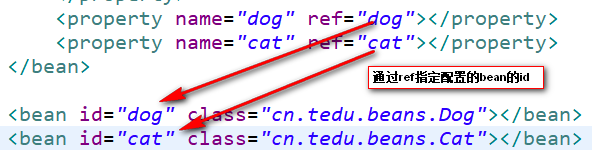
b.自定义bean的注入:
package cn.tedu.beans;

import java.util.List;
import java.util.Map;
import java.util.Properties;
import java.util.Set;

public class Hero {
        private int id;
        private String name;
        private List<String> jobs;
        private Set<String> set;
        private Map<String,String> map;
        private Properties prop;
        private Dog dog;
        private Cat cat;


        public void setId(int id) {
                this.id = id;
        }

         public void setName(String name) {
                this.name = name;
        }

         public void setJobs(List<String> jobs) {
                this.jobs = jobs;
        }

        public void setSet(Set<String> set) {
                this.set = set;

        }


        public void setMap(Map<String, String> map) {
                this.map = map;
        }


        public void setProp(Properties prop) {
                this.prop = prop;
        }

        public void setDog(Dog dog) {
               this.dog = dog;
        }


        public void setCat(Cat cat) {
                this.cat = cat;
        }

       @Override
        public String toString() {
                return "Hero [id=" + id + ", name=" + name + ", jobs=" + jobs
                                + ", set=" + set + ", map=" + map + ", prop=" + prop + ", dog="
                                + dog + ", cat=" + cat + "]";
        }
}
<?xml version="1.0" encoding="UTF-8"?>
<beans xmlns="http://www.springframework.org/schema/beans"
        xmlns:xsi="http://www.w3.org/2001/XMLSchema-instance"
        xsi:schemaLocation="http://www.springframework.org/schema/beans
        http://www.springframework.org/schema/beans/spring-beans-3.2.xsd"
        >

        <bean id="hero" class="cn.tedu.beans.Hero">
                <property name="id" value="123"></property>
                <property name="name" value="亚瑟 "></property>
                <property name="jobs">
                        <list>
                                <value>上单</value>
                                <value>打野</value>
                                <value>辅助</value>
                                <value>中单</value>
                        </list>
                </property>
                <property name="set">
                        <set>
                                <value>aaa</value>
                                <value>bbb</value>
                                <value>ccc</value>
                                <value>aaa</value>
                        </set>
                </property>
                <property name="map">
                        <map>
                                 <entry key="addr" value="王者荣耀"></entry>
                                 <entry key="addr" value="英雄联盟"></entry>
                                 <entry key="skill" value="风火轮"></entry>
                                 <entry key="age" value="19"></entry>
                        </map>
                </property>
                <property name="prop">
                        <props>
                                <prop key="k1">v1</prop>
                                <prop key="k2">v2</prop>
                                <prop key="k3">v3</prop>
                                <prop key="k4">v4</prop>
                        </props>
                </property>
                <property name="dog" ref="dog"></property>
                <property name="cat" ref="cat"></property>
        </bean>
        <bean id="dog" class="cn.tedu.beans.Dog"></bean>
        <bean id="cat" class="cn.tedu.beans.Cat"></bean>
</beans>
@Test

/**
 * SpringDI set方式属性注入 - 非Spring内置的可以直接注入类型的注入
 */
public void test2(){
        ApplicationContext context = new ClassPathXmlApplicationContext("applicationContext.xml");
        Hero hero = (Hero) context.getBean("hero");
        System.out.println(hero);
}
- 自动装配
在Spring的set方式实现的注入过程中,支持自动装配机制,所谓自动装配机制,会根据要设置的javabean属性的名字 或 类型 到spring中自动寻找对应id 或 类型的< bean>进行注入设置,从而 省去依次配置的过程,简化了配置。
为 指定< bean>开启自动装配:
<?xml version="1.0" encoding="UTF-8"?>
<beans xmlns="http://www.springframework.org/schema/beans"
        xmlns:xsi="http://www.w3.org/2001/XMLSchema-instance"
        xsi:schemaLocation="http://www.springframework.org/schema/beans
        http://www.springframework.org/schema/beans/spring-beans-3.2.xsd"
        >

        <!--
                autowire设定自动装配:
                        byName:根据javabean中需要注入的属性的名字 ,在spring容器中找对应id的<bean>将该<bean>的对象复制给 当前的属性
                        byType:根据javabean中需要注入的属性的类型,在spring容器中找对应class类型的<bean>将该<bean>的对象复制给 当前的属性
                        **byType方式 根据类型进行匹配,可能匹配到多个<bean>,此时会抛出异常。而byName是通过id来寻找<bean>,id没有重复,不会有这方面的问题,所以推荐使用byName方式
         -->
        <bean id="teacher" class="cn.tedu.beans.Teacher" autowire="byType"></bean>
        <bean id="dog" class="cn.tedu.beans.Dog"></bean>
        <bean id="cat" class="cn.tedu.beans.Cat"></bean>
</beans>
为 全局配置自动装配:
<?xml version="1.0" encoding="UTF-8"?>
<beans xmlns="http://www.springframework.org/schema/beans"
        xmlns:xsi="http://www.w3.org/2001/XMLSchema-instance"
        xsi:schemaLocation="http://www.springframework.org/schema/beans
        http://www.springframework.org/schema/beans/spring-beans-3.2.xsd"
        default-autowire="byName"
        >

        <!--
                autowire设定自动装配:
                        byName:根据javabean中需要注入的属性的名字 ,在spring容器中找对应id的<bean>将该<bean>的对象复制给 当前的属性
                        byType:根据javabean中需要注入的属性的类型,在spring容器中找对应class类型的<bean>将该<bean>的对象复制给 当前的属性
                        **byType方式 根据类型进行匹配,可能匹配到多个<bean>,此时会抛出异常。而byName是通过id来寻找<bean>,id没有重复,不会有这方面的问题,所以推荐使用byName方式
         -->
        <bean id="teacher" class="cn.tedu.beans.Teacher"></bean>
        <bean id="dog" class="cn.tedu.beans.Dog"></bean>
        <bean id="cat" class="cn.tedu.beans.Cat"></bean>

</beans>
package cn.tedu.beans;


public class Teacher {

        private Dog dog;

        private Cat cat;

        public void setDog(Dog dog) {

                this.dog = dog;

        }

        public void setCat(Cat cat) {

                this.cat = cat;

        }


        @Override

        public String toString() {

                return "Teacher [dog=" + dog + ", cat=" + cat + "]";

        }

}
@Test

/**

 * SpringDI 自动装配

 */

public void test4(){

        ApplicationContext context = new ClassPathXmlApplicationContext("applicationContext.xml");

        Teacher teacher = (Teacher) context.getBean("teacher");

        System.out.println(teacher);

}
4.基于构造方法的注入
对象属性设置的另一种方式是在对象创建的过程中通过构造方法传入并设置对象的属性。
spring也可以通过这样的构造方法实现属性的注入。
package cn.tedu.beans;


public class Student {

        private int id;

        private String name;

        private Dog dog;


        public Student(int id, String name, Dog dog) {

                this.id = id;

                this.name = name;

                this.dog = dog;

        }


        @Override

        public String toString() {

                return "Student [id=" + id + ", name=" + name + ", dog=" + dog + "]";

        }

}
<?xml version="1.0" encoding="UTF-8"?>

<beans xmlns="http://www.springframework.org/schema/beans"

        xmlns:xsi="http://www.w3.org/2001/XMLSchema-instance"

        xsi:schemaLocation="http://www.springframework.org/schema/beans

        http://www.springframework.org/schema/beans/spring-beans-3.2.xsd"

        >


        <bean id="student" class="cn.tedu.beans.Student">

                <!--

                        index:为构造方法的第几个参数 进行配置

                        name:为构造方法的哪个名字的参数进行配置

                             **index 和 name 可以配置任何一个或同时配置 但要求一旦配置必须正确

                             **推荐优先使用index方式配置 防止没有源码造成name无法匹配到对应参数

                        type:该构造方法参数的类型

                        value:该构造方法参数的值 ,用来指定基本值

                        ref:该构造方法参数的值,用来指定引用其他bean的值

                 -->

                <constructor-arg index="0" name="id" value="999"/>

                <constructor-arg index="1" type="java.lang.String" value="张无忌"/>

                <constructor-arg name="dog" ref="dog"/>

        </bean>


        <bean id="dog" class="cn.tedu.beans.Dog"></bean>


</beans>
@Test

/**

 * SpringDI 构造方法方式属性注入

 */

public void test3(){

        ApplicationContext context = new ClassPathXmlApplicationContext("applicationContext.xml");

        Student student = (Student) context.getBean("student");

        System.out.println(student);

}





 扫一扫
扫一扫


 776
776

 被折叠的 条评论
为什么被折叠?
被折叠的 条评论
为什么被折叠?
 到【灌水乐园】发言





