


}
if (userRequest.header(“User-Agent”) == null) {
requestBuilder.header(“User-Agent”, Version.userAgent());
}
…
}
2. 支持自动重定向
有时我们请求的URL已经被移走了,此时server会返回301状态码和一个重定向的新URL,此时我们要能够支持自动访问新URL而不是向用户报错。
对于重定向这里有一个测试性URL:www.publicobject.com/helloworld.… ,通过访问并抓包,可以看到如下信息:
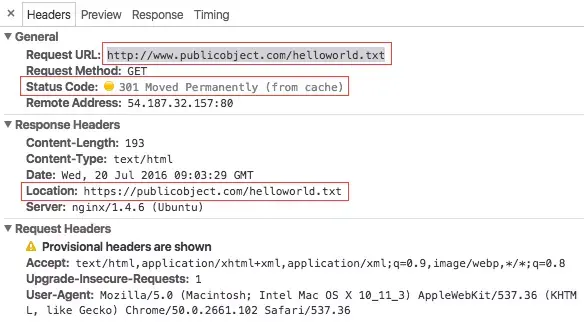
因此,我们在接收到Response后要根据status_code是否为重定向,如果是,则要从Response Header里解析出新的URL-Location并自动请求新URL。那么,我们可以继续改写sendRequest(request)方法:
[class WingjayHttpClient]
private boolean allowRedirect = true;
// user can set redirect status when building WingjayHttpClient
public void setAllowRedirect(boolean allowRedirect) {
this.allowRedirect = allowRedirect;
}
public Response sendRequest(Request userRequest) {
Request httpRequest = expandHeaders(userRequest);
Response response = executeRequest(httpRequest);
switch (response.statusCode()) {
// 300: multi choice; 301: moven permanently;
// 302: moved temporarily; 303: see other;
// 307: redirect temporarily; 308: redirect permanently
case 300:
case 301:
case 302:
case 303:
case 307:
case 308:
return handleRedirect(response);
default:
return response;
}
}
// the max times of followup request
private static final int MAX_FOLLOW_UPS = 20;
private int followupCount = 0;
private Response handleRedirect(Response response) {
// Does the WingjayHttpClient allow redirect?
if (!client.allowRedirect()) {
return null;
}
// Get the redirecting url
String nextUrl = response.header(“Location”);
// Construct a redirecting request
Request followup = new Request(nextUrl);
// check the max followupCount
if (++followupCount > MAX_FOLLOW_UPS) {
throw new Exception("Too many follow-up requests: " + followUpCount);
}
// not reach the max followup times, send followup request then.
return sendRequest(followup);
}
利用上面的代码,我们通过获取原始userRequest的返回结果,判断结果是否为重定向,并做出自动followup处理。
一些常用的状态码 100~199:指示信息,表示请求已接收,继续处理 200~299:请求成功,表示请求已被成功接收、理解、接受 300~399:重定向,要完成请求必须进行更进一步的操作 400~499:客户端错误,请求有语法错误或请求无法实现 500~599:服务器端错误,服务器未能实现合法的请求
 最低0.47元/天 解锁文章






 扫一扫
扫一扫


 989
989

 被折叠的 条评论
为什么被折叠?
被折叠的 条评论
为什么被折叠?
 到【灌水乐园】发言





