
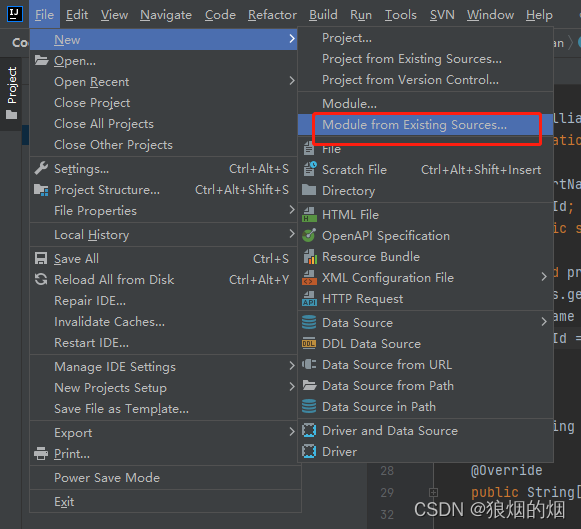
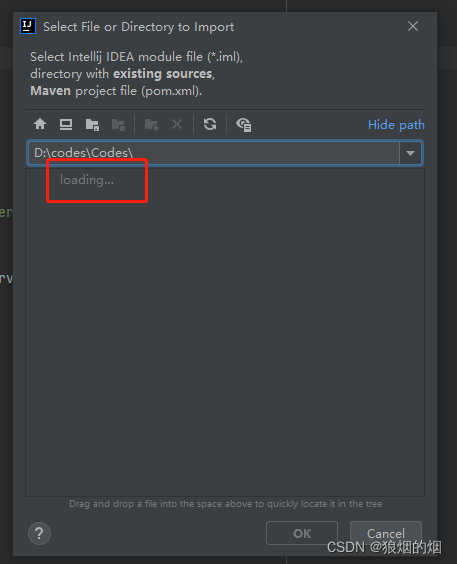
Idea open loading...

本文描述了当资源管理器在打开包含远程磁盘的应用软件时遇到的问题,特别是远程磁盘响应较慢导致长时间等待的情况。


出现上面的界面大约过了十几分钟开始显示Codes下面的代码目录.

这个情况肯定是资源管理器在做什么事情.

我的问题是自己挂载了一个远程磁盘,每次涉及到应用软件在打开我的电脑的资源管理器的时候会检索远程磁盘,在远程磁盘响应慢的情况时候会出现等待时间特别长的情况 

Prefix Caching Prefix Caching is a technique to optimize the inference efficiency of generative models. Its core idea is to cache intermediate computation results (KV Cache) of input sequences, avoiding redundant computations and thereby accelerating response times for multiple requests sharing the same prefix. How It Works Prefix Identification: When multiple requests share identical input prefixes (e.g., prompts or initial context), the system caches the intermediate states (KV Cache) corresponding to that prefix. Incremental Computation: For subsequent requests, only the newly added portions (e.g., user-appended input) need computation while reusing cached intermediate results, significantly reducing computational overhead. Enabling Prefix Caching for Service Deployment To enable prefix caching when launching the service, add the parameter enable-prefix-caching. By default, only first-level caching (GPU cache) is enabled. To enable CPU caching, specify the swap-space parameter to allocate CPU cache space (in GB). The size should be set based on available machine memory after model loading. Note: The ERNIE-4.5-VL multimodal model currently does not support prefix caching. For detailed parameter descriptions, refer to the Parameters Documentation. Example launch command: python -m fastdeploy.entrypoints.openai.api_server \ --model "baidu/ERNIE-4.5-21B-A3B-Paddle" \ --port 8180 --engine-worker-queue-port 8181 \ --metrics-port 8182 \ --cache-queue-port 8183 \ --enable-prefix-caching \ --swap-space 50 \ --max-model-len 8192 \ --max-num-seqs 32 Enabling Prefix Caching for Offline Inference Set enable_prefix_caching=True when launching FastDeploy. Enable CPU caching via swap_space based on available machine memory. A test example is provided: demo/offline_prefix_caching_demo.py
最新发布
07-06
评论
成就一亿技术人!
拼手气红包6.0元
还能输入1000个字符
 
红包 添加红包
表情包 插入表情
 条评论被折叠 查看
添加红包

请填写红包祝福语或标题

红包个数最小为10个

红包金额最低5元

当前余额3.43前往充值 >
需支付:10.00
成就一亿技术人!
领取后你会自动成为博主和红包主的粉丝 规则
hope_wisdom
发出的红包
实付
使用余额支付
点击重新获取
扫码支付
钱包余额 0

抵扣说明:

1.余额是钱包充值的虚拟货币,按照1:1的比例进行支付金额的抵扣。
2.余额无法直接购买下载,可以购买VIP、付费专栏及课程。

余额充值


