


css 图片案例
01 css语法.html
<!DOCTYPE html>
<html lang="en">
<head>
	<meta charset="UTF-8">
	<title>Document</title>
	<style>
		p{
			color:red
		}
		h2{
			color:blue
		}
	</style>
</head>
<body>
	<p>css从入门到精讲</p>
	<h2>观众:</h2>
</body>
</html>
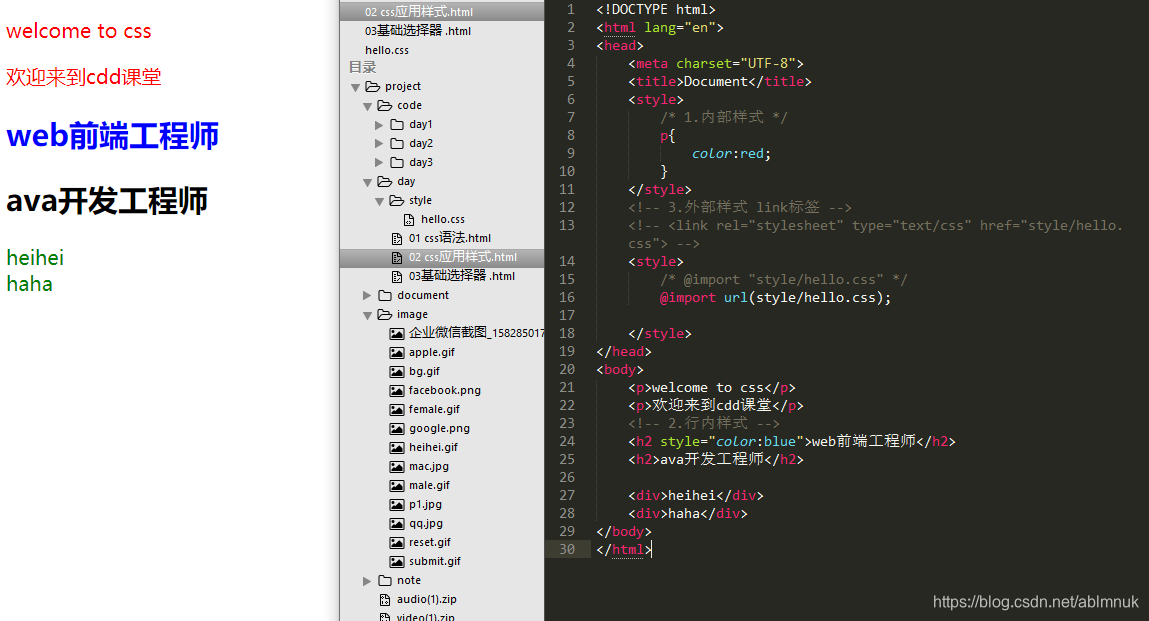
02 css应用样式 .html
<!DOCTYPE html>
<html lang="en">
<head>
	<meta charset="UTF-8">
	<title>Document</title>
	<style>
		/* 1.内部样式 */
		p{
			color:red;
		}
	</style>
	<!-- 3.外部样式 link标签 -->
	<!-- <link rel="stylesheet" type="text/css" href="style/hello.css"> -->
	<style>
		/* @import "style/hello.css" */
		@import url(style/hello.css);

	</style>
</head>
<body>
	<p>welcome to css</p>
	<p>欢迎来到cdd课堂</p>
	<!-- 2.行内样式 -->
	<h2 style="color:blue">web前端工程师</h2>
	<h2>ava开发工程师</h2>

	<div>heihei</div>
	<div>haha</div>
</body>
</html>
hello.html
div{
	color:green;
}
####0.3 .html 基础选择器
<!DOCTYPE html>
<html lang="en">
<head>
	<meta charset="UTF-8">
	<title>Document</title>
	<style>
		p{
			color:red;
			font-size:20px;
		}
		h2{
			color:yellow
		}
		.hello{
			background-color:#cccccc;
		}
		.world{
			font-weight:bold;
		}
		#heihei{
			color:blue;
		}
	</style>
</head>
<body>
<!--  -->
	<p>welcome to css</p>
	<p>hello world</p>
	<h2>web前端开发</h2>
	<h3>Java开发</h3>
	<hr>
	<!-- 只修改p标签 -->
	<p class="hello">welcome to css</p>
	<p>hello world</p>
	<h2>web前端开发</h2>
	<h3>Java开发</h3>
	<!-- 只要应用hello就生效,与标签无关 -->
	<div class="hello">观众:</div>
	<!-- 既要有背景颜色,又要加粗文字 -->
	<div class="hello world">观众:</div>
	<div class="world">观众:</div>
	<span>从入门到精通</span>
	<hr>

	<h1 id="heihei">嘿嘿</h1>
</body>
</html>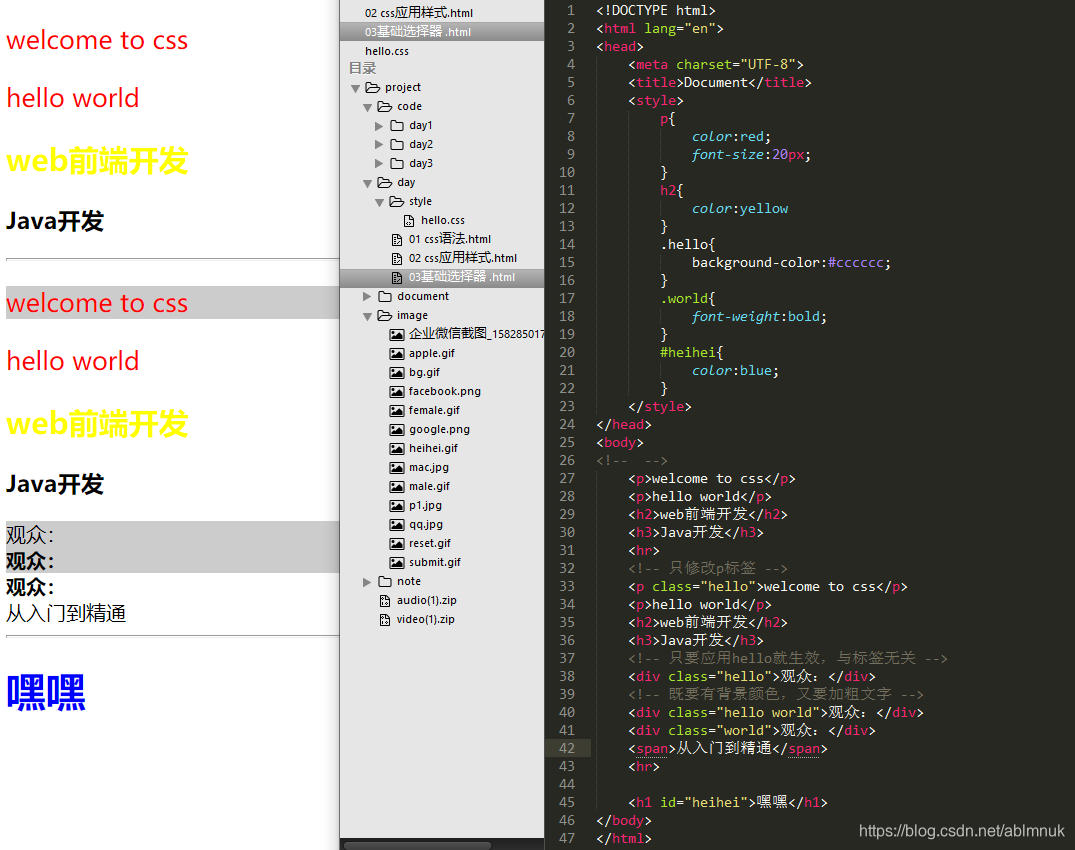
04.复杂选择器
<!DOCTYPE html>
<html lang="en">
<head>
	<meta charset="UTF-8">
	<title>Document</title>
	<style>
	/* 1.标签选择器与类选择器结合起来…… */
	h1.aaa{
		color:red;
	}
	p#bbb{
		color:blue;
	}
	/* 2.组合选择器 */
	h1,p,div,span,.ccc{
		font-size:30px;
	}
	div{
		background:pink;
	}
	.ccc{
		font-weight:bold;
	}
	/* 嵌套选择器 */
	div>p{
		color:green;
		text-decoration:underline;
	}
	/* 对div内部的类选择器进行修饰 */
	div h3.ddd{
		color:yellow;
	}
	</style>
</head>
<body>
	<h1 class="aaa">welcome</h1>
	<h4 class="aaa">css</h4>
	<h1>hello</h1>
	<hr>
	<!-- 需求:修改id属性为bbb的p标签 -->
	<p id="bbb">world</p>
	<p>html</p>
	<h2 id="bbb">web开发</h2>
	<hr>
	<!-- 将h1、pdiv、span标签的字号设置为30像素 -->
	<h1>hello</h1>
	<p>html</p>
	<div>web开发</div>
	<span class="ccc">Java开发</span>
	<hr>
	<!--  -->
	<div>
		<p>div内部的p标签</p>
		<h3>div内部的h3标签</h3>
	</div>
	<hr>

	<div>
		<h2>
			<p>div内部的h2标签内部的p标签</p>
		</h2>
	</div>
	<hr>

	<div>
		<p>div内部的p标签</p>
		<h3 class="ddd">div内部的h3</h3>
		<p class="ddd">pppp</p>
	</div>
</body>
</html>
05.伪类选择器
<!DOCTYPE html>
<html lang="en">
<head>
	<meta charset="UTF-8">
	<title>Document</title>
	<style>
		/* a:link{
			font-size:12px;
			color:black;
			text-decoration:none;
		}
		a:visited{
			font-size:15px;
			color:red;
		}
		a:hover{
			font-size:20px;
			color:blue;
		}
		a:active{
			font-size:40px;
			color:green;
		} */
		a:link,a:visited{
			font-size:13px;
			color:#666666;
			text-decoration:none;
		}
		a:hover,a:active{
			color:#ff7300;
			text-decoration:underline;
		}

		p:hover{
			color:red;
		}
		p:active{
			color:blue;
		}
	</style>
</head>
<body>
	<a href="#">IT教育,高校培训</a>
	<p>css从入门到精通</p>
</body>
</html>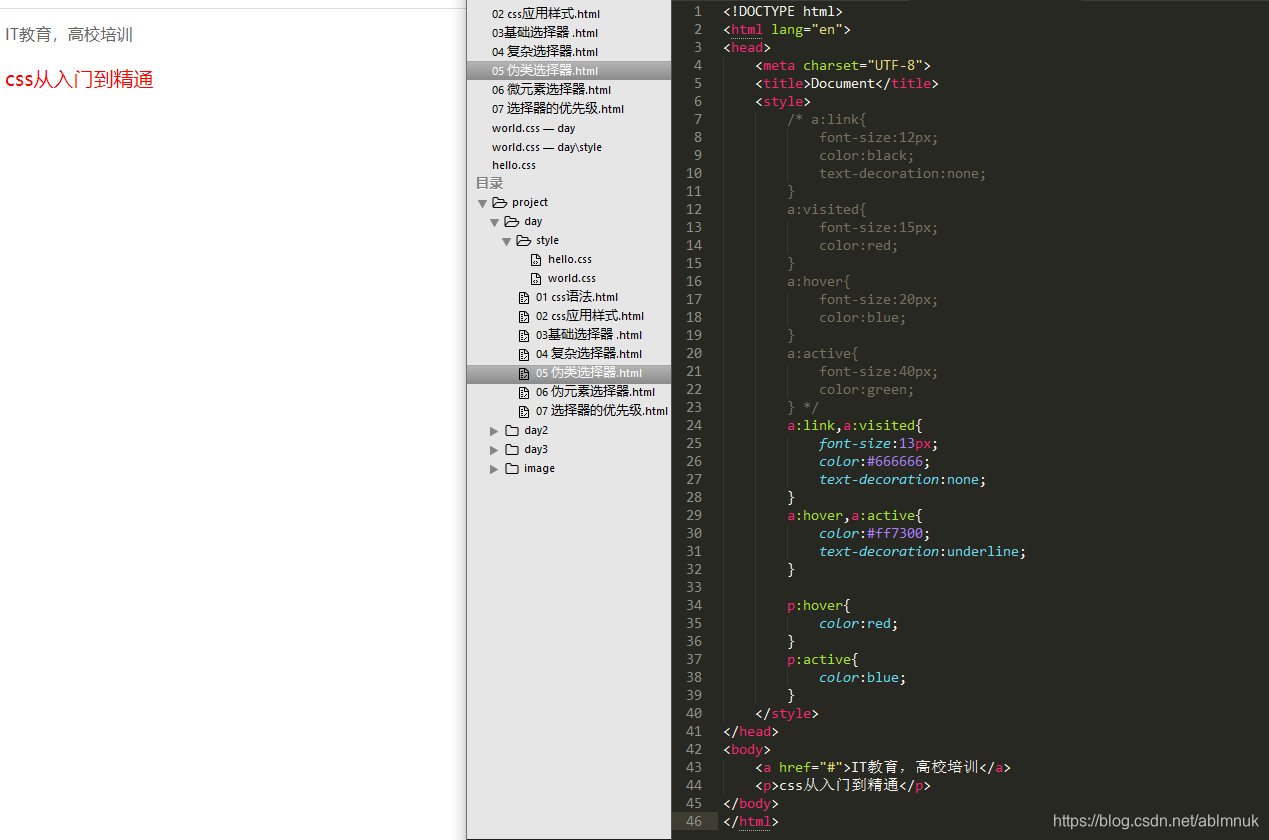
06.微元素选择器
<!DOCTYPE html>
<html lang="en">
<head>
	<meta charset="UTF-8">
	<title>Document</title>
	<style>
	p:first-letter{
		color:red;
		font-size:30px;
	}
	p:first-line{
		background:yellow;
	}
	p:before{
		content:"嘿嘿";
	}
	p:after{
		content:"哈哈";
	}
	</style>
</head>
<body>
	<p>hello world</p>
	<hr>
	<p>
		hello  <br>
		welcome
	</p>
</body>
</html>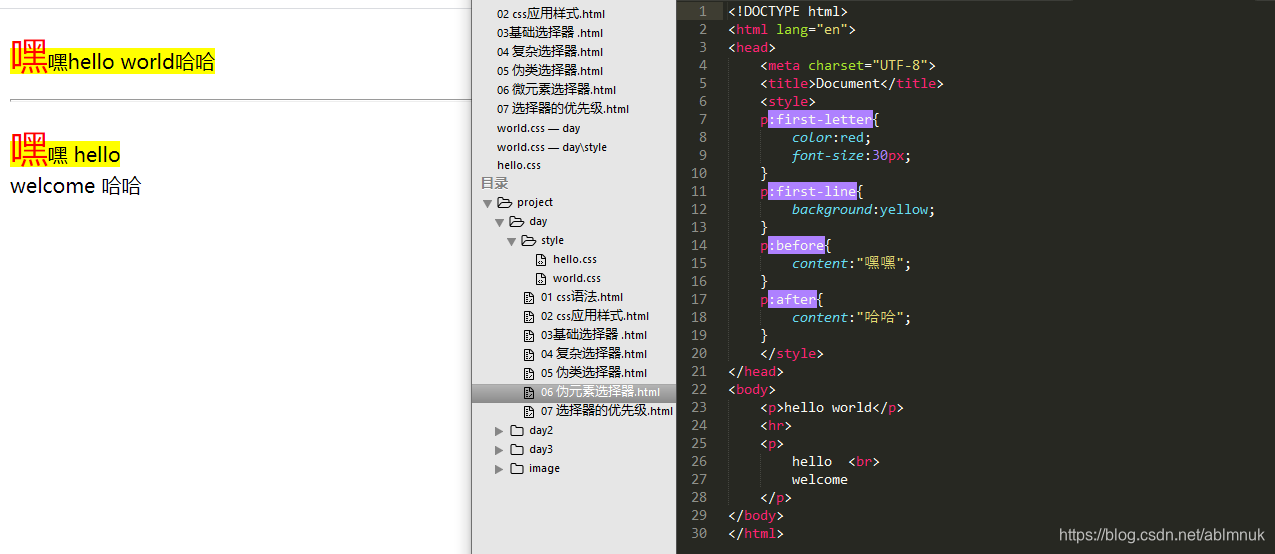
07.选择器的优先级
<!DOCTYPE html>
<html lang="en">
<head>
	<meta charset="UTF-8">
	<title>Document</title>
	<link rel="stylesheet" href="style/world.css">
	<style>
		div{
			font-size:20px;
			color:red;
		}
		.hello{
			font-weight:bold;
			color:blue!important;
		}
		#world{
			text-decoration:underline;
			color:green;
		}
		p{
			color:red!important;
		}
	</style>
	<!-- <link rel="stylesheet" href="<style/world.css"> -->
</head>
<body>
	<div class="hello" id="world" style="color: pink">css从入门到精通</div>
	<p>观众:</p>
</body>
</html>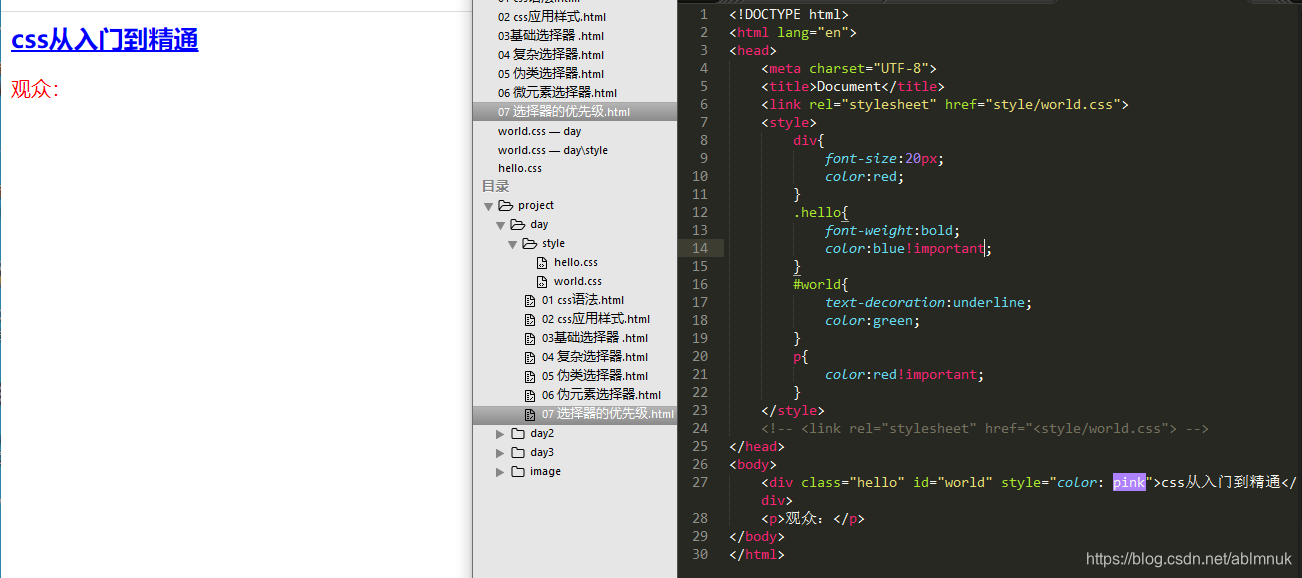
####08.文字相关的属性
<!DOCTYPE html>
<html lang="en">
<head>
	<meta charset="UTF-8">
	<title>Document</title>
	<style>
		div{
			font-size:30px;
		}
		p{
			/* font-size:20px; */
			/* font-size:80%; */
			font-size:2em;
		}
		span{
			font-size:1em;
		}
		.hello{
			/* font-size:80%; */
			font-size:2em;
		}
		body{
			font-size:62.5%;
		}
		#ddd{
			font-size:3em;
		}
		ul li{
			/* font-size:30px;
			font-weight:bold;
			font-family:华文楷体,黑体,宋体;
			font-style:italic; */
			font:italic normal 20px 楷体,黑体,宋体;
		}
	</style>
</head>
<body>
	<p>
		css从入门到精通!
		<span>观众:</span>
	</p>
	<span id="ddd">听讲人:</span>
	<hr>
	<div>
		我的div
		<p>
			css从入门到精通!
			<span>观众:</span>
		</p>
	</div>
	<hr>

	<span class="hello">观众:</span>
	<hr>

	<ul>
		<li>嘿嘿</li>
	</ul>
</body>
</html>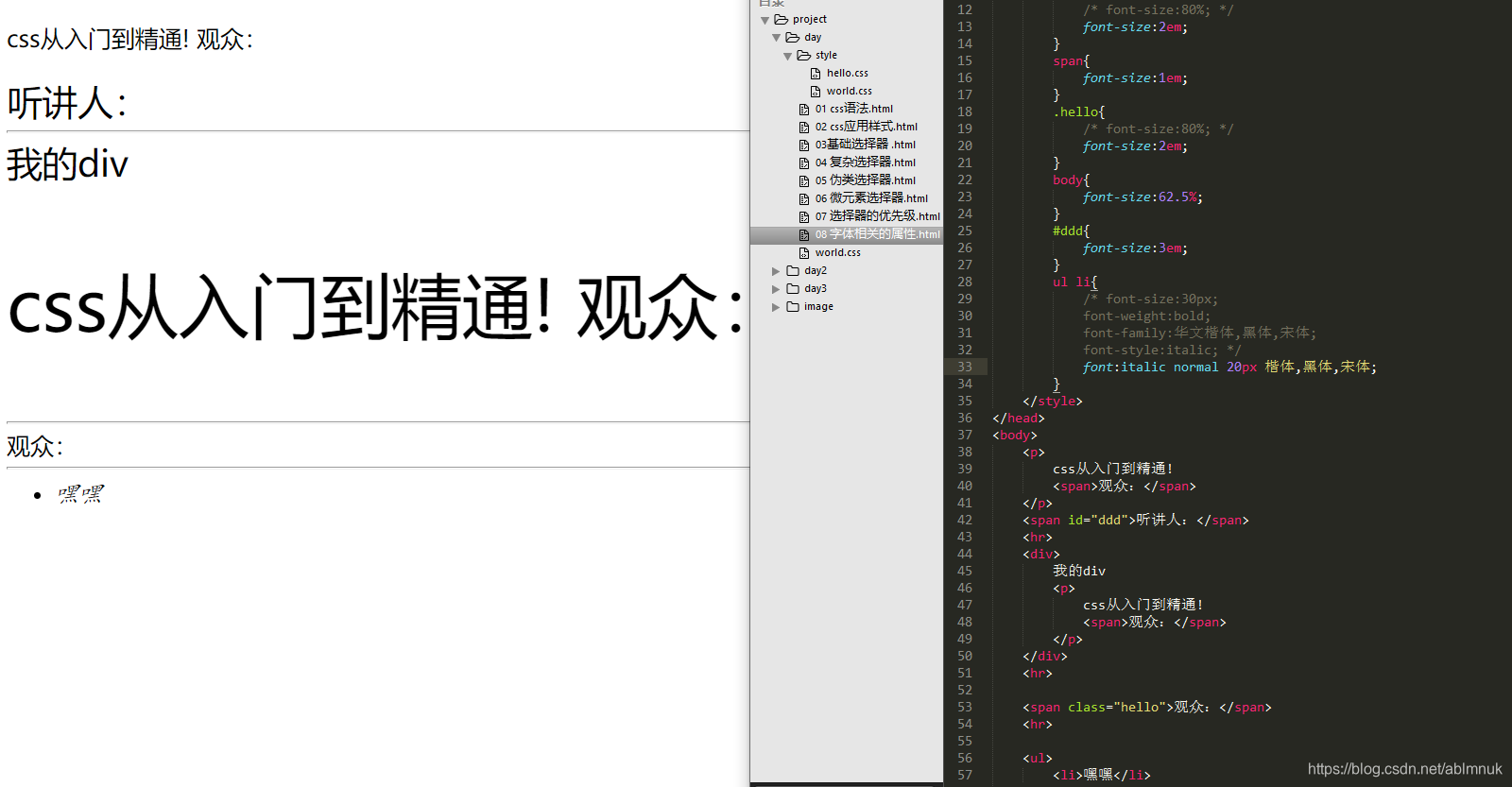
09.文本相关的属性
<!DOCTYPE html>
<html lang="en">
<head>
<meta charset="UTF-8">
<title>Document</title>
<style>
p{
color:red;
/* background-color:#0F0; */
/* background-color:rgb(0, 0, 255); */
background-color:rgba(0,255,0,0.5);
line-height:50px;
text-align:center;
}
img{
vertical-align:middle;
}
div{
text-indent:30px;
}
span{
text-decoration:underline;
text-transform:capitalize;
letter-spacing:3px;
word-spacing:8px;
}
h3{
width:300px;
height:200px;
background-color:#cccccc;
white-space:nowrap;
overflow:hidden;
}
</style>
</head>
<body>
<p>welcome to css</p>
<p>welcome to css</p>
<p>welcome to css</p>
<p>welcome to css</p>
<hr>
<img src="../image/qq.jpg" alt="">
html和css简单
<hr>
<div> welcome to css welcome to css welcome to css welcome to css welcome to css welcome to css welcome to css welcome to css welcome to css welcome to css welcome to css welcome to css</div>
<hr>
<span>hello world</span>
<hr>
<h3>welcome to css welcome to css welcome to css welcome to css welcome to css welcome to css welcome to css welcome to css welcome to css welcome to css welcome to css welcome to css</h3>
</body>
</html>
ss welcome to css welcome to css welcome to css welcome to css welcome to css welcome to css welcome to css welcome to css welcome to css
hello world
welcome to css welcome to css welcome to css welcome to css welcome to css welcome to css welcome to css welcome to css welcome to css welcome to css welcome to css welcome to css
```day2
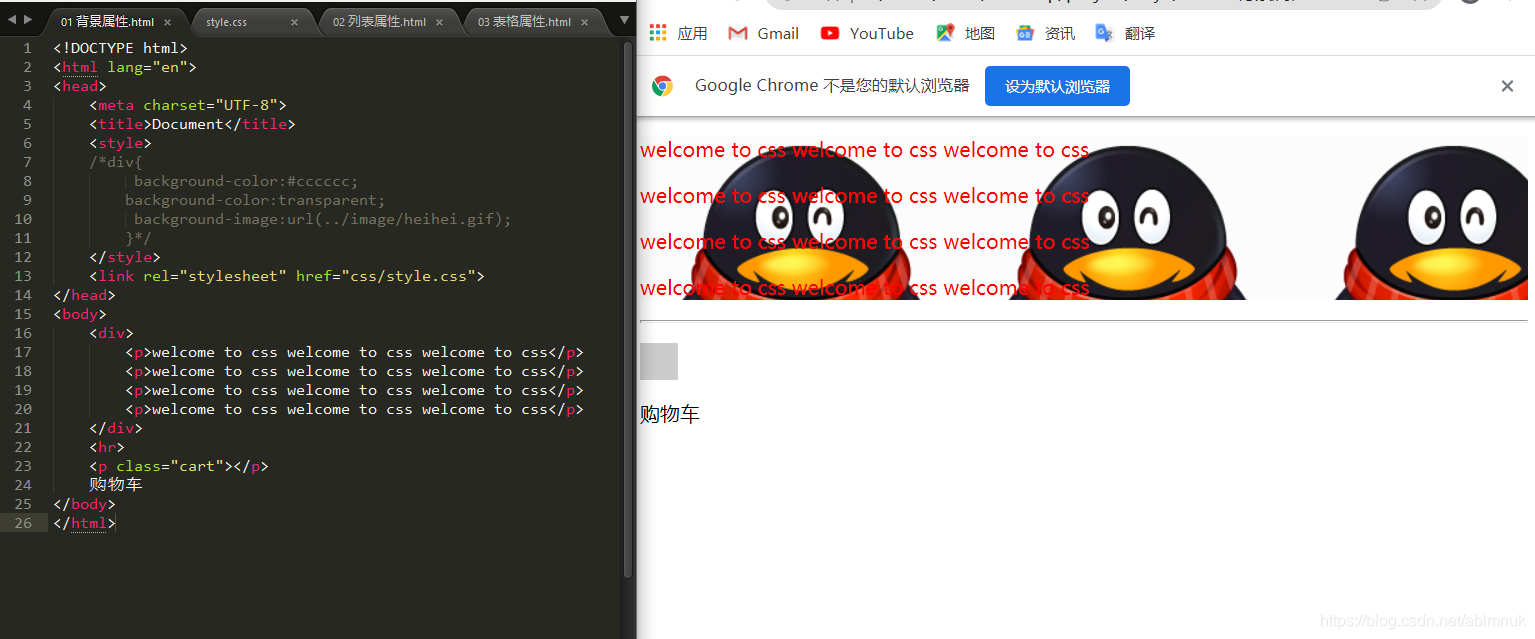
01.背景属性.html
<!DOCTYPE html>
<html lang="en">
<head>
 	<meta charset="UTF-8">
	 <title>Document</title>
 	<style>
 	/*div{
   background-color:#cccccc;
  background-color:transparent;
   background-image:url(../image/heihei.gif);
  }*/
 	</style>
 	<link rel="stylesheet" href="css/style.css">
</head>
<body>
 	<div>
  		<p>welcome to css welcome to css welcome to css</p>
  		<p>welcome to css welcome to css welcome to css</p>
 		 <p>welcome to css welcome to css welcome to css</p>
  		<p>welcome to css welcome to css welcome to css</p>
 	</div>
	<hr>
 	<p class="cart"></p>
 	购物车
</body>
</html>
style.css
div{
 color:red;
	 /* background-color:#cccccc; */
	/* background-color:transparent; */
 	/* background-image:url(../../image/heihei.gif);
 	background-repeat:no-repeat;
 	background-position:right top;
 	height:1000px;
 	background-attachment:fixed; */
 	background:url(../../image/qq.jpg) repeat-x ;
}
.cart{
 	width:30px;
 	height:30px;
 	background-color:#ccc;
 	background-image:../../image/icon.gif
 	/* background-color:transparent; */
 	background-position:-160px -30px;
}
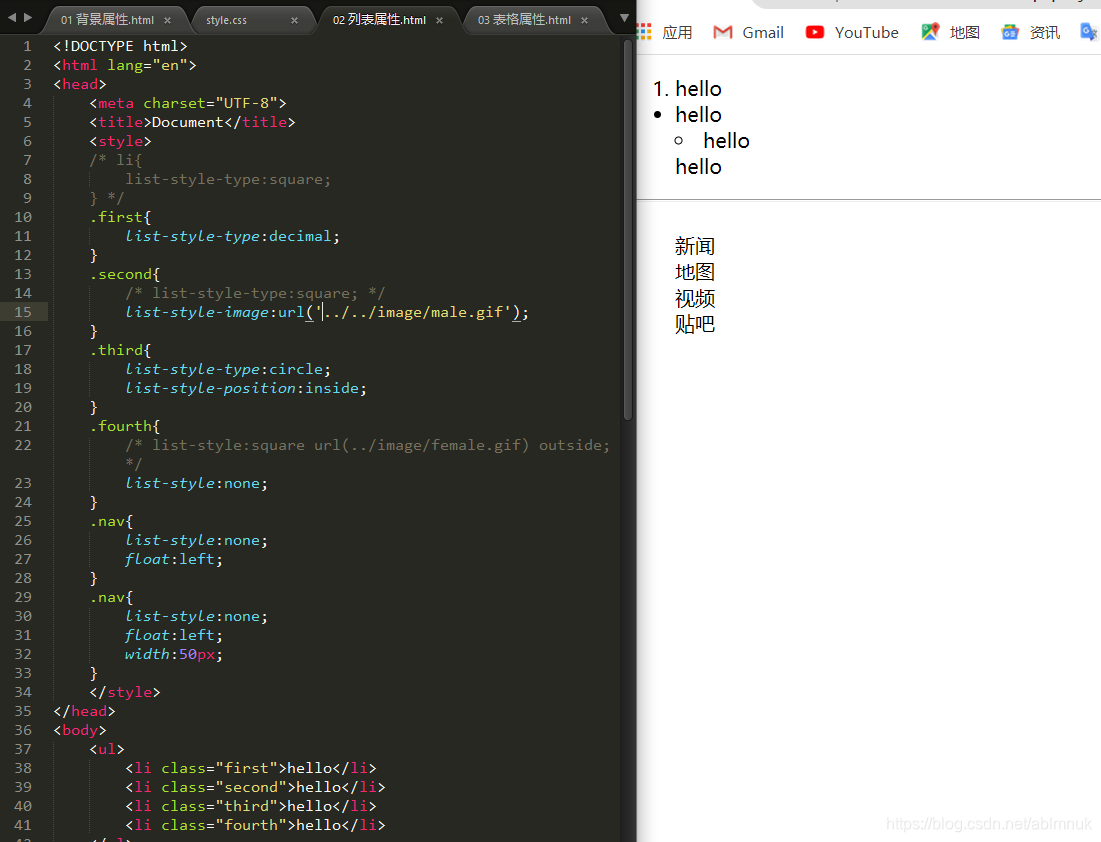
02.列表属性.html
<!DOCTYPE html>
<html lang="en">
<head>
 		<meta charset="UTF-8">
 		<title>Document</title>
 		<style>
 		/* li{
 		 list-style-type:square;
 		} */
 		.first{
  			list-style-type:decimal;
 		}
 		.second{
  			/* list-style-type:square; */
 			list-style-image:url('../../image/male.gif');
 	}
  		.third{
  			list-style-type:circle;
 			list-style-position:inside;
 		}
 		.fourth{
 			 /* list-style:square url(../image/female.gif) outside; */
 			 list-style:none;
 		}
		 .nav{
  			list-style:none;
  			float:left;
 		}
 		.nav{
  			list-style:none;
  			float:left;
  			width:50px;
 		}
 		</style>
</head>
<body>
 		<ul>
 3, 			<li class="first">hello</li>
  			<li class="second">hello</li>
  			<li class="third">hello</li>
  			<li class="fourth">hello</li>
 	</ul>
 	<hr>
 	<nav>
  		<ul class="nav">
   			<li>新闻</li>
   			<li>地图</li>
   			<li>视频</li>
   			<li>贴吧</li>
  		</ul>
 	</nav>
</body>
</html>
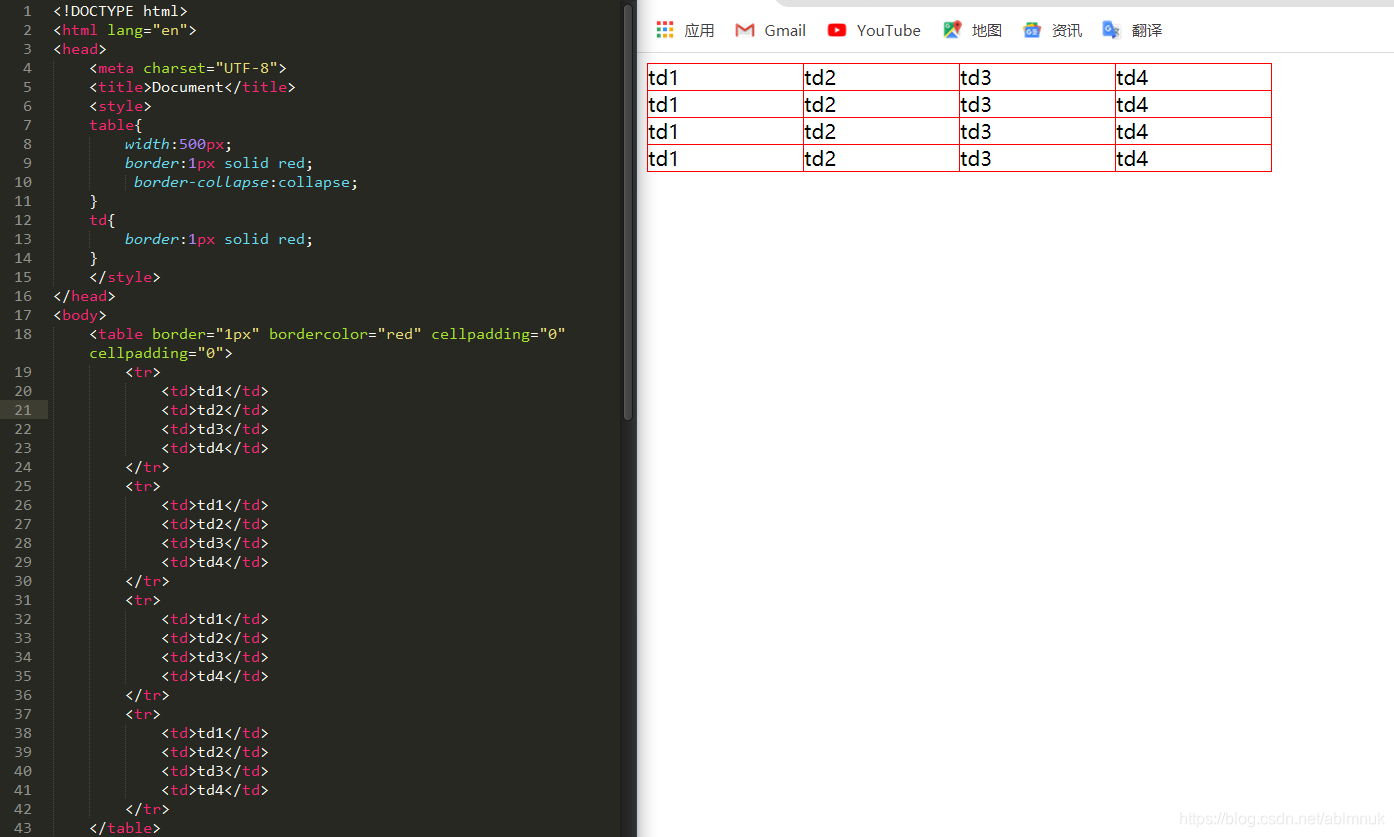
03.表格属性.html
<!DOCTYPE html>
<html lang="en">
<head>
 	<meta charset="UTF-8">
 	<title>Document</title>
 	<style>
 		table{
  			width:500px;
 			border:1px solid red;
  			border-collapse:collapse;
 		}
 		td{
  			border:1px solid red;
 			}
 		</style>
</head>
<body>
 		<table border="1px" bordercolor="red" cellpadding="0" cellpadding="0">
  			<tr>
   				<td>td1</td>
   				<td>td2</td>
   				<td>td3</td>
   				<td>td4</td>
  			</tr>
  			<tr>
   				<td>td1</td>
   				<td>td2</td>
   				<td>td3</td>
   				<td>td4</td>
  			</tr>
  			<tr>
   				<td>td1</td>
   				<td>td2</td>
   				<td>td3</td>
  	 			<td>td4</td>
  			</tr>
  			<tr>
   				<td>td1</td>
   				<td>td2</td>
   				<td>td3</td>
   				<td>td4</td>
  			</tr>
 		</table>
</body>
</html>
04.盒子模型.html
<!DOCTYPE html>
<html lang="en">
<head>
 	<meta charset="UTF-8">
 	<title>Document</title>
 	<style>
	 p{
  		width:250px;
 	 	background-color:#cccccc;
 	}
  	.first{
 		/* border-top-width:1px;
  		border-top-color:red;
  		border-top-style:solid;
  		border-right-color:blue;
  		border-right-width:1px;
  		border-right-style:dashed;
  		border-bottom-color:green;
 		 border-bottom-style:;
 		 border-bottom-width:; */
  		/* border-top:1px solid red;
  		border-right:2px dashed green; */
  		/* border-color:red yellow green blue;
  		border-width:1px 2px 4px 8px;
  		border-style:solid dashed dotted double; */
  		border:1px dotted red;
 	}
	.second{
  		/* padding-top:15px;
  		padding-left:10px;
  		padding-bottom:20px;
 		 padding-right:30px; */
 		 /* padding:1px 2px 4px 8px; */
  		padding:5px;
	 }
 	</style>
</head>
<body>
 	<p class="first">welcome to</p>
 	<p class="second">welcome to html</p>
 	<p class="third">welcome to css</p>
</body>
</html>

05 盒子模型的默认值.html
<!DOCTYPE html>
<html lang="en">
<head>
 	<meta charset="UTF-8">
 	<title>Document</title>
 	<style>
  		body{
   			margin:0;
   			padding:0px;
  		}
 		 /* p默认的margin */
  		p{
   			margin:0px;
  		}
  		ul{
   			list-style6:none;
   			margin:0;
   			padding:0px;
  		}
  			body,ul,ol,dl,li,p,form,h1,h2,h3,h4,h5,h6{
  			margin:0;
  			padding:0;
 		 }
 	</style>
</head>
<body>
 	welcome to css
 	<p>hello world</p>
 	<ul>
  		<li>hello1</li>
  		<li>hello2</li>
  		<li>hello3</li>
 	</ul>
</body>
</html>

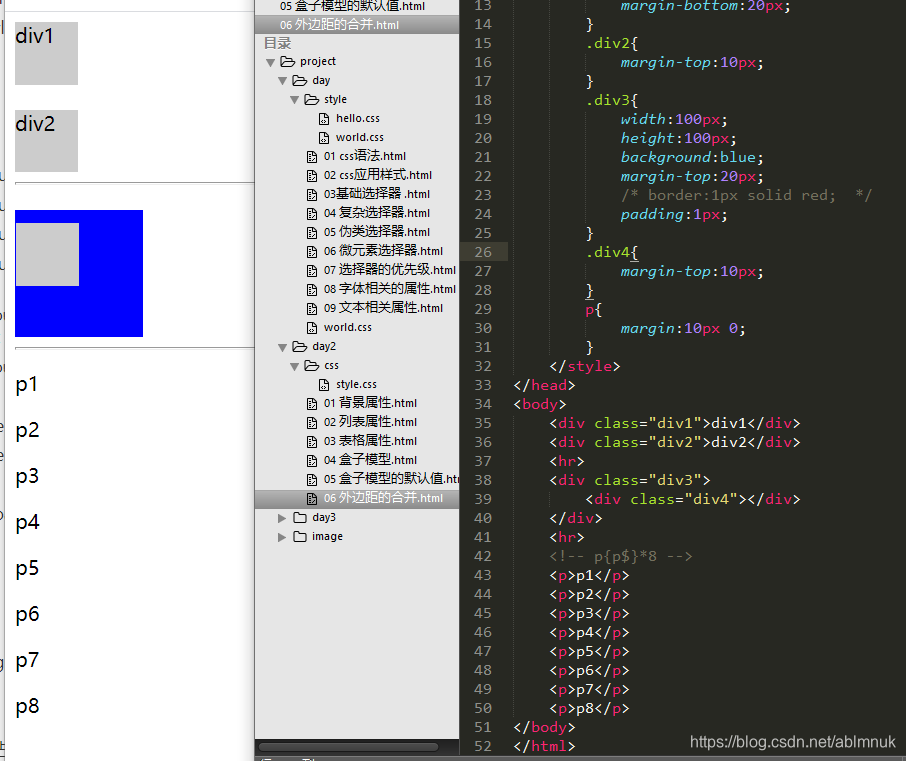
06 外边距的合并.html
<!DOCTYPE html>
<html lang="en">
<head>
 	<meta charset="UTF-8">
 	<title>Document</title>
 	<style>
  		div{
   			width:50px;
   			height:50px;
   			background:#ccc;
  		}
  		.div1{
   			margin-bottom:20px;
  		}
  		.div2{
  			margin-top:10px;
  		}
  		.div3{
   			width:100px;
   			height:100px;
   			background:blue;
   			margin-top:20px;
   			/* border:1px solid red;  */
   			padding:1px;
 		}
  		.div4{
   			margin-top:10px;
  		}
  		p{
   			margin:10px 0;
  		}
 		</style>
</head>
<body>
 	<div class="div1">div1</div>
 	<div class="div2">div2</div>
 	<hr>
 	<div class="div3">
  		<div class="div4"></div>
 	</div>
 	<hr>
 	<!-- p{p$}*8 -->
 	<p>p1</p>
 	<p>p2</p>
 	<p>p3</p>
 	<p>p4</p>
 	<p>p5</p>
 	<p>p6</p>
 	<p>p7</p>
 	<p>p8</p>
</body>
</html>
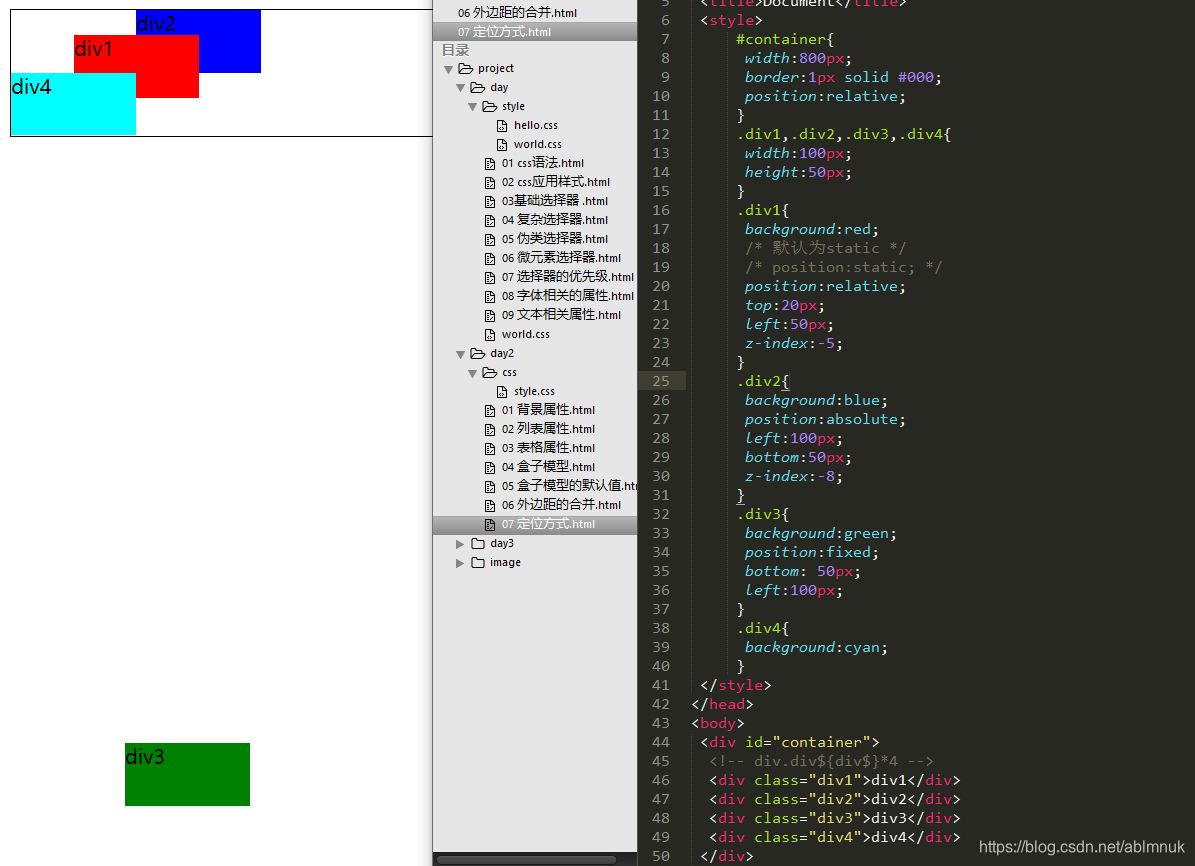
07 定位方式.html
<!DOCTYPE html>
<html lang="en">
<head>
 	<meta charset="UTF-8">
 	<title>Document</title>
 	<style>
     		#container{
      			width:800px;
      			border:1px solid #000;
      			position:relative;
     		}
     		.div1,.div2,.div3,.div4{
      			width:100px;
      			height:50px;
     		}
      		.div1{
      			background:red;
      			/* 默认为static */
      			/* position:static; */
      			position:relative;
      			top:20px;
     			left:50px;
      			z-index:-5;
     		}
    		.div2{
      			background:blue;
      			position:absolute;
      			left:100px;
      			bottom:50px;
      			z-index:-8;
     		}
     		.div3{
      			background:green;
      			position:fixed;
      			bottom: 50px;
      			left:100px;
    		 }
     		.div4{
      			background:cyan;
     		}
 	</style>
 </head>
<body>
 	<div id="container">
  		<!-- div.div${div$}*4 -->
  		<div class="div1">div1</div>
  		<div class="div2">div2</div>
  		<div class="div3">div3</div>
  		<div class="div4">div4</div>
 	</div>
</body>
</html>
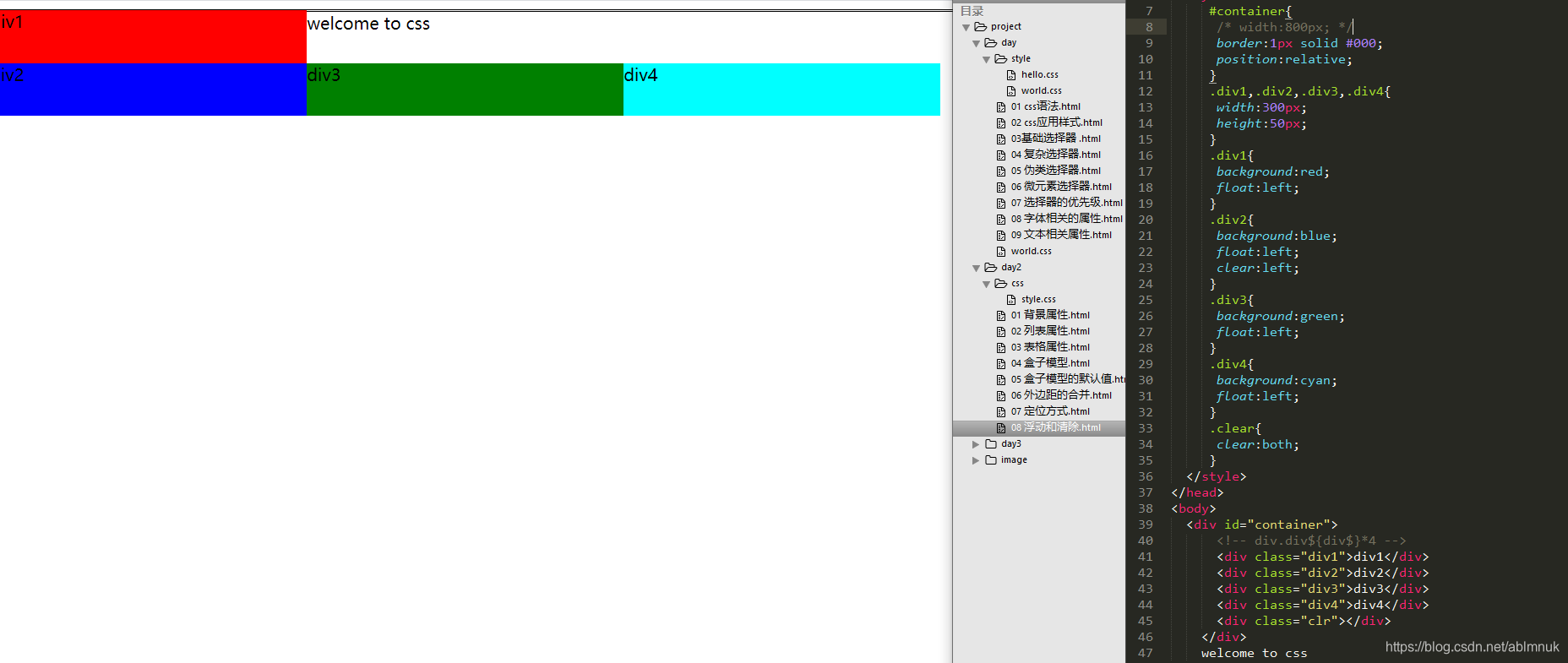
08 浮动和清除.html
<!DOCTYPE html>
<html lang="en">
<head>
 	<meta charset="UTF-8">
 	<title>Document</title>
 	<style>
     	#container{
     		width:800px;
      		border:1px solid #000;
     		position:relative;
     	}
     	.div1,.div2,.div3,.div4{
      		width:300px;
      		height:50px;
     	}
     	.div1{
      		background:red;
      		float:left;
     	}
     	.div2{
      		background:blue;
      		float:left;
      		clear:left;
    	}
     	.div3{
      		background:green;
      		float:left;
     	}
     	.div4{
      		background:cyan;
      		float:left;
     	}
     	.clear{
      		clear:both;
     	}
  	</style>
</head>
<body>
  	<div id="container">
    		<!-- div.div${div$}*4 -->
    		<div class="div1">div1</div>
    		<div class="div2">div2</div>
    		<div class="div3">div3</div>
    		<div class="div4">div4</div>
      		<div class="clr"></div>
   	</div>
    	welcome to css
</body>
</html>
09 标题.html
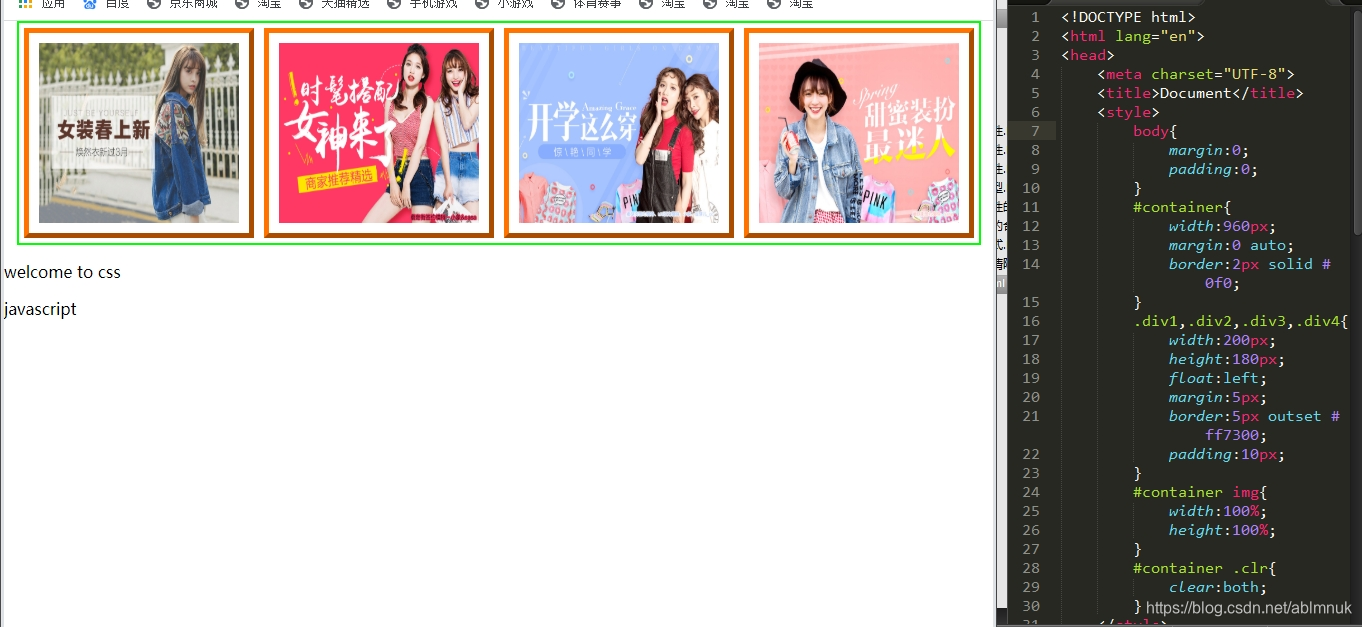
<!DOCTYPE html>
<html lang="en">
<head>
 	<meta charset="UTF-8">
 	<title>Document</title>
 	<style>
  	body{
   		margin:0;
   		padding:0;
  	}
  	#container{
   		width:720px;
   		margin:0 auto;
   		border:2px solid #0f0;
  	}
  	.div1,.div2,.div3,.div4{
   		width:200px;
   		height:180px;
   		float:left;
   		margin:5px;
   		border:5px outset #ff7300;
   		padding:10px;
  	}
  	#container img{
   		width:100%;
   		height:100%;
  	}
  	#container .clr{
   		clear:both;
  	}
 	</style>
</head>
<body>
 	<div1 class="div1"><img src="../image/adv1.jpg" alt=""></div1>1
 	<div2 class="div2"><img src="../image/adv2.jpg" alt=""></div2>
 	<div3 class="div3"><img src="../image/adv3.jpg" alt=""></div3>
 	<div4 class="div4"><img src="../image/adv4.jpg" alt=""></div4>
 	<div class="clr"></div>
 	<hr>
 	<p>welcome to css</p>javascript
</body>
</html>
day3
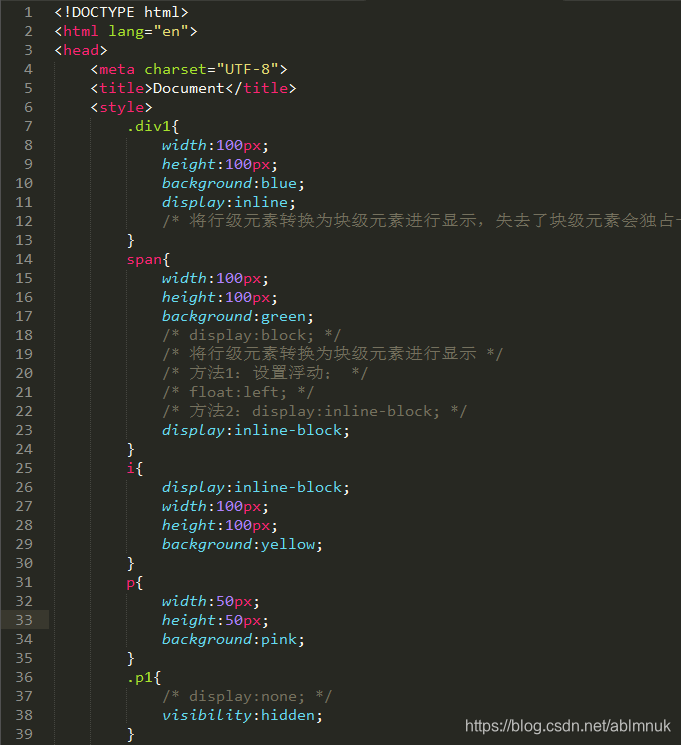
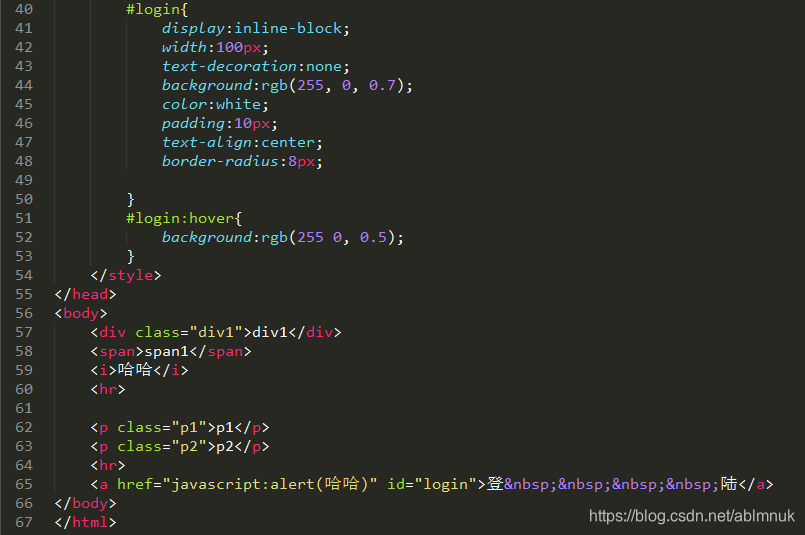
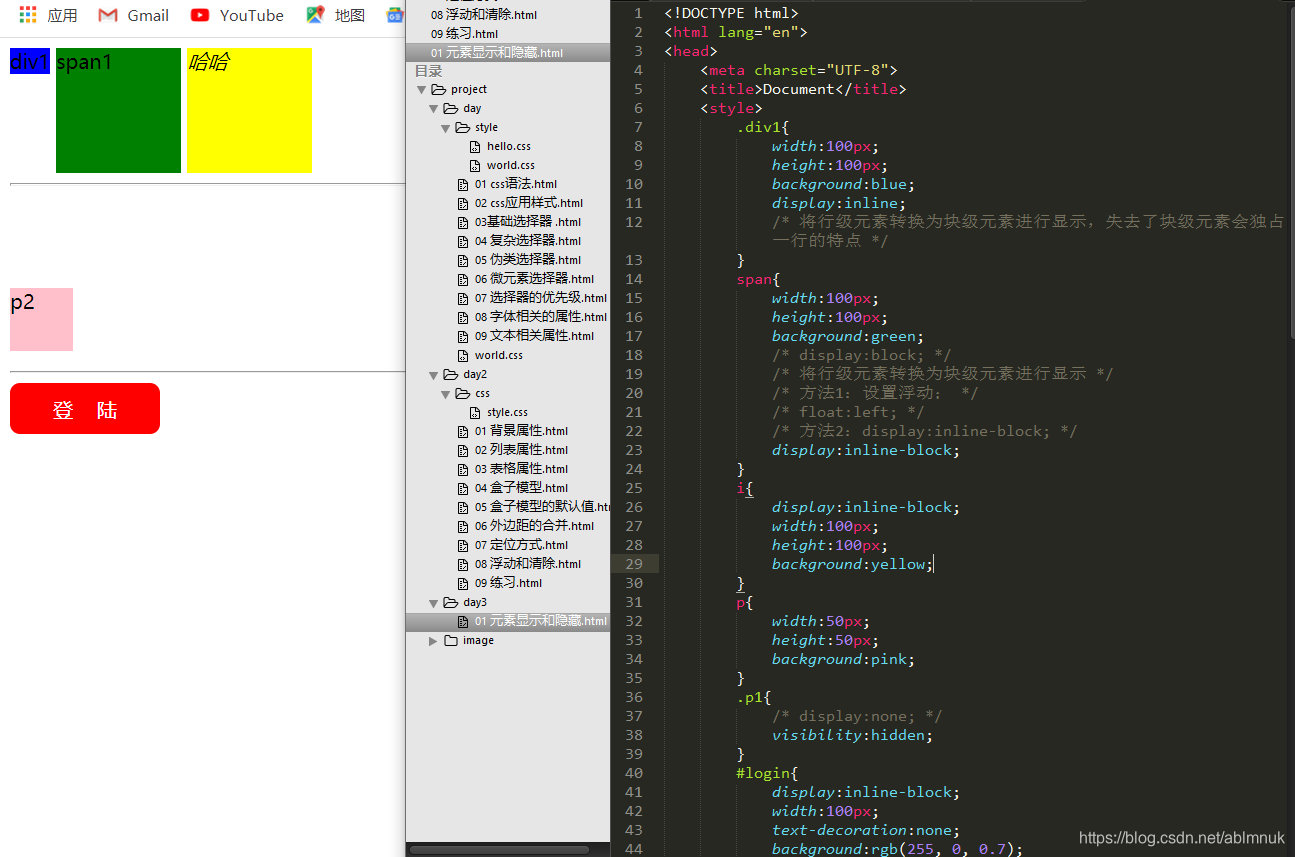
01元素的显示和隐藏.html
02 轮廓属性.html
<!DOCTYPE html>
<html lang="en">
<head>
 	<meta charset="UTF-8">
 	<title>Document</title>
 	<style>
 	span{
  		border:2px solid red;
  		/* outline-width:4px;
  outline-color:blue;
  putline-style:dashed;*/
  		outline:green dashed;
 	}
 	.usrname{
  		border:2px solid red;
  		outline:none;   /* 用户名不设置轮廓 */
  		padding-left:3px;
  		width:80px;
 	}
  	.email{
  		border:0;
  		outline:0;
  		border-bottom:1px solid black;
 	}
 	.btnsubmit{
  		border:0;
  		padding:5px;
  		width:100px;
 	}
 	.mydiv{
  		width:100px;
  		height: 50px;
  		background:#ccc;
  		/* border:2px solid red; */
  		outline:2px solid red;
 	}
 	</style>
</head>
<body>
	<span>welcome to css</span>
 	<hr>
 	用户名:<input type="text" class="usrname">
 	<hr>
 	<a href="#">css</a>
 	<hr>
 	邮箱:<input type="text" class="email">
 	<input type="submit" value="提交" class="btnsubmit">
 	<hr>
 	<div class="mydiv">div</div>
</body>
</html>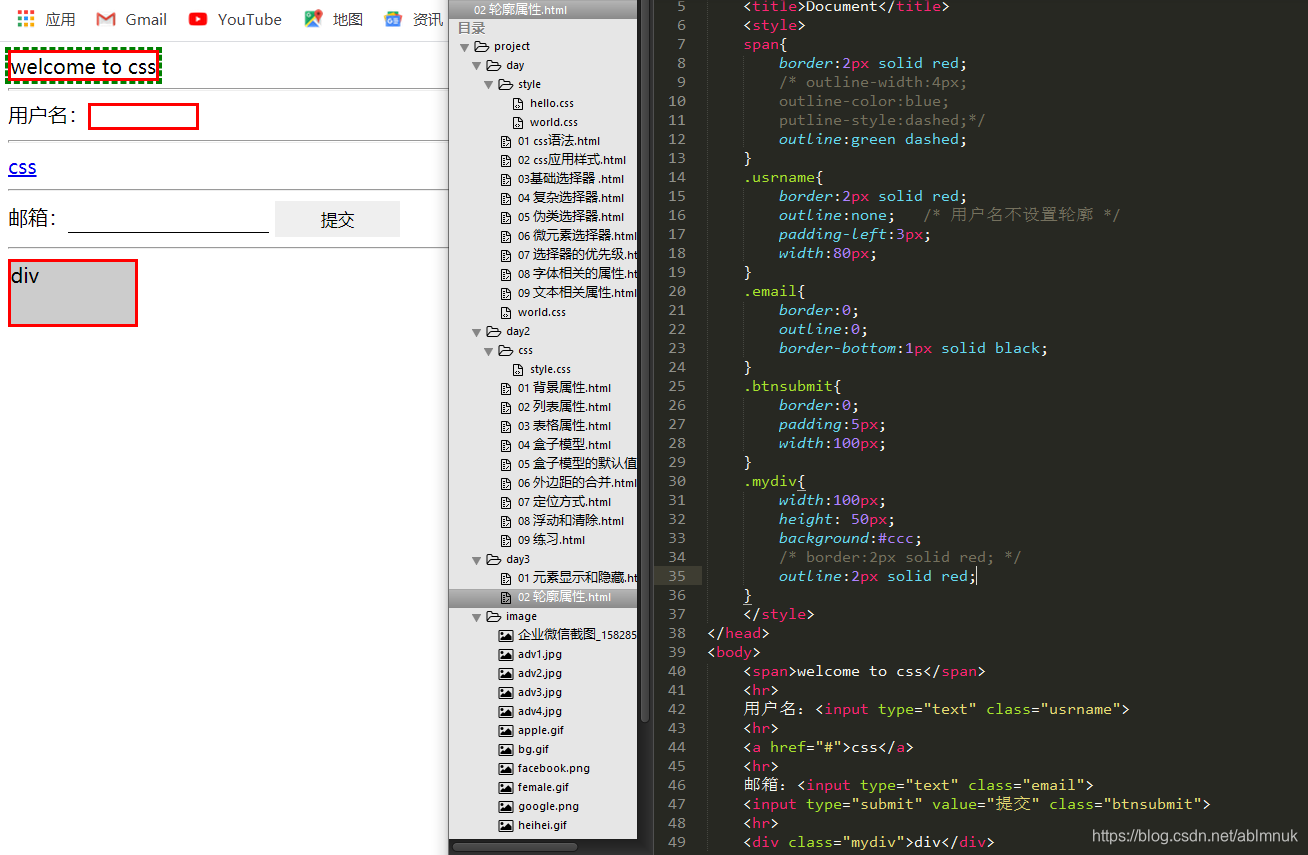
03 其他属性.html
<!DOCTYPE html>
<html lang="en">
<head>
 	<meta charset="UTF-8">
 	<title>Document</title>
 	<style>
 	p{
  		border:1px solid red;
 		min-width:500px;
 	}
 	div{
  		border:1px solid blue;
  		width:300px;
  		height: 100px;
  		overflow:scroll;
 	}
 	span{
  		cursor:pointer;
 	}
 	</style>
</head>
<body>
	<p>
 	welcome to css welcome to css welcome to css welcome to css
 	welcome to css welcome to css welcome to css welcome to css
 	welcome to css welcome to css welcome to css welcome to css
 	</p>
 	<hr>
 	<div>
  	welcome to css welcome to css welcome to css welcome to css
  	welcome to css welcome to css welcome to css welcome to css
  	welcome to css welcome to css welcome to css welcome to css
 	</div>
 	<hr>
 	<span>光标形状</span>
</body>
</html>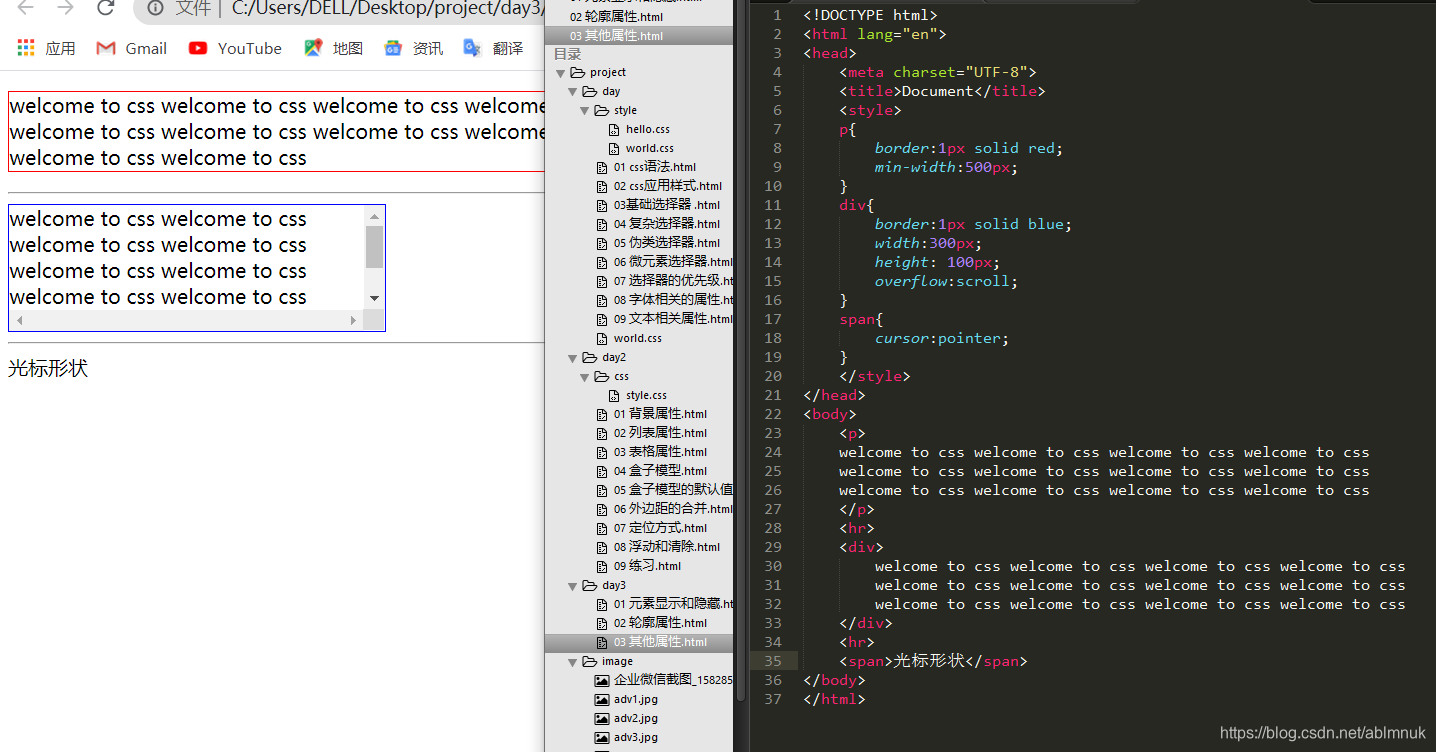
04 表格属性.css
<!DOCTYPE html>
<html lang="en">
<head>
 <meta charset="UTF-8">
 <title>Document</title>
 <style>
  .hello{
   /* width:600px; */
   width: 80%;
   border:1px solid #ccc;
   border-spacing:0;
   border-collapse:collapse;
  }
  .hello th,.hello td{
   border:1px solid #ccc;
   padding:5px;
  }
 </style>
</head>
<body>
<!-- table>(thead>th{th$}*4)+tbody>(tr>td{td$}*4)*6 -->
<table class="hello">
  <thead>
   <th>th1</th>
   <th>th2</th>
   <th>th3</th>
   <th>th4</th>
  </thead>
  <tbody>
   <tr>
    <td>td1</td>
    <td>td2</td>
    <td>td3</td>
    <td>td4</td>
   </tr>
   <tr>
    <td>td1</td>
    <td>td2</td>
    <td>td3</td>
    <td>td4</td>
   </tr>
   <tr>
    <td>td1</td>
    <td>td2</td>
    <td>td3</td>
    <td>td4</td>
   </tr>
   <tr>
    <td>td1</td>
    <td>td2</td>
    <td>td3</td>
    <td>td4</td>
   </tr>
   <tr>
    <td>td1</td>
    <td>td2</td>
    <td>td3</td>
    <td>td4</td>
   </tr>
   <tr>
    <td>td1</td>
    <td>td2</td>
    <td>td3</td>
    <td>td4</td>
   </tr>
  </tbody>
 </table>
</body>
</html>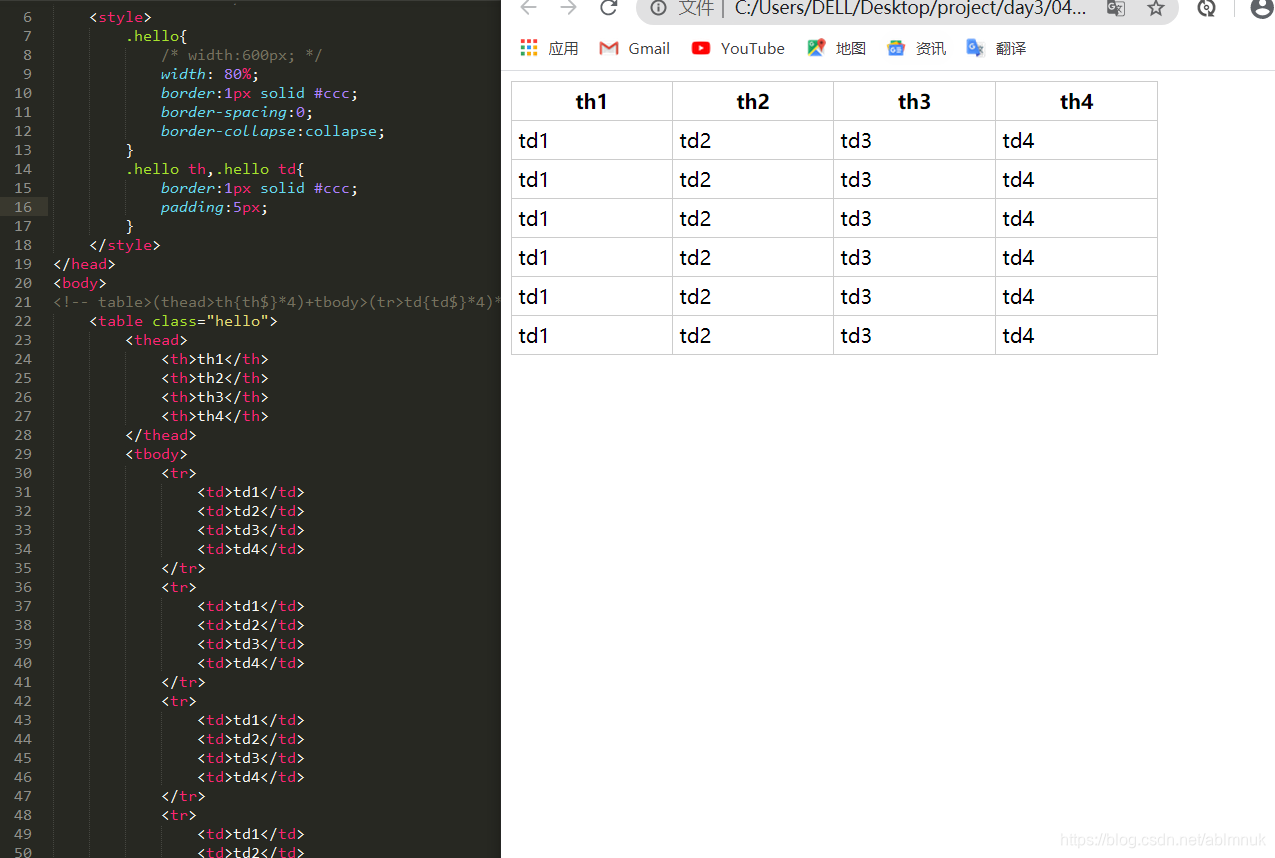
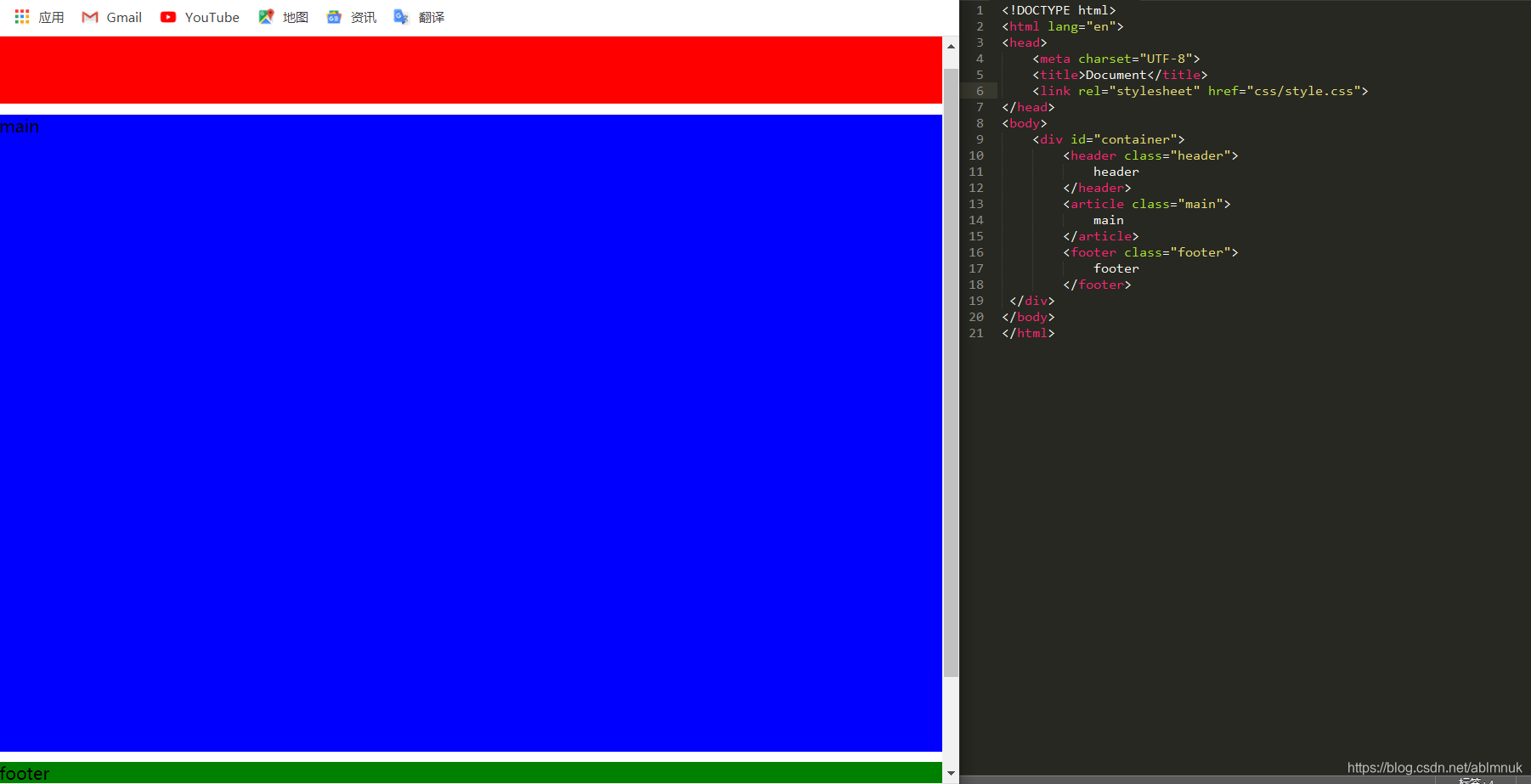
05 简单布局.html
<!DOCTYPE html>
<html lang="en">
<head>
 <meta charset="UTF-8">
 <title>Document</title>
 <link rel="stylesheet" href="css/style.css">
</head>
<body>
 <div id="contianer">
  <header class="header">
   header
  </header>
  <article class="main">
   main
  </article>
  <footer>
   footer
  </footer>
 </div>
</body>
</html>
style.css
@charset “utf-8”;
body{
margin:0;
padding:0;
}
#contianer{
width: 980px;
border:1px solid #ccc;
margin:0 auto;
}
#contianer .header{
width: 100%;
height: 80%;
background:red;
}
#contianer .main{
width: 100%;
height: 600%;
background:blue;
/* margin-top:10px; /
margin:10px 0;
}
#contianer .footer{
width: 100%;
height: 120%;
background:green;
/ margin-top:10px; */
}
06 其他布局2.html
<!DOCTYPE html>
<html lang="en">
<head>
 <meta charset="UTF-8">
 <title>Document</title>
 <link rel="stylesheet" href="css/style2.css">
</head>
<body>
 <div id="contianer">
  <header class="header">
   header
  </header>
   <article class="wrapper">
    <!-- <aside>
     left side
    </aside> -->
    <section class="main">
     main
    </section>
    <aside>
     right aside
    </aside>
   </article>
   <footer>
    footer
   </footer>

 </div>
</body>
</html>
style2.css
@charset "utf-8";
body{
 padding:0;
 margin:0;
}
#contianer{
 width: 980px;
 border:1px solid red;
 margin:0 auto;
}
#contianer .header{
 width: 100%;
 height: 80px;
 background:red;
}
#container .wrapper{
 width: 100%;
 height: 600px;
 background:blue;
 margin:10px 0;
}
#contianer .wrapper .aside{
 background:pink;
 width: 200px;
 height: 400px;
 float:left;
}
#contianer .wrapper .main{
 background:cyan;
 width: 770px;
 height: 600px;
 float:left;
 /* margin:0 10px; */
 margin-right: 10px;
}
#contianer .footer{
 width: 100%;
 height: 120px;
 background:green;
 /* margin-top:10px; */
}
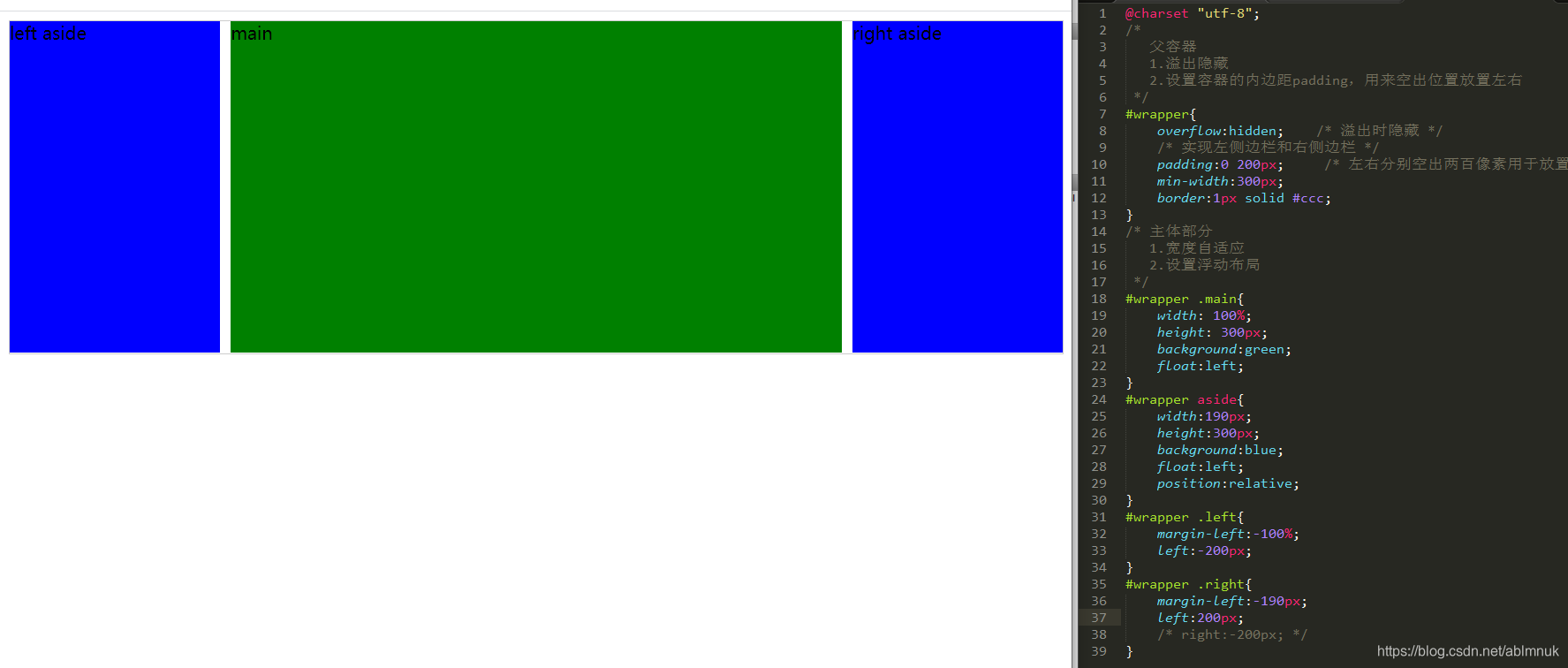
07 圣杯布局.html
<!DOCTYPE html>
<html lang="en">
<head>
 <meta charset="UTF-8">
 <title>Document</title>
 <link rel="stylesheet" href="css/style3.css">
</head>
<body>
 <article id="wrapper">
  <section class="main">
   main
  </section>
  <aside class="left">
   left aside
  </aside>
  <aside class="right">
   right aside
  </aside>
 </article>
</body>
</html>
style3.css
@charset "utf-8";
#wrapper{
 overflow:hidden;
 padding:0 200px;     /* 左右分别空出两百像素用于放置左右侧边栏 */
 min-width:300px;
 border:1px solid #ccc;
}
#wrapper .main{
 width: 100%;
 height: 300px;
 background:green;
 float:left;
}
#wrapper aside{
 width:190px;
 height:300px;
 background:blue;
 float:left;
 position:relative;
}
#wrapper .left{
 margin-left:-100%;
 left:-200px;
}
#wrapper .right{
 margin-left:-190px;
 left:200px;
 /* right:-200px; */
}
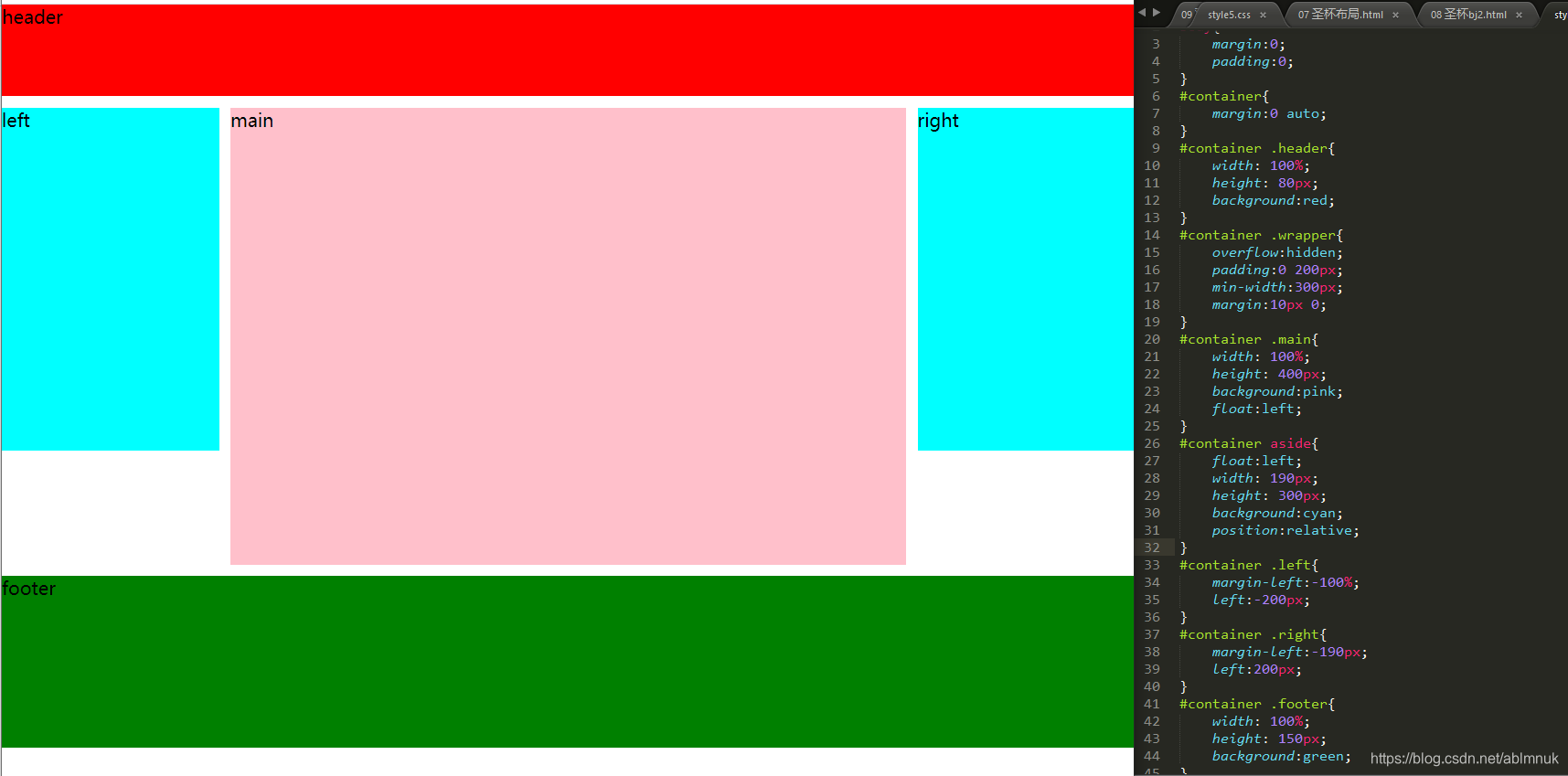
08 圣杯布局2.html
<!DOCTYPE html>
<html lang="en">
<head>
 <meta charset="UTF-8">
 <title>Document</title>
 <link rel="stylesheet" href="css/style4.css">
</head>
<body>
 <div id="container">
  <header class="header">
   header
  </header>
  <article class="wrapper">
   <section class="main">
    main
   </section>
   <aside class="left">
    left
   </aside>
   <aside class="right">
    right
   </aside>
  </article>
  <footer class="footer">
   footer
  </footer>
 </div>
</body>
</html>
style4.css
@charset "utf-8";
body{
 margin:0;
 padding:0;
}
#container{
 margin:0 auto;
}
#container .header{
 width: 100%;
 height: 80px;
 background:red;
}
#container .wrapper{
 overflow:hidden;
 padding:0 200px;
 min-width:300px;
 margin:10px 0;
}
#container .main{
 width: 100%;
 height: 400px;
 background:pink;
 float:left;
}
#container aside{
 float:left;
 width: 190px;
 height: 300px;
 background:cyan;
 position:relative;
}
#container .left{
 margin-left:-100%;
 left:-200px;
}
#container .right{
 margin-left:-190px;
 left:200px;
}
#container .footer{
 width: 100%;
 height: 150px;
 background:green;
}
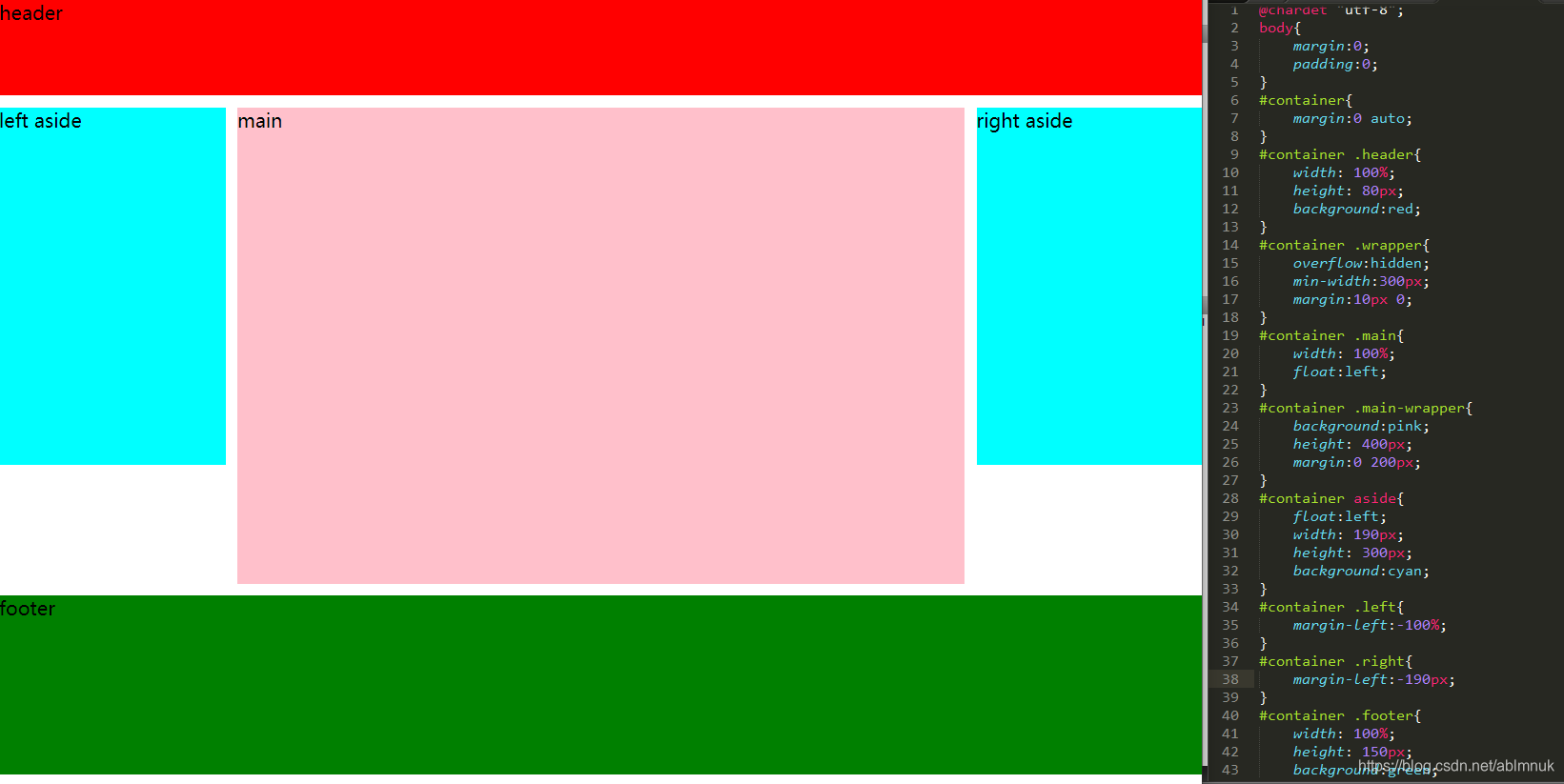
09 双飞翼布局.html
<!DOCTYPE html>
<html lang="en">
<head>
 <meta charset="UTF-8">
 <title>Document</title>
 <link rel="stylesheet" href="css/style5.css">
</head>
<body>
 <div id="container">
  <header class="header">
   header
  </header>
  <article class="wrapper">
   <section class="main">
    <div class="main-wrapper">
     main
    </div>
   </section>
   <aside class="left">
    left aside
   </aside>
   <aside class="right">
    right aside
   </aside>
  </article>
  <footer class="footer">
   footer
  </footer>
 </div>
</body>
</html>
style5.css
@chardet "utf-8";
body{
 margin:0;
 padding:0;
}
#container{
 margin:0 auto;
}
#container .header{
 width: 100%;
 height: 80px;
 background:red;
}
#container .wrapper{
 overflow:hidden;
 min-width:300px;
 margin:10px 0;
}
#container .main{
 width: 100%;
 float:left;
}
#container .main-wrapper{
 background:pink;
 height: 400px;
 margin:0 200px;
}
#container aside{
 float:left;
 width: 190px;
 height: 300px;
 background:cyan;
}
#container .left{
 margin-left:-100%;
}
#container .right{
 margin-left:-190px;
}
#container .footer{
 width: 100%;
 height: 150px;
 background:green;
}





 扫一扫
扫一扫


 226
226

 被折叠的 条评论
为什么被折叠?
被折叠的 条评论
为什么被折叠?
 到【灌水乐园】发言





