找工作小项目:day6-事件驱动

day6-事件驱动

问题1:什么是事件驱动?
之前的代码中,我们发现最主要的一直发生变化的就是服务器,服务器最主要的工作是监听epoll上的事件并对不同事件做出不同响应,这就是事件驱动。
问题2:事件驱动有哪些模式?(这里的回答借鉴于https://www.zhihu.com/question/26943938/answer/1856426252)
主要分为Reactor模式和Proactor模式,这里主要说Reactor,Proactor在链接里有讲。Reactor模式是在 I/O 多路复用监听事件,收到事件后,根据事件类型分配给某个进程 / 线程
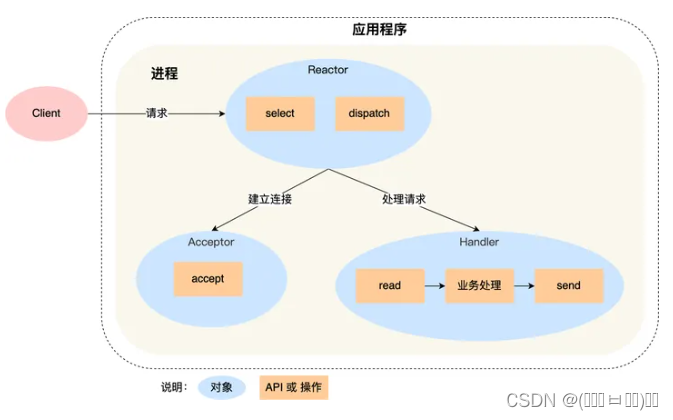
单 Reactor 单进程 / 线程(day5之前的代码都是这个样子)
在这里插入图片描述
Reactor 对象通过 select (IO 多路复用接口) 监听事件,收到事件后通过 dispatch 进行分发,如果是连接事件则分发到Acceptor 处理,如果是其他事件则分发到Handler 处理。
这种方案无法充分利用 多核 CPU 的性能;而且Handler 对象在业务处理时,整个进程是无法处理其他连接的事件的。
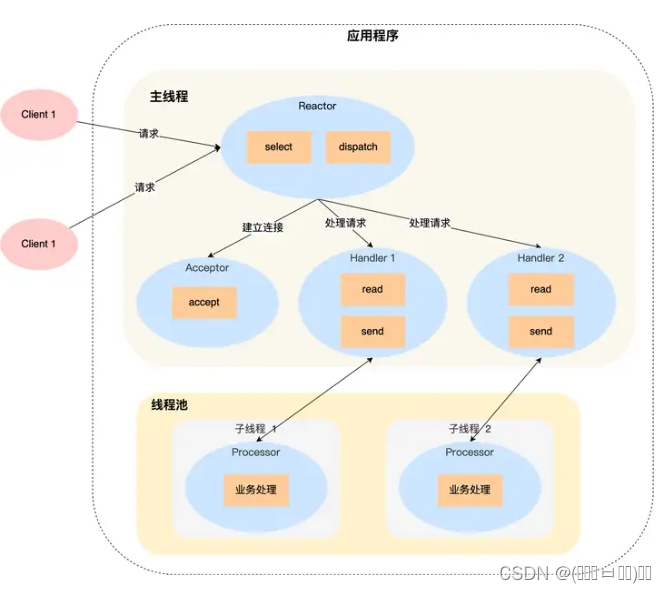
单 Reactor 多线程 / 多进程
克服「单 Reactor 单线程 / 进程」方案的缺点
在这里插入图片描述
Reactor 对象通过 select (IO 多路复用接口) 监听事件,收到事件后通过 dispatch 进行分发,如果是连接事件则分发到Acceptor 处理,如果是其他事件则分发到Handler 。
然而这里的Handler 不再负责处理事件,只负责数据的接收和发送,子线程里的 Processor 对象就进行业务处理,处理完后,将结果发给主线程中的 Handler 对象,接着由 Handler 通过 send 方法将响应结果发送给 client。
然而Reactor 对象承担所有事件的监听和响应,而且只在主线程中运行,在面对瞬间高并发的场景时,容易成为性能的瓶颈的地方。
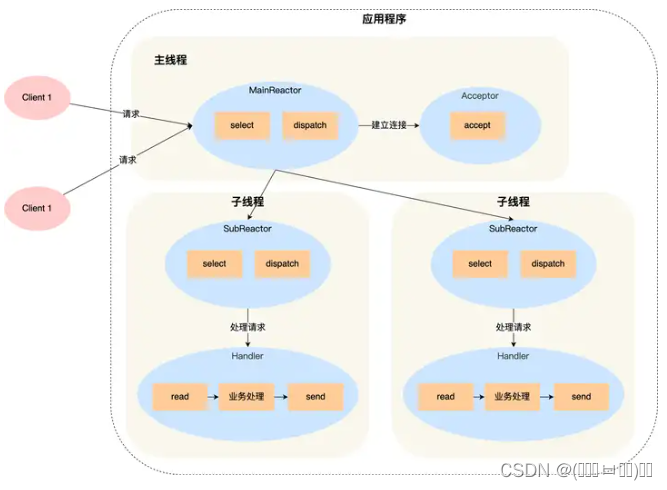
多 Reactor 多进程 / 线程
在这里插入图片描述
主线程中的 MainReactor 对象通过 select 监控连接建立事件,如果是建立连接的事件则通过Acceptor 建立连接,SubReactor 将建立连接的事件加入select 继续进行监听,并创建一个 Handler 用于处理连接的响应事件。
主线程只负责接收新连接,子线程负责完成后续的业务处理。
主线程只需要把新连接传给子线程,子线程无须返回数据,直接就可以在子线程将处理结果发送给客户端。
有了上述基础知识,我们开始讲解如何实现事件驱动。

1、错误检测机制

没变,不谈

2、地址创建

没变,不谈

3、创建socket

没变,不谈

4、并发epoll

没变,不谈

5、channel

这部分开始发生变化了,从这里开始发生变化意味着什么呢?是不是说处理事件的方式发生了变化?原本的先从红黑树上读取事件的机制发生了变化?
那么我们来看channel的声明出现了那些变化

class EventLoop;
class Channel
{
private:
    EventLoop *loop;
    int fd;
    uint32_t events;
    uint32_t revents;
    bool inEpoll;
    std::function<void()> callback;
public:
    Channel(EventLoop *_loop, int _fd);
    ~Channel();

    void handleEvent();
    void enableReading();

    int getFd();
    uint32_t getEvents();
    uint32_t getRevents();
    bool getInEpoll();
    void setInEpoll();

    // void setEvents(uint32_t);
    void setRevents(uint32_t);
    void setCallback(std::function<void()>);
};

首先Epoll被替换为了一个名为EventLoop 的类,还多了一个callback回调函数,多了一个handleEvent方法,多了一个setCallback回调函数的设置。
那么我们从实现来看看各位新成员都是什么做的(这里只看多出来的部分)。

//调用回调函数,说明不同通道会根据某个特性设置不同的回调函数来处理事件
void Channel::handleEvent(){
    callback();
}
//设置回调函数
void Channel::setCallback(std::function<void()> _cb){
    callback = _cb;
}

总结一下,channel中现在包含事件的socket、事件本身及事件的处理方式。

6、EventLoop

刚才说Epoll被替换为了一个名为EventLoop 的类,那么既然Epoll没有发生变化,那么EventLoop 想必是对Epoll做了封装并多了一些功能吧。
首先来看声明

class Epoll;
class Channel;
class EventLoop
{
private:
    Epoll *ep;
    bool quit;
public:
    EventLoop();
    ~EventLoop();

    void loop();
    void updateChannel(Channel*);
};

从声明来看,EventLoop仅仅是多了一个名为quit的标志位,loop和updateChannel应该是调用Epoll中的方法。那么在实现上看一下是否正确。

EventLoop::EventLoop() : ep(nullptr), quit(false){
    ep = new Epoll();
}

EventLoop::~EventLoop()
{
    delete ep;
}


void EventLoop::loop(){
    while(!quit){
    std::vector<Channel*> chs;
        chs = ep->poll();
        for(auto it = chs.begin(); it != chs.end(); ++it){
            (*it)->handleEvent();
        }
    }
}

void EventLoop::updateChannel(Channel *ch){
    ep->updateChannel(ch);
}

从实现来看我们的推测并不完全正确,EventLoop在loop方法中竟然直接对事件进行了处理!!!思考一下,我们使用了上面那种Reactor的方法呢?按我的理解来看目前是单Reactor的多线程处理,因为服务器目前监听事件并分发事件。

7、服务器

在这一天之后服务器也被抽象成为了一个类,老规矩来看看声明

class EventLoop;
class Socket;
class Server
{
private:
    EventLoop *loop;
public:
    Server(EventLoop*);
    ~Server();

    void handleReadEvent(int);
    void newConnection(Socket *serv_sock);
};

根据声明推测,服务器在创建时同时包含了一个EventLoop(升级版Epoll)。并有对channel中的事件分发处理赋值。
首先是构造函数,在构造函数中自带一个红黑树,创建socket、创建地址、绑定监听无阻塞,为服务器创建一个channel,并记录socket、事件类型及回调函数。服务器的回调函数应该是accept,这里将accept封装进了newConnection,这里调用绑定函数是为了实现类似于虚函数的作用,让channel类也能调用该函数。
之后是析构函数

Server::Server(EventLoop *_loop) : loop(_loop){    
    Socket *serv_sock = new Socket();
    InetAddress *serv_addr = new InetAddress("127.0.0.1", 8888);
    serv_sock->bind(serv_addr);
    serv_sock->listen(); 
    serv_sock->setnonblocking();
       
    Channel *servChannel = new Channel(loop, serv_sock->getFd());
    std::function<void()> cb = std::bind(&Server::newConnection, this, serv_sock);
    servChannel->setCallback(cb);
    servChannel->enableReading();
}

Server::~Server()
{
    
}

这是处理读事件的方法,如果没猜错是在服务器完成连接并将客户端事件加入Epoll后重新set回调函数。

void Server::handleReadEvent(int sockfd){
    char buf[READ_BUFFER];
    while(true){    //由于使用非阻塞IO,读取客户端buffer,一次读取buf大小数据,直到全部读取完毕
        bzero(&buf, sizeof(buf));
        ssize_t bytes_read = read(sockfd, buf, sizeof(buf));
        if(bytes_read > 0){
            printf("message from client fd %d: %s\n", sockfd, buf);
            write(sockfd, buf, sizeof(buf));
        } else if(bytes_read == -1 && errno == EINTR){  //客户端正常中断、继续读取
            printf("continue reading");
            continue;
        } else if(bytes_read == -1 && ((errno == EAGAIN) || (errno == EWOULDBLOCK))){//非阻塞IO,这个条件表示数据全部读取完毕
            printf("finish reading once, errno: %d\n", errno);
            break;
        } else if(bytes_read == 0){  //EOF,客户端断开连接
            printf("EOF, client fd %d disconnected\n", sockfd);
            close(sockfd);   //关闭socket会自动将文件描述符从epoll树上移除
            break;
        }
    }
}

那么就来看看newConnection到底做了什么吧。
首先创建客户端地址,服务区accept,将客户端设置为无阻塞,创建一个channel,然后将handleReadEvent绑定回调。

void Server::newConnection(Socket *serv_sock){
    InetAddress *clnt_addr = new InetAddress();      //会发生内存泄露!没有delete
    Socket *clnt_sock = new Socket(serv_sock->accept(clnt_addr));       //会发生内存泄露!没有delete
    printf("new client fd %d! IP: %s Port: %d\n", clnt_sock->getFd(), inet_ntoa(clnt_addr->addr.sin_addr), ntohs(clnt_addr->addr.sin_port));
    clnt_sock->setnonblocking();
    Channel *clntChannel = new Channel(loop, clnt_sock->getFd());
    std::function<void()> cb = std::bind(&Server::handleReadEvent, this, clnt_sock->getFd());
    clntChannel->setCallback(cb);
    clntChannel->enableReading();
}

总结一下,服务器负责判断监听分发事件,loop负责处理事件。

主函数

那么按照逻辑,主函数仅需要三行即可完成。

EventLoop *loop = new EventLoop();
Server *server = new Server(loop);
loop->loop();
return 0;
import time import random from DrissionPage import ChromiumPage from datetime import datetime, timedelta from work import GetHtmlJson import os from threading import Thread from DrissionPage import errors ban_lode_more_js = r''' const docs = Array.from(document.querySelectorAll('div[role="group"]')); const need_doc = docs[docs.length-1];need_doc.style = 'height: 9999px;'; ''' class DownloadTool: def __init__(self): self.base = os.path.join(os.getcwd(), '简历') self.all_work = [] def download(self, url, name): work = Thread(target=self.add_work, args=(url, name)) work.start() self.all_work.append(work) def add_work(self, url, name): file_path = os.path.join(self.base, name) ghj = GetHtmlJson(url, not_kill=True) with open(file_path, 'wb') as f: f.write(ghj.get_content()) print(name, '简历下载完成') def __del__(self): for work in self.all_work: work.join() def get_time(seconds: int = 0): future_time = datetime.now() + timedelta(seconds=seconds) return future_time.strftime('%Y-%m-%d %H:%M:%S') def random_half(lst: list)->list: lst_count = len(lst) if lst_count % 2 != 0: lst_count += 1 if lst_count == 0: return [] # 获取列表的一半 half_size = lst_count // 2 # 随机选择一半数据 return random.sample(lst, half_size) def screening_area(tab, config: dict): time.sleep(1) tab.ele('c:.current-city__label').click() search_input = tab.ele('c:input[placeholder="搜索城市名/区县"]') for hb in config['工作地点城市列表']: try: search_input.input(hb) tab.ele('c:.s-options__content li', timeout=5).click() except errors.ElementNotFoundError: search_input.clear() search_input.input(hb) tab.ele('c:.s-options__content li').click() tab.ele('c:button[class="s-button s-cascader__footer-button s-button--primary s-button--medium"]').click() # 确认 def t_print(text): print(f'{get_time()} {text}') def hello(tab, config: dict): tab.get('https://rd6.zhaopin.com/app/index') # 关闭弹窗 gg = tab.eles('c:div[scene="GLOBAL"]') if len(gg) > 0 and 'display: none' not in gg[0].attr('style'): gg[0].ele('c:.close').click() hello_is_over = False tab.ele('c:a[href="/app/recommend"]').click() time.sleep(5) # 选择对应职位 tab.ele('c:a[zp-stat-id="talent_more_jobs"]').click() tab.ele('c:.job-side-selector__inner') all_jobs = tab.eles('c:.job-side-selector__inner') for job in all_jobs: if config['职位'] in job.text: job.click() break t_print('职位筛选完成') # 筛选地区 screening_area(tab, config) t_print('地区筛选完成') tab.ele('c:i[class="km-icon sk is-mr-4 sk-filter"]').click() # 筛选 tab.eles('c:.filter-group-age .recommend-checkbox-group__item')[-1].click() start_age, end_age = config['年龄范围'] tab.ele('c:.filter-group-age .filter-select-two__start').click() # 年龄 起始 start_ages = tab.eles('c:.km-select__dropdown .km-scrollbar__wrap .km-option') for age in start_ages: if str(start_age) in age.text: age.click() break tab.ele('c:.filter-group-age .filter-select-two__end').click() # 年龄 结束 end_ages = tab.eles('c:.km-scrollbar__view .km-option') end_ages.reverse() for age in end_ages: if str(end_age) in age.text: age.click() break tab.eles('c:.filter-item-activeTime label')[-2].click() tab.eles('c:.filter-item-careerStatuses .recommend-checkbox-group__item')[2].click() filtration_types = tab.eles('c:.filter-item-filterTypes .recommend-checkbox-group__item')[1:] for doc in filtration_types: doc.click() tab.ele('c:button[zp-stat-id="rsmlist-confirm"]').click() # 确认范围 t_print('其他参数筛选完成') # 打招呼部分 while True: if hello_is_over: break reside_count = int(tab.ele('c:.rights-count-number').text) # 剩余的打招呼次数 if reside_count == 0: break time.sleep(5) all_list = tab.eles('c:div[role="listitem"]') need_list = random_half(all_list) t_print('本轮预期打招呼数量为: ' + str(len(need_list))) hellow_count = 0 tab.run_js(ban_lode_more_js) # 防止加载更多数据导致筛选元素失效 for ele in need_list: all_list = tab.eles('c:div[role="listitem"]') need_list = random_half(all_list) try: t_print(f'本轮剩余的打招呼人数为:{len(need_list)-hellow_count}') # # 判断是否有打招呼完成的提示弹出 # ok_pop_windows = tab.eles('c:div[class="km-modal__wrapper set-greet-success-modal"]') # if len(ok_pop_windows) > 0: # t_print('关闭打招呼完成的提示') # ok_pop_windows[0].ele('c:.km-button--filled').click() try: tab.ele('c:div[class="km-modal__wrapper set-greet-success-modal"]', timeout=3).ele('c:.km-button--filled', timeout=3).click() except: pass reside_count = int(tab.ele('c:.rights-count-number').text) # 剩余的打招呼次数 if reside_count == 0: hello_is_over = True break if '继续聊天' in ele.ele('c:.cv-test-recommend-chat').text: continue ele.ele('c:.cv-test-recommend-chat').click() # # 判断是否有打招呼完成的提示弹出 # ok_pop_windows = tab.eles('c:div[class="km-modal__wrapper set-greet-success-modal"]') # if len(ok_pop_windows) > 0: # t_print('关闭打招呼完成的提示') # ok_pop_windows[0].ele('c:.km-button--filled').click() try: tab.ele('c:div[class="km-modal__wrapper set-greet-success-modal"]', timeout=3).ele('c:.km-button--filled', timeout=3).click() except: pass name = ele.ele('c:.talent-basic-info__name--inner').text sleep_time = random.randint(2, 5) t_print(f'已和 {name} 打招呼完成, 准备交换微信和索要简历') # # 判断是否有打招呼完成的提示弹出 # ok_pop_windows = tab.eles('c:div[class="km-modal__wrapper set-greet-success-modal"]') # if len(ok_pop_windows) > 0: # t_print('关闭打招呼完成的提示') # ok_pop_windows[0].ele('c:.km-button--filled').click() try: tab.ele('c:div[class="km-modal__wrapper set-greet-success-modal"]', timeout=3).ele('c:.km-button--filled', timeout=3).click() t_print('关闭打招呼完成的提示') except: pass # time.sleep(3) ele.ele('c:.cv-test-recommend-chat').click() time.sleep(3) get_wx_button = tab.ele('c:a[zp-stat-id="im_ask_for_wx_open"]') get_wx_button.click() # input_wx = tab.eles('c:.km-popover__title') # if len(input_wx) > 0: # t_print('未输入默认微信号, 跳过索要微信部分') # verify_buttons = tab.eles('c:.action-buttons .km-ripple') # if len(verify_buttons) > 0: # verify_buttons[0].click() try: tab.ele('c:.action-buttons .km-ripple').click() except: pass t_print(f'已和 {name} 交换微信') time.sleep(1) get_jl_button = get_wx_button.parent().next() if '要附件简历' in get_jl_button.text: get_jl_button.click() # two_ok = tab.eles('c:.im-session-attach-resume__popover-tip') # if len(two_ok) > 0: # two_ok[0].next().click() try: tab.ele('c:button[class="km-button km-control km-ripple-off km-button--primary km-button--filled is-mt-16"]').click() except: pass t_print(f'已和 {name} 索要简历') tab.ele('c:.im-widget-session__close').click() # 二次确认是否索要简历 t_print( f'已和 {name} 打招呼, 交换微信, 索要简历完成, 将在休眠 {sleep_time}s 后继续打招呼, 下次打招呼时间为 {get_time(sleep_time)}') time.sleep(sleep_time) # 随机休眠 except (errors.ElementLostError, errors.ElementNotFoundError, errors.NoRectError): pass except Exception as e: t_print(f'错误类型: {type(e).__name__}') t_print(e) t_print('出现错误, 5s后重试') time.sleep(5) finally: hellow_count += 1 if hello_is_over: continue t_print(f'一轮打招呼完成, 剩余打招呼次数为: {reside_count}, 页面将在后刷新开启下一轮打招呼') try: # 通过仅选择附近的这一选项来刷新 tab.ele('c:.tr-filter-wrap .recommend-nearby__label-text i').click() # 筛选地区 screening_area(tab, config) time.sleep(3) tab.run_js(ban_lode_more_js) except Exception as e: t_print(e) t_print('打招呼全部完成, 等待沟通') # 沟通部分 def communication(tab, config: dict): tab.ele('c:a[href="/app/im"]').click() time.sleep(2) while True: unread_count = int(tab.ele('c:.app-im-unread').text) if unread_count <= 1: break # 勾选未读消息, 若已勾选, 则重复勾选以刷新列表 unread_check = tab.ele('c:.km-checkbox__label') is_unread_check = True if unread_check.prev().attr('class') == 'km-checkbox__icon': is_unread_check = False unread_check.click() if is_unread_check: time.sleep(1) unread_check.click() time.sleep(2) communication_list = tab.eles('c:div[role="listitem"]')[2:-2] for communication in communication_list: unread_count = int(tab.ele('c:.app-im-unread').text) if unread_count <= 1: break try: communication_text = communication.text if '智联小秘书' in communication_text or '猜你喜欢' in communication_text: continue print(communication) communication.click() time.sleep(2) communication_button_list = tab.eles('c:.im-sender__bar .km-button--outlined') for communication_button in communication_button_list: if '查看附件简历' in communication_button.text: staff_name = communication.ele('c:.im-session-item__title--subtitle').text work_kind = communication.ele('c:.im-session-item-subtitle').text pdf_name = f'{staff_name}_{work_kind}.pdf' tab.set.download_file_name(pdf_name) mission = communication_button.click.to_download(save_path=os.path.join(os.getcwd(), '简历'), rename=pdf_name) mission.wait() message_list = tab.eles('c:div[class="km-list__item im-message"]')[-2:] have_new_message = False for message in message_list: if '您好,这是我的附件简历,请查收' not in message.text: have_new_message = True break if have_new_message: break input_textarea = tab.ele('c:.km-scrollbar__view>textarea') input_textarea.input(config['获取简历后回复']) tab.ele('c:button[class="is-ml-12 is-mb-20 km-button km-control km-ripple-off ' 'km-button--primary km-button--filled"]').click() if '要附件简历' in communication_button.text: communication_button.click() input_textarea = tab.ele('c:.km-scrollbar__view>textarea') input_textarea.input(config['未获取简历回复']) tab.ele('c:button[class="is-ml-12 is-mb-20 km-button km-control km-ripple-off ' 'km-button--primary km-button--filled"]').click() except errors.ElementLostError: pass print('全部沟通完成') # if __name__ == '__main__': # config = { # '职位': '深度学习算法工程师', # '工作地点城市列表': ['江苏', '上海', '浙江', '安徽'], # '年龄范围': [20, 40], # '获取简历后回复': '您的简历我们已查阅,方便的话能加个微信详谈吗。', # '未获取简历回复': '您好, 能发份简历过来看看吗' # } # tab = ChromiumPage().latest_tab # # tab.get('https://rd6.zhaopin.com/app/index') # # input('登录完成后回车') # hello(tab, config) # # time.sleep(60*60) # # communication(tab, config) config = { '职位': '深度学习算法工程师', '工作地点城市列表': ['江苏', '上海', '浙江', '安徽'], '年龄范围': [20, 40], '获取简历后回复': '您的简历我们已查阅,方便的话能加个微信详谈吗。', '未获取简历回复': '您好, 能发份简历过来看看吗' } tab = ChromiumPage().latest_tab while True: # 执行任务 hello(tab, config) now = datetime.now() target_time = datetime(now.year, now.month, now.day, 9, 0, 0) # 如果当前时间已经过了9点,则设定为明天9点 if now >= target_time: target_time += timedelta(days=1) # 计算需要睡眠的时间(秒) sleep_seconds = (target_time - now).total_seconds() print(f"距离执行还有 {sleep_seconds // 3600:.0f} 小时 {sleep_seconds % 3600 // 60:.0f} 分钟") # 睡眠到指定时间 time.sleep(sleep_seconds)
12-02
评论
成就一亿技术人!
拼手气红包6.0元
还能输入1000个字符
 
红包 添加红包
表情包 插入表情
 条评论被折叠 查看
添加红包

请填写红包祝福语或标题

红包个数最小为10个

红包金额最低5元

当前余额3.43前往充值 >
需支付:10.00
成就一亿技术人!
领取后你会自动成为博主和红包主的粉丝 规则
hope_wisdom
发出的红包
实付
使用余额支付
点击重新获取
扫码支付
钱包余额 0

抵扣说明:

1.余额是钱包充值的虚拟货币,按照1:1的比例进行支付金额的抵扣。
2.余额无法直接购买下载,可以购买VIP、付费专栏及课程。

余额充值