



 本文介绍了如何在IE6-IE9浏览器中解决无法通过innerHTML赋值修改tbody的问题,提供了替代方法,并解释了浏览器兼容性问题。
IE6-IE9中tbody的innerHTML不能赋值,重现代码如下
<!DOCTYPE html>
<html>
    <head>
        <meta charset="utf-8"/>
        <title>IE6-IE9中tbody的innerHTML不能复制bug</title>
    </head>
    <body style="height:3000px">
        <table>
            <tbody>
                <tr><td>aaa</td></tr>
            </tbody>
        </table>
        <p>
            <button id="btn1">GET</button><button id="btn2">SET</button>
        </p>
        <script>
            var tbody = document.getElementsByTagName('tbody')[0]
            function setTbody() {
                tbody.innerHTML = '<tr><td>bbb</td></tr>'
            }
            function getTbody() {
                alert(tbody.innerHTML)
            }
            btn1.onclick = function() {
                getTbody()
            }
            btn2.onclick = function() {
                setTbody()
            }
        </script>
    </body>
</html>
两个按钮,第一个获取tbody的innerHTML,第二个设置tbody的innerHTML。
获取时所有浏览器都弹出了tr的字符串,但设置时IE6-9不支持,而且报错,如图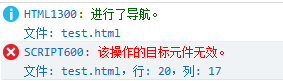
可以利用特性判断来看浏览器是否支持tbody的innerHTML设值
var isupportTbodyInnerHTML = function () {
    var table = document.createElement('table')
    var tbody = document.createElement('tbody')
    table.appendChild(tbody)
    var boo = true
    try{
        tbody.innerHTML = '<tr></tr>'
    } catch(e) {
        boo = false
    }
    return boo
}()
alert(isupportTbodyInnerHTML)
点击下,看看你此时浏览本博客的浏览器是否支持
Click Me
<script type="text/javascript">// <![CDATA[ var isupportTbodyInnerHTML = function () { var table = document.createElement('table') var tbody = document.createElement('tbody') var tr = document.createElement('tr') var td = document.createElement('td') var txt = document.createTextNode('a') td.appendChild(txt) tr.appendChild(td) tbody.appendChild(tr) table.appendChild(tbody) var boo = true try{ tbody.innerHTML = '<tr><td>b</td></tr>' } catch(e) { boo = false } return boo }(); tbodyInnerHTML.onclick = function() { if (isupportTbodyInnerHTML) { alert('你的浏览器支持tbody的innerHTML赋值') } else { alert('你的浏览器是IE6-9内核,不支持tbody的innerHTML赋值') } } // ]]></script>
对于IE6-IE9里如果要设置tbody的innerHTML,可以使用如下替代方法
function setTBodyInnerHTML(tbody, html) {
    var div = document.createElement('div')
    div.innerHTML = '<table>' + html + '</table>'
    while(tbody.firstChild) {
        tbody.removeChild(tbody.firstChild)
    }
    tbody.appendChild(div.firstChild.firstChild)
}
用一个div来包含一个table,然后删除tbody里的所有元素,最后给tbody添加div的第一个元素的第一个元素,即div>table>tr。
当然还有一个更精简的版本,它直接采用replaceChild方法替换
function setTBodyInnerHTML(tbody, html) {
    var div = document.createElement('div')
    div.innerHTML = '<table>' + html + '</table>'
    tbody.parentNode.replaceChild(div.firstChild.firstChild, tbody)
}





 扫一扫
扫一扫


 791
791

 被折叠的 条评论
为什么被折叠?
被折叠的 条评论
为什么被折叠?
 到【灌水乐园】发言





