

前端Tips#3 - 简写的 border-radius 100% 和 50% 是等效的

本文同步自 JSCON简时空 - 技术博客,点击阅读

视频讲解

视频地址

文字讲解

1、先讲结论

border-radius 这个 css 属性大家应该使用得非常娴熟,现实中用到的场景基本都是四个圆角一致的情况。

比如实现一个圆形按钮,其中 border-radius 数值有些人写为 50%,有些人则写成 100%,不过你会发现两者效果是一样的:

测试 HTML 代码如下:

<style>
  .circle-btn {
    color: white;
    width: 100px;
    height: 100px;
    text-align: center;
    line-height: 100px;
  }
</style>

<div class="circle-btn" style="
    background: #8BC34A;
    border-radius: 100%;
">50%</div>

<div class="circle-btn" style="
    background: #E91E63;
    border-radius: 100%;
">100%</div>

result

其实不论是 50% 还是 100%,只要将 border-radius 设置成 x%,且 x >= 50 都能获得和 50% 一样的效果。

如果不知道其中的原因,可以继续往下看。

2、原因分析

第 1 个知识点是 border-radius 的写法,最全的写法是这样的,记住这张图就行:
示意图

详细教程可参考《CSS Border-Radius Can Do That?

第 2 个知识点是 border-radius 的标准,在border-radius 标准中 Overlapping Curves 章节里,有这么一段话:
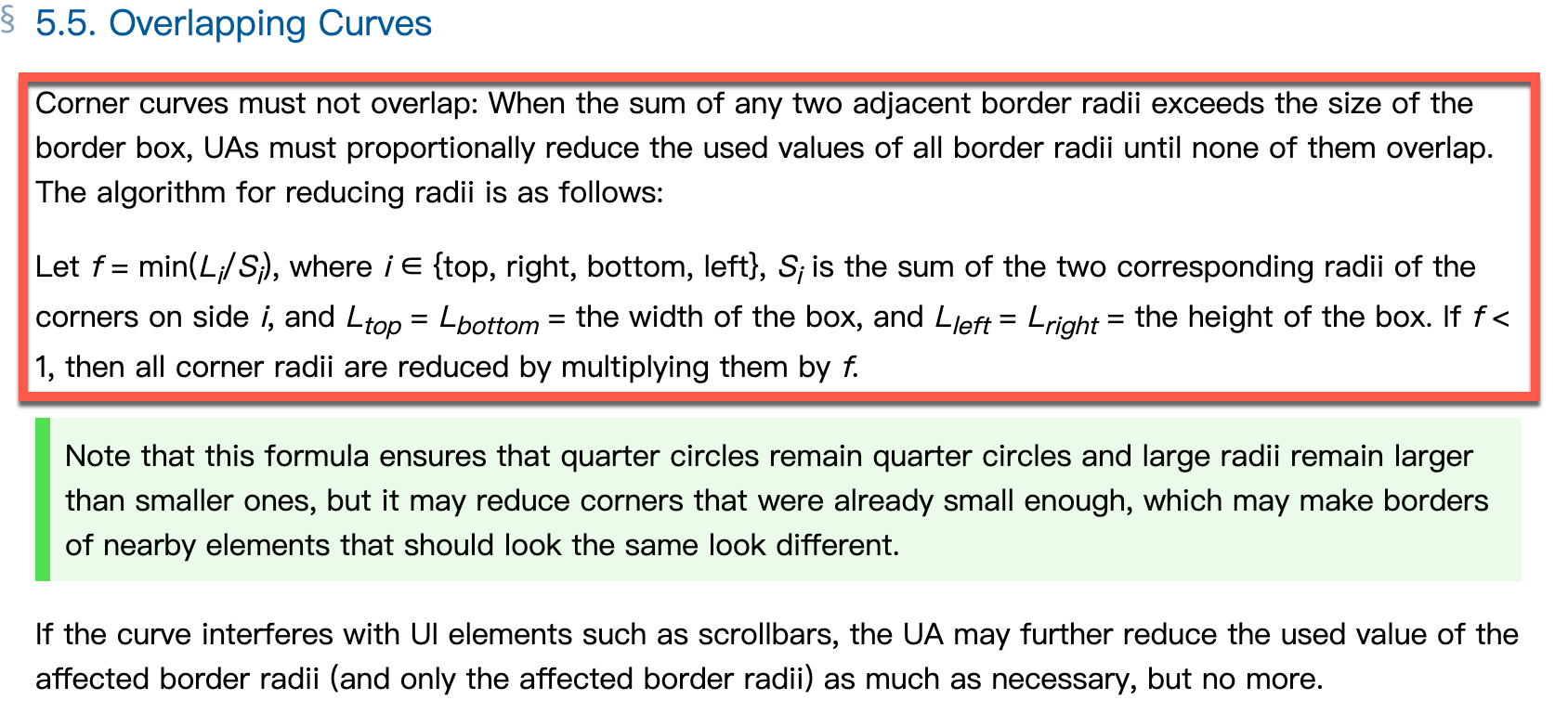
曲线重叠

简单翻译为:角曲线不得重叠:当任意两个相邻边框半径的总和超过边框的长度时,UA(标准实现方)必须按比例减少所有边框半径的使用值,直到它们没有重叠

我们知道两个前提:

  • 每一条边最高可用长度也就 100%;
  • 每一条边最多可以设置两个圆角曲线(在边的两端)

这两端的椭圆半轴长度设置值之和存在两者情况:

  • 设置值加起来不超过 100%,那么大伙儿各自安好,互不干扰;
  • 设置值加起来如果超过 100%,那需要按比例重新划分:比如一个设置 100%,一个设置成 300%,加起来就 400% 了(超过 100% 了) —— 那么实际上一个真正分得长度的 1/4,另一个真正分得长度的 3/4;

结合 知识点 1知识点 2 就能得到文章最开始的结论了。

3、小工具 小练习

如果对 border-radius 的写法不太熟也没关系,有个在线工具可以帮你更好的理解。

另外,最近看到使用单个 div border-radius 实现以下 “转动的太极图”,大伙儿可以练习一下:

练习

具体实现可参考以下任意一篇文章:

也可以参考我所 “抄写” 的代码

4、参考文章

关于 “前端Tips专栏”

前端Tips”专栏,隶属于 JSCON 专栏系列,设计初衷是快速获取前端小技巧知识,取材广泛,涵盖前端编程诸多领域。设计初衷是快速消费类知识,所以每个 tips 阅读耗时大约 5 分钟。为方便读者在不同场合阅读,每篇 tips 配有视频音频文字,挑自己喜欢方便的就行。

有两种方式获取历史 tips:

① 在公众号内回 "tips" “期号” 就可以。例如:回复 “tips25” 即可获取第25期 tips

② 前往网站:https://boycgit.github.io/fe-program-tips ,里面提供了搜索功能

欢迎大家关注我的知识专栏,更多内容等你来挖掘

「可在微信内搜索 “JSCON简时空”或 “iJSCON” 关注」

<think>Hmm, the user is asking about a very specific uBlock Origin filter syntax "#task-item upward()". Interesting - this seems like a power user diving into advanced element filtering. First let me recall the context: previous messages mentioned uBOL vs uBO differences and general ad blocking benefits, but the core query is clearly technical. The user&#39;s phrasing suggests familiarity with CSS selectors ("#task-item" looks like an ID selector) but uncertainty about this particular "upward()" function. *checks uBlock Origin documentation mentally* Right, upward() is part of the extended CSS syntax for cosmetic filtering. It&#39;s not standard CSS but a special uBO function. The user probably encountered this in filter lists or when inspecting elements. Key points to cover: - upward() is for DOM traversal (like climbing parent nodes) - It helps when ads inject wrappers dynamically - Must explain with concrete DOM examples - Should mention alternatives like :remove() if relevant Wait - the user might actually be troubleshooting a specific site where "#task-item" is problematic. But since they didn&#39;t provide a URL, I&#39;ll give generic usage patterns. Should prompt for more details though. *mental note* Must emphasize that upward() chains differently than jQuery parents() since that&#39;s a common confusion point. The () brackets matter for arguments too. Also worth distinguishing: - upward() vs :upward() - Optional depth parameter - How it combines with :remove() User seems technically competent based on precise syntax reference. No need to oversimplify but should avoid jargon like "DOM nodes" without brief context. Might add console debugging tips if space permits. ...time to structure the response with practical examples first. The DOM tree visualization will be crucial since upward() is all about hierarchy navigation. </think>在 uBlock Origin 的过滤规则中,`#task-item upward()` 属于**高级元素选择器语法**,主要用于精确控制DOM元素的过滤行为。以下是详细说明: ### 功能说明 1. **基本结构解析** - `#task-item`:CSS选择器,匹配页面中`id="task-item"`的元素 - `upward()`:uBlock Origin 的扩展函数,用于向上遍历DOM树 - 组合效果:从匹配 `#task-item` 的元素开始,向上查找指定层级的父元素 2. **参数详解** ```javascript #task-item upward( [n] ) ``` - **无参数** `upward()`:向上查找直到根元素(`<html>`) - **数字参数** `upward(2)`:向上查找两级父元素 - **选择性参数** `upward(.container)`:向上查找包含`.container`类的最近父元素 ### 典型使用场景 ```javascript example.com##div.ad-container:has(#task-item) // 标准过滤 example.com##div.ad-container:upward(2) // 向上移除两级父容器 ``` 1. **广告嵌套结构处理** 当广告元素被多层`<div>`包裹时: ```html <div class="ad-wrapper"> <!-- 需要移除的容器 --> <div class="inner"> <div id="task-item"></div> <!-- 已知子元素 --> </div> </div> ``` 使用规则:`example.com##div#task-item:upward(.ad-wrapper)` 2. **动态元素过滤** 针对通过JS动态插入的元素: ```javascript twitter.com##div[data-testid="placementTracking"]:upward(3) ``` ### 注意事项 1. **性能优化** 优先使用具体层级参数(如`upward(2)`),避免无参数`upward()`全树遍历 2. **组合语法** 可与`:has()`联用实现反向选择: ```javascript ##.ad-banner:upward(div):has(iframe) ``` 3. **浏览器兼容性** 此语法仅适用 uBlock Origin **(不支持 uBOL)**,需要开启 [高级用户模式](https://github.com/gorhill/uBlock/wiki/Advanced-user-features)[^1] ### 调试建议 在 [元素选取器](https://github.com/gorhill/uBlock/wiki/Element-picker) 中: 1. 点击目标元素后按 `Shift+Enter` 2. 在弹出框中输入 `:upward()` 参数 3. 实时预览过滤效果 > 提示:完整语法文档可参考 [uBlock Origin Wiki - 扩展CSS选择器](https://github.com/gorhill/uBlock/wiki/Extended-CSS-selectors)[^2]
评论
成就一亿技术人!
拼手气红包6.0元
还能输入1000个字符
 
红包 添加红包
表情包 插入表情
 条评论被折叠 查看
添加红包

请填写红包祝福语或标题

红包个数最小为10个

红包金额最低5元

当前余额3.43前往充值 >
需支付:10.00
成就一亿技术人!
领取后你会自动成为博主和红包主的粉丝 规则
hope_wisdom
发出的红包
实付
使用余额支付
点击重新获取
扫码支付
钱包余额 0

抵扣说明:

1.余额是钱包充值的虚拟货币,按照1:1的比例进行支付金额的抵扣。
2.余额无法直接购买下载,可以购买VIP、付费专栏及课程。

余额充值


