


 本文介绍如何使用OpenGL的混合操作实现遮罩效果,而非传统的alpha测试。遮罩效果广泛应用于创建树叶、复杂窗口或栅栏等物体,使物体在光照下更加真实。文章详细讲解了绘制纹理、设置混合函数以及绘制遮罩扩散纹理的过程。
 This sample shows us how to implement masking effect with OpenGL using blend operation instead of alpha testing. Masking is an important effect, that could be used build tree leaves, some complicated windows or fence, those objects will be shined though them.
Main Idea
1) Draw the scene texture normally;
2) with glBlendFunc(GL_DST_COLOR,GL_ZERO) setup to draw the white and black texture, this texture will make those area that will be fully overlapped be totally black;
3) with glBlendFunc(GL_ONE, GL_ONE) setup, draw the mask diffuse texture. Those areas that fully black will be filled by the mask diffuse texture color.
The above workflow could be represented with following diagram:
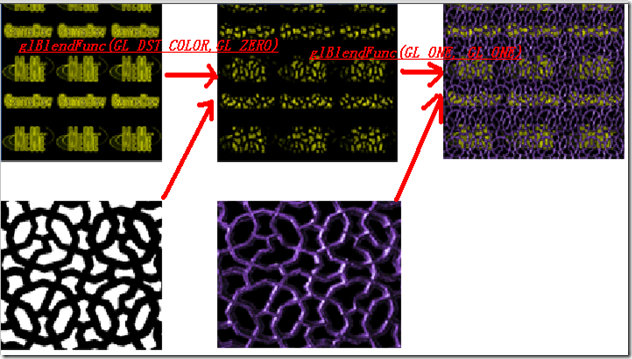
Of course, we could get the same masking effect with the alpha testing feature. I already wrote an alpha testing sample here, you could check them in the source code.
There is one thing that need to take special care is that when you use alpha testing for some mip-maps, you need to care about how those mip-maps are generated. Most of time, the masking texture alpha value should be 1 or 0. No middle valued such as 0.5, 0.6 created. But this situation will happen if you create mip-maps with linear sampling method.
A project named “AlphaRef” added, this project will load some TGA images with alpha channels. An OpenGL texture object will be created with alpha channel, that will be used for alpha testing.
The full source code could be downloaded from here.





 扫一扫
扫一扫


 3907
3907

 被折叠的 条评论
为什么被折叠?
被折叠的 条评论
为什么被折叠?
 到【灌水乐园】发言





