



 本文详细介绍了如何使用Spring Security通过两种方式实现用户登陆后的免密码功能:一种是基于Cookie,另一种是基于数据库。通过配置文件和相关代码示例,展示了如何在网站登陆页面提供‘记住我’选项,并在用户下次访问时自动登陆。
很多网站登陆的时候都会提供“记住我”或者“记住我&&周”的选项,spring security 3也提供了此功能,本人写了两个demo,一个是基于cookie来实现免登陆,一个是基于数据库的:
1 基于cookie的remember-me
spring security的配置如下:
<b:beans xmlns="http://www.springframework.org/schema/security"
 xmlns:b="http://www.springframework.org/schema/beans" xmlns:xsi="http://www.w3.org/2001/XMLSchema-instance"
 xsi:schemaLocation="http://www.springframework.org/schema/beans
 http://www.springframework.org/schema/beans/spring-beans-3.0.xsd
    http://www.springframework.org/schema/security
    http://www.springframework.org/schema/security/spring-security-3.0.xsd">


	<http auto-config="false" access-denied-page="/accessDenied.jsp">
	  <!-- 不要过滤图片等静态资源,其中**代表可以跨越目录,*不可以跨越目录。
	  <intercept-url pattern="/**/*.jpg" filters="none" />
	  <intercept-url pattern="/**/*.png" filters="none" />
	  <intercept-url pattern="/**/*.gif" filters="none" />
	  <intercept-url pattern="/**/*.css" filters="none" />
	  <intercept-url pattern="/**/*.js" filters="none" /> -->
	  <!-- 登录页面和忘记密码页面不过滤 -->
	  <intercept-url pattern="/login.jsp" filters="none" />
	  <intercept-url pattern="/jsp/forgotpassword.jsp"   filters="none" />
	  <!-- ROLE_ENTER_ORDINARY_PAGE, -->
	  <intercept-url pattern="/index.jsp"   access="ROLE_ENTER_ORDINARY_PAGE, ROLE_ENTER_HIGH_LEVEL_PAGE" />


	  <!-- 检测失效的sessionId,超时时定位到另外一个URL, 防止固化session攻击 -->
	  <session-management invalid-session-url="/timeout.jsp" session-fixation-protection="migrateSession">
	  	<concurrency-control max-sessions="1" error-if-maximum-exceeded="true"/>
	  </session-management>

	  <form-login login-page="/login.jsp" authentication-failure-url="/loginError.jsp"   default-target-url="/index.jsp"/>
	  <logout invalidate-session="true" logout-success-url="/login.jsp"/>
	  <http-basic/>
	  <!-- 使用cookie来记录登陆 -->
	  <remember-me user-service-ref="userService" use-secure-cookie="true"/>
	  <anonymous/>
	 </http>

	 <!-- 注意能够为authentication-manager 设置alias别名  -->
	 <authentication-manager alias="authenticationManager">
	      <!-- <authentication-provider user-service-ref="userDetailsManager"> -->
	      <authentication-provider user-service-ref="userService">
      		<password-encoder hash="md5">
      			<salt-source user-property="username"/>
      		</password-encoder>
	           <!-- <password-encoder ref="passwordEncoder"> -->
	                <!-- 用户名做为盐值 -->
	                <!--<salt-source user-property="username" />
	           </password-encoder>-->
	      </authentication-provider>
	 </authentication-manager>

</b:beans>
2 基于数据库的rember-me
首先要建一张表记录登陆:
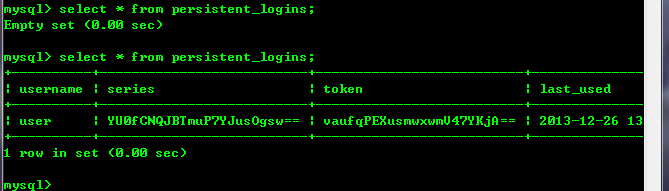
create table persistent_logins (username varchar(64) not null, series varchar(64) primary key, token varchar(64) not null, last_used timestamp not null)然后spring security的配置与第一种配置不一样的地方在<rember-me>
<remember-me user-service-ref="userService" data-source-ref="myDataSource"/>
此处的myDataSource要在spring的配置文件中配置:
  <!-- 数据源 -->
  <bean id="myDataSource" class="org.apache.commons.dbcp.BasicDataSource" destroy-method="close">
    <property name="driverClassName" value="${JDBC.DRIVERNAME}"/>
    <property name="url" value="${JDBC.URL}"/>
    <property name="username" value="${JDBC.USERNAME}"/>
    <property name="password" value="${JDBC.PASSWORD}"/>
  </bean>
测试,jsp登陆代码如下:
   <form action="/spring_security/j_spring_security_check" method="post">
    Account:<Input name="j_username"/><br/>
    Password:<input name="j_password" type="password"/><br/>
    <input type='checkbox' name='_spring_security_remember_me'/>记住我<br/>
    <input value="submit" type="submit"/>  <br/>

   </form>
验证是否记住用户的页面为index.jsp,页面代码为:
  <body>
  	<form action="">
  		<sec:authorize ifAllGranted="ROLE_ENTER_ORDINARY_PAGE" >
			<input type="button" value="普通用户点击 "/><br/>
	    </sec:authorize>
	    <sec:authorize ifAllGranted="ROLE_ENTER_HIGH_LEVEL_PAGE">
			<input type="button" value="高级用户点击 "/><br/>
	    </sec:authorize>
	    用户名称:<sec:authentication property="principal.username"></sec:authentication><br/>
	    <a href="<%= request.getContextPath() %>/j_spring_security_logout">
	    	<input type="button" value="退出"/>
    	</a>
  	</form>

  </body>
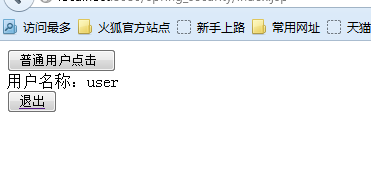
如果用户登陆就会显示登陆用户的名称,
使用第一种配置登陆后,可以在浏览器中查看cookie,
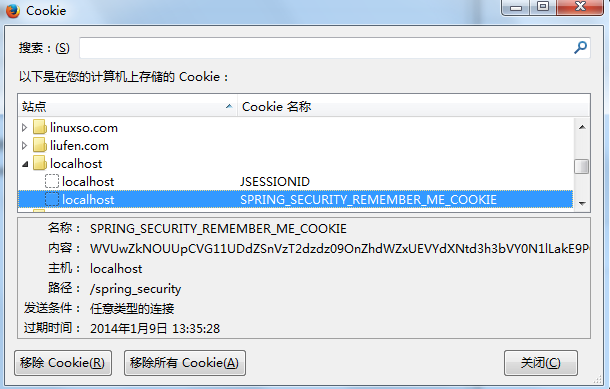
此时关掉浏览器,重新打开浏览器访问http://localhost:8080/spring_security/index.jsp,页面显示为:
使用第二种配置登陆后,数据库中的数据,
此时关掉浏览器,重新打开浏览器访问http://localhost:8080/spring_security/index.jsp
页面显示为:





 扫一扫
扫一扫


 8593
8593

 被折叠的 条评论
为什么被折叠?
被折叠的 条评论
为什么被折叠?
 到【灌水乐园】发言





