



 本文介绍了 Visual Studio 中数据绑定和组件配置相关内容。包括数据源窗口、数据源配置向导、数据组件、TableAdapters 等的功能及使用方法,还提及了数据连接器控件、对象绑定、强类型数据集的部分类支持等,最后给出了 Beta1 数据常见问题解答和相关链接。
2. Data Sources Window -- the main window for viewing and working with the data available to your project. Drag items from the Data Sources Window onto Windows Forms to create databound controls, or drag items from the Data Sources Windowonto existing controls to bind them to the item's data.

This is a usage scenario:
1. A user adds a new data source through the data source configuration wizard;
2. The data source showing up in the Data Sources Window (DSW);
3. The user changes drop type of the data source node in DSW;
4. The user drags a node from DSW and drop on a form;
5. UI is generated and the data binding is set.
3. Data Source Configuration Wizard -- creates and edits data sources (all kind of)in your application.
Started by add new data source from the Data Sources Window. 
4. Data Components
Data components are combinations of data tables and TableAdapters, and are the main items that make up strongly typed datasets. A data component is not an actual class, it is the term used to describe a DataTable and its associated TableAdapter
This is a visual view of a Data Component in the DataSet designer
As my understanding: a Data Component makes the DataSet “connect” to the database.
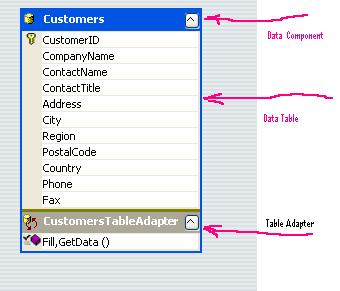
5. TableAdapters -- are designer generated components created by Visual Studio. TableAdapters are analogous to strongly typed data adapters and can contain multiple SELECT commands on a single adapter
6. Data Component Configuration Wizard -- creates and edits data components in strongly typed datasets. You start it by right click on the designer surface and select add new Data Component.
7. DataConnector Control: is designed to simplify the process of binding controls to an underlying data source. The DataConnector component acts as the data source for some or all of the controls on the form.
Note that the name of the DataConnector is still debating and may be changed in RTM. 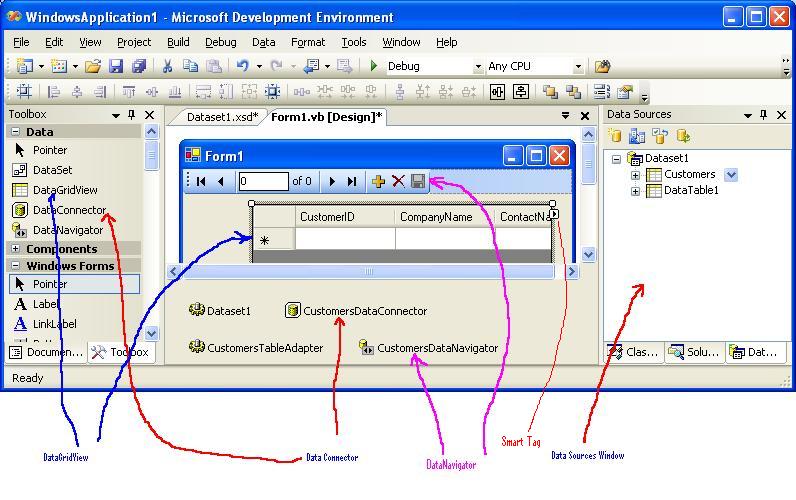
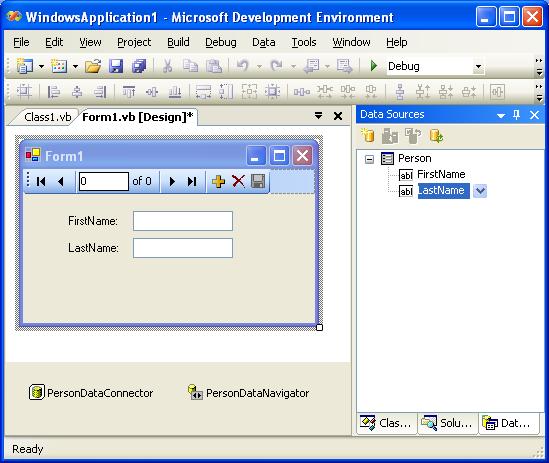
8. Binding to Objects -- Data sources can be created from any object that exposes one or more public properties. No specific interfaces or default public constructors are required to create a data source from an object. All public properties are displayed in the Data Sources Window and can be dragged onto Windows Forms to create databound controls.
如这么一个类, 可以当成数据源:

输入程序后并编译联结(Build) 然后 通过 DataSource Configuration Wizard 加 入数据源
9. Connection String in Settings file
10. Partial Class support for Strongly Typed Datasets (currently VB only)
11. Strongly Typed column and row validation events.
12. Connect to dots -- Bind controls to data by dragging items from the Data Sources Window onto existing controls
13. Smart Tags,
14. Local Data Support
15. DataSet designer has a new look.
Usually you can use Data Source Window as the primary way to build your application but DataSet designer provide more advanced functions to allow you work on more advanced features. In DataSet designer, you can add new DataComponent by DataComponent wizard or drag drop tables from ServerExplorer (or called Database Explorer in Express). You can add more queries to a DataComponent. You can double click to view code or add validation code.
Beta1 Data FAQ:
1. DataConnector
Do not confuse this with the concept of DataConnection, this name will be changed.
2. Adding web service data source (Data Source Wizard not work very well with this yet but there is a work around)
3. After adding a new class to the project, you need to build the project in order to be used as a object DataSource.
Using AddReference will not need to build the project.
Links:
1. Official documents are under MSDN, See Accessing Data (Visual Studio)
2. Official What is new? See here
3. WinForms Site: Improved Data Support
4. Feedback should goto MSDN beta1 feedback center





 扫一扫
扫一扫


 2463
2463

 被折叠的 条评论
为什么被折叠?
被折叠的 条评论
为什么被折叠?
 到【灌水乐园】发言





