


 该博客介绍了如何通过禁用滚动条、隐藏工具栏以及调整C/C++选项来提升Visual C++ (VC++)的开发速度。特别提到了使用F1键结合特定命令行参数快速打开MSDN2008检索函数信息,如通过/CMD参数指定操作。此外,还分享了如何在VS2010中配置F1快捷键以实现代码中的函数检索。
设置后,VC速度飞快.
滚动条,能禁用的全禁用,工具栏能隐藏的全隐藏。

C/C++中的一些选项,能禁用的都设置 TRUE,


按F1 打开MSDN2008 并检索函数名称
"C:\Program Files (x86)\Common Files\microsoft shared\Help 9\dexplore.exe" /helpcol ms-help://ms.vscc.v90
参数内容:
Available command line options:
/helpcol ms-help://<Namespace> Use specified help collection.
/filter <filter name> Use specified filter.
/LCID <locale id> Use specified language.
/LaunchNamedUrlTopic <named url> Display the topic for the specified named url.
/LaunchFKeywordTopic <keyword> Display the topic for the specified keyword.
/usehelpsettings <settings token> Use help settings from the specified application token.
比如在VC++2010 代码编辑器中,选中printf函数,按F1打开 2008中的说明 。
命令行:
"C:\Program Files (x86)\Common Files\microsoft shared\Help 9\dexplore.exe" /helpcol ms-help://ms.vscc.v90 /LaunchFKeywordTopic printf
VS 2010 中设置命令行,放在第1行,后面设置要用到。

参数内容:
/helpcol ms-help://ms.vscc.v90 /LaunchFKeywordTopic $(CurText)
设置F1快捷键
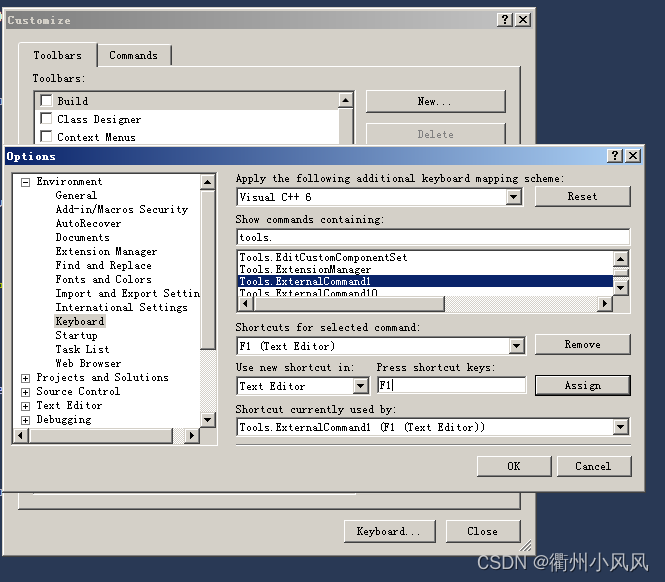
ExternlCommand1 就是第1个命令行





 扫一扫
扫一扫


 9万+
9万+

 被折叠的 条评论
为什么被折叠?
被折叠的 条评论
为什么被折叠?
 到【灌水乐园】发言





